Desert Online General Trading LLC
Dubai, United Arab Emirates
Desert Online General Trading LLC
Dubai, United Arab Emirates


💾 Upgrade your storage game—because your data deserves the best!
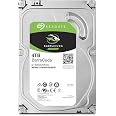
The Seagate BarraCuda 4TB internal hard drive combines high-capacity storage with a fast SATA 6Gb/s interface and 7200 RPM speed, delivering reliable performance for desktops and laptops. Featuring hardware-based encryption and Instant Secure Erase, it ensures your data stays secure while offering broad compatibility and a 2-year warranty.


| RAM | 4 TB |
| Hard Drive | 4 TB Mechanical Hard Disk |
| Brand | Seagate |
| Series | BarraCuda |
| Item model number | ST4000DM005 |
| Hardware Platform | PC |
| Item Weight | 1.34 pounds |
| Product Dimensions | 5.79 x 4 x 0.79 inches |
| Item Dimensions LxWxH | 5.79 x 4 x 0.79 inches |
| Flash Memory Size | 4 |
| Hard Drive Interface | Serial ATA |
| Hard Drive Rotational Speed | 5900 RPM |
| Manufacturer | SEAGATE |
| ASIN | B01LNJBA50 |
| Is Discontinued By Manufacturer | No |
| Date First Available | September 6, 2016 |
R**S
Reliable Storage Upgrade for Everyday Use
Reliable Storage Upgrade for Everyday UseI installed the Seagate BarraCuda 4TB into my desktop as a secondary drive, and it’s been working flawlessly. Setup was smooth—plug it into the SATA port, format, and you’re ready to go. The 256MB cache really helps with responsiveness; large file transfers (like 20–30GB backups) move faster than I expected, and programs that use big data files load without lag.Noise and heat are both minimal. I can hear a faint hum during sustained transfers, but it’s not distracting, and temperatures have stayed stable even after hours of continuous use. Performance is excellent for everyday computing, media storage, and light gaming. It’s not an SSD, so boot times or game load times won’t match flash storage, but for mass storage, this hits the sweet spot.One thing to keep in mind: as with any large drive, I recommend using it alongside a backup plan (cloud or another HDD) in case of failure. While Seagate’s reliability has been solid in my experience, no mechanical drive is immune to wear.Bottom line: A dependable, spacious, and cost-effective hard drive that’s ideal for bulk storage, media libraries, and backups. A great upgrade if you need lots of storage without breaking the bank.
K**N
2 months in and perfect! Great drive!
I've had this for about 2 months now and have had no issues with it. I have the 4TB version. I use it for media and game storage in my gaming rig. I must admit, I was a little apprehensive about getting another Seagate internal drive after my old 7200.11 and 7200.12 drives all died quickly and ran loud and hot. This is the first one I've had since those. and so far it's been excellent! No errors at all, quick and cool running. According to HW Monitor, it runs 4 degrees C cooler than the black and 3 Degrees cooler than the blue. The highest temp I've seen is 28 Degrees C for the Cuda under high load. I haven't run any benchmarks (I don't like to do that), but the speed is comparable to my WD Blue 2012 1TB, which is a pretty fast drive. The Seagate is slightly slower when reading and writing large amounts of small files, but not by much. It is noticeably slower than my WD Black 2013 1TB, but that drive cost me almost as much as this 4TB Cuda did and is considered a higher tier drive.The only drawbacks I can see so far is that the Cuda makes a bit of a racket when transferring small files. It is the only internal mechanical drive in my rig that I can hear at all over the 8 case fans. It's mounted in a quick release bay with rubber mounts, so it will likely be quite loud in a hard mounted bay. It's seek time also seems to be slower compared to the two WD 1TB drives, but again it's not by much and those 1TB drives are both 7200 RPM while the Cuda is 5900 RPM, so that might be part of the reason.Overall, I see no drawbacks with the Seagate Cuda 4TB. It's price per GB is lower than most anything else in it's price range. It's faster than the WD Blue 4TB by a wide margin, which I consider to be it's main competition. That was the drive I was comparing it to when I was looking at a new drive. I'll update this review if the drive blows up or does anything wonky, but barring that I definitely recommend it! It seems Seagate has come a long way in recent times and their products are much improved compared to the ones from 4 or 5 years ago.
C**7
I've Had Great Results with Seagate (Especially the BarraCuda)
I know many avid games like myself who really don't care for Seagate - that's totally fine! Myself personally, I have had a very pleasant experience with Seagate HDDs, particularly the BarraCuda line. I will not buy an HDD that doesn't have 7200prm - this has that. With how expansive my PC gaming library is, 2tb no longer cuts it. At the moment, my PC has 3 drives - 2 SSDs and 1 HDD, equally around 4900tb. For my HDD, this one takes the cake! I bought this as a replacement for my new gaming desktop - the company I had build the computer was wonderful and I have no complaints, but I have never had a good experience with Toshiba HDDs, so I immediately replaced it with this. It's going strong, and I have another one in storage for whenever this one needs to be replaced. Which, I don't think will be anytime soon. All in all, I'm very pleased with my purchase and will continue to buy this BarraCuda HDD.
D**L
Great drive--be sure to format as UEFI
I've had it for a few months now. It's a fine mass storage drive. I'm not using it to boot Windows, though, since I've got an SSD for that. But who sticks their movie collection on their SSD? The main thing with this drive is to ensure you use is as UEFI. Windows 10 only supports up to 2 TB with FAT32 (even though the format will theoretically support more).When I formatted the drive, it asked me UEFI vs. FAT32. I didn't recognize UEFI and I knew what FAT32 was, so guess which I picked? I then realized that I couldn't access half of the drive. Unfortunately, it can be very painful (depending on your setup and idiosyncrasies of the hardware you're using) to switch to UEFI. Even though I didn't have Windows installed on it, I still lost my installation because I had plugged this into the P0 slot on the motherboard--thank you, undocumented "features" (long story). But if you just format it as UEFI at the outset, life will be good.
Trustpilot
5 days ago
1 week ago