Desert Online General Trading LLC
Dubai, United Arab Emirates
Desert Online General Trading LLC
Dubai, United Arab Emirates


🎉 Elevate Your Viewing Experience!
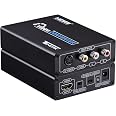
The Tendak HDMI to Composite 3RCA AV S-Video Converter Adapter is designed to convert HDMI signals into RCA and S-Video outputs, supporting resolutions up to 1080P. It is compatible with a variety of devices, making it an essential tool for enhancing your home entertainment setup.
B**E
GREAT Device - Does Just What I Needed It To Do - Performs Excellent !!!!
I purchased this device with the purpose of being able to record "real time" videos being played on my laptop from YouTube and other websites on my DVD Recorder's Hard Drive to create a DVD Disc of various accumulated funny clips that I come across during my surfing. That way, if I want to show them to someone, or just watch them myself again, all I have to do is play the DVD disc. No internet needed, no hunting for the clips again, no having to deal with the "ads" again, and so on. My DVD Recorder has an HDMI Output, but NO HDMI Input. It DOES have an S-Video Input though, so this Converter Device is connected between my laptop's HDMI Output and the S-Video Input on my DVD Recorder. It works perfectly and produces a great picture (for S-Video 480 P Signal). Very Quick and easy to connect up, and the Converter Device provided everything that I needed except for the single required HDMI cable. I, personally, just leave the converter connected to my DVD Recorder at all times, so that way, I'm "ready to go" without having to do anything! The only "draw back" that I see to this unit is that it does NOT have an "ON \ OFF" Switch on the converter, so I have to "plug \ unplug" the 5 Volt DC Power Jack on the Converter unit to control the power to the unit. I don't leave it constantly "powered up" if I am not using it at the time. But that is a very minor "aggrivation" in the whole scheme of things. It certainly does NOT change my VERY POSITIVE opinion \ rating of this product. and the device worked perfectly, first time, right out of the box!!!
J**T
Works Well! (HDMI-to-S-Cable version)
This translates an HDMI signal to an S-Cable signal in correct format. If the image is re-upscaled (from this S-cable signal back to HDMI), it looks quite good. I was frankly surprised at how well this works. The imaging ratios and formats are absolutely correct. Oddly, still graphics look a little fuzzy (but I don't care too much about that), but moving images look almost as good as the originals. The translation of sound from HDMI to RCA stereo is also foolproof and solid. Nice tool, reasonably priced!
M**H
Aspect ratio squeezed
All the features work, except it squishes the widescreen aspect ratio to fit into 4:3. This pretty much ruins the image if you are using this seriously. The quality of the image is fair, it’s marginally better in the S-Video output as you would expect.The aspect ratio squeeze is a deal breaker for most people! Take note! I was using an Amazon Fire Cube for this test.
D**S
Works great
Now I can (and have) hooked up my antique stereo to my Idiot TV (no way a "Smart TV"!) and get AWESOME sound out of it. Sound is a lot better than any sound bar I'VE heard. (I don't use the video connection so can't speak to that.)
T**N
This was to to replace a HDMI to S-Video converted ...
This was to to replace a HDMI to S-Video converted which burned out after a couple years.After about 5 minutes the audio of what I was watching was replaced with a high pitched squealing. I muted it because this is a second TV in the room and I could listen to the other. After about an hour the video stopped working as well.The video signal is mediocre, but this is true of all 3 of these converters I have used. The audio has quite a bit of hum to it, but this was also true of the previous one. The performance while it was working was acceptable, but the blank screen with high pitched squealing wasn't.
J**.
Works but has strange brightness issue
It's alright, I'll probably return it.I have it connected to my Nintendo Switch for my Magnavox CRT. After a few minutes it slowly starts to raise the brightness somehow which makes the video look washed out. No real way to fix it other than to switch the display resolution but after a few minutes again it will wash out. I also tried my Playstation classic and has this issue but no way to change the resolution on the PS Classic so can't fix the issue right away.I play my N64 on this TV without it and it doesn't have this brightness issue so it shouldn't be the TV. I use the composite cables since my TV only has those and no S video input.
J**.
Very good HDMI to S-video picture.
Very good HDMI to S-video. As good as I expect possible. I do wish it could do S-video and composite SIMULTANEOUSLY. Another brand does but has too much brightness and washed out color.
V**.
good picture&sound quality, but with side black columns ??
very good picture, easy installation;one minor and one strange compaint:1) don't know why, but I was unable to give COLOR video from (better) s-video (hosiden) connector output. Even after changing many quality cables and quality reduction adapters I was able to give COLOR s-video only together with (my old) Panasonic DMR-EX98 combo recorder... It could be the result of not so appropriate made pins inside s-video (hosiden) connector... ?2) sometimes 2 (small) black columns by each side of screen, but only with some AV equipment. I don't know if these are results of HDMI output from my SAT DVB-S2 receiver or not (probably not), but my old '2009 Panasonic plasma 50" TV, if connected standardly direct to SAT receiver, sees the whole screen WITHOUT any side columns, but... if through Tendak convertor, than 2 (small) side black columns always appeared.BUT! Contrary when I connect this Tendak convertor to another old Toshiba RD-XV50 combo recorder, no side black columns appeared and everything was ok :-) So appearance of black columns "depends" on what equipment you use...And I rather use more robust non-original 5V/220-240V 4A AC adapter instead of the original (weak) one.
Trustpilot
3 weeks ago
1 month ago
2 weeks ago
2 months ago