We remain fully operational. Our teams are working around the clock to ensure your deliveries continue safely.

DOWNLOAD THE APP


Customer Services
Copyright © 2025 Desertcart Holdings Limited
DOWNLOAD THE APP

🎶 Bring your retro vibes into the digital age—before your tapes fade away!
The BlumWay Portable Cassette Recorder Player is a compact, versatile device that converts your classic cassette tapes into MP3 files directly onto USB drives up to 128GB, without requiring a computer. Featuring auto-reverse playback, adjustable volume control, and dual manual/auto recording modes, it offers a seamless way to preserve and enjoy your vintage audio collection anywhere with included earphones and a portable design.

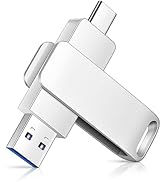
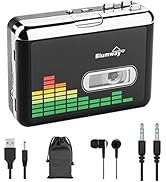
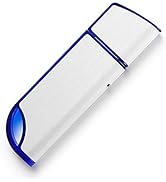


| ASIN | B07MM8NSFB |
| Batteries | 2 A batteries required. |
| Best Sellers Rank | #39,284 in Electronics ( See Top 100 in Electronics ) #17 in Portable Microcassette Recorders |
| Customer Reviews | 3.8 3.8 out of 5 stars (3,364) |
| Date First Available | May 4, 2018 |
| Is Discontinued By Manufacturer | No |
| Item Weight | 11.3 ounces |
| Item model number | 8541723849 |
| Manufacturer | BlumWay |
| Product Dimensions | 4.4 x 3.2 x 1.2 inches |
B**R
What's Not To Like About It?!
What a great tool! If you're like me, you may have tons of cassette tapes (remember them?) and if you are to transfer them to another device, you need other equipment to do it and sometimes they are just to big to be useful anywhere b'cept at home and often times you need more than one device to accomplish the goal of transference. Even some of the latter model cars don't have CD players in them but rather USB ports. Yup, even CD's are becoming a thing of the past. This is a tape cassette player complete with everything you may need for listening to old tape cassettes using battery power, plug in power, computer power. You can transfer cassette tapes to the computer OR just a thumb drive. Unlike some other devices out there that REQUIRE the use of a computer, this one does provides the option. I stuck a 128GB thumb drive in this thing and it worked. Some are limited to 32GB is why that's important. Now I can listen to my own choice of music in my car. I have a CD/Blue Ray DVD player slot in the console and changing CD's was a nuisance whether driving or stationery. Now I can just plug my thumb drive in the USB port and listen for hours. If you like just listening to cassettes on this (earplugs are even provided) you might invest in a tape cassette head cleaner.. Easy recording features a manual and automatic setting with the pressing on the pad of this device. You can even set the volume of the recorded piece. Plays one side only or continuous on both sides of the cassette. I just got this so I have no idea of longevity or craftmanship but this thing is surprisingly weighty for its size if that means anything. So far, as far as I'm concerned, WHAT'S NOT TO LIKE ABOUT IT! 12 30 2020 Ok, I found what not to like about it. Maybe I got a bad one (it happens even with the best of products, right?) I had to return it as while it did play cassettes though maybe not the best of sound quality (but what would you expect $25) it didn't perform the feature for which it was intended which was convert the tape cassette onto the flash drive. I did purchase the drive that was advertised with this unit. It converted 1 1/2 songs and stopped recording onto the flash drive. Of course there is no way to tell whether or not it is, in fact recording until you review what you think you've recorded. I tried again with the unit plugged in to a power source (USB) and this time, nothing was converted. I tried another better quality flash drive. Nothing ended up on the SanDisk. I used both the manual and auto modes of recording and each time ended up with nothing on the drives. I tried recording just one side of the tape cassette and then just one song with both flash drives. Nothing. I quick formatted each drive and tried it again. Nothing. I then went the extreme and did a complete formatting both drives (took longer to format) and tried a final time with each. Nothing. BTW the directions are well written and easy to follow and I'm good at following directions. Yeah, I'm a man and I read the instructions. Sue me! Not a bad idea for converting tapes but now I know WHAT NOT TO LIKE ABOUT IT! Sorry BlumWay. This idea needs considerable reengineering, in my opinion.
F**K
Watch the battery
Worked for a a few minutes, then degenerated to a hiss that seemed to be coming from the drive motor. Worked again when plugged into a charging port. Checked the batteries. One was marginal, the other just failing. With new batteries, the unit produced good sound. They were my batteries. I should not have assumed they were good. This device will not warn you when the batteries are low, it will just not work right.
C**G
Easy if you know a few key tips
I'm about ten tapes into a 200 tape collection. Although Ive seen some bad reviews here and comments about it being 'cheap', I've found it to work great. A few tips can save you a ton of time. For most tapes I'm getting good sound quality, but a crappy tape will just come out crappy, what do you expect. 1. Set the rotary volume dial on high or it will just record silence. It will blast through the headphones, but honestly do you need to listen while you record. Just use the headphones to check if the tape is playing and playing correctly. 2. Use the power cord. Batteries run out too fast and a tape player on low battery never performs well. 3. Set the loop button on one loop, not continuous. Otherwise it will keep recording the same songs. 4. Use the auto function (hold converter ff (small circle on side) until light goes blue) if you want individual songs. Light green for one file for the whole tape. For auto function You will get one blank file for each tape. Also once in ten tapes I got a song that had a long blank intro. I used audacity to edit the mp3 and cut out the blank. Also one Joe Satriani song got cut into three parts cause he has a few pauses in the middle. You can use Audacity to splice the song back together or just label the part one and two. 5. I use auto, hit play and hit digital record then come back and transfer the files to my laptop. If you get all the songs for one album in a folder and label one song, you can use groove to edit the data for them all by album. 6. The door opens all the way with easy access to the playing head so its very easy to clean the tape head, a big problem I have had in the past. 7. For old tapes, run them in another deck on FF once or twice to loosen up the reels and even out the tension. It will give a better recording after that. Overall, I'm impressed and the auto function really lets you get album files by song, just like you would ripping a CD. Next up, looking for a large SD capacity MP3 player to replace my 80G IPod Classic...
A**R
I had better quality cassette players in 1990
I don't understand how in 2024 we can have cassette players that are lower quality than the cassette players from the 1990's. I understand the sound quality is going to be rough but the aux port doesn't work properly. I can't plug the cable in all the way or no sound comes out. I have to find the sweet spot so I can get sound out for 2 speakers. Otherwise It's not sound or just 1 speaker. The play button doesn't do anything half the time. The motor seems under powered to spin the cassette and I'm not even using batteries. Waste of money. Will return.
S**I
Records at too low a volume. Instructions say "Please DO NOT record at maximum volume" (without saying why) but when recorded at a lower volume, have to turn the sound up fully when playing the MP3 on my computer. Also it's rather awkward to use with controls in different places - the Play button on top and the Record button on the face of the machine.
G**.
Absolute garbage! I used this item to convert some old tapes, I managed 3 tapes. Firstly the door button broke, then the machine totally packed in .It's cheap build , even the metal looking bits are just cheap plastic .Don't waste your money, it's a good idea but needs a massive overhaul, this is made to make a quick buck out of the customers.
C**P
i bought 2 pieces of this product but unfortunately not good quality , the first worked for one day and the other in not working
R**A
Awesome job on the product design and features!
G**E
Je suis très satisfaite de cet achat ! J'ai réussi à transférer sur PC de vielles cassettes de souvenir... datant de 58 ans !! Le résultat est vraiment très bon lorsqu'on utilise le logiciel Audacity pour éliminer le bruit de fond et améliorer l'ensemble. Par contre, lors de l'enregistrement, s'assurer d'être dans un environnement loin des ondes et sans téléphone cellulaire qui risque de sonner car ceci nuit grandement au résultat obtenu. La fabrication est somme toute très fragile... On doit le manipuler avec délicatesse, mais pour l'utilisation que j'en ai fait je ne regrette nullement mon achat. Très simple d'utilisation, on doit toutefois surveiller l'enregistrement car il ne s'arrête pas automatiquement.
Trustpilot
1 week ago
2 weeks ago