We remain fully operational. Our teams are working around the clock to ensure your deliveries continue safely.

DOWNLOAD THE APP


Customer Services
Copyright © 2025 Desertcart Holdings Limited
DOWNLOAD THE APP

🖥️ Elevate your workspace, dominate your day.
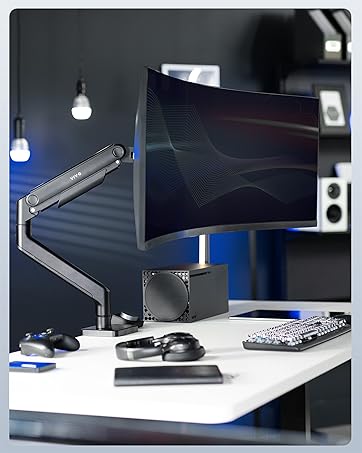
The VIVO STAND-V104A is a robust quad monitor mount designed for 13" to 32" screens, supporting up to 22 lbs each with VESA compatibility. It offers full articulation—tilt, swivel, rotation, and height adjustment—enabling ergonomic multi-display setups. Featuring drill-free clamp and optional grommet mounting, it secures firmly while saving valuable desk space. Ideal for home offices and multitasking professionals seeking a sleek, organized, and highly customizable workstation.





| ASIN | B07G9P4XGQ |
| Best Sellers Rank | #248 in Computer Monitor Arms |
| Brand Name | VIVO |
| Color Name | Black |
| Customer Reviews | 4.3 4.3 out of 5 stars (661) |
| Date First Available | August 8, 2018 |
| Is Discontinued By Manufacturer | No |
| Item Weight | 22.3 pounds |
| Item model number | STAND-V104A |
| Product Dimensions | 67.5 x 34 x 29 inches |
A**S
Great Monitor Stand, but not for the mechanically disinclined
PROs: - Two different options for mounting, both clamp and bolt. - Quite sturdy, with nylock nuts adjusting the arm stiffness. - The 3+1 configuration is ideal for me, vice the 2x2 frequently seen elsewhere. - Has survived two cross-country moves with no issues at all. - I appreciated the hardware options provided with the kit, to include the standoffs necessary for some monitors and their associated longer bolts. CONS: - Arm length is fixed; if your desk is flat against a wall this WILL NOT WORK for you (unless your rocking 3x 32" monitors across the bottom, in which case you might be okay). - If you're not comfortable mechanically, this product will frustrate you (particularly since it doesn't come with instructions - at least mine didn't). Multiple adjustments are necessary, and getting your monitors aligned how you like them might take you some time to get right. ADVICE: - I opted to drill and bolt the assembly to my desk. I strongly recommend "roughing-in" your setup before drilling, as this will determine how far away the center screen will be since this monitor stand cannot adjust in/out from the mounting pole. - In addition to the bolt, lockwasher, and plate provided with the kit, I additionally added a 4x14" piece of 5/8" scrap plywood in between the support plate and the underside of my desk in order to distribute the load better. - Take your time with wire management, and don't rely on the easily-damaged plastic clips that come with this product. While you're here, shop for some velcro cable management strips of sufficient length (you'll need 8-10" long strips to be effective, 6" will only barely work), and when setting up your system make sure to leave some slack in the cables around the joints of the monitor stand. This stand is just slightly shy of perfect for my setup. Top screen is an aging 27" LED display that is generally only used for system and network monitoring tools. Along the bottom I have a 27" 4K gaming monitor flanked by two 22" 1080p screens primarily used for chat programs, references while writing papers, and other miscellany. While I could easily step down to three - or maybe even two - screens, this monitor stand gives me the ability to have everything I interface with on display all the time. Additionally, it gives me the flexibility to modify my setup for when I finally get around to replacing the gaming monitor with something bigger.
M**K
Great quality and durability!
Great value, easy to adjust, and great quality! This works wells on my raising desk and I have had zero issues. I had 3 27” monitors and a 34” at one point. This looks great and is versatile. The arms can be removed if you decided you just wanted 2 monitors in the middle. I love that I can adjust these and take advantage of my full desk space. With the top monitor being higher, I like the ability to tilt it downwards to help with the viewing angle.
P**L
It's a great stand
It's fairly sturdy, that's a fact. Fitting 4- 32" monitors? Probably not without adapters for offsets unless the 32" monitor has the VESA mounts dead center and then it's still a toss up. 4-27" monitors would fit easy with no problem. If you want to mount quad 32" monitors you will need VESA adapters that will allow you to raise the upper screen up, and the lower screen down to accommodate. Your 32" monitor will have to have the standard 100mm x 100mm pattern, or you'll need an adapter. If you are using a TV you will probably need an adapter also. It's fairly easy to assemble, just pay attention to the VESA plates because the center plates are different from the side plates. Also, before you mount your monitors I suggest tightening the bolts in the center of the mount so they don't sag, because they will if you don't. Also tighten the nut on the sides of the left and right monitor arms or they will sag also. Once you get it tweaked, it's really a good stand. No, the left and right monitors won't be perfectly aligned with the center. There are adjustable adapters you get if it bothers you.
G**M
Very sturdy, easy to adjust, Take your time, lay things out before assembly.
Very sturdy, very flexible. very adjustable. Make sure you lay the monitors out as you want them mounted. The two center mounts are adjustable by several inches, but the outer monitors are limited to less than an inch. I flipped the upper mount over to gain the extra height, but I had to disassemble the adjustment assembly and turn 180 degrees, I also added a custom soundbar mount below the top monitor. Works great. I only wish that it could be taller by about 6". 1. So, I wouldn't have to invert the top mount. 2. So, I could replace the 24" with another 32" monitor in the future. With the soundbar mounted there is not enough height for a 32" monitor on the top. I also mounted the post on a 2" riser on my desk to get the height that I needed. Overall, the best solution to fit my desk and my needs. I do not mind adapting things to fit my needs.
M**.
Excellent quad monitor stand if you have the room behind your desk. Heavy duty. Rock solid stand and arms. Easily adjusted. As you can see from the photos it needs room at the back of the table. I had to pull the table out 6 inches and that wasn’t enough so I will be looking for a different quad monitor stand. If the arms had been in 4 sections rather than 2 it would have been perfect.
K**N
An excellent product. It's sturdy, heavy, and allows for two installation modes. The only downside is that the top screen must be smaller than 26 inches if you have a 32-inch screen as your primary monitor. Otherwise, everything is great. Installation is fairly simple, although it can be time-consuming if you skip steps. I recommend it, for the price, it's the only one I've seen that can hold 4 monitors.
L**N
Build like a tank, holds all monitors up well with no sag. Takes a while to setup but overall the best monitor mount I have used for the money. Photo for reference is 27x34ultrawidex27 triple curved with a 22ontop Used for sim racing perfect Will transition it to a homemade cockpit later down the track as the mount offers bolt mounting as well as clamping
C**S
Great for gaming and having work monitors also abit bulky but does the job it's suppose to.
T**Y
I have been hunting for something like this for awhile, starting with designing my own custom-made setup out of pipe fittings. The custom setup was a bit on the weaker side and cost around $500. Then I found a company that made exactly what i wanted, and they were great in answering questions until I got to the price, which was going to cost me at least CAD $940 in total to get it to me, and that is after the 50% "discount" i was given. Then I decided to try this one, which is a tiny fraction of the price. It didn't have all the features of the others but for the price it is simply incredible value. I ended up purchasing two so that I have a little bit more flexibility with arm options. I installed it yesterday. so far so good. I'm using it with a 32" monitor in the centre, a macbook pro on the right (with a laptop-VESA attachment I purchased elsewhere), a wide-screen monitor on top, and a nice flat panel in portrait orientation on the left. I'm very happy with this; so glad i found it before pulling the trigger on those other options! While it lacks the ability to adjust the top monitor outwards a bit towards me, there are small VESA adaptors I could try... but actually the way it worked without adjustment is almost perfect. The centre and top mounts can be exactly placed vertically thanks to a fine-tuning mechanism they've included on the VESA attachment points.
Trustpilot
1 month ago
1 month ago