We remain fully operational. Our teams are working around the clock to ensure your deliveries continue safely.

DOWNLOAD THE APP


Customer Services
Copyright © 2025 Desertcart Holdings Limited
DOWNLOAD THE APP

💼 Level up your laptop storage game with Toshiba’s reliable powerhouse!
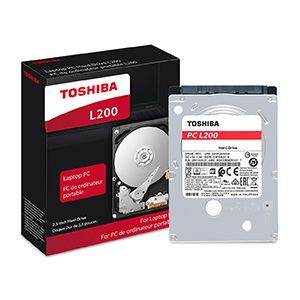
The Toshiba L200 2TB internal hard drive is a 2.5-inch SATA 6Gb/s mechanical drive spinning at 5400 RPM with 128MB cache, engineered for laptops and gaming systems. It combines large capacity with energy-efficient design, advanced shock protection, and reliable performance, making it an ideal upgrade for professionals and gamers seeking dependable, expanded storage without sacrificing battery life.




| ASIN | B07CT5RDDX |
| Additional Features | Portable, Shock Resistant |
| Best Sellers Rank | #229 in Internal Hard Drives |
| Brand | TOSHIBA |
| Built-In Media | Toshiba L200 Laptop PC Internal Hard Drive |
| Cache Memory Installed Size | 128 |
| Color | Grey |
| Compatible Devices | Laptop |
| Connectivity Technology | SATA |
| Customer Package Type | FFP |
| Customer Reviews | 4.6 out of 5 stars 340 Reviews |
| Data Transfer Rate | 6000 Gigabits Per Second |
| Digital Storage Capacity | 2 TB |
| Enclosure Material | Aluminum |
| Form Factor | 2.5-inch |
| Global Trade Identification Number | 00723844000318, 07238440003180 |
| Hard Disk Average Latency | 11.11 Milliseconds |
| Hard Disk Description | Mechanical Hard Disk |
| Hard Disk Form Factor | 2.5 Inches |
| Hard Disk Interface | Serial ATA |
| Hard Disk Rotational Speed | 5400 RPM |
| Hard-Drive Size | 2000 |
| Hardware Connectivity | SATA 6.0 Gb/s |
| Installation Type | Internal Hard Drive |
| Item Type Name | Toshiba L200 2TB Laptop PC Internal Hard Drive 5400 RPM SATA 6Gb/s 128 MB Cache 2.5 inch 9.5mm Height - HDWL120XZSTA |
| Item Weight | 4.16 ounces |
| Manufacturer | Toshiba America Electronic Components Inc |
| Model Name | Toshiba L200 |
| Model Number | HDWL120XZSTA |
| Number of Items | 1 |
| Special Feature | Portable, Shock Resistant |
| Specific Uses For Product | personal, gaming, business |
| UPC | 723844000318 |
| Warranty Description | 2 years |
A**N
Great storage drive for the money
My son came to me with his new Acer Nitro 5 laptop and said it was ridiculously slow... I work in IT and this statement made so sense since we over bought what he needed and it should last for years, this was 3 months after purchase. A quick look through the laptop found the internal NVMe drive had 0 available bytes, so we removed a game and opened up 120GB and ordered this drive for game storage as his laptop has a 2.5 SATA hard drive expansion slot, which we would just get a large HDD to use for game installs. Drive came in bulk packaging, vacuum sealed in an anti-static bag with those little black plastic molded "feet" on either end, in a single-wall box... No additional packaging or double boxing, but it arrived intact. I could see if your delivery carrier was a little "rougher" with packages, this might be a problem for this drive as it was packaged, but mine arrived with no issues. Installation was simple... Acer includes the SATA cable and mounting screws for the drive, which is good because this drive came with nothing extra, no screws or anything else. Installation took about 10 minutes total, most of the time getting the back cover off. After physically installing the drive and putting everything back together the PC booted right up and recognized the drive. This drive doesn't include any software (you don't really need it), so we went into Disk Management and formatted the drive as a single volume, and created a few directories on it to match the main drive so when an app or game was installed my son only had to change the C: to a D: in the installer and everything would work as expected. He has since installed a couple games without issue. The drive works well... It isn't the speediest thing, especially when you are used to an SSD, but for storage or applications that are not super disk intensive it works fine. Performance is good and there is no noticeably impact to battery life or increased heat dissipation. We have used Toshiba laptop drives in the past and they have been very good options in the past, so I expect no issues and good longevity.
W**T
Great for second HD in a DVD replacement caddy
Toshiba L200 1TB Mobile 2.5 Inch SATA 5400rpm Internal Hard Drive I bought this drive to use as a second drive in my laptop through the use of a hard drive caddy that replaces my DVD drive since I rare to never need the DVD and is a very easy swap if I do need it. I purchased this drive around the early part of Dec and thus far has performed very well. The extra storage is nice to have and since the main drive is coming up on the 5 year mark I have moved much of what was on the main to this drive. I have externals as well but is much nicer to just have it on board and not using up a USB port and being just another thing to worry about. This drive is very quiet, transfers between drives are quite fast. Time will tell of course as my computer is on 24/7 except a once a week reboot or install reboot. I recommend this drive as a cheap storage drive or even a main drive replacement if the 5400 RPM is of no concern to you. (my main is 5400 as are most included in new laptops unless you pay extra) Any drive 500 gig or more I highly recommend partitioning. A search for partitioning software will give plenty of easy to use options. On my main I have a partition just for Windows and I store on the others. This way if windows ever needs to be reinstalled fresh you will not lose anything on the other partitions so long as reinstalling to same partition Windows was on in the first place.
S**O
Works great with my TP-Link Tapo H500
Works great with my TP-Link Tapo H500
J**S
It's a Toshiba and They Last Almost Forever
Toshiba builds great products. The only reason I replaced my prior Toshiba drive several years ago was to get a bigger one. Works perfectly -- but if possible buy a SOLID STATE DRIVE now (Samsung builds the best ones), not an old-technology mechanical HDD. Solid state drives are many times faster and give you an entirely new world of performance.
G**Y
Satisfactory purchase
Work as expected
M**R
Too Easy
I put this HDD in a small form factor Dell desktop running Windows 10 because it has a 2.5" drive bay, and I had outgrown the old 256MB drive that came with the PC. I cloned the old drive to this new 1TB drive and installed it as the boot drive. Other than booting up a bit slow, it works fine. This is a cheap drive that is easy to install and does what it is supposed to do without any drama. Plug it in. Turn it on. Transfer your files to it. That's all! I haven't checked to see how hot it runs but I can confirm that it is very quiet--almost silent. If you are skeptical of the Toshiba brand--don't be. This is my second Toshiba HDD and they both work perfectly.
C**S
Replaced Seagate in PS4 - running great
Purchased this to replace a Seagate 2tb that I had installed a little over 12 months ago on PS4. The Seagate started freezing and looping the PS4 in safe mode. I was 2 missions away from completing Assassin's Creed Origins with all DLCs packs. As any gamer can imagine it was getting ugly, I wanted my trophy and Bayek was waiting. Overnighted this one and installed it, whole process took about 15 minutes that's including the Sony install. (It is super easy to upgrade the 4 storage, if you're hesitate go for it, you slide the top case off and remove one little screw. Drive slides out in case. Remove the 4 screws holding it in slide your new drive in and reinsert the screws. Plug your machine of happiness in and Sony will guide you through the rest of the steps with on screen prompts.) It's smooth and fast, my load times are quicker. It's quiet not as much humming as I had with the Seagate. Yes it's priced higher, buy nice or buy twice. I also added a 4tb external for game downloads and backups. So 6 tb should hold me for awhile however I'm back to a level one Assassin now with all rubbish weapons. I hope this lasts longer than a year, I will absolutely be back here to update the review if it does not. Also Amazon shipped this in a padded envelope (!?) with no anti static bag. Just the box with a pad around the drive. So be forwarned.
J**D
Largest capacity (currently 2TB) Toshiba 2.5" laptop drive
I converted a Dell 5510 one SSD drive system into a two drive system by replacing the 6 cell battery with 3 cells. I hardly ever run on only battery anyway. The space gained is available for a 2.5 standard SATA drive. The Dell needs a special cradle to hold it in place and it covers part of the circuit board so I used some silicone tape (somewhat overkill as its good for over 1KV isolation) to keep the cradle from touching the drive's board and give the drive further cushioning. Fits right in there for the second drive slot and you can use Storage Manager in Windows to format and partition it and assign it a name (like old_sparky) and a drive letter. It is quite fast and I've been able to populate it with my movable data feast quickly. Nearly silent and very little warming under use. I have had many Toshiba drives and like them for reliable operation. Can't say the same for some of our supermarket variety hard drives.
Trustpilot
1 month ago
2 months ago