We remain fully operational. Our teams are working around the clock to ensure your deliveries continue safely.

DOWNLOAD THE APP


Customer Services
Copyright © 2025 Desertcart Holdings Limited
DOWNLOAD THE APP

💼 Elevate your work and play with power and style that adapts to you!
The ASUS Vivobook S 16 Flip is a sleek, powerful 16-inch laptop featuring a 13th Gen Intel Core i9 processor, 4TB SSD, and a versatile 360° hinge. Designed for professionals who demand speed, flexibility, and premium build quality, it offers a vivid touchscreen, advanced connectivity with Wi-Fi 6E, and military-grade durability—all wrapped in a thin, lightweight chassis.






| ASIN | B0DHXJMLDY |
| Best Sellers Rank | #3,923 in Computers & Accessories ( See Top 100 in Computers & Accessories ) #159 in Computer Routers |
| Brand | ASUS |
| Card Description | Integrated |
| Color | Black |
| Computer Memory Type | DDR4 SDRAM |
| Customer Reviews | 3.8 3.8 out of 5 stars (45) |
| Date First Available | June 6, 2024 |
| Hard Drive | SSD |
| Item Dimensions LxWxH | 4.2 x 4.2 x 7.9 inches |
| Item Weight | 3.67 pounds |
| Item model number | BD5 OUTDOOR (W-1-PK) |
| Max Screen Resolution | 1920 Pixels |
| Number of Processors | 1 |
| Operating System | Windows 11 Home |
| Processor Brand | Intel |
| Product Dimensions | 4.2 x 4.2 x 7.9 inches |
| Screen Resolution | 1920 x 1200 pixels |
| Series | Zenwifi Bd5 |
| Standing screen display size | 16 Inches |
| Wireless Type | 802.11ax |
A**Y
Fantastic
Great addition to my Asus mesh network. Easy to add in, and now provides great coverage to my pool deck area outside. It’s been through a few storms and zero issues and allows me to easily connect my pool pump and filter wirelessly where before I always had intermittent issues. This is my third Asus node and half better coverage throughout back yard cutting grass now (we sit on a 2 acre lot w a 3k sq ft ranch). I have one upstairs, one downstairs, and one outside now in a roughly triangular setup. We stream on several TVs and my wife and I both work from home- no speed issues and connectivity is solid. App is easy to use
J**S
This is NOT the Range Extender You’re Looking For
This product might be wonderful. It might work flawlessly. BUT… if it doesn’t, ASUS tech support is frustrating, hard to understand, and not technically literate. When the BD5 would not connect to my ASUS router, I spent 5 hours between chat and telephone, being told repeatedly to complete the setup using an Ethernet connection, which worked great. However, from that point forward the router expected the extender to connect via cable. Wireless connection? Impossible. And to boot, the unit shipped with outdated firmware that was a mess to update. So it’s on its way back to Amazon
E**F
Great outdoor router/extender but the mounting bracket could be designed better!
The BD5 Outdoor is a great addition to the ASUS AIMESH network when and if you want your outdoor spaces to be WiFi accessible. It will connect flawlessly to an existing ASUS AIMESH network, or you can use it as a standalone router. The only issue I had is NOT with the router itself BUT with the ASUS design of the bracket that the router sits on outside. It has a slightly curved back if you are going to mount it to a pole BUT the issue is IF you are going to mount it to a house wall and if the house wall has siding (MOST DO) then you will want to screw the bracket to the wall. This is where I have issues with ASUS and their design. The Bracket has four holes to enable you to attach the bracket to a wall, BUT the geniuses at ASUS made the four holes recessed about an inch deep and the recess allows for a screw head of maximum 0.200" diameter so you may be able to get a #6 wood screw with a length of 1.5" OR more to fit IF you have the ability to grind the head diameter down so it can fit in the recessed holes. There is NO reason that they could not have done the same design and provided a recessed hole of maybe 3/8" or .375 so you would have a decent amount of space to use a #8 wood screw and fasten it to a wall. SO the end results are the router is Great and works as described and is very easy to install. The bracket provides options to mount to a pipe or a wall but the fastening to a wall is limited unless you are able to use tiny screws to screw into the wall if needed without the need for a deep/longer screw.
S**E
Be patient and read before you act on any quick set up.
I have had several routers, mesh, AP wifi this and that throughout my upgrading of our home. If you get an ASUS group or decide to put your own firmware on these it should be ok. Either I am the luckiest person alive with ASUS or a have a high threshold for tolerance learning levels. 1. You have to set the network to fit your needs and this was a great addition to our Mesh network 2. Split your network and or decide if you want to run point to point, hard wire, Access points etc. ( We have an IOT or internet of things sub network for stuff that need to talk in the house and not out of the house) 3. Data and information security (Asus combined with 2 firewalls and VPNs etc has done well with this addition) 4. How noisy is your area you are putting this addition in. More doesn't always mean better. If you get jitter, lag and or issues. You need to look at packet priority (web surfing, work from home, gaming, streaming etc). 5. If you dont know how to adjust for these settings and looking for a plug and play situation - call your cable company and let them set you up with their stuff so you can call them for tech questions. ASUS makes a decent set for tech regarding configuration and adaptability. 6. Chances are you can Google the tweaks you need, ask some AI chat bot or call ASUS region based office for support. Don't call fred down the street in his mothers basement who doesnt have a job and games all day showing up at your door with a Coke and Cheeto dust on his face to fix something you can look up yourself on your cell phone. 7. Last piece of advise is try to keep your nodes with visible distance of the other units - Some ASUS units do better thru or around walls but really you should have a hard wired AP at that area in my opinion. Tweak something after you have looked it up. Most smart home items don't get the firmware they need or the old configs cleaned out before changing the heart of your connections. Plan, review and test after you watch some videos, read the information you can (dont be the guy at the end of the project holding bolts after assembling the bike - maybe there are extra parts hell I dont know). Look with those two eyes, listen to podcasts and video advice and speak ill of this if you will after you have done due diligence. I made the mistake of bashing one ZenWifi model and it was because I had picked up the plug from the old unit and it was not getting the right voltage for the new unit. Plugged in the right cord, firmware updates and did the steps and got full bands by finding the channel that fit my neighborhood and home. Best of luck, I love the stuff ASUS puts out. Stability: Stability - Use AP and Mesh combo Speed: Speed - Tweak the packet priority and beamforming to beacon more for noisy networks
B**N
Works great as an add on to my existing ASUS mesh system.
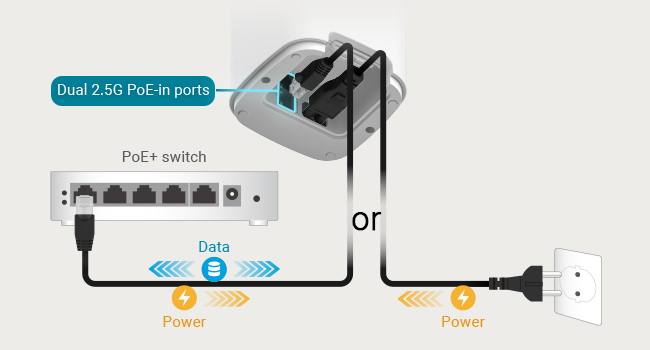
I bought this to add to my existing ZenWiFi system. I mounted this just outside the back of my garage under the overhang. I drilled a small hole to run an Ethernet cable from this device to the other ASUS mesh device inside the garage. I used an inexpensive switch that provides power over Ethernet so the outdoor unit is powered without needing to run 120 voltage. Now my entire backyard has strong WiFi signal. Setup was very easy using the ASUS app on my iPhone.
C**M
Frustrating Setup and Unreliable Performance
I had high hopes for this system, but unfortunately, it just doesn't work reliably. The setup process was incredibly frustrating. Adding new mesh nodes was nearly impossible, often failing and requiring multiple factory resets. Furthermore, setting up guest networks constantly failed or would drop connections shortly after activation. After numerous attempts to stabilize the system, I concluded it's simply not a reliable networking solution. I ended up trading in all of my components for a different brand (eero).
E**R
I recommend
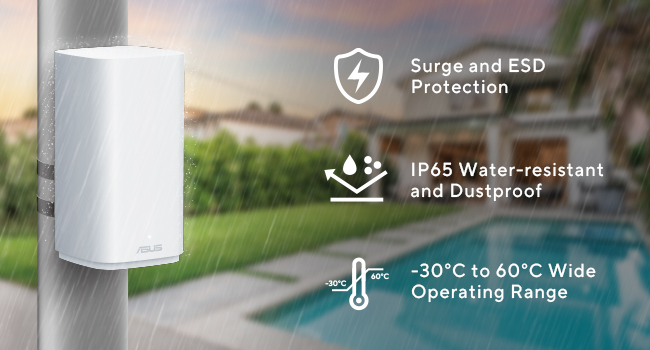
I have this outside near my pool and it works great. It’s been in harsh Az environment and no issue.
E**N
Unfortunately the router disconnected from the network on its on, so I decided to reconnect it, and since over several days or resetting , I keep getting unable to connect. Not sure what happen to this router but it attempts to connect but now it will not no matter what I try. Maybe I got a lemon or somethin and I missed the return window by 2 days. I will try to figure out with Asus if they will keep good to their warranty and such, this is a lot of money. Overall when it was working it was great since delivery on 27 September 2025, and even now everything seems to be functioning correct. Not sure maybe something in side, as of now caution on this product until I get an answer and update my review.
Trustpilot
2 days ago
1 day ago