


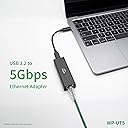
🚀 Upgrade your network game with 5GbE speed and sleek durability!
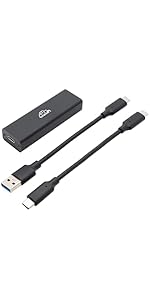
The WP-UT5 USB 3.2 to 5GbE adapter leverages the Realtek RTL8157 chipset to deliver blazing 5Gbps wired LAN speeds with ultra-low power consumption. Its compact aluminum casing and braided cables ensure durability and portability, while dual USB-C cable options guarantee broad compatibility. Ideal for professionals seeking seamless, high-speed connectivity on macOS and iPadOS without driver hassles.




| ASIN | B0DF2TTT9H |
| Best Sellers Rank | #848 in USB Computer Network Adapters |
| Customer Reviews | 3.8 3.8 out of 5 stars (59) |
| Date First Available | August 25, 2024 |
| Item Weight | 2.82 ounces |
| Item model number | WP-UT5 |
| Manufacturer | Yuanzhou Intelligent (Shenzhen) Co., Ltd. |
| Product Dimensions | 3.2 x 1.1 x 0.6 inches |
J**S
Great functionality with MacOS and IpadOS
Nicely made product based on fit and finish of the metal case. Plugged it in with my M4 iPad and it hooked up to my UniFi 10G switch (FlexXG) quickly at 5Gb. No issues, no drivers to load, utterly seamless. Same with my M2 Mac minis. Great product and it doesn’t seem to get too warm regardless what i throw at it.,
D**C
Performance is definitely dependent on hardware and operating system
The previous review that stated it might work or it might not depending on hardware is spot on. Go read it if you haven't already. I am primarily using a M3 MacBook Pro 14 and this adapter consistently gives the max speed/throughput my ISP says I should be getting (2Gbps up and down). This is the fourth USB-C to Ethernet adapter I've tried but the first with the more advanced Realtek chipset, and that seems to make the difference. I have tested this out on a 2019 16 inch MBP with an Intel CPU and that doesn't hit anywhere near the advertised speed ... HOWEVER it's a work computer using Zscaler and very well might be bandwidth capped. All of the other adapters I tried had me around the same speed as this adapter, about 6-700 Mbps up and down. I'm also on macOS 14.7 which may also contribute to the problem. I have an 13 inch MBP with Intel chipset from 2020 running macOS 15.5 and that gets the same speed as the M3 MBP. So, almost certainly an issue with Zscaler and/or the older OS. Haven't even talked about my network infrastructure. Using Ubiquiti router, switches, and access points and a Comcast XB10 in bridge mode. I have yet to test this on different network infrastructure, so that may impact things too. I know I often have trouble with multi-gig hardware on my Verizon FIOS 1Gbps network (which I keep to 10/100/1000 equipment, so I haven't even plugged this in on that Verizon network). Giving this five stars because it's the only one giving me consistent speeds I expect on the 2.5Gbps network. Your mileage will almost certainly vary, so be careful blaming the adapter if you have problems.
J**H
Not a recommended purchase
This adapter gets hot and drops packets on a regular basis. Difficult to get file transfers done when you can't rely on the ethernet connection. My built-in 1G ethernet port on my laptop performed 100% better than this one. Shameful, to say the least. Not often I don't recommend a purchase but this is the exception.
S**M
It might work for you or it might not. You probably won't know until you buy it.
I originally wrote a scathing review of this thing, but I deleted it after doing more extensive testing. This thing can work well under the right circumstances, but that's something you need to be very wary of if you're thinking of buying it. The hardware you have, the OS you use, and the driver you're running all have to be just right for this to work well. Whether this will work for you is very much hardware-dependent. If you're planning to plug this straight into a machine with at least a USB 3 port, you might be okay. If you're planning to plug this into a dock or a hub, or if your machine uses an internal hub with other things on it, there's a good chance you'll have a bad time. As an example, I have a 16" 2024 MacBook Pro. Plugged straight into the machine with the right software (discussed below), using iperf3, I get consistent performance of around 4.7 Gbps in both directions. I also have a Dell S2722QC monitor, which has 2 downstream USB ports that nominally support 5 Gbps. Performance if I plug it into this thing is a total crapshoot, and I don't know why this is. Unplugging it and plugging it back in leads to wildly different results, sometimes with performance as low as 300 Mbps, other times exceeding 3 Gbps. Sometimes it ends up being poor in one direction, other times it's fine both ways. I can't make any sense of it, but it makes the device unusable in this configuration. It's also worth noting that a 1 Gbps Ethernet adapter performs at full speed in both directions consistently plugged into the same monitor, so I don't know what's going on here. Now on to the software side of things. On Windows, forget about it if you aren't using Windows 11. This thing is unstable under Windows 10. And even if you run Windows 11, you will need to update the driver from the one included with Windows to have a good experience. You can either install it from the Realtek website or run Windows Update after plugging it in. If you don't do this, it will only sync with your switch at 2.5 Gbps, performance will be very poor (worse than a 1 Gbps adapter), and you'll experience dropped packets. On macOS, I've seen people report good experiences with 14.5 and above, but I can say from experience that you will experience issues if you run 15.0-15.3. These problems appear to have been fixed in 15.4, which was only released a few days ago as of the writing of this review. I didn't do as much testing on Linux, so all I'll say is that if you aren't running a recent kernel, you aren't in for a good time. In summary, this might work for you, or it might not, and you probably won't have any way to know until you buy it. Personally, I'm on the fence about whether to keep it or return it.
W**J
just like others... defective cable USB A to C..
Device seems to work on an old QNAP NAS, but it seems it throttles down much more than the 2.5GbE USB dongles I've tried.
K**O
Working great with my Mac Mini M4.
I have this connected to my Mac Mini M4 through my TB3 dock. It is connected at 5Gb through my UniFi Aggregation switch via a 10Gb SFP+ module that can negotiate between 1,2.5,5 and 10Gb speeds. I did numerous iperf3 tests against my 10Gb server and had a consistent 4.70Gb throughput in both directions. So far I haven’t had any strange behavior.
E**Z
No me sirvió para lo que compre y tiene varias caídas no es estable .
J**Y
Exactly what I needed to increase the network throughput to an N100 based mini PC
Most 2.5gbit USB adapters are based on a similar Realtek chipset, but they are CPU hungry. I bought this to increase the network bandwidth available on an Intel N100 based mini PC. The CPU could not keep up to provide full 2.5 gbit speeds. This 5gbit card provides much better performance at 2.5gbit speeds on lower powered systems. Perfect for what I needed.
A**R
Decided to give it another try before sending back - must have had a faulty driver install previously as removed driver and reinstalled and am now getting expected speeds
S**O
M2 mac mini の Thunderbolt 4ポートに、USB-Cケーブルで RTL8157の LAN変換アダプタを接続。 10GbEスイッチ(RTL9303+RTL8264)経由で M4 mac mini (10GbE) との速度をiper3で計測し、5GbEの性能で通信できました。 RTL8157 -> Apple AQC113 [ ID] Interval Transfer Bitrate [ 5] 0.00-1.00 sec 538 MBytes 4.50 Gbits/sec [ 5] 1.00-2.00 sec 556 MBytes 4.67 Gbits/sec [ 5] 2.00-3.00 sec 557 MBytes 4.68 Gbits/sec [ 5] 3.00-4.01 sec 560 MBytes 4.67 Gbits/sec [ 5] 4.01-5.01 sec 558 MBytes 4.68 Gbits/sec [ 5] 5.01-6.01 sec 557 MBytes 4.67 Gbits/sec [ 5] 6.01-7.00 sec 555 MBytes 4.67 Gbits/sec [ 5] 7.00-8.01 sec 560 MBytes 4.68 Gbits/sec [ 5] 8.01-9.01 sec 558 MBytes 4.68 Gbits/sec [ 5] 9.01-10.00 sec 551 MBytes 4.64 Gbits/sec Apple AQC113 -> RTL8157 [ ID] Interval Transfer Bitrate [ 5] 0.00-1.00 sec 191 MBytes 1.59 Gbits/sec [ 5] 1.00-2.00 sec 561 MBytes 4.71 Gbits/sec [ 5] 2.00-3.01 sec 562 MBytes 4.71 Gbits/sec [ 5] 3.01-4.01 sec 561 MBytes 4.70 Gbits/sec [ 5] 4.01-5.01 sec 560 MBytes 4.70 Gbits/sec [ 5] 5.01-6.01 sec 561 MBytes 4.70 Gbits/sec [ 5] 6.01-7.01 sec 561 MBytes 4.71 Gbits/sec [ 5] 7.01-8.00 sec 558 MBytes 4.69 Gbits/sec [ 5] 8.00-9.00 sec 560 MBytes 4.71 Gbits/sec [ 5] 9.00-10.00 sec 561 MBytes 4.70 Gbits/sec IN性能、時折1GbE程度まで速度低下するタイミングがありました。 macOS 15.2 、RTL8157 は 標準ドライバで利用できましたが、MTUのカスタム設定可能な範囲は1280〜1504。 ジャンボパケット利用は出来ませんでしたが、デフォルトの1500のMTUに起因するボトルネックはない模様でした。 M2 mac mini USB-Aポート(最大5Gb/s)での接続では、転送性能は低下しました。 2.5GbEの性能は上回りますが、5GbEの性能で利用するにはUSB-C接続での利用は必須と思われます。 [ 5] 0.00-1.00 sec 362 MBytes 3.04 Gbits/sec [ 5] 1.00-2.00 sec 377 MBytes 3.16 Gbits/sec [ 5] 2.00-3.01 sec 372 MBytes 3.10 Gbits/sec [ 5] 3.01-4.00 sec 376 MBytes 3.16 Gbits/sec [ 5] 4.00-5.01 sec 372 MBytes 3.11 Gbits/sec [ 5] 5.01-6.01 sec 294 MBytes 2.46 Gbits/sec [ 5] 6.01-7.01 sec 351 MBytes 2.94 Gbits/sec [ 5] 7.01-8.00 sec 372 MBytes 3.13 Gbits/sec [ 5] 8.00-9.00 sec 376 MBytes 3.16 Gbits/sec [ 5] 9.00-10.00 sec 376 MBytes 3.14 Gbits/sec
J**H
Works great, needs custom driver on Linux as of 2025-05 (as do the other RTL products). Very fast on both MacOS/Linux -- can transfer at full speed. MacOS seems to have a driver for it too, which is nice.
Y**A
working stable and stay cool.
K**I
Macmini M1で使用しました。10Gbpsのネットワークを組んでいる中でしっかり5Gbps程度出ます。 その後Windows11でもフルスピード出ることを確認しています。 また、付属のケーブルですが、ホスト側がUSB-AまたはUSB-Cコネクタタイプで2本付属しています。
Trustpilot
3 weeks ago
1 day ago