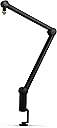
🎙️ Elevate your broadcast game with the boom arm that means business.
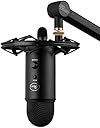
The Blue Microphones Compass Premium Tube-Style Boom Arm is a sleek, aluminum-constructed desktop mic stand featuring internal springs, hand-tightened friction hinges, and a built-in cable management system. With 32-inch reach and 360-degree rotation, it supports professional mics up to 2.4 pounds, including Blue Yeti models, delivering stable, quiet, and visually clean setups ideal for streaming, podcasting, and broadcasting.


| ASIN | B078MLBGRM |
| Antenna Location | Gaming, Streaming |
| Audible Noise | 44 Decibels |
| Best Sellers Rank | #17,023 in Musical Instruments ( See Top 100 in Musical Instruments ) #140 in Microphone Mounts |
| Brand | Blue Microphones |
| Color | Black,Blue |
| Compatible Devices | Camera, Camera, Gaming Console, Gaming Console |
| Connectivity Technology | XLR |
| Connector Type | clamp |
| Customer Reviews | 4.1 out of 5 stars 6,712 Reviews |
| Enclosure Material | Aluminum |
| Hardware Platform | Camera |
| Item Dimensions | 43.9 x 2 x 2.5 inches |
| Item Height | 2.5 inches |
| Item Type Name | Microphone Stand |
| Item Weight | 2.98 Pounds |
| Manufacturer | Blue |
| Microphone Form Factor | Studio Condenser |
| Model Name | 989-000517 |
| Model Number | 989-000517 |
| Number of Batteries | 1 Lithium Ion batteries required. |
| Number of Channels | 1 |
| Polar Pattern | Unidirectional |
| Power Source | Corded Electric |
| Recommended Uses For Product | Gaming, Streaming |
| Signal-to-Noise Ratio | 44 dB |
| Special Feature | Stand |
| UPC | 836213000236 |
| Unit Count | 1 Count |
| Warranty Description | 90 days limited |
J**D
Incredibly strong boom arm that beats Rode
I originally purchased the Rode PSA1 Swivel Mount Studio Microphone Boom Arm in 2012 and used it with my Blue Yeti microphone. It was very reliable. Earlier this year I was looking for a new boom arm and saw this and decided to try it out. Here is my comparison of both products. I am using the Blue shock mount and a pop filter in addition to my Blue Yeti microphone. Installation Installation for both products is very easy and quick in that you just clamp it to the edge of your desk. Between the two I would judge the base of the Blue boom arm to sturdier than the Rode. You screw in the shock mount on end of the boom arm, screw in the Blue Yeti into the shock mount and the clamp the pop filter to edge of the shock mount and twist it until it is in front of the microphone. I was able to attach the Rode boom arm to the back side of my desk so it will be out of the way when not in use. I was not able to do that with the Blue boom arm because I just could not get it to adjust to being in the right position when recording so I had to attach it to the side of my desk. This means it will get in my way when not in use as I move things around on my desk. Overall for installation Rode wins because it is not in the way when not in use. Adjusting Placement For Rode, you just grab it and move it where you need to have the mic placed for recording. Once you get it placed you have to let go and hope that it does not automatically start to retract due to the weight. Sometimes I have to position it, wait for it to rise, reposition it and wait for it to rise and reposition it until eventually, it stays in place. For Blue boom arm, it has three joints that you can rotate to move the mic into position. They all have a knob that you twist to loosen for it to move and when you have mic positioned then you twist it to lock it in place. Adjusting these knobs can be a challenge. But once you have the mic in place it will not move. I do 4 hours of podcast recording every Sunday and it stays in place the whole time. Overall for quickly positioning the Rode wins but you have to fidget with it. If you want the positioning to be permanent and stay there then the Blue wins by a wide margin. Cable Organization The Rode boom arm comes with some velcro straps that you can use to gather cables and then put the velcro strap over the boom arm. You get two straps to attach the cable on both halves of the boom arm. Blue, on the other hand, includes a slot built into the boom itself for the cables. Since it is built into the boom itself the cables are completely hidden from view. If you are on air when recording this is an extremely nice feature because the cables do not distract from your image on the screen. For Rode, the cables are very visible on the screen. Overall Blue wins this hands down Overall User Experience I had my original Rode boom arm for 5 years. Eventually, it got to the point where it sagged from the weight and I had to purchase a second one in 2017. I have had the Blue arm for less than half a year. I was satisfied with the Rode arm so much that when I needed to replace it I purchased it again and didn't even bother comparing any other product. When I started a new podcast as well as recording training videos I decided to get a new setup so it was consistent in color. (My original Blue yeti mic was silver and shockmount was black). I got a new black Yeti mic, black shock mount and realized they made a boom stand. After reading the reviews I decided to invest in it. I have been beyond pleased with this setup compared to the Rode. Knowing everything that I know now if I had to start over again I would purchase the Blue boom arm over the Rode hands down.
D**E
What You Need to Know Before Buying
As of May 2019 this is arguably the best looking boom arm on the market. It looks better in person than any picture or video can show. The desk mount is very sleek and modern giving it style but allowing it to do its job - being a secure, sturdy mount. The hinges are well designed as well as the cable management slot is a thought out idea, it's not just Velcro tie downs. It can support mic's (w/ or w/o shock mounts) that weigh more than the advertised 2.4 lbs. The only downfall to this boom arm is the tighten rods have a plastic cap so you'll feel like you're going to break something if you go too tight BUT there is a design feature built in to help with that. There is a tension screw on the bottom (next to the pivot rod) of the arms base that allows for spring tension adjustment. You can find out how to adjust the springs tension via the owners manual. TLDR; Very good design making it the best looking boom arm on the market. Most negative reviews are due to a strong spring tension but that can be adjusted via a design feature on the arms base.
J**J
Doesn't do the one thing it's supposed to do
This is one of the few products I've ever had to return to Amazon. It literally does not do the one thing it's supposed to do, which is hold a microphone in the desired position. Within the first couple of minutes after taking it out of the box, one of the joint covers popped off and I heard a snapping sound, as if a plastic tab had broken off. I didn't actually find anything broken on the cover or the boom, nor could I find anything on the floor, so I'm not sure what this was. In any case, it was not reassuring. The screw from the middle joint also fell out, followed by the nut, and I had to press hard and awkwardly from multiple angles simultaneously to get it all back into position. The build quality of this middle joint and its moving parts are really bad. The outside of the middle joint also has a sharp, uneven plastic edge that looks so broken I'm still not sure if the one I received was defective or if it's just badly made in general. It mounted to my desk nicely, and the base joint felt sturdy and swiveled smoothly and quietly. However, the three joints, and especially the middle one, absolutely cannot hold the position you set them to. I tightened the joints as hard as I could, and like other reviewers, nearly bruised my fingers with the amount of force necessary. And yet, the arm swings back into its default position at the middle joint, no matter how hard I tightened. I'm not an idiot. (Well, I might be, but not for this particular reason.) I read the instructions carefully and adjusted the fine-tuning screw in the base of the boom. I tried positioning the mic after several different adjustments of the fine-tuning screw. Super tight, super loose, and everything in between—the middle joint would always spring back to its default position. I could have just dealt with it and used the boom from a different position that worked better with its design, but for $100, this product should work perfectly, not barely. I'm going to try the Rode PSA1 next and hope it will be better than the Blue Compass. Very, very disappointing.
D**N
Elevate Your Audio Setup with the Logitech Compass Microphone Boom Arm!
Rating: ⭐⭐⭐⭐⭐ The Logitech Compass Premium Tube-Style Microphone Broadcast Boom Arm is a game-changer for creators, and it has transformed my recording, gaming, and streaming experience. The build quality is superb, and the tube-style design with internal springs gives it a professional look and feel. It’s robust and built to last, which is crucial for daily use. The built-in cable management is a thoughtful touch. It keeps my setup tidy and eliminates cable clutter, ensuring a clean and organized workspace. The desktop clamp is secure and stable, and the microphone arm is highly adjustable. It allows me to position my microphone exactly where I need it for optimal audio capture. Whether you’re a content creator, streamer, or gamer, the Logitech Compass Boom Arm is an invaluable addition to your audio setup. It brings convenience, stability, and a touch of professionalism to your recordings and broadcasts. Highly recommended for those looking to elevate their audio game!
H**N
Suitable with heavier mic
Like many other reviews might have pointed out, the spring on this thing is a nail buster. Good things - Good looking - Simple set up procedure - Neat cable channel Bad: - Spring strength - Access to cable channel could be done better More about the bad points: So this boom arm has spring adjustment, which means it will naturally want to straighten out unless you adjust it with the knob on the side of the 2 joints at the bottom point where it connects to the table clamp and at the middle point. The problem is it wants to straighten itself out too much. For my microphone at around 400-450 grams (a little less than 1 lb), even if I squeeze it to the point that I believe is the hardest humanly possible and without causing permanent damage, this thing cannot bend to a 90 degree, not even close. So if you have a nice heavy mic, this will be less of a problem. If you have something that weighs about the same as mine, or less, you are better off with something else; though, if you're splurging on a $100 boom arm, I imagine your mic would be a really nice one, not like mine. If your mic is heavier but still run into this problem, do ask for an exchange through Amazon, as it very possibly will fix your problem. I'm not doing it because I'm not particularly mad with the current level that my boom arm is at, but it is a thing to point out
A**A
A Chore to set up, but very sturdy. Perfect for my Blue Yeti.
Okay. When you receive this product, go to YouTube and find the video of the guy that tells you how to set this puppy up (TITLED: How to tighten the Blue Compass Boom Arm with ease), because this boom does NOT come with any helpful instructions AT ALL. It was absolutely confusing and I could see why people complained about this boom not staying put or lifting/moving. If you don't set it up correctly (and how could you when there are no instructions), it will absolutely do ALL these things. Now... It WILL feel like it's fighting you the whole damn way... But stick with it. Once you put your microphone on, it will stay put. My boom holds my Yeti up perfectly. It's oh so sturdy. Not like those coil arms that will weaken with time. This is heavy duty stuff. So sleek and professional looking. Worth every penny.
L**S
Still holds up my mic.
after years of using it, it hasn't failed me yet. It holds my microphone perfectly in place. There's no noise when moving around and it smoothly swivels to where I want it to be and stays there. I do recommend to tighten it as much as you can, so the mic arm doesn't just lift up when using. This combined with the Shock mount, made a perfect pair. Do keep in mind that the arm has a cable rout that holds the cable with plastic clips that if forced, can break, so be careful with that. After all, I'm satisfied with it.
C**K
Inconsistent Quality Boom
UPDATE: Amazon shipped a replacement. The second boom did not have the tension issue that I saw with the first. 2 full turns of the bottom tension screw made a noticeable difference in the stiffness of the arm. The middle joint locking mechanism is also able to hold the arm in place instead of floating back up to vertical. I would say that this second arm is working perfectly. Given my first experience and those of many reviewers here, there appears to be a quality issue with the product. If you experience it, a replacement may just do the trick. ORIGINAL REVIEW ---------------------- I have really liked my Blue microphone. Came to a point where I decided to put it on a boom instead of a stand and figured Blue would be there for me with the same quality as the mic. I was wrong. Very wrong. TENSION SCREW My problem with the arm began with the tension adjustment screw at the bottom. This arm has way too much tension even for a heavy mic. I loosened it up about a half turn at a time to check the tension and honestly, 4 full turns later it felt no different. Even loosened significantly, it feels more like a workout device than a boom to hold a mic. CLAMP ISSUES I mounted the clamp (be aware that the plastic key for the clamp sticks out further than the diameter of the socket. In my case that meant I couldn't mount it where I wanted to because the lip of my desk is 2" deep. That's perfect for the top of the clamp, but the key is 2.25" so, I can't turn it as it hits the desk. If you are looking at this bracket, be sure that you have at least 2.25" clearance so that you can tighten it. MID-BOOM JOINT I moved the arm to a less ideal spot to try it out. In this new spot, I needed the second joint to bend. Again, I had problems with the joint being so strong that the mic and isolation mount would just float right back up until the boom was practically straight. Tightening the joint at the base had done a good job of keeping that joint where I wanted, so I proceeded to do the same to the second joint. That didn't go so well as the joint was so strong that I tightened it past the limit of the plastic cover and it still was so strong that it would go straight with everything on it! When I say I tightened it past the limit, take a look at the photo to see what I mean. Essentially, the plastic cap is a socket head for a bolt that runs through the joint. As you turn the cap, you are driving the bolt deeper into the joint. Since the plastic cap isn't traveling down, the bolt gets low enough to pop out of the plastic cap and, you're done. There's no way to reverse the bolt because the socket inside the cap is too shallow. This is a poor design for 2 reasons: 1) The socket inside the cap is plastic despite the fact that it's job is to turn a metal bolt with significant force, and 2) The bolt can be irreversibly driven by the cap to a point where it is too deep to remove. There should be a limiter. CHANNEL COVERS I really do like the channel, but wow those channel covers are finger nail busters! CONCLUSION My mic is back on the stand it came with. I have a $99 boom that's garbage and a shock mount I can't use until I get an arm that works. Perhaps I got a bum one, but from the other reviews here, I am thinking that either it's just poorly designed or there is a bad run of these. I figure an Amazon replacement is going to be from the same lot.
Trustpilot
2 months ago
5 days ago