We remain fully operational. Our teams are working around the clock to ensure your deliveries continue safely.

DOWNLOAD THE APP


Customer Services
Copyright © 2025 Desertcart Holdings Limited
DOWNLOAD THE APP

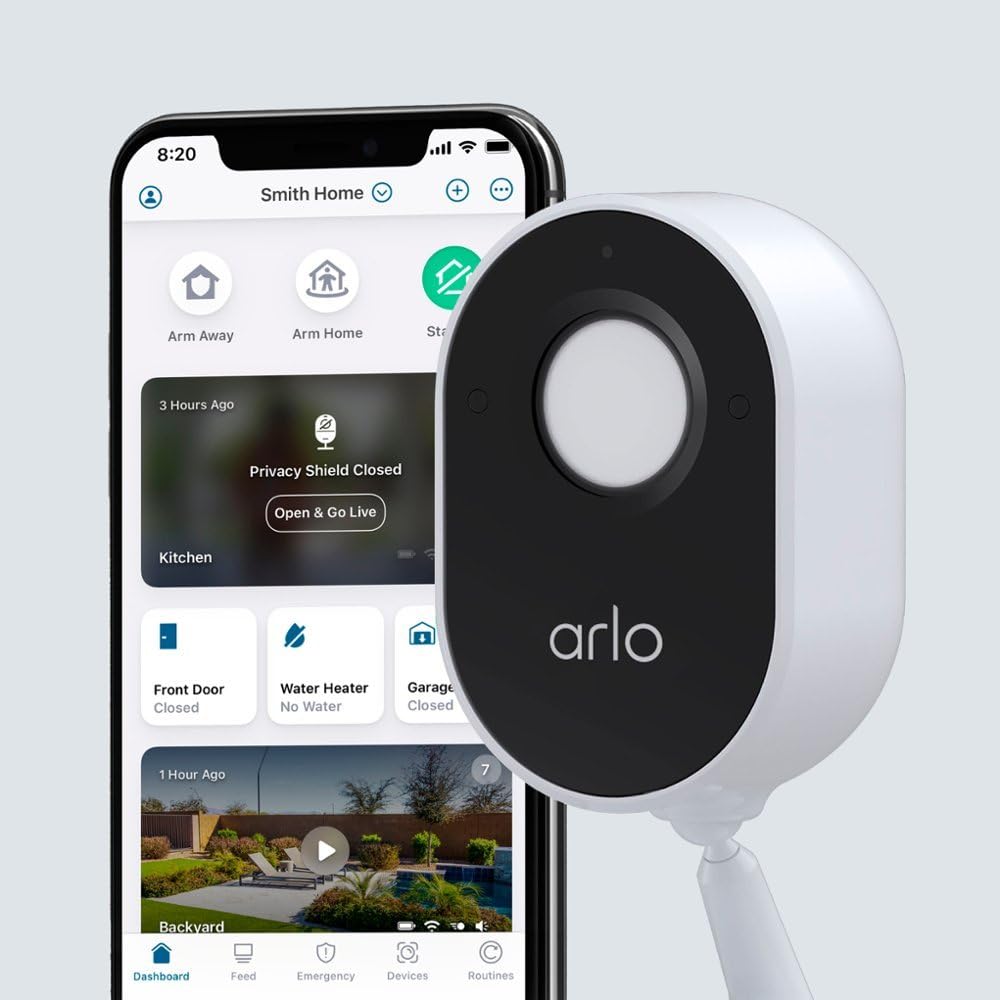
🔒 Elevate your home security with smart clarity and privacy—because you deserve to feel safe and in control.
The Arlo Indoor Camera VMC2040 delivers crisp 1080p HD video with a 130-degree wide field of view, enhanced night color vision, and a built-in privacy shield. Powered by a plug-in cord, it offers continuous monitoring without battery hassles. Featuring two-way audio and a siren, it integrates seamlessly with Wi-Fi and Amazon Alexa, making it a smart, reliable choice for modern indoor security.
| Indoor/Outdoor Usage | Indoor |
| Compatible Devices | Smartphone |
| Power Source | Corded Electric |
| Connectivity Protocol | Wi-Fi |
| Controller Type | Amazon Alexa |
| Mounting Type | Wall Mount |
| Video Capture Resolution | 1080p |
| Color | White |
| Number of Items | 1 |
| Included Components | Bag |
| Wireless Communication Technology | Wi-Fi |
| Item dimensions L x W x H | 6.3 x 5.1 x 5.2 inches |
| Batteries Required? | No |
| Field Of View | 130 Degrees |
| Low light technology | Night Color |
| Room Type | Study Room possibility, Living Room, Hallway |
| Video Capture Format | MPEG-4 |
| Unit Count | 1.0 Count |
| Control Method | App |
| Manufacturer | Arlo |
| Part Number | (Renewed) VMC2040 |
| Item Weight | 11.7 ounces |
| Product Dimensions | 6.3 x 5.1 x 5.2 inches |
| Item model number | (Renewed) VMC2040 |
| Style | VMC2040-100NAS(Renewed) |
| Item Package Quantity | 1 |
| Special Features | 2-Way Audio |
| Batteries Included? | No |
T**A
Arlo could do better explaining, but no complaints otherwise
I have a pre-existing Arlo system with three Pro3 cameras, a doorbell, and a VMB4540 SmartHub, and I wanted to add a camera to keep an eye on our dog when he's left alone in the house. The wired Essential Indoor camera was the camera I wanted to add. Following are that things that I couldn't find answers to on the Arlo web site.1. The USB cord (comes with a wall plug adaptor) that comes with the camera is 6 ft long.2. The Essential Indoor camera does work seamlessly with the VMB4540 SmartHub. Setup using my phone and the Arlo app was driven by prompts that were easy to follow.3. I couldn't find anything on the web site that stated that the Essential Indoor camera would work the same as my other cameras with the SmartHub without an Arlo Secure subscription. That is, the Essential Indoor camera records to the SmartHub based on motion detection, just like the other cameras. Note that I do not subscribe to Arlo Secure, so if I want to review any saved videos I have to remove the USB thumb drive from the SmartHub and look at saved videos on my computer. That's ok, because I only really want to be able to monitor the dog.One other thing that I will add is that during setup there is a prompt to update the firmware. I'm not sure if this relates to the SmartHub or the camera. I had to retry the update about 20 times before it finally took. I looked at the update titles and they were all the same filename, so it wasn't successive updates. It just didn't seem to take. I will note that when it finally went through I had moved my phone closer to the SmartHub. I don't know if that mattered because after moving closer it still required a couple of tries before it took.Overall, I'm happy with the camera and other than the glitchy firmware update setup was easy.
M**L
Reliable and affordable
No problems so far. I love the Arlo cameras because they simply work and give a solid performance all of the time, and that's what we want from a security system. The only issue I had was when one of the camera's movable parts broke as I extended the support small base. (be careful when moving that part and ensure it is not stuck because it is made of plastic). I sent it back and bought a new one, no problem. They have a great image, and the best feature is that they have a physical door that closes when they are not activated, so you can be sure no one is looking into your home. To me what matters is how reliable the system is and how simple and with few moving parts. Arlo does a great job at that. Very happy!
T**H
Good picture, but difficult to set the intensity
Good picture, but very difficult to set up with confusing process to get the camera going. Window on the camera screen will shut closed with a while lid that clicks on and off all day as long as the camera is on; very annoying. The lid shuts and gets stuck and stops working often which defeats the purpose of having surveillance cameras! The app has widgets that are terribly confusing and seemed to duplicate themselves. The monthly service plan is very expensive, and they will continue to charge you after you cancel the service! You have to fight to get the service shut down and if you dispute the charges, they will do everything they can to keep your money!
D**7
These work well though set up is a bit tricky.
These have reasonably good video for the price and set up isn't particularly difficult if you read the directions carefully. You have to have a pretty strong WIFI signal and your phone has to be on the same WIFI that the cameras are paired with to set them up initially. After that you get alerts where ever you are regardless of whether you are on WIFI or not. You have a lot of control over that sort of thing including who you allow to see the camera feed. Tech support is a little hard to get a hold of but once you get ahold of a real human being you can general get the help you need.
A**N
Trouble connecting.
Revised.I have had 6 Arlo Qs working great for several years now. Decided to plan ahead since the Q support will stop end of 2024. These Essential indoor cameras would not connect no matter how much I tried. And I tried 3 different cameras. One chimed a few times, but no connection. I finally gave up and returned the two that are still within the return window. Guess I’ll be switching to a different brand at the end if 2024.So I tried again. Turns out that in this model of camera the sync and reset buttons are one and the same. Poor design. So to sync it’s just a touch of the button then release and wait for the sync, but the instructions don’t tell you that. If you hold the sync button for too long you are simply resetting the camera to its factory settings. So press and release the sync button then wait for the camera to be found. Worked like a charm this time. Only giving 4 stars since the instructions could be better.
M**N
Great indoor camera
Bought this to check in on pets while away. Took a few tries to get it added to my system but finally got it. Great picture and piece of mind being able to check in. Will probably get another one for other areas of the house.
A**.
The app could be a lot more user-friendly
The app could be a lot more user-friendly. You have to spend time searching around for stuff. It doesn’t just make sense like it should. Sometimes certain features don’t work, like it will say that the shutter is closed, but it’s really not, and you have to power off the camera, and then power it back on for it to start working again. The picture quality is kind of disappointing actually. I’m used to talking to people through FaceTime which has a nice clear picture and this is not even close to that type of experience. there’s a big delay, like anywhere from 3 to 10 seconds when you’re talking through the camera. The microphone sucks. Unless someone is standing right in front of the camera and talking into it like a microphone, it’s hard to hear anything. I got it because it seemed like the best option that had the privacy shutter within the price range. It’s just OK. I didn’t know you have to have a SmartHub from Arlo in order to connect it to HomeKit, but it’s also inconvenient that would have to buy another presumably, just OK piece of hardware from Arlo in order to use Siri voice commands.
Trustpilot
5 days ago
3 weeks ago