Desert Online General Trading LLC
Dubai, United Arab Emirates
Desert Online General Trading LLC
Dubai, United Arab Emirates


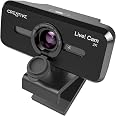
🎥 Elevate your video presence with crystal clarity and smart privacy — because your image deserves the spotlight!
The Creative Live! Cam Sync V3 is a versatile 2K QHD USB webcam delivering 2560x1440 resolution at 30fps, compatible with PC and Mac without extra drivers. It features 4X digital zoom with multiple zoom modes, dual omni-directional microphones enhanced by SmartComms NoiseClean technology, and a privacy lens cover for security. Its 360° rotation and 30° tilt, along with a universal mounting clip and 1.8m cable, provide flexible, professional-grade video conferencing and streaming capabilities.


| Standing screen display size | 2.7 Inches |
| Max Screen Resolution | QHD (1440p) |
| Number of USB 2.0 Ports | 1 |
| Brand | Creative |
| Series | V3 1440p Webcam |
| Item model number | VF0900 |
| Operating System | Windows 10, Windows 11, macOS 10.14 |
| Item Weight | 3.35 ounces |
| Product Dimensions | 2.28 x 2.05 x 2.28 inches |
| Item Dimensions LxWxH | 2.28 x 2.05 x 2.28 inches |
| Color | 2K QHD with SmartComms Kit |
| Rear Webcam Resolution | 5 MP |
| Manufacturer | Creative Labs |
| ASIN | B0B5CKBMJ8 |
| Date First Available | June 29, 2022 |
C**S
I have the clearest video of anyone at work
Crystal clear video even in dim lighting. I use an external mic for audio, but the mic on this works really well too. I got it for meetings and streaming.Easy to mount on my monitor with the clip/folding leg apparatus on all webcams or by screwing the base onto a tripod mount.Definitely would recommend. The touch to zoom feature it SO nice too. Just tap on the top of the camera housing to cycle through the different magnification settings (I think its actually just changing your Field of View, at least for the first two, so you don't lose video quality).You also don't have to search for software to download to get it up and running. I seem to remember it being plug and play with an option to download software that helps you adjust video setting, brightness, etc. if you're into that.
V**O
I loves image quality
This camera is amazing. I love the image quality. Perfect for meetings.
M**G
ok for the price, has electrnic zoom
from all the countless cameras out there this is probably one of the more usable ones. More usable because it has a zoom and the picture quality is good. Nothing excellent or anywhere near the camera quality of your cell phone but clean enough for most uses like zoom meetings. Most webcams look awefull because they have microscopic sensor paired with bad lenses. This results is grainy, distorted and blurry picture quality. This webcam is not much better but probably better that the camera already in your laptop and you can change the zoom angle which is a big practical advantage over a fixed wide angle. The more you zoom in the more you lose in resolution because its not a lens (optical) zoom but an image crop. Better than nothing.
D**N
The zoom button is exactly what I wanted.
The zoom button on top is exactly what I was looking for. Works great and clear!
W**K
Excellent Mid-Priced Webcam
Was looking for the best bang for my buck, middle of the road cost, preferably from US company, webcam for my wife's office PC. I had previously purchased a Creative "Live Cam V1" for the home PC when webcams were in short supply. Although the cost of both were similar, this webcam "Live! Cam Sync V3" is a far superior to the earlier one. Upgrades (and why I like this one) include much better light control (much less affected by backlighting), a hinged lens cover (older one was a rubber one with a tether), a touch button on the top of the webcam that toggles through 4 zoom levels. This allows it to go from fairly wide angle (think multi-person view) to basically a tight head shot. It was plug and play in Windows 10 as we didn't want the "extra" software features. Its primary use is for Zoom meetings. Very happy with the purchase. If you want really high quality/resolution you will want to ante up for a higher quality webcam, but for most home and work from home use cases, this is ideal, and highly recommended.
S**N
Great product.
Great product.
T**D
Do NOT but this Cam Sync HD 720P HD VF0770 Webcam, if you are using with Widows 10
I found (from a Search on Google) this is EOS (End Of Service) by Creative!It only works on Windows XP? It certainly never worked on my Windows 10 (64 bit) OS.Update Drivers - Live! Cam Sync HD VF0770Windows encountered a problem installing the drivers for your deviceWindows found drivers for your device but encountered an error while attempting to install them.Live! Cam Sync HD VF0770Reinstall the drivers for this device. (Code 18)If you know the manufacturer of your device, you can visit their website and check the support section for drivers.Setup Live! Cam Sync HO VT0770 DriverAn error encountered during uninstallation.Do you still want to proceed to install?Yes NoUpdate Drivers - Live! Cam Sync HD VF0770Windows encountered a problem installing the drivers for your deviceWindows found drivers for your device but encountered an error while attempting to installthem.Live! Cam Sync HD VF0770Reinstall the drivers for this device, (Code 18)If you know the manufacturer of your device, you can visit their website and check the supportsection for drivers,
T**N
It works, but not great in my book.
I bought this to replace my laptop's 720p stock camera. It has some nice auto-exposure settings that almost negate the need for external lighting, but it has some big drawbacks for me as well. It does do 4K, but all my capture software is limited to 1080P, so it doesn't have much functionality there. It's USB 2.0, so if it needs additional bandwidth, it won't be there. A 4K stream plus audio might be pushing the limits (or exceeding) USB 2 bandwidth. And the frame rate: It says it's 30FPS, but in reality, it blurs every other frame, so it seems like 10 to 15FPS. It has a wide-angle lens, and the manual focus is a nice plus. No more frame "blur, focus, blur, focus" throughout the recording. However, there is no digital zoom or auto-framing on the hardware, but you can get this functionality with some software.This would be fine for video chat, but if you're using it for video production, find something MUCH better. Audio-wise, I've found it to be much better than the built-in mics on my laptop but not as good as my DAC's phantom-powered XLR studio mics. Again, an upgrade for the laptop hardware but not a replacement for pro-quality gear.All in all, you get an fair camera for the price!The reason I docked 2 stars was the poor frame lag (blur) and the bad software (don't install it; it won't give any additional functionality!).
Trustpilot
1 day ago
1 month ago