Desert Online General Trading LLC
Dubai, United Arab Emirates
Desert Online General Trading LLC
Dubai, United Arab Emirates


🔗 Plug in. Power up. Play in 4K brilliance.
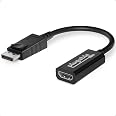
The Plugable Mini DisplayPort/Thunderbolt 2 to HDMI 2.0 Adapter effortlessly converts Mini DisplayPort output from older Macs and Surface PCs to HDMI, supporting stunning 4K UHD resolution at 60Hz. This driverless, VESA-certified adapter ensures seamless, high-quality video connectivity with a compact, lightweight design—perfect for professionals demanding crisp visuals without the hassle.


| Package Dimensions L x W x H | 14.9 x 10.1 x 1.3 centimetres |
| Package Weight | 0.02 Kilograms |
| Product Dimensions L x W x H | 15 x 10.5 x 1 centimetres |
| Item Weight | 9 g |
| Brand | Plugable |
| Colour | Black |
| Included components | Video adapter - DisplayPort / HDMI |
| Model year | 2016 |
| Part number | MDP-HDMI |
| Guaranteed software updates until | unknown |
D**D
Great product from Pluggable as usual - Works great for Windows 10 Mixed Reality
Great product from Pluggable as usual, I bought this as it's on the list of recommended Active Mini DisplayPort adapters for Windows 10 Mixed Reality - The one I was using previously was a passive adapter. This works the same as the v2 Microsoft Surface HDMI adapter but costs half of what it is on Amazon, and 1/3 of the cost elsewhere.Highly recommend this if you are looking for an affordable adapter to use with Windows 10 Mixed Reality on your Surface or other Mini DisplayPort device. I used this with a HP Mixed Reality HMD and a 2017 i5 Surface Pro. Works great for all the usual scenarios too such as connecting to a monitor, TV etc.I still also carry my multi adapter (the passive one I mentioned) in case I need to display to DVI or VGA (it also does HDMI, but as it's not an active adapter doesn't work with MR or the Surface Dock)
C**C
Allows full WQHD (2560x1440 @ 60 or 75Hz) resolution with Mid 2012 Macbook Pro
Bought this adapter after trying unsuccessfully with several others claiming to be able to carry up to 4k resolution over HDMI, but every time was only getting at most 2048x1152 from my Mid 2012 Macbook Pro to my new Dell S2719DM monitor.Based on some of the internet comments I was reading, other than confirming that the Macbook is indeed capable of pushing out WQHD video from its Thunderbolt port, I was beginning to think I would never get it with this particular monitor which only has HDMI inputs - all previous reviews were stating that a Mini DP to Display Port lead was the only way to get the full WQHD resolution.False - this adapter works a treat with the HDMI cable that comes in the box with the Dell monitor. I can happily report that I'm running 2560x1440 resolution at 60Hz (with an option to put that up to 75Hz) using this adapter - crystal clear and working fine. I'm not an expert when it comes to this stuff, but I believe based I what I have read that this setup is working where others have failed because this is an 'active' adapter - the description of the product itself on Amazon gives some good info on what this means.Thank you Plugable! You have just given my 7 year old laptop a new lease of life! A little bit pricier than other cables and adapters out there, but you pays your money you takes your chances, and in this case well worth it in my opinion.
A**Y
Plug and play
I'm successfully using this with a Sony KD43XF7073SU 4k TV with Windows 10 and an old AMD 7970. I had a bit of a scare at first because the PC booted up in 3840x2160 30Hz with 4:2:0 chroma and it truly looked like something the dog dragged in with grainy text, ghosting and slow mouse response times.The solution was to right click on the desktop -> Display Settings -> Advanced Display Settings -> Display adapter properties for Display 1 -> Monitor -> Screen refresh rate -> 60Hz. I also had to use the TV remote to turn off all the picture processing options, bring down the sharpness to a better level and set up the brightness/contrast/black levels. I also had to adjust Windows ClearType settings to look right for this monitor (Start -> ClearType).Now I've got 3840x2160, 60Hz, YCbCr444 and it's looking really nice with a cool, crisp display. Let's hope the adapter has good longevity because I don't really want to be swapping the old 7970 for a while yet.
A**O
Connect your mid-2011 Mac Mini to an Ultrawide monitor.
I recently bought an ultrawide (3840x1200) monitor and it works great with Windows and Chromebook but my old Mac Mini is limited to 1920x1080 on HDMI.This adapter allows me to drive the monitor to the full 3840x1200 resolution via HDMI, the only problem I've had is during boot, where the Mac seems to be operating with different monitor timings.This results in either a corrupt screen or a vague fuzzy screen which is just about sufficient to log on. The latter is present after resetting PRAM, but a reboot usually results in a severely corrupt out of sync screen. I've not yet found a resolution for this, but it seems to be a Mac issue, not an issue with the adapter.For the moment, the solution is just to sleep the Mac, rather than shut down.Edit: update- turning off disk encryption (Apple Filevault) helped with this. Initial screen is still corrupt, but login screen is now at correct resolution.
F**N
Works @ 2160p/60Hz but not cheap
As a lot of modern laptops/NUCs don't seem to have HDMI2 support for 4K (2160p/60Hz+) I have been looking for an active adapter to use the mini-DP/thunderbolt output in order to use 4K/60Hz.I can report this does work on Skylake NUC and laptop (gen6) to both a 4k TV (Samsung) and 4k monitor (LG) with 2160p/60Hz support. The HDMI output on both was only able to do 2160p/30Hz so this is a big improvement. Some older mini-DP to HDMI adapters I had did not work higher than 1080p. Converter mini-DP to HDMI cables did not work either at 4k so an active adapter was needed.It uses a Parade PS176 chip with firmware x26 - this is newer than what Intel provides for their NUC6i7KYK (firmware x20 update) so look online for specs. It's supposed to do up to 4096 x 2160 at 60Hz, and up to 4:4:4 colour sampling and naturally HDMI 2.0a. Though it seems you cannot have 2160p/60Hz + 4:4:4 at the same time. Unclear if a future firmware could bring HDMI 2.1 capability - you may need to risk a firmware obtained elsewhere e.g. as above for Intel NUCs.But it does not come cheap, 20 quid for adapter + HDMI2 compliant cable does add up, but I guess this is the price of using new tech.Note that KabyLake NUCs seem to rely on the same tech so don't expect miracles there but at least you don't need to buy this.Note that I have experienced audio drop-outs similar to reported on Intel NUC6i7KYK forum - which Intel has been unable to fix (or even understand what the problem is) - so perhaps it is down to Intel and not Parade so will give adapter the benefit of the doubt. What it does show is try not to use/rely on adapters and always use the native port unless you want to debug strange edge issues...
Trustpilot
3 weeks ago
1 month ago
2 weeks ago
2 months ago