🎯 Elevate your creative game with precision, power, and seamless workflow.
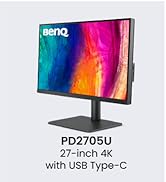
The BenQ PD3205U is a 32-inch 4K UHD IPS monitor tailored for designers and MacBook users, featuring factory-calibrated AQCOLOR technology with 99% sRGB and Rec.709 coverage, Delta E ≤ 3 accuracy, and uniformity for consistent color. It offers versatile connectivity including 90W USB-C power delivery, HDMI, DisplayPort, and a KVM switch for controlling two PCs with one keyboard and mouse. Eye-care technologies ensure comfort during extended use, making it a top-tier choice for professionals seeking vibrant, true-to-life visuals and streamlined productivity.









| ASIN | B09QLH5JZ8 |
| Are Batteries Included | No |
| Best Sellers Rank | 5,616 in Computers & Accessories ( See Top 100 in Computers & Accessories ) 121 in Monitors |
| Brand | BenQ |
| Colour | Black |
| Computer Memory Type | DIMM |
| Customer Reviews | 4.4 4.4 out of 5 stars (2,318) |
| Date First Available | 15 Mar. 2022 |
| Graphics Card Interface | Integrated |
| Guaranteed software updates until | unknown |
| Item Weight | 7 kg |
| Item model number | PD3205U |
| Manufacturer | BenQ |
| Number of HDMI Ports | 1 |
| Number of Lithium Metal Cells | 1 |
| Number of USB 2.0 Ports | 2 |
| Number of USB 3.0 Ports | 2 |
| Processor Count | 4 |
| Product Dimensions | 21 x 55 x 98 cm; 7 kg |
| Resolution | 3840 x 2160 Pixels |
| Screen Resolution | 3840x2160 |
| Series | PD3205U |
| Speaker Description | 2.5Wx2 |
| Standing screen display size | 31.5 Inches |
| Voltage | 240 Volts |
S**S
Amazing 4k resolution and worked well with Macbook Pro (both Intel 2019 and M1 2020)!
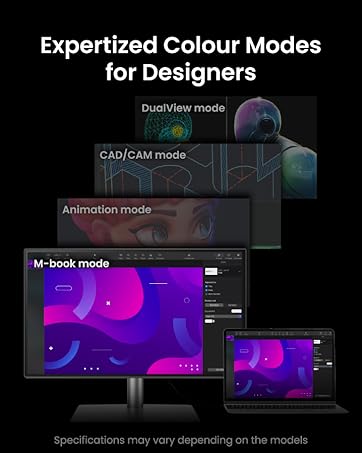
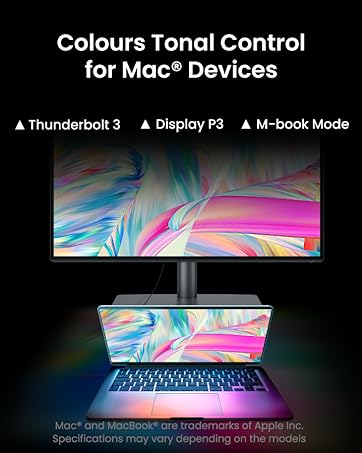
I bought it during Black Friday sale and the price was really good. I'm very satisfied with this monitor - my first 4k monitor! The quality is brilliant and it has Macbook mode, which is perfect for my Macbook laptops - to maximise the best colour performance. It came with HDMI, USB-C and Displayport cables. I only used USB-C and HDMI mainly. Noting that I have the second monitor in my set-up, I can conveniently use either HDMI or USB-C, i.e. the HDMI cable is connected to the dock station for two extended displays but sometimes, I want to use a single monitor that can be done via USB-C whilst not using the dock. The BenQ monitor has button to quickly switch between HDMI and USB-C input - quite convenient for my use. Plus, USB-C can charge my laptops well at good charging speed. The monitor has three ports on the side (USB-C, USB-A [both downstream] and headphone jack) - so convenient to reach to for charging a couple of my devices. There are more USB-A ports at the back of monitor, which I don't use but useful if I need more ports to connect with. Also, it has dual view meaning I can connect bot of my Macbook laptops (Intel 2019 and M1 2020) via USB-C and HDMI simultaneously as well as setting monitor to dual view mode. I can confirm that it worked well but it is not useful for my case - mayble, this is a good option for someoneone who wants this mode in a single monitor. Overall, I'm loving this monitor so far! I would recommend this for Macbook users due to being Mac-compatible.
S**M
Fantastic display for photigraphers
My 8 year old 27" iMac could no longer handle my 50mp RAW files on Lightroom and as Apple discontinued the 27" iMac I was forced to buy a Mac Mini Pro which doesn't come with a display. I looked at Apple Studio display which cost £1500 but it was out of stock everywhere so I bought this as I know a lot of photographers use this monitor. It was so easy to set up as it comes with all the leads (thunderbolt 3) you need to connect to the current Mac minis and Macbook pros. The stand was easy to assemble and is made of sturdy aluminium. The little puck which comes with the monitor is really useful and makes it so easy to change any of the display settings, trust me there are tonnes of settings you can adjust to suit your needs. A lot of people go on about scaling issues as this is a 4k monitor and current Apple Macs are set up for 5k. Trust me, this is not an issue. You can go into the display settings on your Mac and adjust the resolution to suit your eyes. Depending on your eyesight, you might find 4k is too small to read text and prefer a ratio closer to 3k (like I have), but either way you will see much more display, especially useful when editing photos when you can view the whole picture on screen without needing to scroll. You can even switch the display to the same resolution as your old non retina 27" iMac, but once you try 3k or 4k you won't go back. I was also concerned that this has a matte (non gloss like iMacs) finish, but when the monitor is on I don't even notice it's not glossy. The colours are vivid and bright, contrasts have rich tones and the display is sharp and virtually identical to Apple's colour profile, you won't need to calibrate but you can tailor the display to suit you own needs or choose from many preset settings. The only downside are the built in speakers, they sound a bit tinny (no bass) but that didn't bother me as I only use my Mac for surfing the net and editing pictures. If you need HQ surround sound then you could buy a set of external speakers or spend nearly another £700 for the Mac Studio. I reckon if you bought the 32" version of this monitor it might make using the full 4k easier as the display will be larger than on 27", but I didn't want such a big screen plus the 32" is claimed to be less sharp. When you view your old pictures which filled the whole screen on your old iMac, they won't fill the whole screen on this monitor and will appear much smaller. That's because the old non retina 27" iMac was around 2k and this screen is 4k, so this has double the resolution ie a picture that was 2000 pixels wide on a 2k screen will appear half that width on this screen as the pixels are half the size on this screen - so you fit more on screen and it looks fantastic. I'm glad I bought this screen as it's the best display I have ever used and really makes editing photographs much easier and more enjoyable. It really stands out way above my old non retina 2k iMac display which I always thought looked amazing until I bough the Benq.
C**N
Great monitor …but with one drawback
This is great monitor and works really well with my MacBook Air. As a graphic designer colour accuracy was really important to me and on this you can always trust BenQ to deliver. Coming from a 27 inch monitor to this 32 inch makes a significant difference if you work with multiple applications at the same time and need a bit of extra screen real estate. Yes, it’s not retina level in terms of pixels per inch so won’t be as razor sharp as Apple’s displays but it’s still a very clear, crisp image and - crucially, colour accurate. The adjustable stand is also very sturdy and enables you to rotate the screen into portrait mode which is great for web design and/or coding. The only, quite frustrating, issue I have with this monitor is its brightness - or lack of. This monitor really isn’t very bright at all in its standard mode at just 250 nits - a far cry from the 500-600 nits you’d typically find in Apple displays. I didn’t think it would be a problem but I constantly find myself trying to turn the brightness up when it’s at maximum. I can live with it (for now) but if you work in a reasonably bright room you might struggle with this monitor. Other than that, it’s a great monitor.
L**R
excelente, fidelidade de cores e um bom custo beneficio
C**H
Screen is very good with 4K ,HDR , KVM switch . But after few days I got a line popping up on my screen . Tried every bit available on google to fix it but couldn’t fix it . So returned back .
D**N
Très bon produit, fonctionne à merveille sur mon mini Mac M4 et mon portable Windows
C**G
One of the best (albeit very expensive) screens for productivity and office tasks. The 5k creates so much more of the content visible all on a 27 inch screen and the colours and contrast makes everything so vibrant. Tried larger screens but couldn’t get used to them, gave this one a shot and wow. The port selection is ideal. Refresh rate is low but it doesn’t matter for my use case. All in all i am satisfied with this purchase.
H**O
Estou usando para edição de fotos e vídeos. Tenho obtido resultados muito fiéis para publicações em redes sociais e impressões. Também é muito confortável utilizar o monitor para edição e a tela muito nítida.
Trustpilot
1 day ago
1 week ago