
DOWNLOAD THE APP


Customer Services
Copyright © 2025 Desertcart Holdings Limited
DOWNLOAD THE APP


💼 Elevate your data game with Syba’s powerhouse RAID enclosure—because your workflow deserves the best.
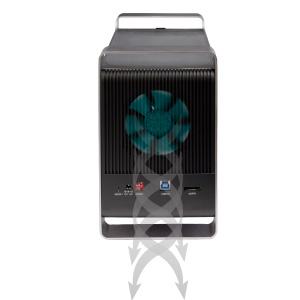
The Syba SY-ENC50122 is a 5-bay external RAID enclosure supporting both 2.5" and 3.5" SATA drives up to 80TB total. It offers multiple RAID configurations (0,1,3,5,10, JBOD, SPAN) and connects via USB 3.0 (5 Gb/s) or eSATA. Its tool-less tray design and aluminum build ensure easy drive swaps and optimal cooling, making it ideal for professionals needing high-capacity, reliable storage.


| ASIN | B08NSJM8CK |
| Are Batteries Included | No |
| Compatible devices | Personal Computer |
| Connectivity technology | USB |
| Customer Reviews | 3.9 3.9 out of 5 stars (44) |
| Data transfer rate | 5 Gigabits Per Second |
| Date First Available | 17 Nov. 2020 |
| Guaranteed software updates until | unknown |
| Hard disk form factor | 3.5 Inches |
| Item Weight | 3.63 kg |
| Item model number | SY-ENC50122 |
| Item weight | 8 Pounds |
| Manufacturer | Syba |
| Material | Aluminium |
| Max number of supported devices | 5 |
| Memory storage capacity | 16 TB |
| Product Dimensions | 23.5 x 12.7 x 22.61 cm; 3.63 kg |
| UPC | 857426008680 |
| Wattage | 96 watts |
C**P
It looks great, but doesn't work with MacBook. I downloaded the software as instructed and it just doesn't load or do anything. I found a window that than latter suggested contacting the manufacturer as the software isn't compatible.
S**.
I received the item today with different packing (not proper) Have some scratches on item as well It look like its used item
A**R
Works well with my existed configuration
S**R
Does exactly what I needed it to. Got 5 10TB drives running in RAID5 mode. Works seamlessly on both Windows and Linux so far (I’m using NTFS as my file system). Great for archival storage. Though the software seems spotty. That said, it seems you don’t actually need the software as far as I can tell.
B**N
For kinda better instructions follow below. DO NOT HAVE HARDWARE RAID AND SOFTWARE RAID AT THE SAME TIME. RESET THE DEVICE IF YOU MAKE A MISTAKE. Requirements: Windows Disk Management - Open SYBA Raid Manager - Open (Running as Admin - sometimes the drives wont show up when starting normally) Configuration instructions: 1. Ensure device is powered off. 2. Set DIP switches to RAID 5 (1 - Up | 2 - Down | 3 - Up) 3. Hold reset button in the back and push the power button. 4. Continue holding reset button for 15-20 seconds until one of the following happens in Disk Management. -4a. If Disk Management shows 5 different disks it did not work - start over. -4b. If Disk Management shows 1 large disk it worked - continue to step 5. 5. Look at SYBA Raid Manager - Basic RAID Configuration menu (Basic Mode - 3rd Menu) 6. You should see the Raid Name as 5BAY H/W RAID 5 7. Go into Disk Management and right click on the new disk to initialize disk 8. You can now create volumes on you new RAID 5 drive. If these instructions are wrong or inaccurate please post your findings to help the community.
Trustpilot
1 day ago
1 month ago