Desert Online General Trading LLC
Dubai, United Arab Emirates
Desert Online General Trading LLC
Dubai, United Arab Emirates


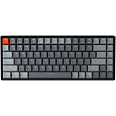
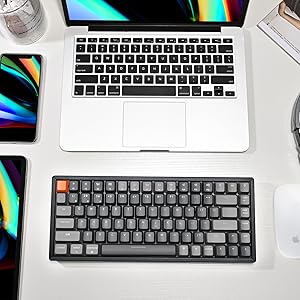
⌨️ Elevate your desk game with the Keychron K2 V2 — where style meets unstoppable performance!
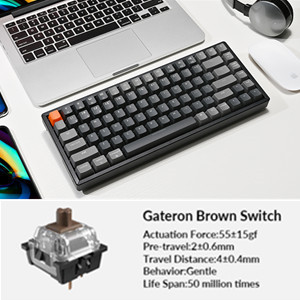
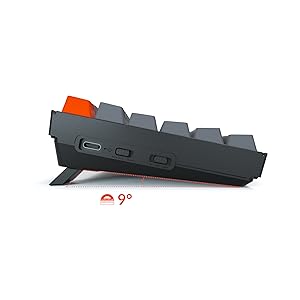
The Keychron K2 Version 2 is a compact 75% wireless mechanical keyboard featuring 84 keys with RGB backlighting and an aluminum frame. It supports Bluetooth 5.1 multi-device connectivity for up to 3 devices and wired USB-C mode. Equipped with durable Gateron Brown switches rated for 50 million keystrokes, it offers tactile responsiveness ideal for both work and light gaming. The keyboard includes Mac-specific function keys and extra keycaps for Windows compatibility. Powered by a large 4000mAh battery, it delivers up to 72 hours of continuous typing or 7 days of typical use, making it a versatile and stylish choice for professionals seeking productivity and flair.





| Brand | Keychron |
| Product Dimensions | 64.01 x 64.01 x 19.3 cm; 1 kg |
| Batteries | 1 Lithium Polymer batteries required. |
| Item model number | K2C3 |
| Manufacturer | DOSNTO |
| Colour | Gateron Brown Switch |
| Power Source | Battery Powered |
| Operating System | Mac,Windows |
| Are Batteries Included | No |
| Lithium Battery Energy Content | 3.8 Watt Hours |
| Lithium Battery Packaging | Batteries contained in equipment |
| Number Of Lithium Ion Cells | 1 |
| Item Weight | 1 kg |
| Guaranteed software updates until | unknown |
A**L
Not the best
Typing experience bang average and the RGB lights failed really quickly. I returned it after a few days.
H**Z
Excelente, feliz con mi teclado
Todo salió súper, el producto llegó súper rápido desde EE.UU a Bogotá, feliz con mi compra
R**Y
NOT a new product
The product arrived in a box that was not sealed with clear signs on the keys of prior usage. I bought and paid for a new product and received a SECOND HAND one! This is unacceptable trash!
P**É
Solid Mac-first keyboard, with only a few caveats...
Since I needed new peripherals to go along with my new M1 Mac mini last November, after years of typing on flat MacBooks, I decided to finally treat myself to my first mechanical keyboard since the original IBM PC was offered with one. After a long online dive, when I surfaced I had decided on the 75% Keychron Wireless Backlit RGB with Brown switches and Aluminum Frame.For me, these Browns by Gateron are an acceptable compromise between mechanical feel and reasonable noise, just as long as you are okay with the lack any actual mechanical "break" when actuating. I prefer not waking up the house late at night! That being said, I do sometimes still miss a clearly felt mechanical actuation feel, but this works for me, and is still legions ahead of any membrane keyboard, or Apple's own. IThe keyboard is rather tall, but not exceptionally so. I use it with the rear feet extended for a more sloped typing angle, which helps. I ordered the matching Keychron Wooden Palm Rest in anticipation of this and it makes a big difference when I do serious typing. I also prefer the feel of the finished wood on my palms over spongy fabric covered palmrests, or the bare glass top of my desk. When just casually surfing the web or doing other non-typing-intensive tasks, I put away the palmrest since it just tends to get in the way if I have to move the keyboard around and have desk clutter.Bluetooth is rock-solid, with never a glitch or delay, ever. In fact the connection is far more reliable than with Apple's Magic Trackpad 2 that I bought at the same time. If I recall, I think I had to use a wired connection just once, to be able to boot up my brand new M1 Mac mini. This is a condition specific to only the M1 versions when using a non-Apple keyboard on a new machine.The RGB color options and patterns, though entertaining as heck at first, end up becoming more of a distraction after a while. I ended up using one preferred color pretty much all the time. Keyboard circus lights can be distracting!A note on the colors, specifically blue. Normally a color I might choose, this blue is not very bright, even when turned all the way up in the dark. I always end up using the brightest setting for all the colors, all the time, to get to a decent brightness level. Except for blue. I find it far too subtle. in my photos I use cyan/teal, which I like very much.Battery life with the RGB lighting activated is an issue, but it's addressed in the descriptions when you buy it. Expect to get a full day's use out of it, then plug it in overnight so you're ready to go in the morning. With the illumination turned off, it's much longer, maybe a few days.After nearly a year of use, I can say I am still satisfied with my purchase. I wish the lighting was a tad brighter, and the rubber on one of the folding feet has disappeared (a much bigger problem on the Keychron Palm Rest on which ALL of the pads slid right off it's base - a BIG problem since it'll wobble without!), but not enough suffer any buyers remorse. The keycaps still look good with crisp lettering, and they haven't acquired significant shine from use yet. Battery life is as purchased. it still looks and types great. Whether or not you consider it's reasonable cost vs. comparably featured keyboards from some others, it's a worthy purchase.Except for that one rubber foot-pad... When one falls off, you know more will eventually follow. Especially when you consider how awful they were on my Palmrest. I tried everything to get them to stick - unacceptable that they all fell off within a few weeks of purchase.Keychron, you make some good gear that I'm comfortable recommending to others. I want mine made right again; how does one get replacement feet, please?
D**B
Geile Tastatur mit fatalem Problem
Ich bin schon lange ein Fan mechanischer Tastaturen und lege als Vielschreiber einen hohen Wert auf meine Eingabegeräte. Die Verarbeitung der Tastatur entspricht dem Preis und das Tippgefühl mit den roten Switches war richtig richtig gut und vor allem schnell. Da ich die Tastatur mit ins Büro nehmen wollte habe ich die roten Switches gewählt aber die wären wahrscheinlich immer noch zu laut gewesen im (zumindest) Großraumbüro.Ich bin kein Fan von großen Lichteffekten, am liebsten ist mir eine gut dimmbare weiße Beleuchtung ohne viel Schnickschnak. Gut dimmbar ist diese Tastatur nicht hat aber dafür viel Schnickschnackeffekte. 2 Modi finde ich richtig gut. Alles an und die getippten Buchstaben gehen aus oder umgekehrt.Gerne hätte ich die Tastatur behalten aber leider a) bekam ich ein US-Layout statt des deutschen ISO und b) hatte ich mit Bluetooth unter macOS ständig einen Fehler bei dem die Funktionstasten wie Command, Leertaste, option etc total verrückte Sachen machten was nur durch ein an und ausschalten behoben werden konnte. Auch ein Firmware-Update half nicht.Ich warte aktuell auf die deutsche ISO-Version und hoffe das diese den Fehler nicht hat. Solange teste ich die K3 slim V2 in deutschem ISO Layout auf der ich grade diese Rezession schreibe
B**O
One of the best wireless mech keyboards
I got mine just a few weeks back, and I would say that this is far the best wireless mechanical keyboard if you are using both windows and macOS, pairing is easy, the only thing I wish they have included is a way to tell you how much battery is left in your keyboard as the inly indicator shows are just estimate (green is 100 to 75, blue is 75 to 35, and red is below 35% charge). Anyway great keyboard and I love it
Trustpilot
2 weeks ago
1 month ago
4 days ago
3 weeks ago