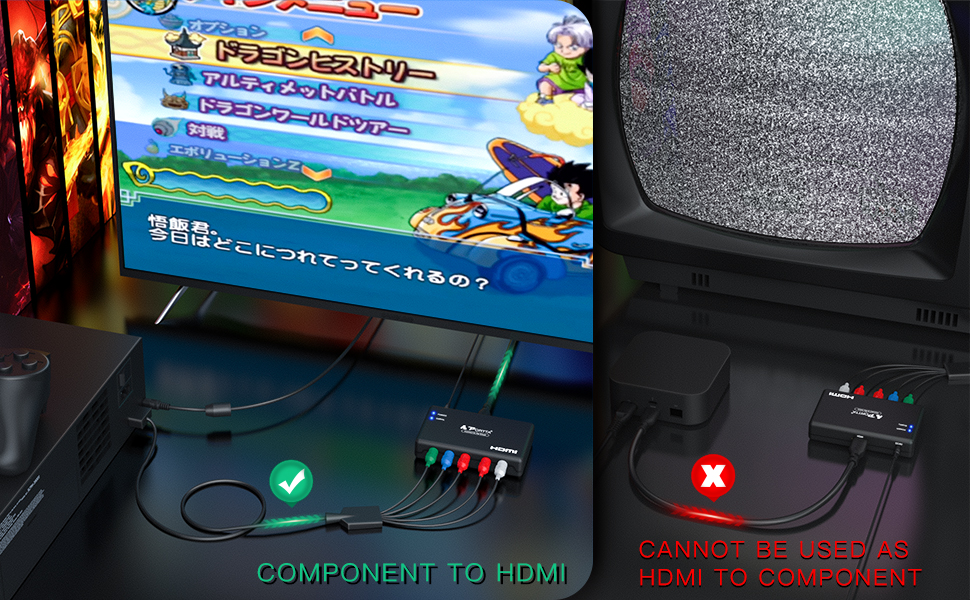
🔗 Bridge the past and future—convert your classics to HD glory!
The Portta Component to HDMI Converter transforms analog YPbPr video and stereo audio signals into crisp HDMI output supporting up to 1080p 60Hz resolution. Compatible with legacy devices like PS2, Wii, and Xbox, it delivers uncompressed 2-channel LPCM audio and requires no complex setup. With HDMI 1.3 compliance, a compact design, and a 5-year warranty, it’s the perfect solution to seamlessly connect your vintage gear to modern HDTVs and projectors.


| ASIN | B003VJ9RP6 |
| Best Sellers Rank | #140 in HDMI Cables |
| Brand | Portta |
| Built-In Media | main unit |
| Color | Black |
| Compatible Devices | Television |
| Connector Type | Component |
| Current Rating | 1.5 Amps |
| Customer Reviews | 4.1 out of 5 stars 4,995 Reviews |
| External Testing Certification | - FCC,CE |
| Finish | Hdmi,Projector |
| Global Trade Identification Number | 00846561005296 |
| Input Voltage | 5 Volts |
| Item Dimensions | 3.78 x 2.36 x 0.79 inches |
| Item Height | 2 centimeters |
| Item Weight | 0.18 Pounds |
| Manufacturer | Portta Electronics & Technology Limited |
| Model Number | PETRH |
| Number of Items | 1 |
| Number of Ports | 5 |
| Package Quantity | 1 |
| Specific Uses For Product | Monitor,Projector |
| UPC | 846561005296 |
| Unit Count | 1.0 Count |
| Warranty Description | 5 Years |
| Warranty Type | Limited |
D**N
Works great with Wii!
My new TV only had HDMI ports for video input so I got this adapter to use my old Wii console. Super easy to plug in, and the USB port on the TV provides power as well for a clean installation. No lag and no drop in image quality, very happy with this adapter.
A**R
Seamless Component to HDMI Conversion!
The Portta Component to HDMI Converter is an absolute game-changer for anyone needing to connect legacy devices to modern displays. This converter offers seamless conversion and delivers exceptional performance, earning my full five-star rating. The conversion process with this device is flawless. It effortlessly transforms component video signals into high-quality HDMI output, allowing me to connect my older devices to newer TVs and monitors without any compatibility issues. The picture quality is impressive, with vibrant colors and sharp details. Setting up the Portta Component to HDMI Converter is a breeze. It's a plug-and-play solution that requires no complex configurations or additional software. Simply connect the component cables, power up the converter, and enjoy the converted signal on your HDMI display. It's hassle-free and user-friendly. The build quality of this converter is excellent. It feels sturdy and well-made, ensuring durability for long-term use. The compact design makes it easy to place and integrate into any setup, whether it's a home theater system or a professional AV environment. One of the standout features of this converter is its support for audio. It not only converts video signals but also includes an audio output, allowing me to enjoy both video and audio in sync. This eliminates the need for separate audio connections and enhances the overall viewing experience. The Portta Component to HDMI Converter offers great value for the price. It provides a cost-effective solution for connecting older devices to modern displays without the need for expensive equipment upgrades. It's a worthwhile investment that extends the lifespan of my legacy devices. In summary, the Portta Component to HDMI Converter is a reliable and high-performance solution. Its seamless conversion, easy setup, and audio support make it an excellent choice for anyone seeking to connect component video devices to HDMI displays. This five-star rating is well-deserved for its outstanding performance and value.
V**D
Functional Little Device
As at least one other reviewer has mentioned, the thing is tiny. It can easily fit in the palm of your hand. If you aren't able to tell from the photos, the device is powered off a wall plug that ends in a mini-USB adapter; this means any generic mini-USB cord should work with it. It takes so little power that a laptop USB port can handle it. It gets a little warm, but I wouldn't call it hot, if plugged in for a while. The temperature may simply be coming from the little blue power light inside it that is on when the device is on. I was able to successfully run my PS2 slim console (composite cables) through it and into my television. I'm not able to compare what it would look like with the TV doing the up-scaling, but the device does a pretty good job translating the signals to HDMI. My only complaint on the picture is that it's a little flickery in some places at certain times. Otherwise, the Playstation 2 looks just fine on the TV and the sound was fine as well. My screen flashed green briefly as it started up, but then colors normalized. The converter doesn't shut down if it isn't getting a signal from your game system or whatever. It will show a message of "no signal" on your TV, but it's different one than if the TV is not getting a signal from the converter. You may want to power the thing off a USB port on your TV (if you have one), a power strip that turns off when you turn off the TV, or simply a power strip with a switch you can flip when done using it. I have some potential concerns about longevity. It seems like you can change between 1080p and 720p while the device is plugged in and it'll reboot itself, but I had some glitches when I switched to 720p. In fact, the TV failed to get a signal at times with that setting, though flipping the switch and turning it and the TV on/off got it working again. It may be that the TV had problems simply because it's not its native resolution or it's possible there's some minor short that may cause problems at some point down the road. I had no problems at 1080p. I'll update my review if it dies quickly or anything, but having only used it for a brief amount of time it's performing just as promised and far better than I would have expected from a no name piece of Chinese gear. I'm quite happy with the device thus far. On my GameCube the upscale makes the image somewhat softer than that built in to our LG 42LM3400 42" 1080p 60Hz LED 3D HDTV composite inputs, though I actually like the TV upscale better. Just FYI, as of this review many LG models have combination composite/component inputs so you can use one or the other; for some reason even their website lists them as having only component inputs. If you go with LG look closely at reviews or try to get a picture of the back of the TV; you may not actually need to get one of these units. One last thing, if you're trying to decide on this thing and you look at other reviews, some of the low ratings are due to having the wrong unit shipped to people. I can fully understand irritation at that, but it's something of an unfair knock against the device itself. As of this review, at least one person had very recently received the wrong converter. If possible, I'd suggest a fulfilled by Amazon seller to be on the safe side if you need to return. Amazon is the best.
A**R
Works AWESOME with Wii
This works fantastic with the Nintendo Wii. I tried the Wii2HDMI adapter, but it was very blurry on my 50" TV and I was getting some weird scan lines. This adapter is much clearer at 480i. It comes with a 1A USB power adapter and USB cable, but I am also able to run it off of my TV's USB port fine. The unit itself is light and feels pretty sturdy.
S**Q
POS will not transmit / match signal with source.
I purchased this for my PS1. Everything works well with the MINI AV2HDMI I got from Amazon, but this unit is supposed to have a better picture and did not work at all. I double-checked every connection and only get “NO SIGNAL” on my monitor. Nothing I tried ever produced a picture from my PS1. Someone please advise an alternative product that has built-in smart upscaling or downscaling capabilities that is guaranteed to work with PS1, PS2, and onward. Going back to amazon. They should tell me to throw it in the trash.
R**B
Works for Wii
Works as described. Using for Nintendo Wii without any issue.
K**L
Cost-effective option for older devices, occasionally drops signal
I purchased this Component to HDMI converter to allow me to connect my Wii to my newer OLED TV that did not have component inputs. This converter is very easy to use: It is a plug-and-play device, which means that you simply connect the component cables to the input and the HDMI cable to the output, and it's ready to go. It does a good job of converting the signal, producing clear and sharp video with no noticeable loss of quality. Another positive feature of the Portta Component to HDMI Converter is its compact size. It is small and lightweight, making it easy to transport or hide away behind a TV. The price is also reasonable and affordable. Unfortunately, I get occasionally signal dropouts while playing games. I've tried swapping out inputs on my TV and cables, but nothing I've done has prevented the signal from dropping for a few seconds. This is very frustrating while playing platformers and racing games! Additionally, it does not have a built-in upscaler, so it will not improve the quality of the source material beyond what the source is already outputting. Overall, this converter is a decent option for anyone in need of converting analog component video signals to HDMI. While it is easy to use and produces good quality video, the signal dropouts make it hard to endorse.
M**H
Great for _some_ retro systems
I used this converter to hook up several old game systems, both directly and via two daisy chained RCA switchers. I will describe my results. The video switchers work great with it, no apparent difference with or without them. Sega Genesis - Very impressive. Some blurriness is to be expected. The Genesis seems to detect my setup and output in widescreen! There is no distortion - circles are circles. The picture fills the screen. Cool! Sega Dreamcast - No problems here. Video is as sharp as can be over RCA cables. Someday maybe I will get the VGA box, but that usually costs several times the price of the HDMI converter. Super Nintendo - Sadly, this was the worst of the batch. Stretched video, extra blurry, I even get distorted colors. Obviously not too much is to be expected from these 16-bit systems, and I should probably blame only the SNES. Sill, I would like the converter to have some better color handling. I would give it a 4.5 for this, if possible. Nintendo 64 - Not too shabby. I use the same video cable as the SNES. Some games utilize the expansion pak to output higher-res graphics and those usually have the option for widescreen. For instance, Turok 2. There is a list on Wikipedia (probably). The games that do not have this option are above SNES quality, and look alright from far away. There does exist a VGA box that is meant to work with Genesis, SNES, as well as N64, and possibly other systems. I do not know if it works well or at all, as it goes for even more than the DC VGA box. PSX - Holy crap I am glad the PS2 is backwards compatible and I have a composite cable for it. The PSX output is irredeemably stretched and the way those jaggies turn into blur makes it hard to look at. I might have to get out the PSX for an imported game, if I'm really desperate, but that is the only case I would not use the PS2 instead. A bit sad. Overall, an awesome converter for my purposes. 4.5 stars!
Trustpilot
3 weeks ago
2 months ago