🔗 Bridge the old and new—connect with confidence!
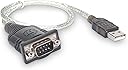
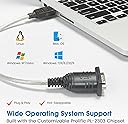
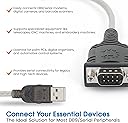
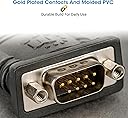
The MANHATTAN USB to Serial Converter effortlessly adds a 9-pin RS232 serial port to any USB-enabled Windows system, supporting transfer speeds up to 225 kbps. Featuring the trusted Prolific PL2303 chipset, it offers plug-and-play compatibility with a wide range of serial devices including modems, cameras, and barcode scanners. Its 18-inch cable length provides flexible connectivity, while a lifetime warranty ensures long-term reliability for professionals bridging legacy tech with modern workflows.


| ASIN | B0007OWNYA |
| Best Sellers Rank | #408 in Serial Adapters #1,333 in Computer Network Adapters |
| Brand | MANHATTAN |
| Built-In Media | switch/conversion connector/conversion connect/monitor arm & stand/USB cable/ |
| Color | Clear |
| Compatible Devices | Camera, GPS Navigation System, Modem, Scanner |
| Connector Type | Usb |
| Customer Reviews | 4.1 out of 5 stars 918 Reviews |
| EU Spare Part Availability Duration | 1 Years |
| External Testing Certification | Não aplicável |
| Finish | Gold |
| Global Trade Identification Number | 00766623205146 |
| Item Dimensions | 18 x 1.5 x 2 inches |
| Item Type Name | MANHATTAN USB - Serial Converter Pl - 2303Ra 45 Cm (205146) |
| Item Weight | 3.2 ounces |
| Item dimensions L x W x H | 18 x 1.5 x 2 inches |
| Manufacturer | Manhattan |
| Model Number | 205146 |
| Number of Items | 1 |
| Number of Ports | 1 |
| Package Quantity | 1 |
| Power Plug Type | No Plug |
| Specific Uses For Product | personal, gaming, business |
| UPC | 163120683468 766623205146 |
| Unit Count | 1.0 Count |
| Warranty Description | Limited lifetime |
| Warranty Type | Limited |
A**S
Good cable, works well in Linux
This cable works well in Linux and should work well in most any modern OS. The manufacturer provides drivers for Linux, Mac and Windows on the included mini CD and on their web site. In Linux at least, the driver is included in any kernel above 2.6.9, so no driver should need to be installed. You just plug the cable into a USB port and the system will detect it as a pl2303 device and attach it to /dev/ttyUSB0. Dmesg reports: [60253.000715] usb 4-1.3: new full-speed USB device number 4 using ehci_hcd [60253.086957] usb 4-1.3: New USB device found, idVendor=067b, idProduct=2303 [60253.086962] usb 4-1.3: New USB device strings: Mfr=1, Product=2, SerialNumber=0 [60253.086965] usb 4-1.3: Product: USB-Serial Controller D [60253.086967] usb 4-1.3: Manufacturer: Prolific Technology Inc. [60253.087312] pl2303 4-1.3:1.0: pl2303 converter detected [60253.089056] usb 4-1.3: pl2303 converter now attached to ttyUSB0 I used this to back up a 21-year old Casio SF-4300B digital diary on a computer without a serial port, using the XLink/Win program in Wine. When using this cable in Wine, you have to link the Linux device to the Windows serial port COM1, with the command "ln -s /dev/ttyUSB0 ~/.wine/dosdevices/com1" as regular user, as mentioned at [...]. Then, any Windows software that runs in Wine should be able to access your serial device. I don't currently know of any native Linux software than can back up these Casio diaries. The 13 inches of cable in this converter were practical with the Traveling Software serial cable I used it with.
A**Y
no drivers for windows10, working well on Linux, recommended.
on windows10 there are no drivers by default, so converter will not work. I did not try if drivers for windows7 will work (seems producer does not create driver version for windows 8 or 10) I've tried this converter with Linixmint (on currently available version 19.1 Tessa) and its working. For that I've used standard console program "minicom", which is not installed by default on this Linux To sum up: this USB to Serial Converter is okay to use.
R**S
Works great with Linux (Ubuntu 10.04 LTS) + Minicom
Bought this to connect newer boxes/laptops w/o a serial port to Cisco routers and switches via a standard console/rollover cable. This worked great right out of the box with support for Linux (Tested with Ubuntu 10.04 LTS). To get it quickly configured for minicom do the following: Plug in the adapter wait a few seconds Open a terminal window and type: dmesg | grep tty Note which tty the device has been assigned Then in terminal: sudo su Configure Minicom with: minicom -s (sudo required) Select to configure serial port setup Change the serial device to the tty to which the adapter was assigned. Set BPS/parity/bits to required (Cisco 96008N1 - no flow control) Exit and save as the default Hope this helped saved you some time if you are purchasing for the same reason, I will buy this again in the future if I need another. Too fast? reference: [...] PS: If you are having trouble getting minicom from the repository (via apt-get) make sure you have universe and multiverse enabled to download minicom, do this through the package manager settings then run apt-get update and you should be good to go, google if you are having more trouble.
W**W
OUTSTANDING PRICE AND PERFORMANCE!!!
Outstanding cable! Bought 4 and plugged them into my Dell Toweredge T110II running Ubuntu 12.04lts. The OS picked them all up immediately and I was able to configure my 3 routers and 2 switches through their respective console ports using ser2net and tera terminal with ease. For s@#$% and giggles, I also plugged it into my laptop running windows 7. Plug and play automatically installed the driver and it worked just as flawlessly. Besides its perfect performance, the cable is also way cheaper (and stylish) than anything else you'll find at Amazon, Best Buy and Microcenter. I wouldn't just recommend this cable to anyone studying for their CCNA, I'd insist that it was mandatory!
S**.
Best USB to Serial Adapter I've Found!
This is an excellent USB to Serial Adapter, I bought it after searching around for some time looking for one that worked with Windows Vista/7 64bit. I was a bit hesitant at the price difference, but it has definitely paid off. It worked flawlessly after a short driver install and reboot with my Win 7 x64 system and a multiple set of Cisco Switches I was using it to setup. Now it's just plug and play, and I couldn't be happier with it.
G**.
Does NOT work on OS X 10.9.5 (Mavericks)
Does NOT work on OS X 10.9.5 (Mavericks). I emailed the manufacturer requesting support. Reply #1 said, "Please know that this may take several tries before this device is recognized as a virtual connection before you are able to connect a serial device and use it. Attempt to repeat the installation steps after uninstalling and rebooting your system." Uninstall WHAT? my system? Their driver package did not contain an uninstall feature. So I was left with removing the ProlificUsbSerial.kext directory and files manually as my best guess at uninstalling. I would then reboot the system and install the package. Insert the USB plug, check the device list... nothing. OS X did see the device in the "System Information" app, but the driver would never load which means it never showed up in /dev/ which means I had no access to the device. I went through this process 8 times. I also attempted simply unplugging and replugging the device, checking after each cycle, 40 times. I emailed the manufacturer a second time informing them of what I was trying and asking for instructions on uninstall. This was the reply I received 3 days later: "The biggest issue with this serial converter is that it doesn't always communicate or perform specific tasks in the manner the end user is expecting; however, it is impossible for us to support every single use of this device when it being used for a certain application. This is even more challenging given the type of computer, its specs and the operating system being used. If you are requesting for us to properly support your issue, please provide us with screen shots and more, detailed information." Greg's Rule #1 for Tech Support: Do NOT blame the customer because your instructions were vague and unhelpful!!! I am not going to ask for clarification. I have already returned the item to Amazon. (No hassle, thank you Amazon!) I have ordered Keyspan by Tripp Lite USA-19HS High-Speed USB Serial Adapter, PC, MAC, supports Cisco Break Sequence A) it says it supports MAC right in the title B) Tripp Lite is a company I know By the way, I skipped the Tripp Lite product originally because the only one available for Amazon Prime was used. I read many of the reviews for the Manhattan and there was one from a Mac user saying it worked without issue.
L**Y
Cheap, dont buy this.
Cheap!!! And I mean very cheap. Knock off of a knock off type of cheap. Spend the few bucks more and get a cables to go version, it will work better and last longer. But it performed well while it worked....for a month.
M**E
Works for some serial devices
I bought this for our company, hoping to eliminate the need for a switch box for serial modems. I tried this product with both of our modems and it failed to communicate data between the device to the computer. I tried numerous different settings changes, but without success. I did some research about this device and it's driver and apparently with some devices, it doesn't send/receive data correctly. What I found is that you need a device that runs on the FTDI driver rather than the driver this device uses. Unfortunately, you cannot change this, so what I did is swapped this one out with another I had for syncing a police scanner. This worked well for that application, so in the end, there really isn't any loss. But I am docking 2 stars for not being completely compatible with all of our devices. A word of advice: If you need to use a USB to serial converter for modems, then go with another product listed with FTDI drivers. I did see a few here on amazon, but for other uses, this would be fine. Also one other minor complaint is that this device does not include any LED's to see if it is communicating. That is a minor loss, but not a big deal. I would probably not recommend this device, but instead, one with the FTDI driver.
Trustpilot
1 month ago
1 day ago