

🚀 Elevate your Raspberry Pi setup with a sleek 7-inch touchscreen powerhouse!
The Longruner 7-inch touchscreen offers a vibrant 1024x600 HD display with versatile image flip and format options. Compatible with multiple operating systems including Raspbian and Windows, it features a responsive five-point touch interface. Housed in a protective black acrylic case that doubles as a stand, this screen is designed for seamless integration with Raspberry Pi models, making it ideal for developers, makers, and tech enthusiasts seeking a compact, multifunctional display solution.




| ASIN | B07S74MP36 |
| Best Sellers Rank | #13,839 in Single Board Computers (Computers & Accessories) #16,605 in Computer Monitors |
| Brand | Longruner |
| Color | Black |
| Customer Reviews | 4.2 4.2 out of 5 stars (280) |
| Date First Available | May 23, 2019 |
| Item Dimensions LxWxH | 3.27 x 2.28 x 1.06 inches |
| Item Weight | 1.1 pounds |
| Item model number | LSC7BC-US |
| Manufacturer | Longruner |
| Max Screen Resolution | 1024 x 600 |
| Product Dimensions | 3.27 x 2.28 x 1.06 inches |
| Screen Resolution | 1024x600 |
| Series | Raspberry Pi Touch Screen |
| Standing screen display size | 7 Inches |
| Voltage | 5 Volts |
T**P
While not a fan of acrylic...
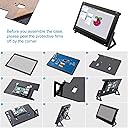
The major issues with this include:: A) acrylic case and legs are moderately fragile, and can break if mishandled. The screen itself has minor pieces exposed, however this is a MODERATELY visible issue. The quality, function, assembly, feel, weight, and overall satisfaction is still over 4.5 stars. multi-touch is flawless so far. responsive within 10 pixels (made a custom copper point wedge to test) and faster than visually noticable. The screen resolution is perfect for coding, watching video, playing games, or goofing off. the cords leave a bit to be desired. but again, 4.5 outa 5 stars. great product. Look at the Q and A section for the case assembly instruction link @ the mega site. Enjoy.
G**N
Good screen for the money, average image quality.
I bought this for my 3D printer and the Raspberry pi 3+. I nstalled the latest OctoPi version (0.17.0) with the desktop. I also installed TouchUI. The screen works fine but I wouldn't call it a top quality screen. The touchscreen works well but the images are just okay. It is fine for my purpose. And for the money it isn't bad. Just don't expect to be blown away with the image quality. With the HDMI it was very easy to setup, I didn't have to adjust anything the resolution was found automatically. The frame that comes with the screen is a bit fiddely to assemble but it works okay. The instructions are not that great but it isn't that difficult to figure out. Overall I am satisfied with the screen and would recommend it for average image quality usage.
J**4
Nice 7 inch screen w/stand for a Pi 3
Without instructions it would be a little hard to figure out how to the pieces fit. Luckily the seller provides them in the question section. With that said, setup took about 45 mins. I ended up flipping the Pi upside down to hide some of the wires. I actually ordered a short right angle HDMI cable to replace the one that comes with it. The screen itself is crisp and worked first try after rebooting the PI. Overall nice screen w/stand for the money.
N**H
Overall a very good product
There were a few trends I saw in the reviews that I can address now that I received the product. The screen itself is actually quite bright, I've had no issues with it so far. The case itself is actually not that difficult to assemble, however I did not connect a raspberry pi so I'm not if that's where people ran into difficulties. I use this screen as a temperature monitor for my PC (outside the case). When I turn off my PC, the screen is bright blue and says no signal. I resolved this issue by buying a USB extender that comes with a on/off switch. The only reason I gave this 4/5 is because my case was not painted black, which I believe they are supposed to be. At least that's what the image suggests. EDIT: Changed to 5 stars, I did not realize there was a protective layer on top of the case.
W**L
May work for you if you need touch, but otherwise hard to see
I bought this a few years ago, but haven't provided feedback on it until now. While the panel is connected via HDMI, its 1024x600 resolution is almost useless on a desktop environment. Windows and Linux desktops expect to use a larger resolution, which causes issues with being able to see dialogs in their entirety. While you can adjust the resolution from the desktop to be something larger than 1024x600, it then looks like a larger desktop scaled down leading to readability issues. The panel isn't very bright and is hard to read due to that. From examining the panel there doesn't appear to be a way to adjust the brightness. Due to the readability issue I have not tried the touch functionality. If you don't need the touch functionality, there are other portable monitors that can be purchased for less than this product cost that have greater resolution and have adjustable brightness.
T**R
Good display, but No help included and REALLY BAD CD/DVD
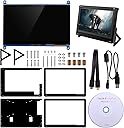
Packaging: The display with the case was packaged securely - well wrapped and protected in plastic wrap, styrofoam and corrugated cardboard. Contents: The contents of the package 'seemed' to be complete - but there was no parts list, which was a bit disconcerting. There was no indication that there were TWO different size screws - when they're that small, it was difficult to tell the difference. I found this out by putting the wrong size screws at the corners (more later). Assembly: There was no hint of assembly - not even an exploded view with corresponding part identifications (e.g. screw sizes at their corresponding points), which would help greatly. The holes were 'pre-drilled' which helps to determine where screws go. But I couldn't tell the size difference between the screws sizes and ended up having to 'tap' the corner holes with the larger screws. Once I realized there were smaller screws, they fit 'comfortably' in those holes. Fortunately the holes were not enlarged too much for the smaller screws. No indication of where the spacers were to be placed within the frame layers, either, but it becomes clearer when you attempt to fasten the Pi board. The placement and orientation of the legs was a little confusing; but the design of them allows for two different orientations, which is nice. All holes are 'pre-drilled'. It took a while to assemble, but it all came together 'properly' without too much hassle. I feel that the amount of time would have been greatly reduced if there had been even an exploded view. I also ordered a clear, plastic case to hold and protect the Raspberry Pi. But - and this is a significant point of hassle - is the fact that the holes in the display case for mounting the Pi case are not the right spacing for the case. The case I ordered looked exactly like the one in the pictures; but since the 'correct' holes for the Pi case are so close the holes in the display case, drilling new holes would only enlarge the existing holes, and make mounting rather flimsy. Operation: The Raspberry Pi booted normally, and I was excited to see the screen display all the items on the desktop. The screen has extremely high resolution, so the user would probably want to change the resolution setting to his/her own taste - this is a function of the operating system, in my case Raspbian. The touch-mouse worked as expected. There is a CD/DVD that comes with the package (don't be fooled by the attractive label), and this is the biggest point of hassle. Obviously when you have a touch-screen, you would want a virtual keyboard. They did include instructions how to 'build' the software for a virtual keyboard, but it was laced with typos. Once the types were corrected, the software built to completion. However, the keyboard was EXTREMELY primitive, and essentially useless. Kudos for the effort, but major criticism for the typos and outdated software. I did a quick web search and found a virtual keyboard that you simply install on the Pi that is what you would expect. I have another Raspberry Pi and installed the other keyboard - plain and simple -- nice! I installed the 'other' keyboard software on the Pi attached to the display but it wouldn't work. I tried to 'undo' the 'damage' that was done with the Longruner-built keyboard software, but was unable (as of yet) to determine where the problem lies. Until I find it, I'll be using a USB keyboard. The touch-mouse does work regardless. The application for which I intended to use this display, unfortunately doesn't quite fit at the usable resolution - display is too small. Still working through this. Summary: All-in-all, not a bad little display. I would recommend this display, but ONLY with the caveats mentioned above so that the end user knows what to expect.
Trustpilot
1 month ago
5 days ago