
DOWNLOAD THE APP


Customer Services
Copyright © 2025 Desertcart Holdings Limited
DOWNLOAD THE APP




🖥️ Elevate your workspace, elevate your game.
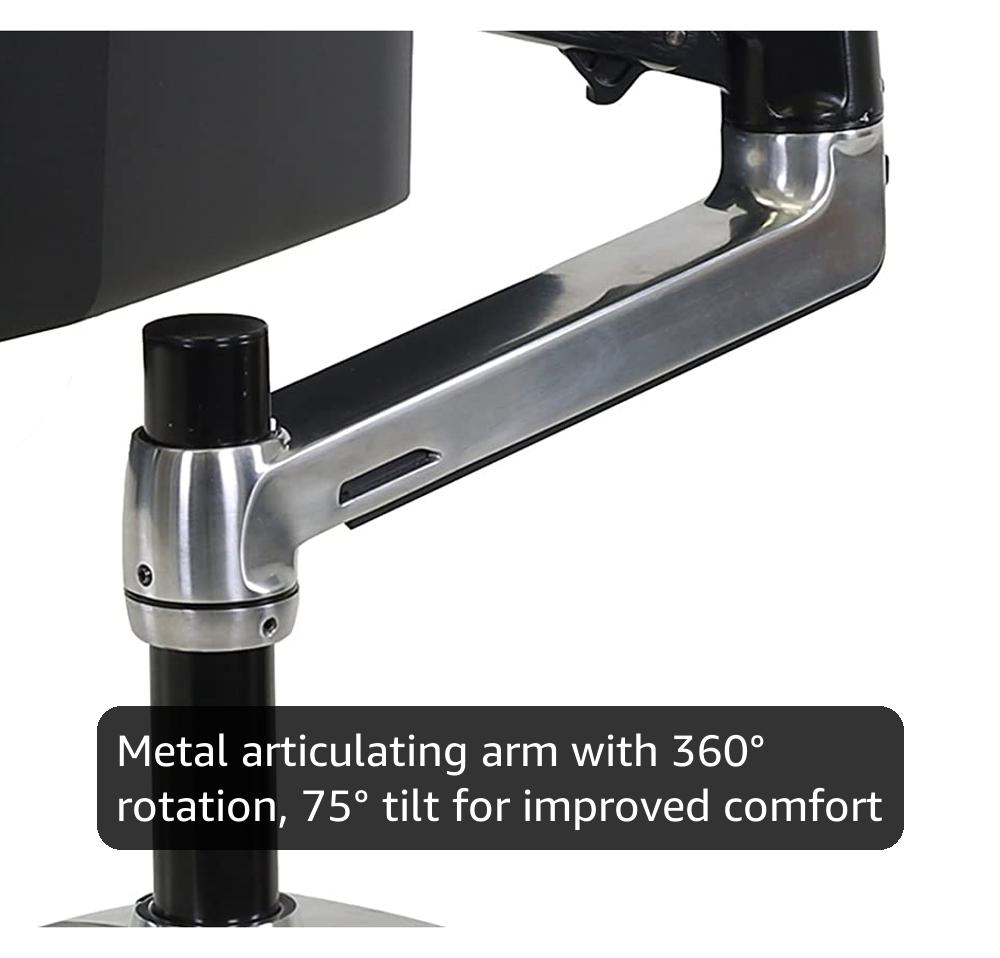
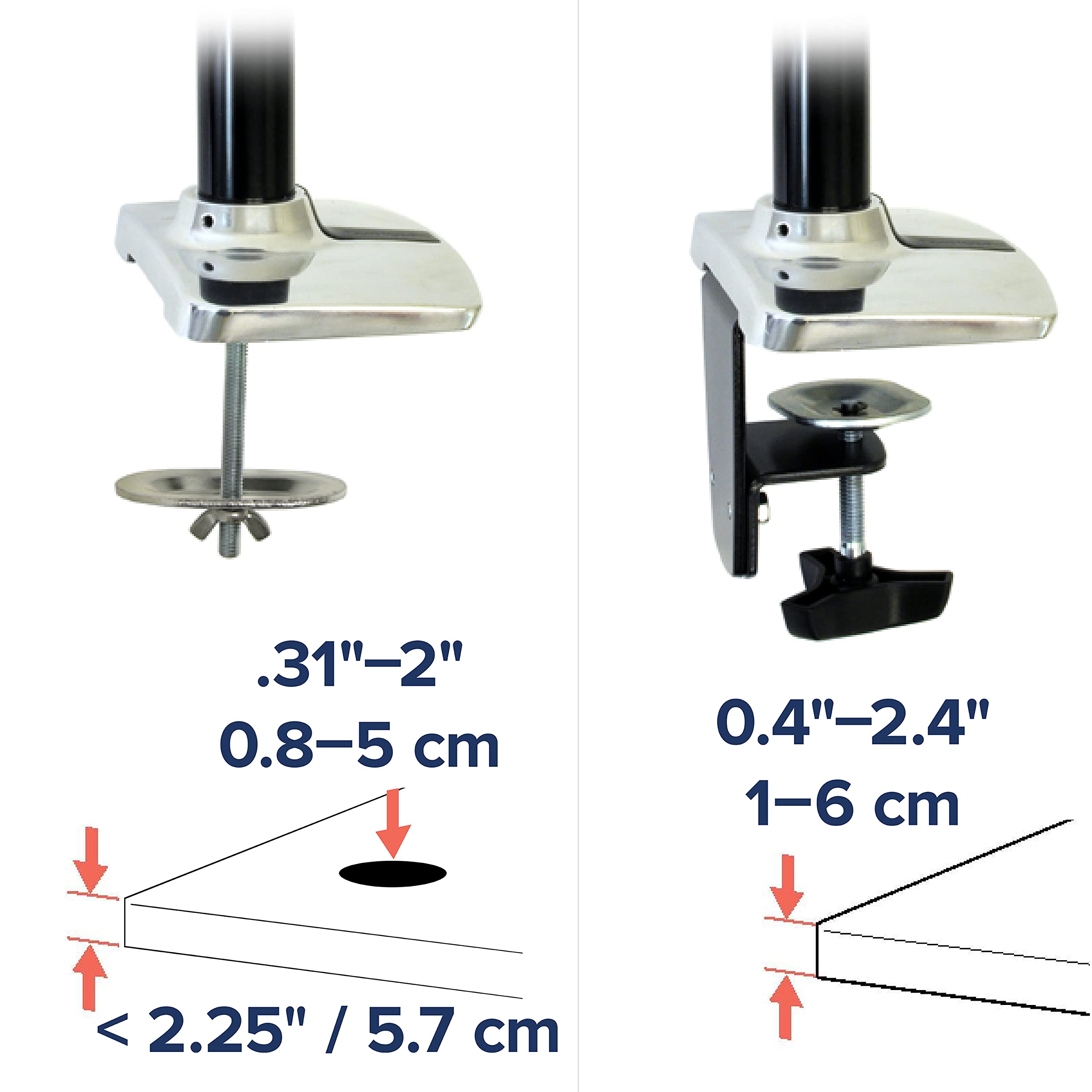
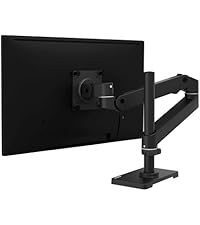
The Ergotron LX Monitor Arm is a premium polished aluminum desk mount designed for single monitors up to 34 inches and 25 lbs. It offers versatile mounting with desk clamp and grommet options, 360° rotation, 75° tilt, and up to 17.3 inches of height adjustment. Built for durability and stability, it features integrated cable management and comes with a 10-year warranty backed by US-based customer support.





| ASIN | B00358RIRC |
| Best Sellers Rank | #449 in Computer Monitor Arms |
| Brand | Ergotron |
| Built-In Media | LX Desk Mount LCD Monitor Arm^Extension^Desk Clamp and grommet mount bases^7" Pole |
| Color | Polished Aluminum |
| Compatible Devices | Monitor |
| Customer Reviews | 4.6 out of 5 stars 4,093 Reviews |
| EU Spare Part Availability Duration | 10 Years |
| Enclosure Material | Metal |
| Global Trade Identification Number | 00698833011463 |
| Item Weight | 3.6 Kilograms |
| Manufacturer | Ergotron |
| Material | Metal |
| Maximum Tilt Angle | 75 Degrees |
| Maximum-Supported Screen Size | 34 Inches |
| Mounting Type | Tabletop Mount |
| Movement Type | Articulating |
| UPC | 809393878841 807034595843 611101328919 642125317832 641438698584 012306004521 809186278209 778889412947 698833011463 069060227147 806293534136 804066784429 777787377815 168141503016 809099143823 638084621127 808111680940 |
| Unit Count | 1.0 Count |
| Warranty Description | 10 Years |
V**N
Product of the Year (and a testimonial about the company)
This arm lives up to every one of their feature claims and then some. Here are some of the standouts : - It's precision engineered and solid - It's sexy looking - It's American made (any company that is hiring people HERE to make innovative and quality products gets a *big salute and a bonus) - It's adjustable to almost any angle you could possibly make use of, and - When you maneuver it to the spot you want - it STAYS - But when you want to quickly move or simply adjust it to another spot, it smoothly swivels there .. and STAYS - And all of this even with heavy monitors - like my Dell 23" touchscreen. For work I put the arm attached to the back of the desk behind my laptop, and the DELL hangs nice and solid above the laptop screen for a perfect dual screen setup. At my height (6'3") that puts the big monitor right at eye height. Perfect for design and development. I push the laptop to the side and swing the arm all the way down to desk height in front of me for DJ'ing with the touchscreen. And I easily swing the arm with the DELL all the way around facing my bed if I feel like watching a movie at night. At no time have I doubted that this thing was stable or that my heavy monitor was in any way at risk. Nor is it the slightest bit finicky about moving or staying where I put it. It smoothly and precisely does its job and does not need adjustment at the joints in the slightest. Now about my experience with customer service: The assembly is basically simple, so the 1 or 2 page sparse instructions were good enough for me to get it 90% there. However the last thing that was holding me up mounting it and finishing the job, was the 'pan' motion left and right (like shaking your head motion left right). All of the other directions of motion have either hex bolts for adjustment, or a screw, or they don't need any adjustment. But the pan left/right was stuck. And I couldn't find any adjustment for that axis of motion at all. When I called the company on the phone somebody picked up after minimal hold. Lo and behold if it wasn't someone living and working right here in the US! After I briefly explained the problem she said she had never seen that before, and she took my number to have someone call me back as soon as they got in the office. Well the next morning I got a call from someone who immediately and helpfully fixed the issue. He said that axis of motion did not need an adjustment. I grabbed a can of spray silicone and a couple of shots on the axis bolt and it was working great. I had a feeling this guy was in management at the company or possibly the owner. He was really friendly and concerned that the unit was working out as advertised - he was also intimately acquainted with the engineering of the arm. Anyway, I purchased some great products in 2013, but this desk mount arm is my personal Product of the Year. In fact, I like it so much that I just ordered one of their laptop stands. With the quality of the arm I already own in mind I'm sure its just as precision and solidly built.
M**H
Great product & great service from Amazon
I ordered this on Wednesday afternoon and selected the super saver shipping option (5-9 days), so I was pretty surprised when I got home the next day and it was sitting on the door step! The stand is nearly perfect. It took about 20 minutes to install. The only tool required was a small screwdriver to remove the mount from my monitor (It's a Dell 2407WFP, by the way). My desk has a glass top surface (on top of wood), so I was worried about the stand scratching the glass, cracking the glass, or not getting a good fit against the glass. Luckily, the base has rubber pads so that it grips the glass very well without scratching it. The build quality is excellent. The parts are weighty and feel solid. The monitor moves around very well and has quite a large range of motion on this arm. One odd aspect of the installation is that the 2 articulated arms are not bolted together in anyway -- each one sits on top of a plastic flange and is held in place just by the weight of the monitor. This sounds like a shaky set up but it works out nicely in practice, although there is a little bit of play around each flange (given that they are not manufactured perfectly). The one drawback is the cable management system. The lower arm (which is optional) has a removable cover and is hollow so that you can route wires through it. However, neither the base nor the upper arm has any built in cable management. Seems weird (to me) to have the capability only in one part (and the optional part, at that) and not have it in the two required parts. Even weirder, they include 2 cable ties in the box so that you can cable tie your wires to the upper arm to hold them in place. This was the option I chose, and it works fine, so my rating is still 5 stars, even though it is an odd design. I was able to get a couple square feet of usable desk space by using this arm instead of the standard monitor base, plus I can now swing the monitor around to watch movies from my bed (it's a weird angle -- the room is L-shaped), and to top it all off, I got overnight delivery for free :) Highly recommended. UPDATE: After using this for several years, I still love it. In fact, I just ordered a second one to go to a dual-display set up. When I moved a couple years ago, I lost the plastic flange that fits inside this arm. I emailed Ergotron to tell them about this, and they mailed me a new flange for free. They didn't even charge me for shipping. That level of customer service is so rare!!! I'd give 6 stars if I could.
F**N
Ergotron + Cintiq 21UX = Best workspace setup
Around the net, (and among these reviews,) there were some small reports of people using this somewhat-known LCD arm for their cintiqs -- and despite the 21UX's heavy weight of 19 lbs, it holds it hanging in the air with ease. Upon receiving the LX, I was skeptical because hey, the Cintiq 21UX is a mammoth and heavy display, weighing in at 19 lbs. The LX has a capacity rating of 20lbs, and it extends 2 feet. I'd be trusting the construction of it to hold up my $2000 tablet in the air safely! So you can't blame me. However, after receiving the LX in the mail, it was definitely far better built than I thought it would have been. No plastic parts -- all 100% (heavy) metal. It came with mount hardware to clamp onto the edge of your desk, or drill through your desk for inner-surface placement. I tried it on the edge of my desk first, and while the clamp held firm and showed no signs of falling off, let's face it, I'm taking no chances here. I also wanted a little more "universal" flexibility in accessing the cintiq, so it being off to the opposite edge of my desk was a little too far away. Thus, I measured out the optimal spot to drill a hole in my desk and mounted it SOLIDLY through the top. I have an IKEA Gallant corner desk, so I drilled it through right where the curved-corner area is. Drilled and bolted in place, there's absolutely 0% change of the clamp failing and falling off the desk, and the arm can reach both sides of the desk easily. (I'll be submitting some user pictures so you can see my Cintiq setup with the LX. Check them out!) So now with my 21UX on the LX, it allows me to "float" the 21UX in front of me, lowered to hang half-off the edge of my desk. It's basically in my lap by this point, offering me optimal ergonomic usage. I find myself no longer slouching when I draw, and I can withstand much longer sessions of drawing in my chair. It's nice that I can *float* the cintiq to where I need it, instead of moving to where it needs me to be. Another reviewer here on Amazon wrote that the LX had a hard time holding up his 21UX, and it would slowly droop over time from the weight. I'm wondering if he carefully tightened the primary tension bolt at the top of the arm? I had to put a lot of tension into the arm, at roughly around 85% tightened. But at that amount, the LX holds the 21UX unbelievably firm, in the air or lowered onto my desk in drawing position. Really you can't go wrong with the Ergotron LX. I'm literally using it with, probably, the toughest thing it will ever have to go up against. I feel safe with my 21UX mounted to it. It's that solid. Sure, there's a little bit of wobble if it's free floating -- but it's nothing that appears concerning, not like the thing's about to break or something. In fact, the Ergotron wobbles less with the Cintiq on it than my NEC monitor on its stock stand. How's that for overbuilt? It's really worth the investment for all 21UX owners who want some greater control over this behemoth. I even recommend it as a top-notch (and good looking) option to those looking for articulate arms for their normal LCD monitors, or hell, even your 12WX if you got one. Ergotron makes other attachments for the arm, such as extenders and a laptop tray. You can really make it work for your workspace well. It's nice being able to simply push the Cintiq out of the way to be up next to my primary monitor when it's not in use. It's nice to reclaim some of that desk space since the Ergotron mount has considerably less footprint than the Cintiq on its stock stand. Stop looking, get this mount. You won't find a better one for this weight range.
D**O
An Absolutely Essential Piece of Equipment For Any Computer User
When I ordered my Cintiq 27QHD, I didn't quite want to spend the 400 bucks required to get that immovable Ergostand thing they sell separately for that specific unit. Fortunately more than a few people have exclaimed that this particular arm works exceptionally well with that particular Cintiq. I have to concur. This thing is a beast, made of solid aluminum and made with heavy-duty metal springs and joints, and while it says the rated weight is 20-25 pounds, I am fairly certain it is strong enough to hold far more (But dont quote me on that), as the 27QHD weighs just shy of 20 pounds and this thing does not even flinch when holding it in any position. It takes a bit of getting use to in order to properly attune it to the weight, but that goes for anything you put on it really. It also has wire management that allows you to run cops from the monitor through the frame of the arm itself, a couple twist ties for cord management, etc. Which is another advantage this arm has over the stand: Positioning. While the Ergostand may be more stable overall, it can only move the screen vertically a small bit. The Ergotron XL Arm has much better movement and range, such as actually lifting it up so you can stand and use it at a comfortable height, move the screen to the side so you have space for other things when not in use, or even being able to completely rotate the screen around, which for a digital tablet is absolutely useful for getting those perfect strokes without having to mess with the actual application orientation, or for getting the right shape screen you would prefer, such as preferring "Portrait" over 'Landscape", for example. For someone that has to use this thing for hours and hours every day, the mobility the Arm affords you is indispensable for comfort and flexibility. I believe the weight rating applies to the fact that with enough weight on the end of this thing floating around, it will be putting quite a bit of strain on the desk/table/whatever to which it is mounted, potentially causing enough strain to break the desk/table/whatever. Considering that whatever is attached to this thing most likely costs at least as much as the arm itself, I would assume you do not want that happening. However, even just the arms neutral position (Letting the top arm rest on top of the mounting bar) holds the monitor fairly well and still provides a wider range of motion than the Ergostand while not putting as much pressure on the desk as if the arm were extended. For this particular device I had to use an adapter since the base VESA screws for this arm are only 100x100, but thats not a big deal, it works well with any adapter. Overall very pleased with this purchase, a good investment no doubt.
W**E
A Four-Star Product with Both "Good" and "Could Be Better" Features
Whoah. When I first started shopping I could not believe the prices of the LCD swivel mount arms in general. I was prepared to pull out my grandfather's Erector Set and start fabricating my own hack-job of a monitor stand, or go to Home Depot, buy some metal banding, hinges, cinderblock, screws, and some OSB to fabricate my own industrial-style workspace for about 25% of the price of a fancy swivel alone! But after thinking reasonably and logically, I realized that I may as well invest something that suits the aesthetic of others as well as myself. because I don't always work alone. And I don't have an office in my garage. Plus people spend time actually designing and creating items exactly like the Ergotron swivel with form, fit, function (and, it's in the name) ergonomics in miond for a living. I'll lean on others when they are skilled at something I'm not. So here goes my review. Overall, the fit and finish of the components on the Ergotron LX desk mount could not be better for my workspace's design intent. With a brushed and apparently (I say apparently with caution) stainless steel on black look, the product both walks the walk and talks the talk with respect to its rigidity, appearance and construction. That said it is a very heavy item - so take heed - if you got a wobbly desk this thing will make it more wobbly. But that has more to do with desk selection than the product. The point is this is a product that from what I can see is MOLDED metal and not an extruded piece of [insert expletive here] that was assembled by someone with little to no knowledge of the metal arts. The product itself has various places to loosen the resistive points on the arms, so you can obtain plenty of degrees of freedom (just look at it) when it comes to repositioning. Just be wary of the ceiling if, say, you're placing this in a nook that has a ceiling that slopes down and intercepts the reach of the product - which is what's going on with my current setup. Overall, after about a month of use I am pleased. I can bring the monitor closer to my kids and away from my workspace when they want to watch movies, and I can place it in the most comfortable position require depending on how I orient myself at work. I installed this on a more traditional desk with a rather measly lip on the back. With the included hardware, however, I was able to screw through the desk and pull up with the clamp. In such manner I have sort of haphazardly rigged it to my workspace. However, this was my choice - the better choice would have been to either (1) utilize a desk with an opening for an integrated monitor stand, or (2) utilize a workbench style desk (the latter being the best likely option for me, and probably the best fit for the mount arm). The most SALIENT advice I can offer any consumer of an LCD arm - this one or any other - is to be very careful when pairing it with a monitor. When shopping for monitors at retail, pay attention to the location of the VESA mount on the display. My monitor's mount is on the bottom of the pedestal that it usually stands upon independently. In order to attach the arm, I had to position the round pedestal vertically, then mount the arm on the base of the pedestal. For that reason, the weak link between the LX Desk Mount Arm and my monitor is my monitor's flimsy hardware. With the mount attached, my display is rather wobbly. Had I PURCHASED A DISPLAY WITH A VESA MOUNT OPPOSITE THE VIEWING SIDE (say. close to the center), I would likely have experienced no wobbliness. But because I didn't consider the physics before buying my display, about 1" x 1/4" x 3" of thermoplastic supports my monitor rather tenuously after the very solid steel arm mounts to the pedestal mount. So make sure your monitor is of the rear-placed VESA mount variety - not of the sort described above. Finally, the integrated cable management system extends all the way until the last vertical arm - but it would be nice if if went, say, 180 degrees or something similar so the cables could be routed under the desk. But overall the product is great - and you will be shocked at the weight and "meatiness" of the product compared to others out there for sale on Amazon which I have seen and touched. Don't be afraid to take the plunge even though this item "seems" pricey - this is about as near perfect as you're going to get when it comes to a strong, reliable, durable, and well engineered monitor arm. Every time I end up purchasing a relatively expensive item that I've extensively researched, I am reminded that the maxim "you have to pay for quality" is still true. And finally - make sure that you have a VESA mount on the rear of your monitor - not on a pedestal base - or be prepared for the wobbles.
M**E
Should be standard included equipment with every Cintiq!
I got one of these for my Cintiq 22hd, and I don't know why anyone would want to use a Cintiq without an arm mount like this. I've never used the included stand that came with my cintiq, and nor would I care to. The ergotron does everything a person could about want, better, faster, and easier. I can recline in my chair and pull the Cintiq into my lap, tilt it back and lay a picture book on 1 half of the screen *to ref draw from it*, or rotate my screen to stand vertical giving me a humongous tall drawing area, or even lifting the stand to put my screen up high so I can stand while drawing if I am in the mood for such, or move the screen to face any-which way in my living room as I see fit. A good arm mount like this just isn't for Cintiqs, everyone should have one of these who doesn't have a huge screen display! I can easily pull the screen down right into my face for reading small text in high res, move it up and tilt it to face downwards at me while reclining back in extreme comfort while gaming or watching movies, and easily push it back when I need to get up. For drawing this thing is awesome. Being able to pull my screen right into my face is so handy for drawing as I look to study small details., but it's equally impressive for entertainment use. I at all times can have the screen exactly where I want and even positions I never even considered. Should people have this much power I wonder.? Are we ready as a society? The various sections of the arm are adjustable with the included tools, to make it as loose or as tight as you'd want. I did have to adjust the tension of each piece a little bit. Some were too tight, others too loose. Again this was easy to do, just follow the instructions and look at the diagrams carefully. I have seen no evidence of sagging or weakening, it's just as stiff as the day I got it, and even if it did start to loosen up, I can tighten the tension screws more. I have it tight enough that I don't move the screen while pushing the stylus pen on it, and yet loose enough that it takes very little muscle to put it into any position I want. Moving it or rotating to aid in drawing is so easy, easier then how it would work with the Cintiq's official included stand yet it also does so much more then it ever could. Wacom should partner up with these guys and include the Ergotron with all tablets light enough to work well with them. Speaking of which, I got a 22hd not only because it's cheaper then a 24hd, but also because I knew it would be a better fit for the ergotron and how I'd use it, in addition to being under the max weight limit. This ergotron arm is so strong, and I could easily tighten it up to support even more weight. It would not surprise me at all if it can work well with the 24hd if you took off its' monstrous 60 pound stand, but technically even then you will still be over the weight limit. The clamp base has holes in it, so you can also drill screws through it to make it more secure. I have not drilled any screws to reinforce it, nor would I want to. Like all pieces of this arm, the clamp is very heavy sturdy steal, and very tightly has been clamped into place. I tried to see if I could make it budge or make it slide around, and I can't. This is a much more solid stable clamp then the pictures show. The Cintiq and arm mount are not going to slip off and fall over unless my entire desk does. As stable as the ergotron is, there is a little shake as I press more firmly and work quickly with the stylus, but this isn't an issue imo, and a very small price to pay to have such a mobile screen. My only complaints after a month and a half of heavy use, is I do think the instructions could have been.... better. And having a hallow part in the upper arm section to hold the cables, but to me that really isn't a big deal at all. I haven't used other lcd arms, so I can't say if this is the best one the market or not, I just know that for my needs this thing is legendary. I knew I'd love this product, but I didn't know it would be so good that I wished I could rate it higher then a 5.
F**S
Strong enough for a cintiq (but just barely!)
This is an awesome product, plain and simple. The install went smooth with relatively easy to follow instructions (though the drawings were laid out in a pretty odd order) and sits nicely on my desk. Personally I used it for my Cintiq (which I don't have set up fully since I need to order a DVI-I extension cable, since on my last order I was sent the wrong cable) and it works perfectly, BUT... it feels like the Cintiq, despite still having a couple lbs of weight before being at the Ergotron's max supported weight, is really pushing the Ergotron to it's limits. The way I have my desk set up, an ideal situation would be two Ergotron LX desk mounts with an additional Extension arm for each to make them reach further attached to my 2 monitors, but unfortunately I don't trust it to support the weight of my Cintiq with an additional arm (the further away from the base, the more stress that will be placed on it). My only other concern would be that no felt was included, so with a heavy monitor attached to a desk can easily scar the desk, I'll be picking some up and attaching to it myself so my desk doesn't get ruined should I decide to remove the arm at a later date. I guess I write this review for two reasons: 1) Ergotron LX is an excellent adjustable arm and I would recommend it to anyone with a Cintiq that has thought about the investment in the past. 2) I also write this as a note to Ergotron developers: there is a definite market need for us Wacom Cintiq Users. If Ergotron made the arm support a few more lbs (30 would be ideal) while having the reach of the LX + an additional extension arm, you'd have one HELL of a product for artists and drafters that use the Cintiq line of pen tablets. So, Ergotron, if you ever come out with a product like that, marked somewhere in the 200-400 dollar range, I'd be interested in buying one (or two). The distance is very important, because ideally, we'd bring it to our chairs so we can reduce stress on our backs while working (leaning forward or even sitting straight up and reaching arms out to the desk is incredibly painful after years of work).
W**.
An essential tool for graphic tablet users!
I purchased this arm along with the laptop tray also sold by Ergotron for my Cintiq 13HD. Needless to say this review will be most helpful for artists with a digital drawing tablet who seek to mount it on an arm. I heard this arm in particular was a favorite among Wacom tablet users, so decided to go for the plunge. Wacom Cintiq13HDs do not have a port on the back for mounting however, so I had to consider a laptop tray as well. I ordered the arm and tray with Prime. It shipped and arrived on my doorstep in two days. It came almost entirely assembled, separated into the three different arm parts. After ogling the directions and trying to figure out how to adjust the tension on the different parts, I now have it fully assembled and attached to a sturdy table nearby my desk. The idea of the arm was to free up valuable desk space and help make my freelance art business a little more efficient, since I had to put my tablet away every time I wanted to use the computer without having the tablet in my way on the desk. So far I am very happy with the purchase. Both the arm and the tray work beautifully together. The lowest tension for the up and down tilt of the tray happened to be just right; I can adjust it on the fly if needed, but the pressure I put on my tablet when drawing does not push it back down as well. Another perk for artists using this is the fact that your tablet is no longer resting on the desk and is propped up at an angle, which means you can practice drawing with your whole arm rather than just your wrist, ultimately keeping carpal tunnel at bay. The arm itself is incredibly sturdy and very well made, with a nice professional looking finish. It wobbles a little around the rod on the clamp that holds it to the table, but I'm sure that can be fixed with a little adjusting. It honestly doesn't bother me enough to consider tweaking it though. All in all I would highly recommend this arm to anybody with a graphic tablet in need of desk space, or are seeking a more comfortable graphic design experience.
Trustpilot
1 month ago
1 month ago