

Desertcart purchases this item on your behalf and handles shipping, customs, and support to South Africa.
🎥 Elevate Your Stream Game with Crystal-Clear 4K Brilliance!
The Elgato Cam Link 4K is a compact, USB 3.0 capture card that transforms your DSLR, mirrorless camera, or other HDMI devices into a professional-grade webcam. Supporting up to 4K60 video capture with ultra-low latency, it ensures flawless, high-resolution streaming and recording on PC, Mac, and iPad. Perfect for content creators and professionals seeking superior video quality and seamless integration with popular apps like OBS, Zoom, and Discord.
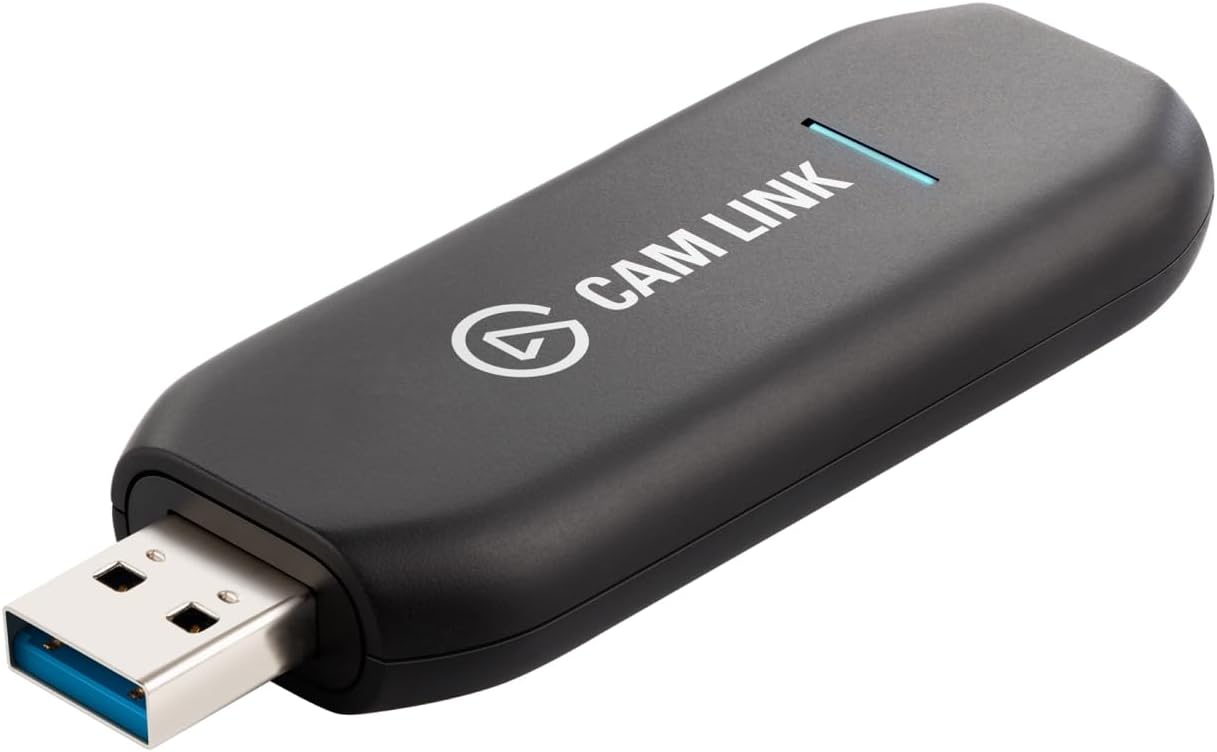


| Antenna Location | live streaming, video recording, content production |
| Asin | B07K3FN5MR |
| Av Output | HDMI |
| Best Sellers Rank | 4,092 in Computers & Accessories (See Top 100 in Computers & Accessories) 7 in External TV Tuners & Video Capture Cards |
| Box Contents | 1 product |
| Brand Name | Elgato |
| Compatible Devices | [PC, Mac] |
| Country Of Origin | Taiwan |
| Customer Reviews | 4.6 4.6 out of 5 stars (13,787) 4.6 out of 5 stars |
| Hardware Interface | USB 3.0 |
| Item Dimensions | 8.1 x 3.1 x 1.2 centimetres |
| Item Type Name | Elgato Cam Link 4K — Broadcast live and record via DSLR, camcorder, or action cam in 1080p60 or 4K at 30 fps, compact HDMI capture device, USB 3.0 |
| Item Weight | 0.71 Ounces |
| Manufacturer | Corsair |
| Manufacturer Part Number | 10GAM9901 |
| Minimum System Requirements | Operating System: Windows |
| Model Name | 20GAM9901 |
| Model Number | CAM LINK 4K |
| Number Of Items | 1 |
| Operating System | Windows |
| Other Special Features Of The Product | Compact |
| Platform | Mac OS X |
| Product Warranty | 1 Year Manufacturer |
| Tuner Type | ATSC |
| Unit Count | 1.0 count |
| Upc | 843591022729 |
| Video Capture Resolution | 4K |
User
Elgato Cam link 4K Capture Card for DSLR
The Elgato Cam Link 4K has been a brilliant upgrade to my setup. It delivers clean, crisp video straight from my DSLR with virtually no latency, and the image quality jump compared to standard webcams is massive. Setup was effortless — plug it in, select the source, and it’s ready to go. Streaming software recognises it instantly, and the 4K capability keeps everything sharp even in challenging lighting.
User
Perfect
Stable 4k HDMI output with decent performance
User
Workds great and well worth the price
Well worth the money spent. I had already wasted money on buying two other cheaper brands. Couldn't get a good quality video out of them until I purchased this Elgato and I have no regrets.Quality really does come with the price and this product is top quality. I've already transferred two VHS tapes to 1080p 60fps digital video. You download the software from their website and it's very easy to use.
User
Took a lot of troubleshooting to get this to work
This product includes a short USB3 cable, I needed to buy a miniHDMI to HDMI cable to use with my Canon EOSR. I installed Elgato Camera Hub before connecting this up, and I could not get this working as a webcam. I could see the camera feed in Window's "camera" app, but it wouldnt initialise in the Elgato software. The camera feed was also visible in another program "OBS", but I could only get that to work as a virtual webcam and OBS reduces the resolution from 4k to 1080p. Then, in teams / zoom / anything if anything tried to access the camlink feed, the output would go green/purple and i would have to disconnect everything.Honestly 10 hours of troubleshooting over 5 days later, I discovered that there was a phantom device in device manager under "Sound, Video and Game Controllers" - in this list there were two entries - "Camlink 4k" and "Elgato Virtual Camera". I deleted "Elgato Virtual Camera" from device manager, didnt need to restart computer but then all of a sudden I can use the camlink feed natively in teams / zoom etc. Ive since uninstalled the Elgato software and uninstalled OBS and now just use this as a pure plug and play device and it works flawlessly, im getting 4k 24.00p.Elgato's customer service are very, very good.
User
Easy and quick to have it ready
It's such a good piece of hardware. Easy to install, no drivers needed and you can have your image setup right away. I use it to turn my gopro hero 5 black into a webcam, which is very nice to use (1080p 60fps)In case you need to modify some settings like contrast, saturation, hue and brightness, you can use the 4k capture utility or do the same on your preferred application (I use OBS Studio and I have more control of the settings for the webcam.As I don't have a pci express slot (I have an itx board with just one slot that I have my graphics card installed), this USB stick is very convenient. A little bit expensive in my opinion, but I haven't found anything similar in terms of quality
User
Great Capture Card at a Even better price
These Cam Links from Elgato are Great, I have now bought multiple of these and haven't had any issues with them at all. We have bought them for streaming and they are great for both Windows and Macs as with both operating systems, you can just plug them in and go. No drivers necessary or bloatware apps to get it working. Just plug it in, plug your HDMI source in and then use your favourite software. I can confirm it works with FaceTime, PhotoBooth, OBS, Livestream Studio 6 from Vimeo, Google Hangouts and Zoom. All in all they are great value for money when compared to the Blackmagic Mini Recorders that only work with Thunderbolt, so to have a device that you can plug into pretty much any modern computer is great, and I would highly recommend this product for anyone who wants to have a capture card for a camera or computer or whatever you want:)
User
M50 camera to OBS.
Worked perfectly. Once I disabled my M50 camera auto shut off. The cam link to worked perfectly. Before I did that it kept on cutting off after a minute or two.
User
Cam Link 4K
These are well made and very useful but you need to watch what you are getting. The latest series is GAM9903 and this does 4K@60fps the problem you will find is there is a lot of conflicting data even printed on the back of the Cam Link with both GAM9903 but the USB plug and on the other end by the HDMI GAM9901. The reason that I needed one is that I have a camera for a microscope which has a 4K output with both HDMI and USB C. The HDMI is taken into the Cam Link the switched over to USB A and both the USB cables are plugged into my PC and then back to the monitor through software. Elgato have good after sales service if a little on the slow side so watch out what you are buying as there is a lot of the older but new Cam Links out there.
User
جيد جدا، لكن متطلبات التشغيل مزعجة جدا
عشان المنتج يشتغل لازم يتوصل ب مدخل usb3 مستقل، بجهاز امكانيات كارت الشاشة فيه عاليةلو اتوصل على usb hub هيقرفك حرفيا ويفصل كتير، خاصة لو انت موصل هاردات او deck او حاجات تانية كتير.لو معندكش مدخل usb3 مستقل في جهازك مانصحكش تشتريهلو عندك المتطلبات، هتلاقي الجودة ممتازهالفرق بينها وبين ال capture card التقليدي الرخيصهو فقط في ال 60 frame لكن جودة الصورة مش بتفرق في حاجه، رغم ان السعر ١٠ اضعاف
User
Aynasız kameralar için harika bir ürün
Ürünün fiyatı sebebiyle çok yaklaşmıyordum ancak en sonunda dayanamayıp satın aldım. 1 günde teslim edildi ve paketleme ve üründe bir sorun yoktu.Ürünü genel olarak özetlemek gerekirse büyükçe bir USB Bellek şeklinde. Bir ucu USB A girişi diğeri HDMI kablosu takılması için dişi giriş. İçerisinden USB A dişiden USB C kablosu çıkıyor. Yani ürünü doğrudan USB A ile bağlamak ya da bu adaptörü kullanarak Type C olarak bağlamak mümkün.Daha öncesinde Canon R10 kameramı EOS Webcam uygulaması ile Type C kablo takarak kullanıp görüntü alıyordum. Ancak 720p sabit ayarı ve 5-10 dakika kayıt ya da stream sonrasında seste kayma olması sebebiyle sorun yaşıyordum. Bu ürün Type C ile görüntüyü aktarmak için yırtınmak yerine HDMI üzerinden görüntü çıkışını alıyor ve bağladığınız cihaza aktarıyor.Bunun ilk artısı temiz bir görüntü oluyor. Profesyonel kameranızın tüm ayarları kamera ekranında kalıyor ve kendi cihazınıza sadece video çeker gibi temiz görüntüyü aktarıyorsunuz. (Bunun için Elgato Camlink desteklenenler listesini kontrol etmeyi unutmayın. Listede olmayan birçok üründe destekleniyor. Bunun için de kameranın ayarlarında Kamera + Monitör HDMI çıktısı seçeneği olan tüm cihazlar ile uyumlu. Bu şekilde de kontrol edebilirsiniz.)İkinci artısı kesinlikle gecikme. 720p kablolu görüntüyü kullandığım dönemdeki gecikmeye kıyasla bu sıfıra yakın diyebilirim. 3-4 dakikalık kayıtta bile sorun yaşıyordum ancak bu cihaz ile 1080P 60FPS görüntü aktarımında gecikme sıfırdı. Ancak söylemeliyim ki 4K 60FPS ayarına aldığımda OBS üzerinde çok ufak gecikme gözlemledim. Ancak cihaz 4k 30FPS için üretilmiş zaten. Bu yüzden 4k 30 ya da 1080p 60 kullanmanızı tavsiye ederim. Benim bulabildiğim 4k 60FPS Cam Link ürünü henüz yok.Cihaz kolaylıkla ısınıyor. Uzun kullanım testi yapamadım henüz ancak bu yorumu güncellemediysem bilin ki sıcaklık sebebiyle hiç sorun yaşamamışım. Ancak ısındığı için Type C adaptörü ile kullanmak daha mantıklı bir karar gibi.Fiyatı yurtdışına göre gerçekten pahalı olsa da sosyal medya gibi bir işiniz varsa ya da bu hobinizi ciddi bir seviyeye çıkartmak istiyorsanız kesinlikle temel ürünlerden biri. Ben bunun yanında Elgato capture card kullanarak 2 PCli bir sistem kullanıyorum.Kutu içerisinden HDMI kablosu çıkmıyor bu yüzden bunu alırken mutlaka (kameranıza göre değişiklik gösterebilir) Micro HDMI to HDMI kablosu almayı unutmayın.
User
Plug-and-play Elgato works perfectly with my camera
Setting this up with my Sony ZV-E10 was super quick and easy—it’s basically plug and play. The build feels solid and well-made, which is what I expect from Elgato products, and the price felt very reasonable for the quality you get.I’m a big fan of Elgato and have my entire streaming and WFH setup built around their products, so it fits perfectly into my workflow. The device works reliably, and the image quality is consistent with what I need for streaming and video calls.Overall, I’d recommend this if you’re looking for a reliable, high-quality, and affordable tool to upgrade your streaming or WFH setup.
User
Work as expected
Plug and Play, Easy to setup and easy to use.
User
A Most Wonderful Device
Been using this with my Nikon D500 with Zoom to conduct online workshops. Upgrading my rig from the Logitech C920, a great leap forward in video quality. For users who are experiencing laggy video, I found out (from the product page) that Cam Link 4K only supports these resolutions: 4K p30, 1080 p60/i60, 720 p60, 576 p50 and 480 p60. And I set the recording resolution to 1080 p60 on my camera, it solved the problem. It turns out that the original frame rate was incompatible (my camera was set at p24).
Trustpilot
2 months ago
1 month ago