🎨 Unlock your digital masterpiece with precision and freedom!
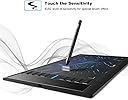
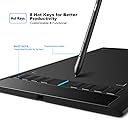
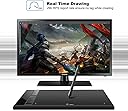
The UGEE M708 is a professional-grade digital drawing tablet featuring a large 10x6 inch active area and 8192 levels of pressure sensitivity for detailed, natural strokes. Its battery-free stylus supports 80° tilt, enhancing brush control without the hassle of charging. Equipped with 8 customizable hotkeys and broad compatibility across Windows, Mac, and Android platforms, it’s designed for artists, designers, and educators seeking a reliable, versatile creative tool backed by a 1-year warranty and comprehensive accessory kit.


| ASIN | B072M76LNZ |
| Active Surface Area | 10 inches x 6 inches |
| Additional Features | 16384 Level Pressure Pen, 80° Tilt Support, Programmable Press Key, Shortcut Key |
| Best Sellers Rank | #312 in Computer Graphics Tablets |
| Brand | UGEE |
| Built-In Media | Cleaning Cloth, Glove, Pen Holder, Pen Nib Clip, Stylus |
| Color | Black |
| Compatible Devices | Desktop, Laptop |
| Connectivity Technology | USB |
| Customer Reviews | 4.3 out of 5 stars 7,065 Reviews |
| Display Type | LCD |
| EU Spare Part Availability Duration | 1 years |
| Global Trade Identification Number | 09384532054351 |
| Item Dimensions L x W | 14.96"L x 8.66"W |
| Item Weight | 0.5 kg |
| Manufacturer | UGEE |
| Mfr Part Number | FBA_UG-M708-US |
| Model Name | FBA_UG-M708-US |
| Model Number | FBA_UG-M708-US |
| Native Resolution | 5080 |
| Number of Items | 1 |
| Number of Packs | 1 |
| Operating System | Android, Linux, Mac OS 10.10 or above, Windows 11 10 8 7 |
| Pressure Sensitivity | 8192 levels |
| Screen Size | 10 inches |
| Software Update Supported to Date | unknown |
| Special Feature | 16384 Level Pressure Pen, 80° Tilt Support, Programmable Press Key, Shortcut Key |
| Specific Uses For Product | Designing, Drawing, Teaching |
| Target Audience | Student, Teacher, Toddler |
| Unit Count | 1 Count |
| Warranty Description | 1 Year |
T**1
Great device
The device allows you to use a pen to draw or use it to work on Word or other such projects using a pen as you mouse, similar to using a touch screen and you finger to move about the screen, like if you wanted to draw with your fingers. Like when connected to a laptop without a touch screen. Works great. It has its own software to adjust the basic functions just like you would adjust you mouse in settings, then when you connect to other app like paint or anything on your screen you can control the cursor with the pen right and left click with the buttons on the pen. To change things on the screen. Works on chromebooks also with no software for adjustments nessary. There are similar items with the monitor built-in that available, which might be a better choice if you really are a artist which would make it more like drawing on paper. I use it just for drawing or wasting time keeps me busy. My children use it was well. Great unit and easy to use Good price, also it's a great place to start then upgrade to one with a monitor if you like it.
Z**Y
Great Carefree Tablet
(I have provided examples of things you can do/draw with this tablet as I am always looking for examples myself with such products.) Possibly one of the best beginner drawing tablets out there. I purchased this tablet about a year ago today when I got my first personal laptop, and it has proved to be more than enough. I have always been wary about purchasing or investing in drawing tablets due to the idea of coming up with issues with the program itself and it not picking up the pencil; issues I have not had thus far. The only issues that have arose for me were very rare times pen sensitivity wouldn't pick up (typically in the middle of drawing-which is when the tablet has been on for quite some time as I leave my laptop open). I have only experienced this issue 2-3 times of owning it in a year, and to be clear have NOT began to become more frequent over time. Another slight nitpick I would have for others is that the tablet's pen scratches up the tablet fairly well. My tablet is full of scars and scratches from my drawing sessions (all centered in the middle for where I draw the most). It doesn't seem to affect its performance, but it does make it look quite dingy and used. The set up of the tablet is simple, and configuring the tablet keys to your leisure is also simple if you know the program that you're using already. I think I will buy another UGEE tablet when the time comes, its easy and not much hassle, and great for a first time tablet that isn't nearly a thousand dollars like some can be. I always recommend this tablet to those who ask, I am very happy with my UGEE (hope I'm not jinxing it). (NOTES: the tablet picks up where the pen is, so you will see a tiny little cursor above where you want to draw. The pen also has two buttons that work when you are touching the tablet- I am unsure what their purpose is but they seem to make the size of the brush smaller on programs such as medibang. The tablet is more than better at picking up pressure sensitivity- I should know by how hard I find myself pressing sometimes [maybe the scratches are actually my fault]. The tablet's left sided buttons are easy to get crust and dust in, and will stick if you don't properly take care of it. The tablet's pencil is not chargable, and works whenever the tablet is on. However, if gotten wet, it will not work and you will need to let it dry for a day or so before using again. Be sure to check that the nibs aren't sharpening themselves on the tablet after extensive use, you will need to replace the nibs every 4 month or so to avoid this (the tablet comes woth extras, don't worry). Have a spare just in case because you will miss using your UGEE when something does happen. So far every program I've tried works with this tablet. i.e. Medibang, Firealpaca, Paint Tool Sai, Drawpile, etc
S**A
Best Tablet for Beginners!
I use this product for digital art. I absolutely love it! If you are looking for an inexpensive tablet that will give you a lot of features, this is for you! My favorite thing about this tablet is the number of buttons they give you! You can remap the buttons to fit what your specifically need out of it. I have a ctrl+z button, buttons for changing my brush size, a color picking button, and buttons for zooming in and out. I rarely have to touch my laptop keyboard when using this product because the buttons are so nice! The tablet size is pretty good, I just have a small desk so I often have it hanging slighting over the side, but that doesn't bother me at all. I've never had issues with this product not working for my different drawing programs. I have used both Krita, Clip Studio and Photoshop with this tablet and they all work great! I don't use the buttons on the pen itself that often, but I'm sure someone could get a lot of use out of that function. The pen holder is another LIFE SAVER. Old tablets made it so easy to lose the pen! If you want to try out digital art, but don't want to drop 400+ on a tablet with a screen, try this out! Its easy to want to jump ahead and buy a screen tablet, but there is a learning curve from paper to digital drawing, so I would recommend trying this out first!
K**N
Just be sure to get a Protector.
This tablet is pretty nice for its price, a great starting tablet for beginners, i would highly recommend it for those starting in digital art/animation. Though i would strongly recommend getting a protector as it scratches very easily, unfortunately upon upgrading to this tablet i didn't think about it at the time and thus have left thousands of scratch marks all over the tablet. That being said this tablet has lasted me 2 years with no issues, well... until the end of its life span. the tablet is currently having issues with pressure and sometimes causes the pen tool to switch to the eraser tool when you press too hard, this wasn't an issue at all up until recently, the cause of this is most definitely because of the scratches, it most likely warned down the tablet, if you get a protector it'd most likely last longer without any issues. there really isn't anything wrong with this tablet, it was a very comfortable tablet to use and the buttons were easy to map, though i still use my old Pen rather than the new one, personally i do not like the pen, to me i just dont like the feel of it. My old pen though it may be cheap, feels better to hold, plus my fingers don't slip down towards the tip of the pen when i'm playing Osu, if the area of the pen where the tip of your fingers are had more of a prominent edge to prevent my fingers from slipping, i'd probably use this pen more, but that's just personal preference. all in all, i loved this tablet and would definitely recommend it.
C**H
Excellent beginner tablet - indestructible, left&right handed, subtle paper texture
I've bought approximately 4-5 of these tablets - both the older model and the newer one (battery pen vs no battery pen) - and they are ALL excellent tablets. The original model was downright indestructible - I completely abused that poor tablet, putting hot pans on it, spilling water and coffee on it, and it STILL works to this day. The only complaint I had about the older model was the battery pen, and with it fixed, I have NO complaints whatsoever. This tablet can take hella abuse and absolute destruction and still work after the fact, and I've been using the UGEE M708 since I started drawing in 2012-ish. That being said, experience with it does come with some notes about it! "Cons" (not things I've personally been bothered too much by, but maybe something to consider) - Will warp with heat (like hot pans... but it's plastic, so.. yeah) - Plastic tablet surface is pretty soft. Precise pressure will dent it - but to be honest, I was literally pressing down on it VERY firmly with my tablet pen. Normal use shouldn't be too bad, so long as you don't drop it on gravel or something? - Wired connector port is a certain size, so though it does use USB-A and is compatible with older android chargers... The actual charger plastic might not fit into the deep slot provided. Wireless dongles probably won't fit in the tablet to make it wireless :( - Old pen sucks, but new pen is kind of lightweight and feels like cheap-ish plastic - it won't pop open and have the rim of the cap break like the old one, but it might just completely snap in half. Haven't had it happen to me, luckily (... well, with the new pen, anyway). Pros: - Great beginner tablet! Driver is decently reliable once it's installed and it's got plenty of surface area and options to help beginners! - Left and right handed - one of the options is to change the screen orientation/size and which way the tablet senses motion (with the buttons on the left or right). - Literally indestructible. Other than being made out of plastic, this thing is well protected from moisture and heat. - Semi-paper textured surface is makes it an excellent startinf point for someone transitioning from traditional to digital art, since most tablets are SUPER smooth. I've bought this as gifts for friends and family (hence why I've bought so many but own 2 working ones, myself), and would highly recommend it for any beginner digital artist!
K**R
Don't make my mistakes and the tablet should be fine ..
It worked really well at first.. Word of advice don't close the drivers because for some damn reason it breaks everything. I had just been drawing and the sensitivity worked fine and all of the hotkeys worked as I set them to but the pen started to stop responding to sensitivity out of no where and I couldn't fix it so I decided to reset my pc and that didn't help at all.. so now a fully charged pen just stops and starts responding out of no where.. tried resetting drivers ..that made things worse and then the hotkeys stopped working all together EDIT: okay so I figured out that if you just reinstall the drivers it fixes all the problems with the drivers and sensitivity crapping out as well as the hotkeys and pen. Just make sure you NEVER close the drivers. not unless you have it set to open when you turn on your pc because you'll have to completely reinstall otherwise you should be perfectly fine :D
J**N
Perfect for beginners
When I got this tablet, I knew practically nothing about digital art. After a few years of dedicated practice, I've come to appreciate this product for what it is. As it is for most things, the learning curve for digital art is steep. But this drawing tablet made that steep climb a little bit easier. The physical product has simple and durable buttons to give you easy access shortcuts, and the buttons leave you a decent amount of draw space to work with. The desktop app you have to download to configure the tablet is also very simplenand straightforward to use. It has all the basic functions, and some nice bells and whistles, that make the configuration process a whole lot easier. After about three years of use, the tablet has only just started to show symptoms of it's age. The symptoms aren't too problematic either; the tablet sometimes loses track of the pen, and it's an easy fix by just lifting the pen off the tablet and putting it back down, that way the tablet can relocate it. The only major limitation of this product is the power of your PC/Laptop. I have decent laptop, but it's definitely not designed for processing digital art work. With the tablet, my dual screen set up, and the drawing program running, my laptop tend to bug out. Which throws off the functionality of the tablet. So, as long as your working with a decent PC/Laptop, and you keep the processing tax low, the tablet will almost never give you any issues. Overall, it's an outstanding product, especially for beginners.
T**A
Great quality for the price, would buy again.
Pros: --Durable construction --Pen recharges with included USB cord, no AAA batteries to replace --Includes spare tips for pen --Battery status light on pen, so no unexpected dying in the middle of a project --Fully configurable with the included drivers, can even be flipped for left-handed use --Is recognized by default windows drivers, in case you can't use the install disk for whatever reason Cons: --The gloves are a little fragile looking, but they're free and I try not to knock free stuff --Charge cord for pen could be a bit longer --Instruction manual is in broken english. It's readable, but you may have to back up and re-read a bit --I still haven't figured out what the shiny glass rectangle area on the side does, might just be decoration over the circuitry area Summary: The all-steel frame feels solid and durable, like it could take a beating. The gloves that came with it feel like decent quality, not the greatest but still usable enough for my needs.The drivers installed quickly and easily on my windows 7 system and I'm already enjoying the calibration options for work area, sensitivity, and so on. I bought it for $58 and at that price it feels very solid. I doubt you'll find anything that feels more high quality without a three-digit price tag.
E**E
Muy bien
Llegó antes de tiempo, en perfectas condiciones, muy útil y completa.
B**N
great product
great product would buy again
N**I
Ottimo
Ottimo prodotto
I**O
Adecuado
Buena relación calidad precio, perfecta para principiantes
S**Y
Its working fine right now
The products doesn't come with the accessories shown in the picture.. I had to return the first model I purchased.. The keys stopped working just after three days.. Got a replacement.. Its working fine right now.. But I am in constant fear that of it crashing any day.
Trustpilot
4 days ago
5 days ago