


🚀 Elevate your workspace with speed, style, and smart tech!
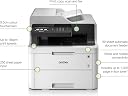
The Brother MFC-L3730CDN is a compact, network-ready 4-in-1 colour laser printer designed for small offices and home workspaces. It delivers fast, high-quality prints at 18 pages per minute with 2400x600 DPI resolution, featuring automatic duplex printing to save paper. Equipped with a 9.3cm color LCD touchscreen, it simplifies multi-function tasks including scanning, copying, and faxing. With a 250-sheet capacity and robust connectivity options, it’s engineered for efficiency and seamless collaboration.







| ASIN | B07HZG5JXS |
| Additional Printer Functions | Copy, Fax, Scan |
| B&W Pages per Minute | 18 ppm |
| Best Sellers Rank | 64,167 in Computers & Accessories ( See Top 100 in Computers & Accessories ) 83 in Laser Printers |
| Box Contents | Printer, UK 3-Pin AC adapter/power supply cable, Product safety guide, Software disc, User Warranty card, Quick setup Inbox toner, Fax line cord. |
| Brand | Brother |
| Brand Name | Brother |
| Color Depth | 24 bpp |
| Color Pages per Minute | 18 ppm |
| Colour | Light Grey/Dark Grey |
| Compatible Devices | Laptops, PC |
| Connectivity technology | USB |
| Control Method | Touch |
| Customer Reviews | 4.1 out of 5 stars 51 Reviews |
| Display Type | LCD |
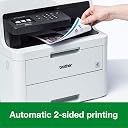
| Dual-sided printing | Yes |
| Duplex | Automatic |
| Hardware Interface | USB 2.0 |
| Ink Colour | Black |
| Is Electric | Yes |
| Item Dimensions D x W x H | 16.1D x 18.7W x 16.3H centimetres |
| Item Type Name | Brother MFC-L3730CDN Colour Laser Printer | PC Connected & Network | Print, Copy, Scan, Fax & 2 Sided Printing | A4 |
| Item Weight | 23.4 Kilograms |
| Manufacturer | BROTHER |
| Maximum Copies Per Run | 250 |
| Maximum Copy Resolution Black and White | 600 dpi oder höher |
| Maximum Copy Resolution Color | 600x600 dpi |
| Maximum Copy Speed Black and White | 18 ppm |
| Maximum Print Resolution Black and White | 2400 x 600 DPI |
| Maximum Sheet Capacity | 250 |
| Maximum Supported Paper Size | A4 |
| Maximum print Resolution Color | 2400 x 600 DPI |
| Model Name | MFC-L3730CDN |
| Model Number | MFC-L3730CDN |
| Model Series | MFC-L3730 |
| Model name | MFC-L3730CDN |
| Network Connectivity Technology | USB |
| Number of Drivers | 1 |
| Number of Trays | 1 |
| Other Special Features of the Product | Auto-Duplex, Network-Ready |
| Output sheet capacity | 250 |
| Paper Size | A4 |
| Power Consumption Size | 400 Watts |
| Print media | Envelopes |
| Printer Output Type | Colour |
| Printer Type | Laser |
| Printing technology | Laser |
| Processor Count | 1 |
| Product Warranty | 1 year |
| Resolution | 600 x 600 |
| Scanner Type | Flatbed |
| Series Number | 3730 |
| Special feature | Auto-Duplex , Network-Ready |
| Specific Uses For Product | Office |
| Total USB 2.0 Ports | 1 |
| Total USB Ports | 1 |
| Unit Count | 1.0 count |
| Warranty Type | limited warranty |
| Wattage | 400 watts |
R**T
Good solid workhorse of a printer
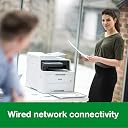
I bought this to replace a 15 year old HP inkjet all-in-one. Whilst this not a photo printer, it is a good solid reliable workhorse of an office printer and is more than able to do everything I ask of it. Printing is very quick, particularly if you ask for multiple copies of the same page. The scanner is quick and easy, especially with the sheet feeder. I have not tried the fax functionality. One thing that caught me off guard is that this particular model (MFC-L3730CDN) is wired network only. This was not an issue for me, as it sits next to my router, but I was expecting it to have WiFi as well and it didn't, so read the specs of the model you are ordering very carefully. One tip is to make sure you set the paper weight/media type correctly when printing envelopes and such, otherwise it doesn't open the paper path wide enough and may cause a paper jam. I am very pleased with mine and hope it manages to last as long as the one it replaced.
A**R
It works.....
I must have mis-read, misunderstood the product description as I have not been able to use it in wireless mode.........otherwise it’s easy to instal and print quality is fine.
M**P
Great price for a multi function colour laser printer
Being sick of inkjet printers drying up between use I finally decided to get a colour laser. A great price for a multi function colour laser printer. Initial setup of the printer on the wired network is easy with printer drivers working from Windows. Setting up the scan to file or pdf is just as easy. The copy function is great with the document feeder, however if you need to scan double sided you have to use the scanner bed and manually change the pages. Duplex feature works great for printing
M**I
Unusable - keeps jamming
I could barely print a single page - each time you get a paper jam in main tray message, while in fact there is no jam. It seems the spool drum simply cannot grab the paper from the tray. The manual feed also jams one time out of three for no reason. If this product is representative of the brand, avoid at all costs!
W**D
Great printer.
I haven't tried every feature on this printer yet, but it was very good value, delivered 2 days ahead of estimated arrival date by Amazon Prime. It was a doddle to set up by downloading drivers from the internet. Set up is simple and intuitive.
A**R
Bigger than I need but pretty good
Quite a nice printer/scanner. In this day and age most quality printers come with a scan function though personally I tend to use a small hand scanner most of the time (home use). I also found that when scanning it didn’t quite capture the very edges of an A4 document which doesn’t help. I found it reasonably easy to set up (wired and wireless) and eventually managed to get the duplex system to work though I had some challenges. I saw another reviewer complaining that it doesn’t scan double sided though I couldn’t find any reference to that on the Amazon page anyway. It prints double sided but doesn’t scan that way. I found the printing to be good quality – nice colours and the print speed is fine for me (I’m not running a business). The paper capacity (250 sheets) is also pretty good. My only concern is the size of the printer in my small home office (the third bedroom really) but once I’d unboxed it and removed all the packaging it’s not too bad at all. My use for this would be at home so the amount of printing I need to do will be minimal. That way the toner will last longer. Everyone knows that the biggest cost for any laser printer is the toner and sometimes it’s cheaper to buy a new printer rather than buy a complete set of toner cartridges. You can always go down the route of 3rd party toner cartridges but read the reviews first. I’ve heard that some manufacturers may have software that affects any non-branded toner so be careful. The other point is that if you use non-branded toner you invalidate any warranty. My final word on toner is to ask why manufacturers don’t have a standard toner cartridge that fits all printers? I know the answer – it’s a financial one but I think it would be such a good idea.
T**L
Absolutely drinks ink
We have never had an office printer that gets through so much ink! Our printing habits haven't changed but HP toners so much longer. Not happy
A**S
Great printer
Great printer but had a couple of problems with the software and had to remove and reinstall. Had a large spring lying inside the printer but doesn't seem to have a home.
Y**S
Top
Sehr gut 👍🏻 ich bin zufrieden
J**D
Hyper efficace, fini les galeres de l'imprimante a jet d'encre
Impression sans problème, par internet et à la maison. Pas fait pour la photo
E**.
Très déçu
Une véritable galère ! Un coup elle va bien imprimer un coup non. Selon les logiciels utilisés les impressions vont être nikel alors qu'avec d'autre une catastrophe. Franchement si j'avais su je ne l'aurai pas achetée. Passer d'une jet d'encre très simple d'utilisation à ça...J'en ai un besoin professionnel ben elle n'a rien de professionnel. EDIT le 04/07/2021 : Imprimante horrible ! mauvaise couleur, n'imprime que quand elle veut, bourrage papier non stop......A FUIR !!!!
C**T
Très bonne imprimante
Rien à redire
Trustpilot
3 weeks ago
3 weeks ago