


Desertcart purchases this item on your behalf and handles shipping, customs, and support to South Africa.
โ๏ธ Stay cool, stay ahead โ your AV gearโs silent guardian.
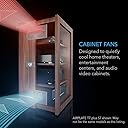
The AC Infinity AIRPLATE T8 is a UL-certified dual-fan cooling system designed specifically for home theater and AV cabinets. Featuring a powerful 104 CFM airflow with ultra-quiet 19 dBA noise levels, it uses smart temperature-controlled fan speeds and an LCD alarm display to prevent overheating. Its sleek matte white aluminum frame fits discreetly into modern setups, while expandability options future-proof your cooling needs.






| ASIN | B07DYF19T1 |
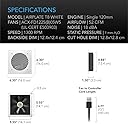
| Air Flow Capacity | 104 cfm |
| Best Sellers Rank | #11 in Computer Case Fans |
| Brand | AC Infinity |
| Brand Name | AC Infinity |
| Compatible Devices | AV Cabinets, Desktop, Gaming Console, Receiver |
| Cooling Method | Air |
| Customer Reviews | 4.7 out of 5 stars 325 Reviews |
| Included Components | AIRPLATE T8 |
| Item Dimensions L x W x H | 6.3"L x 1.3"W x 6.3"H |
| Item Highlight | With Temperature and Speed Controller, Matte White Finish, Aluminum Frame, UL-Certified for Home Theater AV Cabinets |
| Manufacturer | AC Infinity |
| Material Type | Aluminum |
| Maximum Rotational Speed | 1300 rpm |
| Model | AI-APT8-W |
| Noise Level | 19 db |
| Number of Items | 1 |
| Part Number | AI-APT8-W |
| Power Connector Type | AC Power Plug |
| Product Dimensions | 6.3"L x 1.3"W x 6.3"H |
| UPC | 819137020504 |
| Unit Count | 1 Count |
| Voltage | 6.5 volts |
| Wattage | 10 watts |
J**K
Well worth the money
Out of all the AV cooling systems, this was one of the more expensive on offer, but I feel is well worth the price. I bought the Airplate T8 in white with dual 6" fans. The reason for buying was the smart fan function and the option of having it in white. I have a crown amplifier, Pioneer AV receiver and Niles 6 zone system all installed in one small kitchen cabinet, and when all three are powered, the heat is quite considerable, threatening to overheat or shorten the components' lives. The twin fans, one to draw in cold air, and the other as an exhaust fan, considerably reduce the temperature inside the cabinet. The alarm fuction is a really nice idea to warn me if there's a risk of overheating, and you can set your own temperature that triggers a noticeable electronic alarm when tripped. I set mine at 95f to make sure that it alerts me to higher temperatures way before they reach a dangerous level. A nice touch. There are several modes to choose from, auto, smart, on. Smart is the best for me, which will gradually speed up the fans as temperatures rise. Usefully, you can set the increments for the fans to increase, by either 2 or 4 degrees, and in short, this means that if set a temperature limit of 95f, which means the fans either kick in at 75f (when using 4 degree increments) or 85f (when using 2 degree increments). You decide to have 6 fan speeds which go up with every increment. As a result, the system is cooled at an early stage before it really heats up, and gives the fans a chance at keeping everything at a safe level. I found that temperatures never went above 92f, and never needed to put the fans on full. I've not had the alarm trigger yet, except for testing. So this system is enough for my needs, and I can just set and forget it, safe in the knowledge that my equipment won't overheat. The read out is nice and clear and easy to read, and though the instructions are a little tricky to initially understand in regards to the smart mode, it's relatively easy to set up. Once you calibrate the temperatures after using it for a day or two, you won't need to change the settings again. Installation: You do need a drill and preferably a jigsaw cutter, but cutting the holes to install is a relatively easy affair, helped largely by the cutting templates that come with it. I'm not the best handyman, but I was able to use the templates to cut accurate holes that kept the fans and panel tightly fitted. I've read comments that the fans can be noisy. While you can hear them on speeds 4-6, I've found them relatively quiet except for the top speed, but really, I'd prefer to have the slight noise if it means I don't burn out my system, and mine rarely needs the fans on full. It is worth getting some kind of rubber sealant behind the fan mounting, which considerably reduces any sounds from vibrations. Worth considering. We chose white to match our cabinets, and I was doubtful they'd match, but I'm glad I chose that color as it really reduces their visibility. And I particularly like the fact that you can install a further 4 fans if you feel the two that come with the system are not enough for your needs. Overall, a great choice for AV system cooling, and the smart mode and Oled display give you a lot of reassurance that you aren't overheating and damaging your components. Highly recommended.
T**.
Read before buying
Answers to questions I had: Do the fans go in the same direction?- no, one sucks air in, and one blows it out. Do both sides of the fan have a cover?- no. One side will be a "wire cage" that really isn't decorative, so if you're putting this in a cabinet, I recommend putting the fan in the back or somewhere that the other side of the fan won't also be visible. THIS SYSTEM IS AMAZING! I just put this in an entertainment unit that has a closed door where my PS4 Pro is. Before putting this system in, the cabinet would be well over 100* with the door closed. Now, the thermostat reads 79 after playing games that ran hot for over 3 hours. I can't even feel any temperature difference when I open the cabinet, except it almost feels slightly cooler than the room. The system was actually cooling my PS4 even while it had been running for hours, where it would usually be pretty hot even in an open air environment, my PS4 was barely even warm. The fans are insanely quiet. They really are nearly silent. I can't hear them when the cabinet is closed, and even when it's open, I couldn't hear it unless I had my face in the cabinet. They came with templates for the holes that needed to be cut, which made installing them very easy. I'd recommend a Dremel or something with a circular blade, but I used a drywall knife and it worked fine. Was just a lot of work. The only complaint I have, is that the hardware is very long, so it sticks out the back of my cabinet pretty considerably. Worth every penny of $100, and I'll definitely be buying more systems from them.
A**E
I like it.
So far I am really happy with this set up. This is definitely a premature review, as I have yet to really put this entire system to the rest considering I am waiting on internet/cable installation, so the cabinet I installed these in is empty, but despite the necessity still to test the product accurately, I really like the set up so far. Installation was a breeze. I decided to bring some "2020" vibes to my "custom" IKEA media center (sounds fancy/, right? Not really - they offer configurators on some of their product lines now, which allows you to get somewhat creative with your component choices) and installed this ventilation system. I decided not to mount the controller and instead affixed it to a small stand using some zip ties. So far the functions operate according to the description, with one fan acting as an inlet, while the other acts as an exhaust (fan direction can be changed via provided instructions). The programmable settings are intuitive and they really thought out a lot of the features, like being able to shut off the screen while the system is still on/in use/in program&alarm modes, and the automatic thermostat temperature setting. For my configuration there was a lot of wire slack, but I was able to round it all up using the protruding machine screw posts to provide a really sleek installation. Pro Tip: Don't forget that if you are using the T8 set up without any additional ventilation fans, you can daisy chain one fan to another and then simply use a single USB to power both fans from the controlle, which substantially clears wire clutter. I will update once I have some more usage time with this set up, but I highly recommend it at least for the (seemingly working) theory, overall ease of installation, and great aesthetic.
J**S
Almost perfect, but needs better cable management
Bought this product to install in a AV cabinet to keep it cooler. Iโve read most receivers need to be kept at around 85 degrees for best performance and longevity. After unboxing I was surprised how nice the fans and control module were. This is clearly a well made fan system. Install was relatively straight forward, just use the templates and cut out the proper size hole. It helps to use a drill bit to get the hole started, then a jig saw to do the rest. After installing the fans, then came hooking everything up. I was a bit disappointed here. The USB connectors take up a lot of unnecessary space and the cables are really long, creating a birds nest of cables behind my receiver. Also really wish I had the option to plug the control module directly into a USB outlet on my surge protector versus using an extra outlet. After everything was hooked up, I was pleasantly surprised by the noise level. They are quiet, but can still be hear from about 15 feet away.
C**S
Amazing Computer Controlled Dual Fan System - Really Nice Niche Quality Products
It took a while to find the right fan for my project. We removed an old oven and added a microwave into a new closed space. Iโm working on new building new drawers underneath now. I may add another air vent later, if needed. Anyway, I was worried it the microwave might overheat so I added this two fan system. Thereโs also a fan underneath the microwave and it draws air in and then the fan in photo draws air out on the outside. I set it up so that the fan turns on at 90 degrees right now. I very happy because I donโt have to manually turn the fan on when I gets hot. Also because it looks great and is super quiet. It really works awesome. I had looked at fans that were specifically made for putting in walls and there was nothing even close to quality, quiet-ness, options and price point. This is basically every a really I am computer USB fan. I really couldnโt be happier. In fact if this fan ever broke, all I would have to do is buy another usb computer fan and replace it. Computer fans are really easy to find and they work terrific. That said, I have no reason to buy it from another company Iโm just making a point that these are just really high-end computer fans. If they can work in a $3000 computer, they can work for a $300 microwave. This company makes a really awesome products. Fyi, I did scratch the white paint on the edge on one of the fans a little when installing it. I was trying to sand some paint on the wall. Had I done it again, I would have uninstalled the fan before sanding or covered it with some painterโs tape. It really was my fault.
C**.
Quality and Performance Priced Right
Replaced an entertainment center and found that the new one had nowhere near the airflow and clearance that the old one had, causing a couple electronics to overheat. I found this set and it has been an amazing find that exceeded expectations. First, the quality of these fans and the controller are fantastic. The build quality is perfect, no cheap fittings or material to be found. Installation is a breeze if you just follow the instructions and the provided template. The fans fit like a glove. Setup is simple, plug in the fans to the controller and a few simple preference settings and you are done. The cabinet stays ventilated and cool, one fan flowing intake at the bottom and one exhaust at the top. Where I was seeing overheating warnings above 100-110 Fahrenheit and beyond, this setup has kept the temperature well below 100F with a PS5 running and audio equipment. Well worth the purchase and peace of mind.
A**R
Great media cabinet addition
Installed these on a couple of custom media cabinet projects. Works great. Easy to install. Very functional and easy to use
D**.
Great setup for keeping a PS5 cool
Didn't realize how much heat the PS5 puts off while its in use. I keep it behind closed doors in a space of about 4-5 ftยณ. Was seeing temps inside the cabinet approaching 110 degrees fahrenheit. Needed something to help keep it cool. This setup works great! Installation was fairly straightforward. Be prepared to make a mess if cutting through materials like drywall or particleboard. The instructions say that both fans are oriented the same way. However, mine were shipped with them oriented the opposite directions. Perfect! I set the exhaust fan up high and the intake down low (ideal since heat rises). On the highest speed setting, it keeps the cabinet @86 degrees consistently even after the longest gaming sessions. A little loud, but not annoyingly so. Would recommend this unit if you're in a similar situation. One nitpick would be to pigtail the fan usb connections so shorter usb cables could be used if extra fans won't be needed. The extra wire length looks unsightly for my tastes (zip-tied the excess length) even though they're hidden away behind closed doors. OCD, I know. Overall a great unit worthy of 5 stars.
A**A
So good when mounted. Great venting system.
Easy and well put vent system. Looks great when mounted ๐๐ป
M**I
Amazing
Superb product. I've been buying on Amazon for years now and without a shadow of a doubt this is the best product ever provided by a third party on the Amazon platform. Spot on design, build quality, packaging, presentation, instructions, delivery etc, everything about it shouts "premium". This is not a cheaply made piece of garbage with badly translated instructions yet it provides great value for money.
L**E
Brilliant product
Brilliant, it does have a high pitch whine when running on full. It does exactly as described. I needed something for my account cupboard not a media unit and this seemed the best product and I am not dissappointed.
B**Y
The power adapter only ships with a US plug
This is a very reliable product, easy to set up. The fans can be separated from their frame to reverse their direction to push or pull air as needed. You can use the control buttons to configure this system in many ways to suit different scenarios. It includes a printed colour manual that is easy to read. I am using it to cool an AV rack housed in a cupboard. I set it to adjust fan speed based on temperature, and to beep if it exceeds a specific temperature. The power adaptor included in the box has a US plug.
R**N
Perfect
Perfect for my enclosed A/V setup. The smart mode works great! You can reverse the fan directions easily.
Trustpilot
4 days ago
2 months ago