Desertcart purchases this item on your behalf and handles shipping, customs, and support to South Africa.
🚀 Elevate your home network to WiFi 7 — because buffering is so last decade!
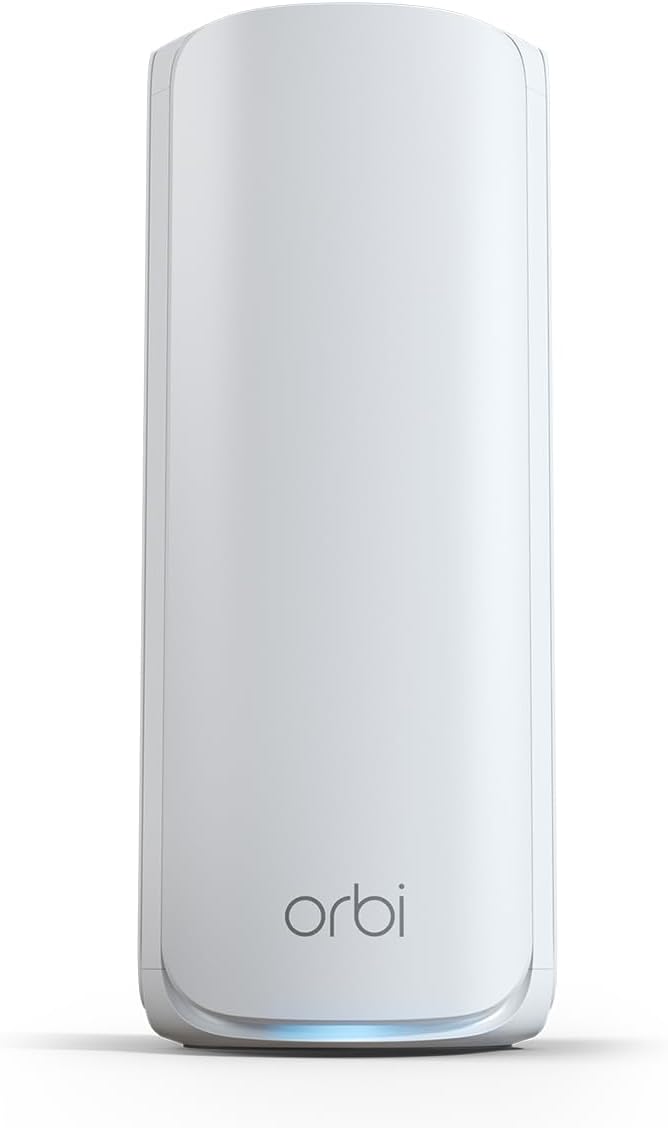
The NETGEAR Orbi 770 Series Tri-band WiFi 7 Mesh Add-on Satellite (RBE770) effortlessly extends your Orbi WiFi 7 system coverage by up to 2,750 sq.ft, delivering ultra-fast speeds up to 11 Gbps. Featuring a 2.5 Gbps Ethernet port and advanced security protocols like WPA3 and automatic firmware updates, it ensures a reliable, secure, and seamless mesh network experience. Designed for easy setup and compatibility with Orbi RBE772 and RBE773 routers, it’s the perfect upgrade for professionals demanding top-tier home connectivity.


| ASIN | B0D524NVHC |
| Antenna Location | Business, Gaming, Home |
| Antenna Type | Internal |
| Best Sellers Rank | #26,939 in Computers ( See Top 100 in Computers ) #101 in Whole Home & Mesh Wi-Fi Systems |
| Brand | NETGEAR |
| Built-In Media | One (1) Orbi WiFi 7 Satellite (RBE770), One (1) power adapter, Quick start guide |
| Color | White |
| Compatible Devices | Gaming Console, Personal Computer, Security Camera, Smart Television, Smartphone |
| Compatible devices | Gaming Console, Personal Computer, Security Camera, Smart Television, Smartphone |
| Connectivity Protocol | Wi-Fi, Ethernet |
| Connectivity Range | 2750 Square Feet |
| Connectivity Technology | Ethernet, Wi-Fi |
| Control Method | App |
| Controller Type | App Control |
| Coverage | 2,750 square feet |
| Customer Reviews | 4.1 out of 5 stars 678 Reviews |
| Data Transfer Rate | 11 Gigabits Per Second |
| Frequency | 6 GHz |
| Frequency Band Class | Tri-Band |
| Frequency band class | Tri-Band |
| Has Internet Connectivity | Yes |
| Has Security Updates | Yes |
| Is Modem Compatible | No |
| LAN Port Bandwidth | 2.5 gigabits_per_second |
| Manufacturer | NETGEAR |
| Maximum Upstream Data Transfer Rate | 10.5 Megabits Per Second |
| Mfr Part Number | RBE770-100NAS |
| Model Name | RBE770-100NAS |
| Model Number | RBE770-100NAS |
| Model name | RBE770-100NAS |
| Number of Ports | 2 |
| Operating System | NETGEAR firmware (based on Linux) |
| Other Special Features of the Product | Internet Security, IoT Network, Parental Control, Remote Access, WPA3 |
| Router Firewall Security Level | True |
| Router Network Type | Mesh |
| Security Protocol | WPA3 |
| Special features | Internet Security, IoT Network, Parental Control, Remote Access, WPA3 |
| UPC | 606449166422 |
| Unit Count | 1 Count |
| Wi-Fi Generation | WiFi 7 |
| Wireless Compability | 802.11.be |
| Wireless communication standard | 802.11.be |
G**A
Gran cobertura de internet
Excelente producto.
R**W
This System Just Works! It Delivers on its promisses - Period!
Outstanding GUI, Firewall, and Wireguard VPN support - Product - NOT so much! I replaced a Linksys Mesh Wifi 6 Router & Linksys Velop Pro 6E WiFi Mesh Nodes. Why, Linksys tech support absolutely bricked my Linksys Mesh Wifi 6 Router, locked it up so it would not even allow a logon directly connected to a computer. I have used Linksys since 2014 with some, but not many issues so I thought it would be just as good, was I ever wrong! First tech support is NOT useful. Second, product is NOT reliable. Compare that to the ASUS ROG Rapture GT-AXE11000 & ASUS ROG Rapture GT6 AX10000, Night vs Day, period. The tech support for Asus is FAR superior to Linksys, far, far, far superior. I programed the router, added and moved the nodes to their respective locations and enabled my Proton VPN on the router and programed the firewall. I set up the static IPs for my Security cams, my Synology Drive and other equipment I wanted the IP address fixed. To say this process was simple is an understatement. The GUI interface is exceedingly helpful and informative. ASUS was build and programmed with the end user in mind. What I liked, The GUI, Firewall, and Wireguard VPN support. What I do not like, the consistent drops of the ROG Rapture GT6 Nodes. It IS horrible, at a distance of 30 feet or so it drops over and over. This requires the user to reset the node and add it back in continually. To top that off the router acted up and started power cycling on and off without connecting. To address that I had to reset the router and repeat every step I made to the firewall and VPN programming. Tech support WILL help you with this process however, if you must add the nodes and correct issues with the router over and over, the product is useless. Toggling from Airmesh on the Dashboard to the Network map in the Advanced Settings section my connected node showed GREAT connection, and my Network map showed 3, then 4 bars all the while connecting, disconnecting, then reconnecting. I actually watched this take place and do it do it over and over. Keep in mind this node is less than thirty feet away! The other node set at ~30’ dropped after 4 hours of being connected and had to be factory reset once again to add it back. Note; at 40 feet the one node will not connect, move to 30 and it did but drops. Any closer than 30 - what use is a node? I also had the internet service provide come out and test the lines. We did improve the throughput to the house, marginally but increased the signal quality some. Afre that, the Node crashed. I reset the entire system and the on again off again node issue resurfaced confirming an issue with the router not the ISP. Checking the ASUS blogs identifies this as a documented issue with the system with bloggers really upset, rightfully so. This known issue has been left unaddressed, seemingly ignored by Asus. Asus you have a great GUI, GREAT product support, and a terribly dysfunctional product, a product prone to crashes and drops. That IS the bottom line. I intended on moving on to TP-Link Tri-Band WiFi 7 BE22000 or NETGEAR Orbi. I imaged reviewing/testing products whether I wish or not simply as a customer needing one; preferably one that actually delivered on its promises. I was leaning towards NETGEAR as it is a US Based company and the warnings that TP Link sales may be banned in the future as a Chinese based corporation. Reason: Chinese law mandates that any security flaws identified in its products must first be reported to the Chinese Ministry of Industry and Information Technology (MIIT) a agency of the CCP. I ultimately choose Netgear. The very next day after placing the order I read a Christian Guyton article “I just learned something awful about my home Wi-Fi setup thanks to iFixit’s ‘worst of CES 2025’ awards” confirming my fears. I look for TP Link to soon go down the same path as Tik Toc.After writing extensively on Linksys and Asus utter complete failure to deliver on a true network coverage and hardware capabilities I did purchase Netgears Orbi 770 Series Tri-Band WiFi 7 Mesh Network System (RBE773) - Router + 2 Satellite Extenders. I am very pleased to report that setup was easily accomplished with the ORBI android app. You can also do so with the web interface, I would based on my observations say that the app provides easy setup, use the Gui to fine tune your security settings not the app. Some settings are NOT available on the app, just the web based Gui. The Gui is NOT as flashy or fun as the ASUS Gui, but neither are the system failures. That was made clearly evident in the fact I did NOT have to contact product support one time, not once! That’s has always been my experience with Netgear products, I own plenty, they charge a premium and I am convinced they are worth it. Will I feel this way in a year who knows. I am just happy I found a secure and reliable product for my home network with firewall and VPN capability as well as being able to assign static Ips for several important piece of equipment to include a Synology NAS, all IP Cameras, doorbell and garage door cams, etc. Netgear’s Orbi 770 Series Tri-Band Wi-Fi 7 Mesh Network System (RBE773) - Router + 2 Satellite Extenders work, they just work. That is the bottom line. Save yourself time and headaches and just buy it. I do not think you will be sorry. My ONLY regret, I did buy it first. 2 week update: My Orbi system has held all its settings and I have been able to not monitor it as its throughput is working just as advertised. Our living room node is connected to my Samsung TV via Ethernet, and we have had ZERO drops or issues with buffering. That accomplishment is something neither Linksys or ASUS could deliver. The ONLY issue I have is it does NOT support Wireguard VPN capabilities just Openvpn. Wireguard is much more secure. Netgear are you listening?? It does however have firewall and openvpn , allows fixed IP addresses so Orbi hands-down a winner!
T**S
Nightmare Router!! Go with Eero 7 Pro instead.
We had a Netgear Orbi RBR50v2 for years and it was time to get a new router. Since we didn't have issues with the Orbi RBR50v2 we decided to continue using Netgear for our wifi needs. We went with the Netgear Orbi 770. When it arrived I set it up as usual and it seemed to be fairly straight forward. I could still use the same app I always used since the router was by the same company so that was nice. I was already familiar with the UI of the app. After some usual hiccups like WPA2/3 compatibility issues with certain devices, we managed to get it up and running. Not long after, the disconnections started to happen. At first I thought it needed to be reset. So I did that and it seemed ok after each time I did this but it would keep returning. So then I looked into firmware updates. I tried looking into other things like the distance between the router and the satellites. I tried EVERYTHING. I'm fairly tech savvy and am usually able to figure out how to get things up and running for the most part. I read forums like Reddit with people have similar issues and also they were throwing out all kinds of things to try. Even downgrading the firmware. Eventually, I told myself, if I have to jump through this many hoops just to get this stupid router to work while paying an arm and leg for it, this router isn't cheap, I really don't feel like it's fair to the consumer to have to go through all of this misery and so I decided to return the item. I went with the Eero 7 Pro and never looked back. The Eero 7 Pro was SO MUCH EASIER to set up, it was like a night and day difference. I was completely blown away by how simple it was. Not to mention how good the connection has been since setting it up. I never once experienced a drop connection again. I don't know what happened with Netgear but I am no longer bringing their routers into my home ever again. From here on out its going to be Eero all the way. Thank you Eero for creating such an awesome product and Netgear, you have a lot of work to do if you want to stay relevant in the wifi market. Such a big disappointment. Hope this review helps you out and thanks for reading.
L**E
Satisfactory upgrade from old RBS 50 Orbi system
It works well with Wireless backhaul, but is unstable with wired backhaul. My house is wired with cat 5e, which may be the problem as the recommendation is for cat 6 which is impractical. The speed is excellent, and the devices are easy to set up and manage. The Orbi app has been improved since my old RBR50 model, now showing connectivity between the satellites and the main router, even in access point mode. It is a little disappointing that they have cut down the rear Internet ports to only two on the switch which is included in the router and satellites, and there is no longer and on and off switch on the back, just a sink button and a reset port. The range is good for my 5200 square-foot two-story house, with full Internet bars on my phone at any location and no trouble handling the multiple devices connected to my wireless system.
A**R
That 2.5G Port speed OOF
I've been using the Netgear Orbi 770 (2-pack) for a few months now in my home, and it's been a game-changer Setup was straightforward through the Orbi app; it took maybe 15-20 minutes to get everything synced and running. Coverage is impressive, reaching every corner of our house (including the backyard) with strong, consistent signals — no more dead zones like with our old router. What really stands out is the network speed and the ports. The 2.5 Gig internet port (WAN) and the multiple 2.5G LAN ports on the router and satellites work great. I have a multi-gig internet connection. Devices plugged into the satellites maintain excellent throughput too, even over wireless backhaul. The ports deliver reliable, multi-gig performance that matches what | expected from a WiFi 7 system. Wireless speeds are solid as well-up to 11 Gops total rated, and in real-world use, I see great results on WiFi 7-compatible devices (often 1-2 Gops close-range). The tri-band setup with MLO helps keep things smooth even with dozens of devices connected. Overall, highly recommend the Orbi 770 if you're looking to future-proof your network. It's not the cheapest, but the performance, especially those fast 2.5G ports and whole-home coverage, make it worth it. 5 stars!
Trustpilot
4 days ago
3 weeks ago