🚀 Elevate Your Tech Game with Highpoint RocketStor!
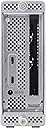
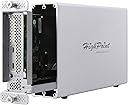
The Highpoint RocketStor 6661A is a Thunderbolt 3 to PCIe 3.0 expansion chassis designed for professionals seeking high-speed connectivity and versatile storage solutions. With support for up to 6 devices and ultra-quiet cooling, it’s perfect for enhancing your workstation's capabilities across Windows, Linux, and macOS.


| Brand | HighPoint |
| Series | RS6661A |
| Item model number | RocketStor 6661A |
| Operating System | Windows, Linux, macOS |
| Item Weight | 4.6 pounds |
| Product Dimensions | 6.3 x 2.24 x 10.12 inches |
| Item Dimensions LxWxH | 6.3 x 2.24 x 10.12 inches |
| Color | White |
| Manufacturer | HighPoint Technologies Inc. |
| ASIN | B07CTL7XWJ |
| Is Discontinued By Manufacturer | No |
| Date First Available | April 30, 2018 |
J**I
Works well so far.
Setup:* 27" iMac 5k with TB2 ports.* HighPoint RocketStor 6661A* Third party PCIe to NVME adapter* Generic 1TB NVME & SSD in a USB 3.0 case (for APFS Fusion)Some Pros: Quiet or the fans don't work. Solid build. Easy to get into the device. Discreet. No crazy vibrations. (I don't like fan or drive vibrations)Cons: No On/Off switch. These devices (external chassis) still have a low adoption and the information out there only focuses on graphics. The one that did focus on NVME did not cover this information.Now for the TL;DR user experience:I wanted to future proof myself with a Thunderbolt 3 expansion to use with my 27" iMac 5k (late 2015). I was very nervous at first since the device had poor reviews. I've had it for 2 weeks now and it's had there has been a fair share of issues but I wouldn't say all of them are Highpoint's fault.I used the Apple TB3 (USB-C) to TB2 adapter to get this to work on my iMac with TB2. I placed a Vantec PCIe card in the enclosure and used a generic 256GB Inland Professional NVME I took out of my Windows box. At this point, I had a secondary SSD in a TB2 dock form a different Vendor. My first step was to even see if macOS saw the device. When I first turned it on, it did not recognize or power up. I was starting to get nervous. For some reason it did not like the Apple TB2 cable. I swapped it out with a 3rd party TB2 cable that I previously purchased. Voila. There's the device.I reformatted macOS and set it up to use the combined 480GB OCZ SSD w/ 256Gb Inland NVME. This setup worked like a charm but it had issues returning from sleep. This is apparently a known issue on a lot of devices. It's not just Highpoint. I got around this by turning off certain power settings such as auto shutoff, standby, and hibernation modes using pmset. Now It was working brilliantly. However, the NVME was only 256GB and I wanted more...I decided to take the TB2 dock back and buy a 1TB NVME instead. The original OCZ 470GB SSD was using USB 3.0 and I wanted to try the TB2 dock. I couldn't afford both the dock and the enclosure though. Now to get macOS on a new APFS Fusion drive using the 1TB NVME plus the OCZ SSD (now in a USB 3.0 enclosure). That's when all the troubles started.The fusion was created automatically and set the 1TB to the "main" device and the 480GB to the "Secondary (Aux" device. (Personally I wish APFS could span drives or use JBOD similar to Windows Storage Spaces. Right now it defaults to Fusion.) Over the next few days, I would have to unplug the Highpoint, cross my fingers, and hope I could option boot and see the drive during selection. Otherwise I'd get the folder with the blinking question mark or have to reset PRAM.Being an old timer Mac guy, I remembered that Macs would scan ports in a specific order during boot time. This apparently never changed from the old SCSI days. I started wondering if the Thunderbolt is last on the chain. I checked disk utility and found the synthesized APFS fusion drive was showing up as USB. Below that was the container and volume. Each were showing up as PCIe. I knew that had to be an issue. Apparently, it was scanning the USB device first before getting to the TB3 device and that in turn led to the question mark. It couldn't find the system on the USB device because the system resided on the NVME. I reformatted and reinstalled but it always showed up the same.You are probably wondering why even set it up that way. Well even with TB2, NVME, and a USB SSD, I was getting ~1200MB/s write and ~1400MB/s read. Together they made up 1.5TB of solid state love. That's a lot of space. What can I say? I am a glutton for space (punishment).Unfortunately, I had to redo the whole installation and manually create the APFS fusion drive so that the slower 480GB SSD was the "main" device and the 1TB NVME was the secondary (Aux) device. Voila! Now it boots up fine. It still doesn't respond to sleep well. That's a known issue though. It's not just Highpoint and I *did* use a generic NVME. (Inland Premium without firmware patches)Is it fast? Not as fast as the original setup but that's only when benchmarking. It's fast when booting up. When starting apps, I get about one bounce. Sometimes no bounce. So yeah. That's fast. Plus maybe it's better to have the secondary drive this way to prevent overall wear on that drive.I will report back in about a month. Fingers crossed.
C**N
Could be better, see edit at bottom
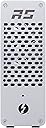
This is a review for the bare case to which you can add a PCIe card of your choice. For example, I use it for my Myricom SFP+ 10GbE network adapter. In order for a PCIe-card of your choice to work, it needs to be Thunderbolt-aware and not draw more than about 45W. The two internal fans keep the card cool (many competing products only use one fan) and the case is spacious enough to accept cards up to 8.2" long @ full height. The case is solid extruded Aluminum, clear-coated to a finish similar to the 2010-era Power Macs.There is one open standard PCIe slot (x4 3.0) and enough room between the slot and the thunderbolt interface to accommodate a pretty wide variety of cards. This means you can attach cards that have more PCIe lanes (x8 or x16, for example) but the cards will only function at x4 speeds, which is allegedly good for 4GB/s raw throughput. Many folk are happy at those speeds with current eGPUs and that's about 3x what my network card can theoretically handle.I would not attempt a eGPU rig with this unit unless you're willing to either tone down the power needs significantly and/or make significant modifications. For example, the OEM power supply is only good for about 60W (12VDC @ 5A), which isn't going to get you very far. Similarly, while the OEM cooling will work just fine for a network card, SAS controller, etc., I doubt it will suffice for a graphics rig under intense load.It would be great if Highpoint allowed the customer to easily mount this case horizontally. The fans are also little buzzy and hence I may elect to replace them with Noctua models in the future. Thankfully, there are standard pin headers for the the fans on the inside, so the swap is easy.Compared to competing products, this case is longer, narrower, and less expensive.EDIT on Nov. 9, 2018:Too bad. As of today, the unit is no longer functioning. The lights come on, the fans start spinning, then the power cuts and the cycle repeats. I doubt it's the external power supply (which was easy to test, but then again, it wasn't under load). I've contacted Highpoint to get a replacement / repair. However, less than a months worth of occasional use shouldn't cause a unit to fail.After some back and forth, a RMA was authorized, I sent in my unit in, and eventually a replacement was sent to me. The replacement has been working fine since.By now there are better options re network adapters than combining this enclosure with a PCIe card. However, it’s a workable solution and I really like how the unit only comes on whenever it is plugged into a active thunderbolt bus.
S**D
Worked for a few days.... then quit.
Purchased and initially worked, but when using again later it no longer powers up. Too bad I only use intermittently, found out didn't work again outside of return window.For a pricey item like this go with another manufacturer, this one was a waste of 200 dollars...
D**N
Does Not support PCIE 3.0 X16 speeds
I bought this enclosure to run an external capture card on my Lenovo legion 7i Gen 6 laptop. I was hoping to use it with a Datapath e1s but I could not get the enclosure to show up in the device manager with the e1s inserted. I then swapped my Avermedia Live Gamer 4K into the enclosure thinking it may be a compatibility issue and the live gamer 4K actually did show up in my device manager. After installing the drivers and running the stress test in RECcentral I found out the card was only running at 10.6gbps and would not capture 4K 60 or 2k 120 at full 4:4:4 RGB24 chroma sub sampling. The advertised speed of the enclosure is PCIE 3.0 x16 witch is 16gbps. This also explains why the E1s would not work. In my experience the e1s requires full lane support even though it only transfers data at a maximum of 650MBps. Bottom line If you require full PCIE 3.0 x16 speed I cannot recommend this enclosure. To be clear this may still fully function with the Elgato 4k60 Pro as it may require less bandwidth but I do not have one to test with so I cannot speak on that. Sadly I will be returning this. The price was right, the build quality seemed good and the small form factor would have worked extremely well for my needs, but the lack of full PCIE 3.0 x16 support was a complete deal killer for both the Avermedia live gamer 4k and Datapath e1s
Trustpilot
1 month ago
3 weeks ago
5 days ago
1 month ago