Desertcart purchases this item on your behalf and handles shipping, customs, and support to South Africa.
๐ Stay connected everywhere โ your personal Wi-Fi, anytime, anywhere!
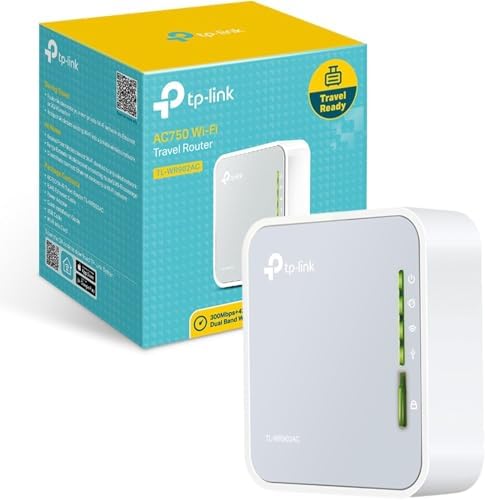
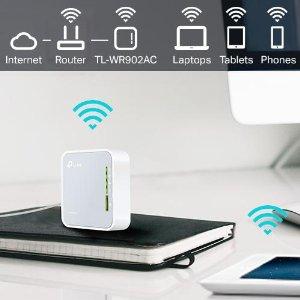
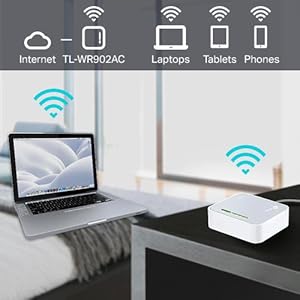
The TP-Link AC750 TL-WR902AC is a travel-friendly, dual-band Wi-Fi 5 router delivering up to 750 Mbps combined speed. Its ultra-compact design supports multiple modes including router, hotspot, bridge, range extender, and access point, making it perfect for professionals on the move. Powered via micro USB, it offers flexible charging options and a USB port for file sharing, ensuring reliable, fast internet access wherever you go.


| ASIN | B01N5RCZQH |
| Antenna Location | Home |
| Antenna Type | Internal |
| Best Sellers Rank | #2,225 in Computers & Accessories ( See Top 100 in Computers & Accessories ) #27 in Routers (Computers & Accessories) |
| Box Contents | AC750 Wireless Travel Router TL-WR902AC, Power Adapter, RJ45 Ethernet Cable and Quick Installation Guide |
| Brand | TP-Link |
| Brand Name | TP-Link |
| Colour | 750 Mbps |
| Compatible Devices | Laptop, Personal Computer, Smart Television, Smartphone, Tablet |
| Connectivity Protocol | Wi-Fi, Ethernet, USB |
| Connectivity Technology | Ethernet, USB, Wi-Fi |
| Control Method | App |
| Controller Type | Switch |
| Country of Origin | China |
| Coverage | Standard |
| Customer Reviews | 3.8 out of 5 stars 9,680 Reviews |
| Data Transfer Rate | 750 Megabits Per Second |
| Frequency | 5 GHz |
| Frequency Band Class | Dual-Band |
| Global Trade Identification Number | 01210002618236, 06935364095666 |
| Has Internet Connectivity | Yes |
| Importer Contact Information | TP-LINK India Private Limited,Green Industrial Park, Dongri Pada, Poman, Kaman-Bhiwandi Road, Vasai East, Palghar, Maharashtra โ 401208 |
| Is Electric | Yes |
| Is Modem Compatible | No |
| Item Dimensions L x W x H | 6.7L x 2.2W x 7.4H Centimeters |
| Item Part Number | TL-WR902AC |
| Item Type Name | Router |
| Item Weight Unit of Measure | 9.52 Ounces |
| LAN Port Bandwidth | 10/100 megabits_per_second |
| Manufacturer | TP-Link Technolgies Co. Ltd. |
| Manufacturer Part Number | TL-WR902AC |
| Maximum Upstream Data Transfer Rate | 375 Megabits Per Second |
| Model Name | TP-link AC |
| Model Number | TL-WR902AC |
| Number of Items | 1 |
| Number of Ports | 2 |
| Operating System | Windows |
| Other Special Features of the Product | Access Point Mode |
| Packer Contact Information | TP-Link Technologies Co., Ltd, South Building, No.5 Keyuan Road, Central Zone, Science & Technology Park, Nanshan, Shenzhen, P.R. China |
| Router Network Type | hybrid |
| Special Feature | Access Point Mode |
| UPC | 845973095666 840460604789 |
| Unit Count | 1 Count |
| Voltage | 120240 Volts |
| Wi-Fi Generation | Wi-Fi 5 |
| Wireless Communication Standard | 802.11ax |
| Wireless Compability | 802.11ax |
V**S
A great repeater for college!
I get actually more speed over it , than just directly connecting to router , also ! College Wi-Fi is only usable by using this , so itโs great ! And it allows multiple devices on one login to router so that really helps (in single device allowance cases) , it can be ran with a power bank (almost 3 days on 20000mah) , so itโs the best thing ever , configuration for pop-up login screens may need some digging tho aha , but works
S**U
Tiny, cute, very simple wifi router with capabilities of it's big brothers.
A small square box in white colour. It's design is pleasing. On your table it will look elegant. Extremely easy to set up. Just watch the tutorial video on YouTube. One of my offices is at basement. Mobile network is very poor there. I use an app on my phone that needs constant connection. It was a real headache. One day i noticed a lan port just beside my table. I got an idea. Now with this wifi router my problem got solved. Connection is stable & fast. But i didn't check the range of wifi as it serves my purpose fully. Excellent product.
B**H
This review is about the TP-WR902AC Travel Router (Do not confuse with other routers here)
First of all - please get this fact right. The seller has placed multiple routers in a single ad. The Star ratings that you see is an aggregate of all the routers. Therefore, let me first clarify that this review is about the TP-WR902AC Travel Router. Seller has put so many routers on the same page either inadvertently - or deliberately. Either way, it misleads customers. When you start to set up the router, it asks whether you want to configure this as a "3G/4G Router" or as a "Wireless Router". One of my uploaded images clearly shows "3G/4G USB" written beside the USB port. If you are seeing Q&A to understand this router, you will have seen some answers saying that there is no USB port. If you have been to the Q&A section, I am sure you are as confused as I was. Not only does this router have a USB port - the port serves a dual purpose. * In 3G/4G mode, this is where you connect the dongle * In Wireless Router mode, this accepts an external USB which can be accessed by your devices with proper configuration. I have added a screenshot for this too - showing my external USB disk partitions as sda1 and sda2 Configuration is easy - my son (12th std) got to work on a router for the first time and he did it in minutes. Both 5 GHz and 2.4GHz WiFi working excellently (Yes - you will have two WiFi signals from this one, as the AC suffix suggests) If you configure this as a repeater, you will experience loss of speed (as with ALL repeaters - something which I explained in my review of the Netgear EX3110 extender ... search for ASIN: "B07B1B2CZT"). However, in my case I pulled a LAN cable from my main router to this one. This makes it simple to connect - just select "dynamic IP" and your router is connected. I get ISP speed and hence happy about it. Just beside the ethernet connector, there is a switch to select whether you want to share ethernet, share a hotspot or create an Access Point. Signals are very strong (as expected, the 2.4GHz gives higher range while 5GHz gives better Signal-Noise ratio). The 2.4 GHz is reaching a third room about 20 feet away - penetrating two walls. So yes - the signal is good. Three dampeners why I gave one star less: 1. Cable is just about 1 foot long (see image). Now *that* is cost cutting. I had to use an extension board to be able to place it on the table. Plug point is just about a metre higher. Wonder how much profit TP Link is making by saving the cable length !! 2. The MiniUSB charging port is a bit inside - therefore every miniUSB charging cable may not be suitable (it will keep falling off). To get a proper one, you need to see and compare the sizes to buy the longest (This one needs an additional 1mm to fit properly). This is not the only device with this issue - and there are many cables easily available - only you need to physically search for it. Online purchases may not work. 3. This does *NOT* accept third party software. dd-wrt definitely is incompatilbe. OpenWRT includes this under their compatible routers list, but their forum says they lose the 5GHz band. Also - no clarity whether OpenWRT will support the 3G/4G mode. However, the OEM firmware is great in itself offer many options to use. So I suggest you stick to it. The hardware version I got was TL-WR902AC v3 00000001 which probably uses a Mediatek card. The preloaded firmware was 0.9.1 0.2 v008a.0 Build 191209 Rel.57116n(5553). When I tried to upgrade from the India site, it said incompatible firmware and when I googled more to realize that this is probably a US firmware. I tried to upgrade to the US firmware and was told that the router already already the latest, so no changes made here. SUMMARY Pros: Ethernet input, Dual-purpose USB, 3G/4G support and rock solid dual-band signals in a pocket-sized package costing less than โน 2000 ... I guess that speaks volumes to help you decide. Cons: Short power cable (1 foot) and no compatibility with dd-wrt or OpenWRT made me reduce one star. I felt that this is truly what it claims to be - a powerful travel router with 3G/4G mode available.
A**H
Wi Fi connectivity issue. Worst call center support. TL WR 902 AC, AC 750 Wi Fi Travel Router.
Very Disappointed. TTL WR 902 AC, AC 750 Wi Fi Travel Router. Product description says it can be used to make WPA2 Enterprise wifi as private wifi. But No support for WPA2 Enterprise PEAP. It actually can not connect to WPA2 Enterprise wifi setup. The worst thing is their call center doesn't take the call even after even 12 rings after a long queue wait when it gets connected to representative, happened twise. They don't know hot to configure. They promised call but never called me. 3 executives disconnected the call after listening to the problem. Even after 8 calls no proper answer as they dont know about their product. The product quality, packaging seems good. But all these are meaningless when the router is not doing what it is supposed to do. Even worst feel is their call center support. On email they never replied till date. Only good thing is this product can be returned.
C**A
Do not purchase this item
Item quality is good. But this didn't serves my purpose. I want to return this product but no support form the Amazon. There is a replacement option but no return. If you know the product then only purchase otherwise don't purchase . This product is simply lying with me. Rarely useful. Think all the available options, finally purchase. This unit heats up.
A**I
Extremely compact but Powerful
This is a great product that TPlink came up with.. It works like charm in different environments.. Use it as a hotspot/ extender / bridge etc Useful in home or travel it is very convenient
S**H
This one is a Little Network Beast
It works as anything , Private WiFi server, Hotspot, Wi-Fi to LAN, LAN to Wifi,Modem to LAN & WiFi. And it finally does it purpose that i bought for i.e it works with JioFi wired & Wireless. So easy 5Star. But the device is fragile, must handle with care for sure.
D**K
Route your wifi internet signal to lan (device which does not have wifi)
My TV wifi streaming was not working properly as inbuilt wifi adapter only supports 2.4 ghz and my broadband provider was providing better speed at 5 ghz rather than 2.4 ghz. So had to find a adapter or router like this which can take in wifi signal and route it to LAN port. Came across this device and it works like a charm. Also this device supports many other functions like range extender, simple router, hotspot mode, etc.
P**P
The Best Portable Hotspot ... and Media Server
I had a Hootoo Tripmate but they stopped supporting the app which was required to configure it, and it was slow(er) 802.11n. I considered buying a tplink or GL.iNet wifi 6 router, but carrying another PD QC power adapter was a deal breaker. There's USB power outlets 'everywhere', like hotel TVs+lamps, battery banks, laptops, etc. The fact that the TP-Link TL-WR902AC could run from 5v 500ma USB (no ext drive) was the clincher. Being 25% smaller and 75% lighter than my old Hootoo made it a slam dunk purchase. The fact that it fits in my travel electronics accessory bag speaks volumes. I intend on using the TP-Link travel router primarily in hotspot mode to share one hotel captive registration with multiple devices to avoid ridiculous charges. I might stream to a Roku or Fire Stick, work from my laptop, and read email or browse the internet with one or two phones. Initial testing indicates that the router delivers about ~110Mbs down and ~20Mbps up, whether you use a 2.4Ghz or 5Ghz channel. When I tested two simultaneous downloads, it didn't balance well. One connection got most of the bandwidth. I didn't spend the time to investigate QOS settings (yet). Regardless, hotels/public wifi rarely offers more than 20Mbps, so bandwidth speeds over that is a don't care. I dinged a star because tplink didn't include a case, not even a cardstock sleeve... and for the funky tplinkwifi.net configuration procedure. 1 month update: Finally got to try it with a hotel captive portal... very interesting experience, going through "Quick Setup"... very non intuitive but only took about 5min of trial and error. I was able to connect 2 phones, a laptop, and my Amazon fire stick simultaneously. And I charged two phones and powered the router with one 3x USB power adapter. All in all a successful 1st run. 2Y Update (Changed to 5*) Things have changed a lot in the last 12 years since I purchased and carried my first HooToo travel router. Free hotel wifi with enough bandwidth to support streaming is more the norm vs charging per device for slow wifi. Cell service is cheaper and phones now support wifi and cell network hotspotting. Streaming services (eg Netflix) support downloaded content for viewing offline. The need to carry a laptop for work, in addition for downtime or holiday entertainment has become less and less, replaced with casting to a hotel Google TV, or streaming to a Fire/Roku Stick. In rare cases, hotels tried to force Pay-Per-View on guests by providing closed TVs without casting or hdmi ports, but Eff that; then I'd resort to peering at my tiny phone screen and torching the hotel with a bad review. --- PUNCH LINE --- For those who have a substantial media library, the TL-WR902AC, serves as a very good, affordable, media streaming server when used with a 1-2TB USB Flash Drive (eg SSK 2TB USB SSD Flash Drive). However, there are quirks-constraints to heed. 1. The TL-WR902AC is power spec'd at 5V/2A (10W). 2. The USB-A port is spec'd at 5V/1A (5W), which also implies the router component may consume up to 5W. 3a. A *mechanical* usb external 2.5" HDD will typically draw 0.35-0.45A when reading/writing, but may draw *1.2A* at spin-up. And continuously draw ~0.3A to keep the disk spinning. 3b. A USB flash drive (eg SSK 2TB USB Flash Drive SSD ) may draw 0.8A (typical)-1A (peak). 4. Underpowering a connected USB drive runs the risk of corrupting the data or damaging the drive. Other: A. My 'older' Roku 4K stick doesn't support MKV video containers. Transcode/copy-convert videos to MP4 h.265 (or h.264) with ffmpeg or handbrake. B. FAT32 doesn't support >4GB files C. Android Phones don't support NTFS D. Streaming doesn't support subtitles. The point is, using a TL-WR902AC w/ 'SSK 2TB USB Flash Drive SSD' to serve up about 400 mp4 h.265 videos to either a VLC/Amazon Fire Stick 4K or Roku Media Player/Roku 4K Stick works well. Reduce the risk of damaging the drive by using the TL-WR902AC solely as a media server reading data from the USB drive; write your media directly with a laptop. I'll update this review if future anomalies arise.
C**K
Very disappointed with TP Link quality
Very disappointed with TP Link quality. You can go thru to change the password but you cannot log into the router. Changing settings for the router is a complete pain and take hours. I bought this because I thought this will be like other TP Link products I bought and will be easy to set up. Instead it is just a useless box.
M**N
BEST BUY
Very useful for captive portal WiFi sharing..
P**M
**Great Travel Modem โ Compact and Reliable**
This modem is perfect for travel. It connects easily to the hotel's host server and is impressively compact. The iOS app makes setup quick and hassle-free. I also appreciate the added security features, which provide extra protection while browsing the web. Highly recommended for frequent
J**I
It works like a charm
The product is made in quality material and very small in size. It works as it claims. One thing I noticed that if I use my own Cat 5e Ethernet cable, it will not connect. I have to use the Cat 5e Ethernet cable provided. I didn't try more Ethernet cables. Also the micro USB cable is a bit too short, which is not a big problem, as every body has a lots of them in stock I guess.
Trustpilot
3 weeks ago
2 weeks ago