Desertcart purchases this item on your behalf and handles shipping, customs, and support to South Africa.
🖨️ Elevate your prints, wirelessly and effortlessly—because your memories deserve the best!
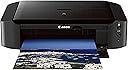
The Canon PIXMA iP8720 is a high-resolution wireless inkjet printer designed for professionals and creatives who demand exceptional photo and document quality. Featuring a 6-color individual ink system with gray ink, it delivers borderless prints up to 13" x 19" at 9600 x 2400 dpi. With AirPrint, Google Cloud Print, and PIXMA Printing Solution, it offers seamless wireless connectivity across devices. Fast print speeds, smart sharing options, and quiet modes make it ideal for home or office use.

| ASIN | B00HM0IV52 |
| GTIN (Global Trade Identification Number) | 00013803230840 |
| UPC | 013803230840 |
| USB2.0ポート数 | 2 |
| USBポート数 | 2 |
| おすすめ度 | 5つ星のうち4.0 2,487 レビュー |
| インク色 | ブラック、グレー、シアン、マゼンタ、イエロー。 |
| カラー | ブラック |
| コントローラーの種類 | Android、iOS。 |
| シリーズ番号 | 8746 |
| スキャナータイプ | フォト |
| ディスプレイの種類 | LCDまたはLED。 |
| デュプレックス | 手動 |
| トレイ数 | 1 |
| ハードウェアインターフェイス | USB, USB 2.0 |
| ブランド | キヤノン |
| ブランド名 | キヤノン |
| プリンタ出力 | カラー |
| プリンタ採用技術 | インクジェット |
| プロセッサ数 | 1 |
| メーカー名 | Canon |
| モデルシリーズ | PIXMA iP |
| モデル名 | IP8720 |
| ユニット数 | 1.00 個 |
| 両面印刷 | いいえ |
| 互換デバイス | スマートフォン, タブレット |
| 出力シート容量 | 150 |
| 印刷メディア | 光沢のある写真用紙 |
| 印刷技術 | インクジェット |
| 同梱商品 | 1 |
| 品目の寸法 (D x W x H) | 33.3奥行き x 59.2幅 x 16高さ cm |
| 商品の用途 | ビジネス。 |
| 商品の追加説明1 | ネットワーク対応 |
| 商品の重量 | 18.6 ポンド |
| 商品種別 | インクジェットプリンター |
| 型番 | 8746B002 |
| 接続技術 | Wi-Fi, 有線 |
| 最大コピー解像度(カラー) | 9600 x 2400 dpi |
| 最大コピー解像度(モノクロ) | 9600 x 2400 dpi |
| 最大コピー速度(モノクロ) | 14.5 ページ/分 |
| 最大メディア(用紙)サイズ | 13 x 19 inch |
| 最大入力シート容量 | 150 |
| 最大印刷解像度(カラー) | 9600 x 2400 dpi |
| 最大印刷解像度(モノクロ) | 9600 x 2400 dpi |
| 最大印刷速度(カラー) | 10.4 ページ/分 |
| 最大印刷速度(モノクロ) | 14.5 ページ/分 |
| 特徴 | ネットワーク対応 |
| 管理方法 | アプリ, タッチ |
| 紙サイズ | 8.50 x 11, 8.50 x 14, 11 x 17, 4 x 6, 5 x 7, 8 x 10, 13 x 19 |
| 色 | ブラック |
| 色彩深度 | 48 bpp |
| 解像度 | 9600 x 2400 |
| 追加のプリンタ機能 | 印刷のみ |
| 通信・接続インターフェース | Wi-Fi, 有線 |
| 電気 | いいえ |
J**Z
Impresionante!
Si andabas buscando una impresora para tus fotos en alta calidad fotográfica, de bajo costo y fácil de operar, no busques más...! Esta es. En combinación con el papel correcto (según tus preferencias) hace maravillas! La defino con una sola palabra IMPRESIONANTE!
B**E
An excellent prosumer printer that stands up to high-use from a professional print designer.
I'm a professional graphic designer and specialize in print work. I've been using this printer in my design studio since 2018 and have printed 5,000+ sheets on it now, and I am still exceptionally happy with it. The print quality is excellent, as good as any of the lower Canon and Epson Pro models I've used. I print photos, posters, invitations, business cards, flyers, greeting cards, vinyl stickers, postcards, envelopes, and more with this for myself, clients, and retail products. I've used up to 140lb watercolor paper and printed branded tissue paper (on a carrier sheet of course) with no issue. I've maybe had 5 paper jams total throughout the life of this printer. I use Canon papers, HP papers, Red River papers (my favorite), and all sorts of off-brand paper, scrapbook paper, cardstock, and printable vinyl. Matte, satin, and glossy. This thing prints like a champ and takes whatever I've thrown at it. Keep in mind that higher-quality papers will always give you higher-quality results, no matter the printer. If you have a color-calibrated monitor and use Canon inks with the proper settings, the color accuracy is excellent. Far better than vista print in color accuracy and quality, in my experience. As with any photo printer, using off-brand inks can and often damages the print heads, in addition to causing color accuracy issues. I get amazingly vibrant, high-color artwork prints out of this machine, the ink quality is amazing. My cost with Canon XL carts for a one-sided, full-color 13x19 glossy highest-quality photo print (which uses the most ink) is roughly $0.009 per square inch or $2.21 per page. OfficeDepo has a great rewards program that includes giving you credit/points for recycling cartridges. I buy most of my tanks from Amazon unless OfficeDepo has a sale, but for every 10 cartridges you recycle, you can get a free XL tank. This isn't a plug-and-play consumer printer though. It takes a few minutes to set up and you have to understand how to use a higher-quality inkjet printer. You have to use the print utility and use the settings appropriately. Almost every bad review I've seen on here is because someone didn't take the time to learn how to use it correctly. If you are tech-illiterate, this isn't the printer for you, and the same will be true for nearly any higher-quality photo printer. Be sure you go to the Canon website and download the drivers offered there, the 8700 driver is great and has a ton of options. Make sure you are using the correct settings for the material you are printing on for the best results. If you think it's too loud, turn on the quiet mode found in the printer utility. You can also adjust the print speed through the utility as well. If you're printing documents, fast printing is fine. If you're printing photos, posters, printable vinyl, or anything ink-heavy (ESPECIALLY on glossy mediums), turn your speed down to the slowest speed for the best results. You CAN set it up without wifi, I set mine up wired at first without issue on my old MacBook Pro. When I replaced my hardware with an iMac, I set it up via the wifi without issue. I've used it over several versions of Mac OS and iOS without issue. I've set it up on two different models of HP laptops as well over wifi without issue. I've used it over several versions of Windows now as well without issue. As with any printer, when you upgrade your operating system to a new version, you may have to redownload the drivers or uninstall and reinstall them, but again that should be understood as that's true of any higher-quality printer. If you have an obstructed wifi signal you may have issues, but that's a given. If your router doesn't have the bandwidth for all the devices using it, you'll have issues, but that's also a given. If you have issues with the wifi, you absolutely can use this printer hardwired as well, and it will print faster. If you have a large print file, you may want to consider hardwiring for that job. When I print multiple copies or multiple pages of 13x19 prints I do this. Be sure to do proper maintenance, which means periodically running cleaning functions, running the print head alignment check, and realigning the print heads with the utility when required (the utility has an automatic function for this you just have to click run and evaluate the test result when complete). These things are true of ANY photo or art printer though. These things will greatly extend the life and quality of your equipment. I have been happier with this printer than I ever expected, especially for this price point!
P**R
Excellent printer
Perfect and fast for everyday printing or high quality photo printing. As for the vendor, I even received it before the expected date. Thank you!
R**F
Excellent Mid-Size Printer for the Price
I'm a 65-year veteran professional photographer and have been dealing with digital printers since the first bubble jets came out. I bought this printer for a backup because the Canon Pro-100 I have been using for over 10 years sustained some damage during a move and I'm not quite ready to purchase a 24" x 36 unit. I'm now a Canon devotee after years of HP and Epson disappointments (although HP has improved quite a bit. Epson, regrettably, is still way to expensive in terms of maintenance and its color balance leaves much to be desired, IMHO). EASE OF USE: I'm delighted with the Canon IP8720 for what it is. Fast, easy set-up. (Can't argue with the complaints about WiFi integration because I am strictly old-school "cable connect"). Print quality is excellent but remember this is a simple CMYK-K printer so don't expect super-fine gradients in lighter colors as with a printer that adds Photo Cyan and Photo Magenta. It uses pigment Black so certain "dye ink only" papers are not compatible as the black will not dry or be absorbed. GRAY SCALES: As with the Pro-100, I have found that "black and white" print settings will produce monochrome prints with a slight magenta cast. In general I have found that the paper selection settings have no relation to the absorption qualities of a particular paper. The settings alter the resident ICCs. For my uses, I have found that to print any image that requires a "neutral gray" tone (either B&W mixed with full color or B&W only) the solution is to set paper to "High Resolution Paper" or "Inkjet Paper" either of which seem to use an ICC that produces a near-perfect neutral gray, regardless of the surface qualities of the paper selection setting. SUMMARY: I found the Canon IP8720 to be an excellent value for 13x19 oversize printing and proofing purposes. Recommended for non-critical everyday use or art prints.
O**A
Excelente
Muy buena impresora, la calidad es excelente y soporta papel de hasta 18" x 12" de varios tipos, muy buena para fotografía pero tambien puede hacer otras impresiones gráficas sin problemas (he hecho tarjetas de presentación con ésta impresora). La tinta oficial es un poco cara pero hay otras marcas que sirven muy bien (recomiendo Arthur Imaging).
Trustpilot
2 months ago
2 days ago