Desertcart purchases this item on your behalf and handles shipping, customs, and support to South Africa.
🎥 Capture Brilliance, Stream Like a Pro!
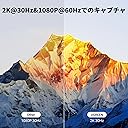
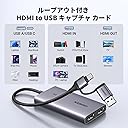
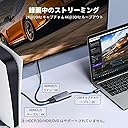
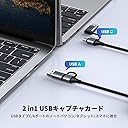
The UGREEN HDMI Capture Board delivers crisp 2K@30Hz recording with advanced 4K@30Hz passthrough, supporting USB 3.0 Type-A and Type-C connections. Its durable aluminum build ensures reliable heat management, while broad OS and console compatibility make it the go-to choice for gamers, streamers, and content creators seeking professional-grade video capture with ultra-low latency.
| ASIN | B0DGXJS6BF |
| Amazon 売れ筋ランキング | パソコン・周辺機器 - 1,588位 ( パソコン・周辺機器の売れ筋ランキングを見る ) 外付TVチューナー・ビデオキャプチャ - 6位 |
| OS1 | Windows 8.1, macOS, Linux |
| おすすめ度 | 5つ星のうち4.2 1,683 レビュー |
| オペレーティングシステム | Windows 8.1, macOS, Linux |
| ハードウェアインターフェイス | USB 3.0 |
| ビデオキャプチャ解像度 | 2K30Hz |
| ブランド | UGREEN |
| ブランド名 | UGREEN |
| プラットホーム | Windows |
| メーカー名 | Ugreen Group Limited |
| メーカー型番 | 25773 |
| モデル名 | CM726 |
| 互換デバイス | Switch、PS5、Xboxなど |
| 付属品総数 | 1 |
| 保証内容 | 2年間のメーカー保証 |
| 動画画素数 | 2K30Hz |
| 原産国 | 中国 |
| 同梱商品 | キャプチャーボード本体 |
| 商品のハイライト | USB 3.0 フルHD 1080P 60Hz 超低遅延、録画 、Switch、PS5、Xboxなど対応 |
| 商品の推奨用途 | ビデオ録画 |
| 商品の追加説明1 | 2K@30Hzキャプチャ、4K@30Hz入力とパススルー、低遅延USB 3.0ポート、多機能対応 |
| 商品の重量 | 88.2 グラム |
| 商品本体サイズ | 90 x 50 x 4 cm |
| 型番 | 25773 |
| 推奨ビデオアウトプットタイプ | HDMI |
| 最小システム要件の説明 | プロセッサ: Intel または AMD のデュアルコアCPU 2GHz以上 RAM: 4GB以上 空きディスク容量: 1GB以上 オペレーティングシステム: Windows 8.1, macOS, Linux |
| 特徴 | 2K@30Hzキャプチャ、4K@30Hz入力とパススルー、低遅延USB 3.0ポート、多機能対応 |
| 製品の推奨用途 | ビデオ録画 |
さ**ち
この価格でSwitch 2配信までできるのは驚き。OBS取り込み用として十分使えるキャプチャーボード
Switch 2をMacBookに取り込み、OBSでそのまま配信できました。この価格でそこまで問題なく使えるのはかなり驚きです。Elgatoも持っていますが、用途によっては「これで十分では?」と思えるレベルでした。 良かった点 Switch 2をOBSに取り込めた * Switch 2の映像をMacBookに入力できました。 * OBSでもそのまま認識し、配信まで問題なくできました。 * この価格で配信環境が成立するのはかなりありがたいです。 価格が安い * Elgato系のキャプチャーボードと比べると、価格はかなり抑えめ。 * 体感としては約1/10くらいの価格感なので、コスパはかなり良いと思います。 違和感なく使える * 30Hzかどうかは厳密には判断していませんが、実際に使っていて大きな違和感はありませんでした。 * カジュアルなゲーム配信や録画なら十分使えそうです。 気になった点 USB-C/A部分のシリコン?が少し硬い * USB-CとUSB-Aを切り替える部分のシリコンパーツがやや硬め。 * 接続時に少し邪魔に感じることがあります。 * ここだけは取り回し面で惜しいです。 総評 Switch 2をMacBookに取り込んでOBS配信できるキャプチャーボードとして、価格を考えるとかなり優秀です。Elgatoのような高価格帯製品と比べると細かい差はあると思いますが、「まず配信したい」「安く環境を作りたい」なら十分選択肢に入る商品だと思います。
A**ー
画面共有したいだろ?
初めてレビュー書くほど感動した商品。 INZONE Budsでパソコン+SWITCH2の音を遅延なしで聞きたかったから友人に言われ購入。 OBSを使っての画面共有、音も問題なし。 いろいろ調べて買ったけど背中を押すレビューが無かったため俺がお前の背中を押す。 お前の悩みはこれで解決するよ
久**田
コスパ最強なキャプチャーボード
パススルー性能が割と高く、OBSでの取り込みデータは必要最低限な品質を保っているので購入 OBSやdiscordの画面共有もできますが、ある程度設定をいじらないと不安定なので注意
田**郎
初めてのキャプチャーボード、最初はこれでいい
switch2の音を聞きながらDiscordでボイスチャットの音も聞きたいし友達間で映像も共有したいということで購入しました。初めてのキャプチャーボードなので安いのを買うのはどうかなと思いましたが結果的にこれを買ってよかったと思っています。 OBSでの録画や配信の画質もちょうどいいし、パススルー機能を使えば格ゲーやFPSなどの反応を問われるゲームもプレイできます。逆に言えばパススルーを使わないとこの商品への評価がワンランクダウンするくらい気に入っています。 ノートパソコンでOBSとDiscordを開き、OBSでswitch2の音を出力させてあげればDiscordのボイスチャットと同時に聞こえてくるので録画や配信をせずにそういう用途で使うのもアリです。映像の出力は別途モニターを購入してもらってパススルーすると快適なゲーム環境が整います。
蓮**實
問題なし(*•̀ㅂ•́)و✧
今のところ不具合なし。 1920×1080で、60fps録画できます。 wiiuでも問題無しに、映ってます。
ぽ**ぽ
値段相応
確かに2kなどは設定の候補にちゃんと出てくる が、ゲーム機側で60fps強制になったりすると超過して画質めちゃくちゃ落ちるので注意
H**A
Good for 1080P not 2K
I purchased it for being able to use it in another PC to stream at 2K or 1440P which this device can't handle, otherwise is a cheaper alternative for more expensive devices if you just want to capture at 1080P from consoles or other devices.
濡**れ
無難に良い!
テレビの代わりにSwitch2やWiiUの画面をPCに映すために購入しました。ある程度の遅延は覚悟していましたが、遅延はほぼ無かったので、とても良い買い物でした。録画も特に問題なく可能でした。 なおこのキャプボは恐らくソフトウェアエンコード、つまりキャプボ側は関与せず全てPC側で人間が認識できるものとして変換している思われるので、PCのスペックに不安があるのなら購入を控えるか、PC側を見直す必要があるかもしれません。
S**A
Excelente placa de captura
Qualidade muito boa, entrega o que promete
K**N
Goede kwaliteit
Werkt met VLC Media Player.
N**N
Don’t return this capture card before trying this!
At first, I honestly thought this capture card was defective. I connected my PS5, TV and MacBook, but the signal kept cutting out. The UGREEN logo would appear, the signal would briefly work, and then it would disconnect and restart. I was genuinely about to give it one star and return it. I even checked the reviews afterwards and thought, “I really should have read these before buying it.” Thankfully, I decided to troubleshoot the issue before giving up. After trying different things, I discovered the actual problem: HDCP was enabled on my PS5! If your capture card isn’t working properly, try this before returning it: 1. Open Settings on your PS5. 2. Go to System. 3. Select HDMI. 4. Find Enable HDCP. 5. Switch it OFF. 6. Reconnect your capture card if necessary and try again. That’s literally what fixed my problem! My MacBook could recognise the capture card, but the HDMI signal wouldn’t stay stable until I disabled HDCP. For reference, I’m using the UGREEN CM726 with my PS5, TV and MacBook. It supports capture up to 2K at 30 FPS, so make sure you check its capture specifications if you’re aiming for 60 FPS. I went from being ready to return this thing to finally getting my setup working. I genuinely thought I’d wasted my money, but it turned out to be a setting on the PS5 all along. My advice: check HDCP before assuming your capture card is faulty. It might save you a return, a replacement, and a lot of unnecessary frustration! Five stars
H**H
Decent Capture card with decent output quality
Pros: - Audio and Video output works as expected without installing any drivers - Some say Audio doesn't work but the audio device does appear and can be listen to via OBS or enabling the "Listen to this device" within windows 11, very easy to setup. - Video and Audio is excellent at 1080p when I tested, minimal compression and no noisy artifacts - Latency is very minimal, it can be slightly more latency bound if the game being captured only runs at 30fps but at 60fps it's quiet minimal if using the capture to use as a monitor though ur pc with OBS ect. Cons: - Very minor con, the capture card needs power to view the HDMI signal on a monitor/pc, without it you can't view the signal. However if your pc does support power to devices while your pc is off or sleep the capture card can still work meaning u can just have hdmi cables connected to the capture card and forget abou it. Highly recommend for the price compared to other capture cards that support both input and output.
J**K
Spełnia funkcję
Działa i spełnia swoje zadanie. Jednak trochę traci jakość obrazu i opóźnienie mogłoby być mniejsze.
Trustpilot
1 month ago
5 days ago