Desertcart purchases this item on your behalf and handles shipping, customs, and support to South Africa.
⚡ Power your network like a pro—fast, clean, and unstoppable!
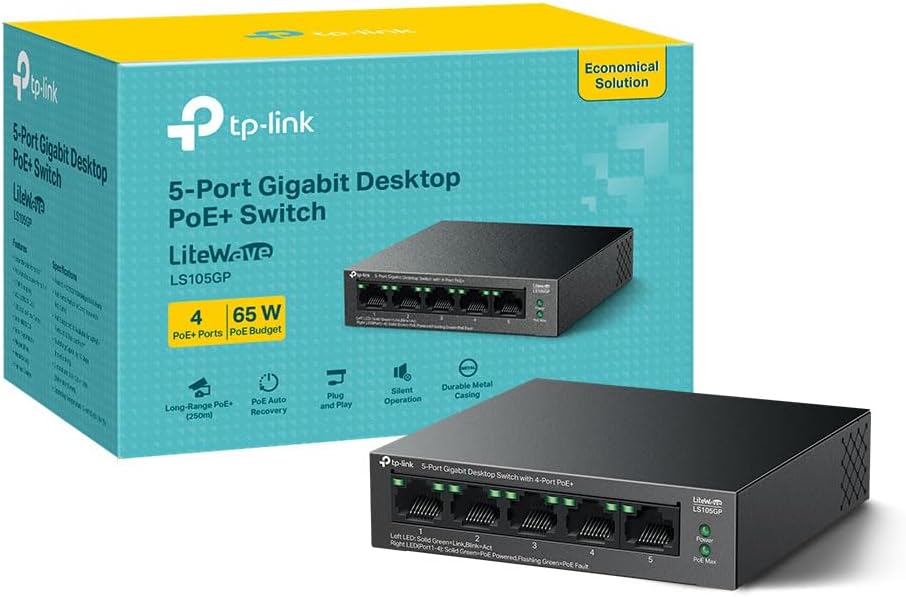
The TP-Link LS105GP is a robust 5-port unmanaged Gigabit PoE+ switch featuring a 65W total PoE budget with four ports supporting up to 30W each. It extends PoE transmission up to 250 meters, ideal for large-scale IP surveillance or access point deployments. Its plug-and-play design, silent fanless metal chassis, and auto-recovery for PoE devices make it a reliable, hassle-free solution for professional and home networks alike.


| ASIN | B0CMV4WT1G |
| Best Sellers Rank | 671 in Computers & Accessories ( See Top 100 in Computers & Accessories ) 7 in Network Switches |
| Box Contents | LS105G |
| Brand | TP-Link |
| Brand Name | TP-Link |
| Case Material Type | Metal |
| Color | Graphite Black |
| Colour | Graphite Black |
| Compatible Devices | PoE-compatible devices |
| Compatible devices | PoE-compatible devices |
| Country of Origin | China |
| Customer Reviews | 4.6 out of 5 stars 52,194 Reviews |
| Data Transfer Rate | 10 Gigabits Per Second |
| Global Trade Identification Number | 04895252504552 |
| Included components | LS105G |
| Interface | RJ45 |
| Item Dimensions L x W x H | 10L x 9.8W x 2.5H centimetres |
| Item Highlight | 4 x 30W PoE+ Ethernet Ports, 65W Total Budget, 250m Transmission, PoE Auto Recovery, Power Saving, Plug & Play |
| Manufacturer | TP-Link |
| Manufacturer Part Number | LS105G |
| Maximum Power | 65 Watts |
| Model Number | LS105G |
| Number of Items | 1 |
| Number of Ports | 5 |
| Number of ports | 5 |
| Platform | Not Machine Specific |
| Product Warranty | Limited life time |
| Product dimensions | 10L x 9.8W x 2.5H centimetres |
| Switch Type | Unmanaged |
| Upper Temperature Rating | 40 Degrees Celsius |
| Voltage | 5 Volts |
J**.
Reliable PoE switch – simple setup and works perfectly
I bought this PoE switch to power a mesh / access point system in my home so I didn’t need separate power supplies for each unit. Instead of having power adapters everywhere, I can now run both power and data through a single network cable, which keeps everything much cleaner and easier to manage. The setup was incredibly simple – just plug it in and it works straight away. I have Ethernet cables running around 20 feet from the switch to the access points and there’s been absolutely no drop in signal or performance. It does exactly what it says on the tin. Solid, reliable and perfect if you need to power devices like access points, cameras or other PoE equipment without extra power supplies everywhere. Definitely a great little switch for a home network setup.
M**N
Really good little hub for PoE users
I recently built some ESP32 powered camera devices using POE ports - I purchased this PoE switch to act as the main hub for them and it works really well, my father picked one of these up for using the cameras on his Model Railway. Not much else to say beyond them doing exactly what they need to - so far been 100% reliable, four cameras streaming data across them with all of them consuming power for 48 hours straight over one weekend and no issues from the hub at all, very happy with the purchase.
R**N
I love it when things just work!
This is one of those items that I was hoping to buy cheap, plug in, make sure it was working and then forget about. I've been able to do exactly that. I bought it to give me a few wired ethernet connections behind my TV stand for my Xbox, Smart TV and Apple TV. To be fair, two of those devices already worked over my home WiFi, but for network stability and a solid connection, you can't beat a good ol' wire going into the back of something! There are no ethernet cables provided with this switch, just a power cable, so you will need an ethernet cable for each device you want to connect. Once I had untangled three patch cables from my "magical box of tangled cables" ( I keep meaning to sort them out with colour-coordinated velcro straps, but that’s another story!), the switch was plugged in and working within 2 minutes of unboxing, which is exactly what I hoped for. The plastic casing is obviously going to feel a little cheaper than the brushed metal look on the more expensive switches, but it feels well made, even if it is very light. It runs completely silently and uses little power, so you won't notice a surge in any electricity bills! This device has some limits, which are worth knowing for someone with high needs, but for the average Joe like me, this is ideal. It has a 100Mbps limit, but this hasn't affected any of my TV or gaming habits. Technically, it claims to have 200Mbps full duplex, but I confess that this is where my brain starts to hurt, and I just have to pretend I understand. I **THINK** it means that the switch can run 100Mbps in both directions simultaneously but you won't get a 200Mbps streaming rate in one direction. In layman's terms: I have watched full HD (1080p) Netflix shows through this switch, without any buffering, on a broadband connection of under 60Mbps. I often wonder how many people benefit hugely from the 100Mbps+ range but the limit may be frustrating for someone who has splashed out on a broadband speed of 200Mbps. So if you have paid out for a 200Mbps broadband, AND for Ultra HD content AND an Ultra HD TV, then I strongly advise you pay the extra for one of the TP-Link's "big brothers" with a Gigabit limit. However, if like me, you want a cheap little switch to add to your nest of cables tucked behind your poor old "1080p TV", this is perfectly fine. Plug it in, check it works, forget about it!
B**T
Almost perfect
The switch does exactly what it is supposed to do. However, there are 3 issues where one is cosmetic and two can be quite dangerous (from security perspective). 1) the power brick is not completely silent - I can hear coil whining. It is pretty quite sound but people with good ears will find it annoying. 2) management IP address obtained by DHCP - there is no way how to block this functionality for specific VLAN only. If there are DHCP servers on multiple VLANs which are connected to this switch, the switch will simply use the IP which comes first. This can cause quite a headache in multi VLAN environment which has one nasty result - access to manage the switch works from any connected VLAN. So if you decide to use the switch for internal and external VLANs, although routing between them won't work, management could be compromised. 3) management is only via HTTP. It would be great if the switch supported HTTPS for security reasons (login credentials are exposed when using HTTP). On top of that, setting of native VLAN on ports is really not intuitive as for some reason it has to be done on 2 different tabs... Positives are absolutely clear: super low price for so much function - PoE (802.3af), VLANs (access, trunk + native), metallic body, compact size.
A**R
Reliable Plug-and-Play PoE Switch – Perfect for powering Outdoor Access Points
Not a great deal to say. It’s a switch that does exactly what it’s supposed to. I’m using it to power a TP-Link outdoor access point on a Starlink satellite broadband system. Setup was completely plug-and-play—no configuration needed at all. The PoE works flawlessly, delivering power and data over a single cable, which made installation much cleaner and simpler than having a separate power supply. Build quality feels solid, it runs silently as expected with no noticeable heat issues. If you need a reliable, no-fuss PoE switch for a small setup, this is a great choice. Highly recommended!
G**K
this was the best value switch I could find and very happy with ...
I have Cat6 boxes behind each TV and at my phone line input, all run to the garage. My ISP has provided me with a wireless hub which has the ASDL switch built in so it has to go at the front door and not in the garage where the other Cat 6 cables run... At present MOST of my devices are wireless however one room is too far away and has no signal yet I want a DLNA client there to stream movies to the TV. Therefore I needed some sort of hub or switch, initially tried an old wireless router with built in hub, that requrired disabling the wifi, then disabling DHCP, then changing its default IP as it clashed with my main router. When it was done it worked but kept disconnecting so purchased this instead! This was ideal as: 1, Its very small! really fits in well! 2, It looks well, i have it stuck to the wall in the garage, its profile and appearance blends in well. 3, It has NO DHCP this was very important, if you have an existing router and you just want to add some wired network capacity you usually dont want an additional DHCP server messing with your network! 4, Its fast enough to max out most domestic broadband connections, there are very few scenarios right now where realistically you can say this is not fast enough. 5, No setup, its plug and play 6, I searched here and other such websites, this was the best value switch I could find and very happy with it. Please note, dont be worried if you look in and see its not using all 8 pins, remember your broadband runs on a phone line which only uses 2!
A**W
Simple to install, big connection speeds upgrade.
Delivery n good time, well packaged, works a treat and very easy to install. Now have a Mac, Canon Pro 1000 printer, a wifi extender to my outbuilding and can live video link from my studio hardwired without swapping cables. So much faster than wifi to the same.
J**Y
9 Years On Still Running as Day 1!
First of all: For the pedantic bolts out there, I will be using simple maths for network speeds as this review is for the average person out there not network engineers lol. To indicate you don't actually you need the expensive 1 gigabit switches if your internal network doesn't require them or your internet connection is below 80 Megabits. Any cheap gigabit switch will do or Megabit switch if you come across one for less than a few quid (esp if you have a very slow internet connection). Have been using the: 'TP-LINK TL-SF1005D 5-Port 10/100 Mbps Unmanaged Desktop Switch' since 21 July 2016 and yes that's right I've been using a 100 Mbps switch for over 9 years and it cost £6.49 at time of purchase and at the time 1 gigabit switchs were fairly expensive. Subsequent TP-Link products bought have not lasted this long let alone 18 months. The NETGEAR JWNR2010-100UKS Wireless N300Mbps router I bought at the time didn't last that long either. Important note: Most likely the internal components will have changed as I don't think TP-Link will be using the same components as they were 9 years ago as manufacturing and nodes for chips have changed drastically since then. So, your mileage will vary. Okay, down to the key reasons why I'm still using this cheap switch. 1) It's taken aeons for ISPs to actually offer anything that will saturate a 100 Mbps switch. I'm currently on 80 Mbps down / 20 Mbps up and after the usual signal degradation of infrastructure it's about 73 down and 16 up. Still not maxing out the switch. 2) For internal file transfers, it's good enough as can just initiate a transfer, play a game, watch a movie or do chores. 3)If it ain't broke, don't fix and even I gave this to a charity shop it would end up in a landfil anyway as people are misguided into thinking they are getting 1 Gigabit speeds because the PC tells them the link speed is 1 Gigabit and there's all the marketing b.s. To work out a close approximation of your actual speed you divide a the speed in bits by 8 to the speed in Bytes (or 1 bit divided by 8 = 0.125 Bytes). So for me that 10 MegaBytes down and 2.5 MegaByte Up doesn't sound as impressive as 80 / 20 does it? haha.... So this 10 Mbps /100 Mbps speed can do 1.25 MBps / 12.5 MBps. So a 1 Gigabit (1000 Bits approx) connection works out roughly as 125 MegaBytes. Unfortunately, ISPs are sneaky in using Megabits and MegaBytes interchangeably as Megabytes. Simple rule of thumb: Mb (Megabits) is not the same MB (Megabytes) and divide the speed in Mb to get rough speed in MB. Same applies to Gb (Gigabits) and GB (GigaBytes).
M**N
nie pięć a 4 porty (jeden idzie na wejście)
Generalnie sprzęt działa i jest mały. Według informacji udostępnia 5 portów i tutaj producent mija się trochę z prawdą, bo jeden port odpada na wejście, więc mamy tylko 4 porty na podłączenie urządzeń. Jakoś to przegapiłem. Byłem pewien że na tylnej ściance jest wejście sieciowe a na przedniej są wyjścia, ale nie. Jeżeli potrzebujesz 5 wyjść to ten sprzęt nie jest dla Ciebie.
I**O
Works well
Works well on standard speed nbn
M**N
Okay
Okay port, I will recommend getting a giga one for today as internet speed goes faster today
M**R
TP-Link 5 Port 10/100 Mbps Network Switch
Very good and fast speed product, thanks Amazon and TP-Link.
E**R
switch ETHERNET 5 ports idéal pour étendre le réseau ETHERNET a plusieurs appareils
très bon article ,bon rendement et très performant très satisfait des services rendues bon vendeur a recommander 10/10 sérieux et rapide que du bon et du plus ! merci. SALOMON Rayd.
Trustpilot
3 days ago
1 month ago