

Desertcart purchases this item on your behalf and handles shipping, customs, and support to South Africa.
🚀 Elevate your home network to WiFi 7 speed and coverage — because buffering is so last decade!
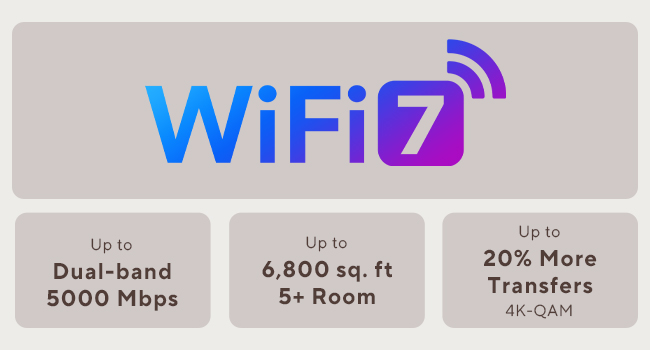
The ASUS ZenWiFi BD5 is a cutting-edge WiFi 7 mesh system offering blazing dual-band speeds up to 5000 Mbps and expansive coverage up to 6800 sq.ft with a 3-pack setup. Featuring dual 2.5G Ethernet ports, advanced AiMesh technology, and robust security with AiProtection Pro and VPN support, it’s designed for seamless, secure, and smart home networking. Ideal for professionals craving reliable high-speed connectivity and smart device management across large homes.


| ASIN | B0DHW9M7CB |
| Antenna Location | Business, Gaming, Home Use |
| Antenna Type | Internal |
| Best Sellers Rank | 113,309 in Computers & Accessories ( See Top 100 in Computers & Accessories ) 227 in Mobile Broadband Devices |
| Box Contents | BD5 3-Pack Router, Power Supply, Power adapter, Power supply., Quick Start Guide, Quick start guide, Quick start guide (may not English language not guaranteed)., Quick start guide (possibly English language not guaranteed)., RJ45 cable, Warranty card |
| Brand | ASUS |
| Brand Name | ASUS |
| Colour | White/Opulent Garden |
| Compatible Devices | Smartphone, Tablet, Personal computer |
| Compatible devices | Smartphone, Tablet, Personal computer |
| Connectivity Protocol | Wi-Fi, Ethernet |
| Connectivity Range | 6800 Square Feet |
| Connectivity Technology | Wi-Fi (802.11ax, 802.11ac, 802.11n, 802.11be, 802.11g), Ethernet |
| Control Method | Touch |
| Controller Type | App Control |
| Coverage | 6800 sq.ft. |
| Customer Reviews | 3.3 out of 5 stars 64 Reviews |
| Data Transfer Rate | 2882 Megabits Per Second |
| Frequency | 5 GHz |
| Frequency Band Class | Dual-Band |
| Frequency band class | Dual-Band |
| Has Internet Connectivity | Yes |
| Has Security Updates | No |
| Is Modem Compatible | No |
| Item Dimensions L x W x H | 14L x 7.1W x 14H centimetres |
| Item Weight | 1.2 Pounds |
| LAN Port Bandwidth | 2500 Mbps |
| Manufacturer | ASUS |
| Manufacturer Part Number | BD5 (W-3-PK) |
| Maximum Upstream Data Transfer Rate | 2882 Megabits Per Second |
| Model Name | BD5 (W-3-PK) |
| Model Number | BD5 (W-3-PK) |
| Model name | BD5 (W-3-PK) |
| Number of Antennas | 4 |
| Number of Ports | 2 |
| Operating System | ASUSWRT |
| Other Special Features of the Product | AiProtection, VPN, WPS Security, Alexa Compatible, Mesh fabric for the whole house, Network standard: WiFi 4 (802.11n), WiFi 5 (802.11ac), WiFi 6 (802.11ax), WiFi 7 (802.11be), IEEE 802.11a, IEEE 802.11b, IEEE 802.11g, IPv4, IPv6, Wirelss Router, AiMesh Node, Access Point Mode |
| Router Network Type | mesh |
| Security Protocol | wpa2-psk, wpa3, wpa2 or wpa3 |
| Special feature | AiProtection, VPN, WPS Security, Alexa Compatible, Mesh fabric for the whole house, Network standard: WiFi 4 (802.11n), WiFi 5 (802.11ac), WiFi 6 (802.11ax), WiFi 7 (802.11be), IEEE 802.11a, IEEE 802.11b, IEEE 802.11g, IPv4, IPv6, Wirelss Router, AiMesh Node, Access Point Mode Special feature AiProtection, VPN, WPS Security, Alexa Compatible, Mesh fabric for the whole house, Network standard: WiFi 4 (802.11n), WiFi 5 (802.11ac), WiFi 6 (802.11ax), WiFi 7 (802.11be), IEEE 802.11a, IEEE 802.11b, IEEE 802.11g, IPv4, IPv6, Wirelss Router, AiMesh Node, Access Point Mode See more |
| UPC | 197105643826 197105627819 |
| Unit Count | 3.0 count |
| Wi-Fi Generation | WiFi 7 |
| Wireless Compability | 802.11.be, 802.11ac, 802.11ax, 802.11g, 802.11n |
| Wireless communication standard | 802.11.be, 802.11ac, 802.11ax, 802.11g, 802.11n |
D**D
Underrated, Good Performer when On Sale, Web Config! 2gbit/s NAT capable
I am giving this mesh router setup five stars because the interface is great for power users, the setup is very simple, and Asus generally makes good home network gear. This device has been far more stable than what I've seen from the reviews - maybe a new revision, or the firmware bugs are fixed? For what it's worth, my setup has all APs and the router connected over the wired backhaul. This is the best way to connect them - otherwise, you are likely to get far lower throughput. HUUGE PLUS: You DON'T need an app, and an app is never required to set up these access points and router! It's suggested, but there is no need at all. The web configurator does it all. On the latest firmware as of today, I haven't had any issues really, apart from needing to set the default gateway on DHCP. The reason for this is because I had some 6ghz-only access points set up, but they kept taking over because it wasn't set. I can saturate my 2 gigabit/s internet connection over Ethernet, and over WiFi I get about 1050 to 1300mbps within about 20ft on the access points over 5ghz on a 2x2 client (S25 Ultra). So, yes, it works fine. I did buy it during the sale for a returned unit that wasn't used for half the price, so for THAT price, it is a fantastic deal. When on sale for $250 or less, it's also quite decent. The included picture is for the speed over Ethernet - the device is capable of NAT (network address translation) at the speed of a 2gb Fiber connection at the least. No one seems to ever include this in reviews...
T**S
Roaming Between Nodes Is Unreliable
I installed the ASUS ZenWiFi BD5 as a 3-node mesh system in my home, which is a two-story reinforced concrete construction. Unfortunately, the roaming between nodes has been unreliable and causes frequent connectivity problems. My setup is as follows: the main router is on the first floor, and I have two nodes on the second floor (office and master bedroom). The office node uses Ethernet backhaul, while the master bedroom node connects wirelessly. The main issue happens when moving between areas of the house. Devices do not transition smoothly between nodes. Instead, the connection often drops completely for several seconds before reconnecting. At times the device stays connected to a distant node even when a closer node is available, and other times it switches but loses internet access during the transition. I attempted several troubleshooting steps: - Adjusted Roaming Assistant thresholds - Disabled Airtime Fairness - Tested different node placements - Verified backhaul configuration - Updated firmware and rebooted the system Despite these changes, the mesh handoff remains inconsistent. In a home with reinforced concrete, reliable roaming is critical for a mesh system, and this setup has not performed as expected. While the hardware itself seems well built and the interface is easy to use, the roaming stability has been disappointing for a system marketed as a seamless mesh solution. Buyers with multi-floor concrete homes may want to consider this limitation before purchasing.
J**N
WiFi muy lento, con conexión inestable
Pésima experiencia con Asus ZenWiFi BD5. Velocidades WiFi muy bajas (peor que versiones anteriores), inestabilidad, problemas con mesh y puertos. Decepcionante tras años con Asus.
J**T
Constant disconnections, compatibility issues, 3-4 daily reboots required to make this system usable
Terrible product overall. These were easy to setup and the WiFi coverage was sufficient but that is where my positive experience stopped. Speed was extremely variable compared to my aging Orbi system that I was trying to replace. After a reboot speed was great, then after 10-15 minutes it would slow tremendously. Nodes were constantly disconnecting/going offline. The whole system needed to be rebooted 3-4 times a day to remain usable. I’m very disappointed in the functionality and performance of Asus mesh networks after trying both this system and a higher end version. Not to mention the ongoing compatability issues with many of my products. I returned the system and for now I’m sticking with my much older Orbi system as it has bullet proof reliability, good speed, and zero compatibility issues. Hopefully asus can work out their issues in future versions since on paper this product should have been awesome.
T**B
Not too bad
bought it used from reseller. works great! looks mint and imesh works like it should
Trustpilot
2 months ago
1 week ago