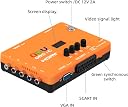
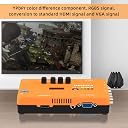
🎮 Elevate Your Retro Setup with Zero Lag & Pro-Level Control!
The Mcbazel ODV-GBS-C is a premium scan converter designed for retro gaming enthusiasts, featuring triple analog inputs (RGBS SCART, YPbPr, VGA/RGBHV) and outputs in HDMI and VGA. It supports zero-latency dynamic deinterlacing for smooth 240p/480i gameplay, includes RGB color calibration knobs, and offers wireless control plus firmware updates. Perfect for connecting classic consoles to modern displays with enhanced video and audio fidelity.


| ASIN | B0B4B2CM9F |
| おすすめ度 | 5つ星のうち4.1 133 レビュー |
| カラー | ブルー、グリーン、レッド |
| コネクタタイプ | RGBS SCART (ブームヘッド入力)、コンポーネント YPbPr |
| コネクタータイプ | RGBS SCART (ブームヘッド入力)、コンポーネント YPbPr |
| パッケージ商品数 | 1 |
| ブランド | Mcbazel |
| ブランド名 | Mcbazel |
| ポート数 | 4 |
| メーカー名 | Mcbazel |
| ユニット数 | 1 個 |
| 互換デバイス | Cellular Phones, Gaming Console |
| 仕上げ | Hdmi |
| 仕上げタイプ | Hdmi |
| 付属品総数 | 1 |
| 商品の重量 | 0.53 キログラム |
| 商品寸法 (長さx幅x高さ) | 15 x 10.2 x 2.8 cm |
| 商品本体サイズ | 15 x 10.2 x 2.8 cm |
| 型番 | MT-040062 |
| 対応デバイス | Cellular Phones, Gaming Console |
| 色 | ブルー、グリーン、レッド |
J**O
Buena alternativa para consolas clásicas
Lo estoy usando para ps2 y Wii, para juegos de ps1, ps2, gc,wii con cables genéricos por componentes, por el momento a funcionado muy bien en un monitor asus 1080p ,la imagen es limpia, no se siente lag, comparado con sus competidores es más barato ossc, retro think lo cual es un plus, además de que no se va la imagen en los cambios de resolución a diferencia del ossc, seguiré probando por el momento estoy contento con el funcionamiento.
C**T
This thing is a game changer! ESPECIALLY on an OLED TV!
Ok, I have decided to finally write a review on this product which I have bought in 2023. I've had such amazing results with it that I felt it necessary to finally write my thoughts as to why this ODV is so amazing. First of all, I have an LG OLED 4K B2 65" TV and whoaaaa, let me tell you. You have to honestly see it in person to believe it. First game I tested this on was Final Fantasy VII, for its gorgeous pre-rendered backgrounds. In fact, this game is the REASON I even looked into getting a higher quality converter due to my sheer DISGUST how SE treated their masterpiece on PS4 - with blurry backgrounds and a glazed look that doesn't do the game justice at all. But alas, the ODV is a total game changer. When you apply the scanlines in the phone settings (and I suggest two button presses on the tab is the SWEET spot) and I was utterly shocked. It turned the default pixellated/grainy textures which looked already far better than the PS4 version anyway into visuals that looked even BETTER than I had remembered it looking on a dedicated CRT. No joke, this damn thing just saved my favourite video games of all time from collecting dust and making them look exactly like I had remembered - Tekken 3, FFVII, FFVIII, FFIX, Vagrant Story, Chrono Cross, Metal Gear Solid......all fantastic! I cannot thank the devs enough for putting their brains together and coming up with a device like this. I mean this literally blew me away. The PS1 games look crisp, sharp and blur free. I'm in love with this thing. And don;t get me started on the PS2 games - scanlines not even necessary. The ODV converts to HD signal beautifully and games like Prince of Persia: Sands of Time just comes to life unlike the (again) UGLY HD remasters that were released. I cannot thank the people enough who have created this and I recommend this to anyone that is a retro fan such as myself where most of your favourite games of all time are. The price is beyond worth it. In fact, with the results that I have received the price was invisible. I would have paid even double if I knew this would give me back my cherished games back the way they were meant to be played. Suddenly, this product doesn't make me miss my CRT anymore since it had died.
D**A
This is a fantastic option for Sony PSOne and Sony PlayStation 2
Let me start off by describing my setup. I have a Denon receiver that feeds an HDMI input into my LG 4K TV (set to game mode). The output resolution on the GBS-C is 1280x960, for a widescreen effect, since 1080p displays in 4:3. You’re probably reading this review because you’re looking for an upscaler. A month ago I was too, and if you don’t know much about tech you’ll be completely lost, when all you want is better video quality for your retro console games. Or in some cases you just need a video signal your TV can understand, like the PSOne’s 240p resolution that isn’t compatible over HDMI. I looked around a bit before buying, and did the research, and if you don’t want to spend a boatload of money on the RetroTink 5x then your options are really limited, due to the chip shortage. Everybody is out of stock of just about everything. If you’re handy with DIY, and a soldering iron, then GBS Control becomes a solid option at a relatively lower price point. But what if you don’t DIY or have the tools to do it? That’s where the McBazel ODV GBS-C comes in. It’s a commercial product that takes the DIY out of the GBS Control, so you can just connect it to your TV’s HDMI input, then connect your gaming console either via component or SCART inputs, and it converts it to a resolution that your TV can understand. It even runs on the same open source firmware that the DIY option uses, so you can update it as new improvements get rolled out by the community. I have my PS2 connected via HD Retrovision component cables, and my PSOne connected via a SCART cable. A couple of caveats on RGB SCART, make sure the one you use has capacitors built into it, or it will only be compatible with the PS2/PS3. Also, when connected via SCART, make sure the switch next to the SCART input on the GBS-C is set to RGBS (middle position). At first mine was set to the first switch position (YPBPR VGA RGBS), and the PSOne had lots of sync issues, screen tearing and dropouts. I almost returned this unit, until I figured this out through trial and error. Now it works great. I have the GBS-C set to output scan lines on the PSOne, because personally I think it looks better. It actually makes it look higher resolution than it does without them. The PS2 uses motion adaptive deinterlacing, and there’s no screen flicker or movement at all like there is with upscalers that use bob deinterlacing. So how’s the lag? Well, there is none. None that’s perceptible anyway. My LED TV adds more lag to the signal than the GBS-C. At first I thought the GBS-C was fairly laggy, but after doing further research it was all the image processing going on in my TV. Once I optimized my TV the lag completely disappeared. Games that require precise timing like Guitar Hero, Tekken 5, and Hot Shots Golf 3 work without any lag issues. I’ve only found one con so far in my use case, and that is that the GBS-C defaults to using the RCA audio inputs if a cable is plugged in, even if the console is turned off. So if I want to play the PSOne over SCART, I have to unplug the audio cables from the PS2’s component input to get any sound. Overall that’s a minor inconvenience, but I’m looking into using the digital audio output from the PS2, and feeding the audio into my receiver that way to see if it solves the problem. I want to just be able to turn on either console without fiddling with wires. Another con, for other people (not me), would be that it doesn’t support S-Video. That means a lot of Nintendo consoles won’t work without conversion first. McBazel shows a S-Video converter that pairs with the GBS-C, but I haven’t found it retail in the US yet. If you need Nintendo S-Video support, then the RetroScaler2x is probably a better option. I included a bunch of photos so people can make up their own minds about the video quality, since the only other review with pictures said it was horrible. It doesn’t seem so bad to me. It’s upscaling 480i and 240p video signals several times, and does a pretty good job to my eyes. The images should be self-explanatory, but if they’re not then the PSOne images all show scan lines, and the PS2 ones don’t. Overall I’ve been very pleased with this upscaler, and GBS-C is probably the best option for PS1/PS2 if you’re on a sensible budget. If you’re a retro console enthusiast, and money isn’t the sticking point, then you probably already know which option is the absolute “best” one, and of course it’s not this one. For everybody else, this option can get you 90% of the way there.
L**E
It works so well! Tested on PS1.
Wow, this thing is a godsend! Picked it up at 20% for Prime Day. I’ve hooked it up to my PS1 via SCART, and then of course into my TV via HDMI. 960p res output. It looks SIGNIFICANTLY better than those cheap RCA -> HDMI “upscalers” you can buy on AliExpress. I’m sure it won’t really compare to a RetroTINK either (especially for 4K TVs), but when you consider the price to performance ratio it is a great deal. Would highly recommend to anyone using their PS1 with a modern TV. I’ve attached some footage of my brother playing Spiderman on my PS1. My TV is 1080p, so consider that if you’re going to be hooking it up to a 4K TV. The scanline functionality/filter also looks great!
C**N
Una opción económica y buena para escalar tus consolas clásicas a tvs modernas.
Resultados bastante decentes en consolas 240p pero lo más interesante es 480i del PS2 da un excelente resultado. Lo único malo es que presenta ruido a pesar de usar cables de alta calidad (HD retrovison). Recomendable.
Trustpilot
2 months ago
2 days ago