


Desertcart purchases this item on your behalf and handles shipping, customs, and support to South Africa.
๐ท๏ธ Elevate your workspace with labels that mean business!
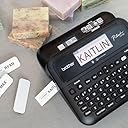
The Brother P-Touch PT-D610BTVP is a professional-grade label maker designed for busy retail, warehouse, and office environments. Featuring dual USB and Bluetooth connectivity, it allows multiple users to create and print high-resolution, durable labels up to 1 inch wide from computers or mobile devices. With a vibrant full-color LCD preview, extensive font and symbol options, and the ability to store 90 labels for quick reprinting, it streamlines asset management, inventory tracking, and product merchandising. The included Brother TZe tapes ensure long-lasting adhesion even in demanding conditions, making this label maker an essential tool for organized, efficient businesses.




| ASIN | B0B1KV3LSX |
| Additional Printer Functions | Print Only |
| B&W Pages per Minute | 20 |
| Best Sellers Rank | #99,154 in Office Products ( See Top 100 in Office Products ) #281 in Label Tapes |
| Box Contents | PTD610BTVP Label Maker |
| Brand | Brother |
| Brand Name | Brother |
| Color Depth | 1 bpp |
| Colour | White |
| Compatible Devices | Smartphones |
| Connectivity Technology | USB |
| Control Method | App |
| Controller Type | Android, iOS |
| Customer Reviews | 4.7 out of 5 stars 363 Reviews |
| Display Type | LCD |
| Dual-sided printing | Yes |
| Duplex | Automatic |
| Hardware Interface | USB |
| Initial Page Print Time | 30 seconds |
| Ink Color | black, cyan, magenta, yellow |
| Item Dimensions D x W x H | 36.1D x 36.1W x 33.8H Centimeters |
| Item Type Name | Inkjet Printer |
| Item Weight | 6.64 Pounds |
| Manufacturer | Brother Printer |
| Max PrintSpeed BlackWhite | 300 x 300 |
| Maximum Copy Resolution Black and White | 300 dpi |
| Maximum Copy Speed Black and White | 20 ppm |
| Maximum Media Size | 24 x 18 |
| Maximum Sheet Capacity | 1 |
| Model Name | PTD610BTVP with Carry Case |
| Model Number | PTD610BTVP |
| Model Series | PTD610BTVP |
| Network Connectivity Technology | USB |
| Number Of Trays | 1 |
| Other Special Features of the Product | Network-Ready |
| Output sheet capacity | 1.0 |
| Paper Size | Letter |
| Printer Output Type | Monochrome |
| Printer Type | Solid Ink |
| Printing Media Type | Labels |
| Printing Technology | Solid Ink |
| Resolution | 300 x 300 |
| Scanner Type | Sheetfed |
| Series Number | 610 |
| Special Feature | Network-Ready |
| Specific Uses For Product | Label printing, commercial and heavy-duty uses, retail locations, warehouses, businesses |
| Total USB Ports | 1 |
| UPC | 012502669593 |
| Unit Count | 1.0 Count |
N**A
Good for permanent tagging.
Expensive.. But nice if you need permanent tagging.
R**W
Good printer and software, but tape wastage is annoying
The printer is decent and does what is mentioned in the features. The software is very good and intuitive, and I was able to set it up and start printing labels without needing much help or tutorials. The only problem I have noticed is the tape wastage. If I need to print just one small label, around an inch of tape seems to get wasted as margin each time. Because of this, I usually combine several labels and print them together in one long batch to reduce wastage. Apart from this issue, I am quite happy with the printer. If anyone knows a way to reduce or avoid this extra margin while printing single labels, please share.
C**R
A nice labeling machine
This unit has lots of features. I can control it from the unit itself, my cell phone or my PC. There are many different types of styles and formats to choose from and some of them you can use your own images. I use mine all the time from labeling my parts bins to marking pipes at work. The 2 sizes of tape available and multiple colors are nice to help mark things and keep them color coded. Whether you are writing labels for wires, envelops, spines of binders, file cabinets or any other thing you can imagine, this labeler will work just great. It runs off 6 AA batteries or the included power adapter. I am not sorry I bought this and would recommend this to anyone needing a labeler.
J**Z
Muy buena etiquetadora
La calidad del producto es buena
J**A
Awesome Label Maker!
I love this printer! The labels come out clear and the lettering is smooth. The tape reels it takes are easy to change out. It will fit a few different size tapes too, meaning you can make labels of various sizes. It has numerous symbols / emojis built into the machine along with a full keyboard making label creation super simple. The phone app is also easy to use. The build quality is nice and the keyboard is easy to use. I hooked it up to my phone via Bluetooth easily and have had no issues with using that. I just finished using it to make labels for my coffee/cocoa/tea room toppings. They all came out great!
S**N
Easy to use and versatile label maker
Overall, I really like many aspects of this label maker. It is my first Brother label maker, but I've I had experience with other brands. The difference was that they all required a computer to use. I tested this label maker with the provided sample labels using different templates. I printed directly from the label maker, via Bluetooth with an Android phone, iPad, and a Windows computer. The mobile app is called iPrint&Label and the desktop software is called P-Touch Editor 6. Functionality between mobile and desktop was similar, but as you can imagine, the desktop app was more robust. The case that came with it was functional and there was space for the sample labels, the printer, and the ac plug. You can choose to use six double batteries (not included) instead if you need a more portable solution. Build quality for the label maker itself is solid. It is a matte plastic with a little bit of a sheen to it. I didn't notice any fingerprints on it. The keys felt good, but they have a little too much side to side movement for me. Hopefully it won't be an issue in the long run. The print quality was mostly good, a font did look a little jagged when printed depending on the template chosen. This only showed up on one label out 30. For me it wasn't a deal breaker and I'll do more testing to see if it comes up again. I use the label maker for my photography and video gear, but also use it for some additional items around the house. To peel off the label, turn it over and separate the two part split on the bottom. I did try readjusting the positioning of a label that I put on a case and it came up easily. To be fair, I did it within a short amount of time and not after a day or two. In terms of sound while printing, it is noticeable for sure, but I didn't find it to be excessive with regard to volume. I would definitely recommend this to people who like the flexibility of printing without a computer, even though the desktop app does work with Mac OS and Windows at the time of this review. It will definitely take time to work through all of the templates and maximize all of the available options.
A**R
Awesome Label Maker - Worth the price.
This is a great label maker. With many options and with the ability to use all sizes of medium, it is proving to be and asset with many applications. Highly recommend!
Trustpilot
1 day ago
3 weeks ago