Desertcart purchases this item on your behalf and handles shipping, customs, and support to South Africa.
🖨️ Print smarter, live freer — the future of home printing is here!
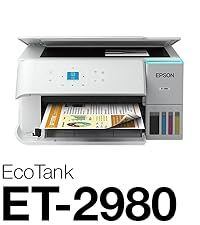
The Epson EcoTank ET-2980 is a wireless all-in-one color inkjet printer designed for home and small office use. Featuring ultra-high 4800x1200 dpi resolution, it delivers sharp, vibrant prints with up to 3 years of included ink—equivalent to about 90 cartridge replacements. Its PrecisionCore Heat-Free technology boosts print speed by 50% over previous models, while refillable EcoFit ink tanks simplify maintenance and reduce waste. With built-in Wi-Fi, USB connectivity, and the Epson Smart Panel app, users enjoy seamless mobile printing and scanning. Additional perks include automatic duplex printing, borderless photo-quality output, and Energy Star certification, making it a cost-effective, eco-conscious choice for professional-quality results at home.


| ASIN | B0F1F2XRW9 |
| Additional Printer Functions | Copy, Scan |
| B&W Pages per Minute | 15 pages_per_minute |
| Best Sellers Rank | #2,573 in Office Products ( See Top 100 in Office Products ) #7 in Ink Tank Printers |
| Brand | Epson |
| Built-In Media | EcoTank ET-2980 all-in-one, manual, power cord, 1 bottle of 502 Black (127 mL) and 1 bottle each of 502 Cyan, Magenta, Yellow (70 mL) |
| Color | White |
| Color Pages per Minute | 8 pages_per_minute |
| Compatible Devices | Laptops, PC, Smartphones, Tablets |
| Connectivity Technology | USB, Wi-Fi |
| Customer Reviews | 4.0 out of 5 stars 969 Reviews |
| Duplex | Automatic |
| EU Spare Part Availability Duration | 1 years |
| Hardware Interface | USB |
| Ink Color | White |
| Item Dimensions D x W x H | 13.7"D x 14.8"W x 7.4"H |
| Item Type Name | Inkjet Printer |
| Item Weight | 11.5 pounds |
| Manufacturer | Epson |
| Maximum Copy Resolution Black and White | 4800 x 1200 dpi |
| Maximum Copy Resolution Color | 4800 x 1200 dpi |
| Maximum Copy Speed Black and White | 15 pages_per_minute |
| Maximum Media Size | 8.5 x 14 inch |
| Maximum Print Resolution Black and White | 4800 x 1200 dots_per_inch |
| Maximum Sheet Capacity | 100 |
| Maximum print Resolution Color | 4800 x 1200 dots_per_inch |
| Model Name | EcoTank ET-2980-W |
| Model Number | C11CL41202 |
| Model Series | EcoTank |
| Number of Trays | 1 |
| Other Special Features of the Product | Auto-Duplex, Borderless Printing, Display Screen, Energy Star, Refillable Ink Tank |
| Output sheet capacity | 100 |
| Paper Size | 3.5" x 5", 4" x 6", 5" x 7", 8" x 10", 8.5" x 11", 8.5" x 14" inches |
| Power Consumption | 13 watts |
| Print media | Envelopes, Glossy photo paper, Paper (plain) |
| Printer Connectivity Type | USB, Wi-Fi |
| Printer Output Type | Color |
| Printer Type | Inkjet |
| Printing Technology | Inkjet |
| Resolution | 4800 x 1200 |
| Scanner Type | Flatbed |
| Special Feature | Auto-Duplex , Borderless Printing , Display Screen, Energy Star, Refillable Ink Tank |
| Specific Uses For Product | Home |
| Total Usb Ports | 1 |
| UPC | 198390000554 |
| Unit Count | 1 Count |
| Warranty Description | 1-Year Limited Warranty |
| Warranty Type | Limited |
| Wattage | 13 watts |
R**.
Good overall printer
I actually purchased the ET-2980 and was sent the 2988 which is the same printer but, includes an extra bottle of black ink. I set the printer up with an iPad with Epson's Smart Panel app and it went very smoothly. I bought a ream of Epson EcoTank Paper and it prints very good on that. I had some HP Presentation paper and it printed even better with deeper colors and contrast on that. I also had some old Epson Photo Luster paper and that printed exceptionally great. I did all the printing from a M1 MacBook Pro 14" and while it worked fine, there is not as much control in the print dialog as the last time I owned an Epson which was probably around 2005. The scanner works fine. After filling the ink tanks the printer does an 11 minute initialization which pumps ink through the tubes to the print heads. That brought the ink level down a little bit so, after that I had some in the bottles and filled the tank up to full again. Except the black was still slightly below full. I will wait for the level to go down about one quarter of the way before opening the extra black bottle. A full image letter page prints in about a minute in best mode with plain paper setting. With Photo Paper in Best setting a full letter page takes about 3 minutes to print. Unfortunately I bought this printer to give Epson a try because my HP Smart Tank 7602 got a clog in the color head and I couldn't clear it. Not with printing purge color pages, built in head cleaning or fluid flushing I watched on YouTube. I looked this printer up on rtings.com and it looked like Epson had improved their black density and they have. Blacks print nice and black now. On the downside, text is not quite as sharp as the HP Smart Tank but, still very good. I have noticed that text is much clearer printing from the iPad Epson Smart Panel App than my M1 MacBook Pro. I have tried pretty much every setting on Mac and it still prints darker, filled in text. It's super dark though. Epson is still using the same print head alignment and nozzle check as they did 20 plus years ago and much more difficult to determine than HP's way of doing it. I am going to print something in black and color every day to try to make sure I don't clog any of the head nozzles. The warranty says 1 Yr warranty or 50,000 prints which ever comes first and if registered within 1 year you get 2 year warranty or 50,000 prints. If the heads don't clog I will be very happy with this printer.
F**R
Great setup app.
The unit arrived with the edge of the box badly damaged in shipping but upon opening, I was relieved the packaging material kept the unit damage fee. I was replacing an older Epson inkjet and a Brother BW laser, settling for slighty less quality but more versatility. Highly recommend following the recommend app install on your phone to walk you through setup. I thought it was well done, very descriptive, and had no issues with setup. Satisfies most of our printing needs. If I was printing pictures, I would want to try glossy paper. On plain paper, I give it a solid "B+". Overall, I would purchase again.
E**N
RUN AWAY!
I am a real person, I bought this printer with my own money. This is not an AI review, I did not get a promotion or kickback. My thoughts: RUN AWAY! This is my 4th Epson printer in 7 years. I print @ 40-50 pages a week. The printers have been usually reliable. I have had a 2700 series and 2 ET-2850's. The last one had a "printer pad has reached its service life" code. this is part that the owner can not replace, the unit needs to be taken in for replacement. Not worth driving 100 miles to the closest service center. I have stayed in th eEpson family because I have about 10 bottles of ink. The previous printers were pretty easy to set up and for the most part worked well, but do not last long. The newest printer, the ET-2980, was much harder to set up. not nearly as intuitive. In the past week I have lost network connection daily. VERY frustrating. I need a printer to print on demand, not be reset and fiddled with. Aug. 16, 2026 STILL - a 1 star review... Last week for some reason the printer started to print wirelessly. for about 3 days. then it stopped and I had to plug in the cable again each time I want to print. Yesterday my daughter gave me some card stock to print some small posters for a birthday party. I set the paper to premium photo matte, single sided only. Printed ok, but took about 30 minutes to print 14 pages... today I went to print some docs. Would not print in double face mode and still was printing as if it were premium paper... I rebooted both my Mac & the printer. I made sure the software I was printing from specified plain paper. BUT: the printer was locked into the premium paper mode. I deleted the printer & re-added it. no change. Finally I found on the printer a restore factory settings. WHAT A HEADACHE. The WORST interface with printers I have had since I bought my 1st printer in 1991... a TOTAL backwards progression in user friendliness...
K**A
Good depending on your needs
I’ve been using this printer for about 6 months now and I love it for my purposes. I homeschool and use it to print activities and curriculum guides. I do not need the quality to be perfect. I’ve printed over 1100 pages and these are some things I’ve noticed. PROS: the cost per page is very cheap. I’ve printed so much already and mostly in color and my black ink is still about 80% full and the color inks have only gone down a little bit. Compared to my HP printer which I was paying crazy amounts for ink this printer has already paid for itself. The print speed is pretty fast when doing black. Color is a little slower but only takes about 30 seconds per page. Wireless printing works great. The printer itself is easy to navigate and scanning and copying both work well. CONS: paper gets jammed a lot when double sided printing. I’ve had many issues with the paper getting stuck and having to open the back to remove the page. Picture quality isn’t the best. I wouldn’t buy this if you’re planning to print a lot of pictures. They turn out okay but the quality is lower than other printers. Also I’m not sure if it was the paper or the printer but the ink was rubbing off the pictures. TLDR: I’d definitely recommend this if you’re like me and mostly print documents or books. I don’t recommend if you plan to print a lot of pictures. Also keep in mind the paper might jam if you’re planning to do a lot of double sided printing.
H**R
Reliable and economical
I purchased this printer in May of this year, 2026, and since I’m a sporadic printer user, I can’t say enough positive things about this setup. I’ve used HP printers exclusively in the past, but I’ll never purchase another one after buying this Epson because of the increasingly invasiveness of HPs firmware and their sabotaging of their own products that force the consumer into having to use sub-par cartridges at exorbitant cost that can only be used once or twice at best leaving you to scramble to go and purchase another over priced cartridge at an even higher price when your kid informs you they need a school project printed that has to be turned in the following day, and you find the cartridge you paid 20$ and previously printed 5 pages with 3 months ago is now useless, and the printer won’t accept you to fill those cartridges with an identical ink product. The Epson, so far, doesn’t need its ego stroked, as it’s perfectly comfortable being the workhorse it was created to be. If you’ve got to print 100 pages front and back in May, and nothing again until the end of June, the Epson just waits patiently until it’s called on to do it’s job and when it’s given the nod, it doesn’t whine about needing another 20$ cartridge before it can print 2-3 pages. To me, that’s how a printer should work. I understand that HP wants to be the exclusive provider of ink for their printers, and that is understandable, but they have every opportunity to do that by remaining competitive and current. Reading reviews before purchase, I did see the complaints about the Epson having a small screen, and “it uses too much ink to prime the lines” as well as a handful of others, and while I don’t want to minimize the impact these may have had on the purchasers, in my experience, they’re either acceptable or easily overcome. I primarily print from my phone, and Epson has some excellent apps for my iPhone and they are free of charge, so I rarely even see the tiny screen. As for the resolution, etc., I honestly don’t use this machine for ultra-hd photo printing, but if I did, I would purchase a machine designed for that type of work and expect it to cost more. I purchased this printer solely to occasionally and sporadically print anything from photographs to documents, either in color or black and white, reliably, and at an acceptable level, and I wanted to be able to scan, duplex print, and copy. I feel I got my money’s worth and a lot more thus far, and if you are looking for a printer for the same reason and with the same requirements, I’d whole-heartedly recommend you give this printer a chance, because it certainly is nice to have a printer now, that when I need to print something, I simply turn it on, connect, and print, and I know in a month or 3, I’ll be able to do it again.
A**A
Good product.
Wow. This is the first printer I’ve bought in maybe 10 years…. I’m amazed at the quality of the printing. And the eco tanks….. no more buying expensive cartridges every 6 months for me. The set up was simple and well guided with either the included printed instructions or via the app. It has good, consistent wireless connectivity, which is so nice to be able to print wirelessly. No paper jams, and ink seem to be lasting a long time, considering the amount of printing I’ve been doing. I am very happy with this purchase.
I**A
Very nice print quality
I’ve been using it for about a month now. It’s my second echo tank printer. So far it’s working perfectly. Very high print quality, quiet, easy to set up, I love the echo tanks because they use a lot less ink and I’m not having to hassle with ink cartridges that don’t seem to last very long.
R**P
I wish I would have kept my old printer.
I don’t typically write reviews, but for how often I saw this printer recommended, I wish I wouldn’t have purchased it. I loved this printer at first, but after six months I’m not impressed. It prints quickly, but I did notice that the colors weren’t as vibrant or crisp as my previous printer, which was fine for my use and how often I needed to change ink cartridges with my old printer. I’ve only used the printer for six months (not heavy use), and just a few weeks ago the double sided print function started to jam the paper. Despite getting better quality paper, I haven’t been able to use this function again. With the low print quality and now the issue with double sided printing, I wish I would have kept my old printer that was 10+ years old. Wireless connectivity has worked great. I haven’t printed a lot of things yet, but ink levels seem to be lasting.
P**E
Very easy to install
Great price, excellent results. Lots of ink. Recommend highly.
C**M
Contente de l'achat pour le moment l'avenir va dire le reste(;
Pour le moment je trouve que c'est une bonne imprimante mais au tout début je la trouvais un peut spéciale contrairement à HP ENVY 4520 mais depuis j'ai photocopier quelque feuilles et elle m'a vraiment surpris je trouve qu'elle est plus vite plus silencieuse et fonctionne très bien avec mon cell.
A**L
No UK plug
Could be a good printer. Don’t know yet. But if you supply to the UK, a UK power option should be available - or at least mentioned.
A**E
Much better than the 2850 before it.
So much better than the 2850. I was constantly having to fight with the old machine, restarting my computer, restarting the printer, checking internet connections, and so many more issues. Sometimes it would take me an hour of fighting with it just to print a single page. This newer one is fantastic. I rarely have to fight with it, and only like a minute when I do. It prints red much better as well. It also prints quite a bit faster. If you have a large print job it's still going to take a bit of time, but definitely only about a third of the time. I have not tried the scanner yet, but I'm very impressed with print speed. It prints on both sides, with the option to flip on the long side and the short side. The printing is sharper, more clear, than the last model I had as well. The only downside is that the tray pushes out when you print, but it doesn't go back in when you're done printing unless you go to the machine and press a button. No big deal for most people, but we have a few cats, and I'm worried one day they'll jump on it and break it before I get a chance to go to the machine and do so because the tray doesn't look overly sturdy. Otherwise the machine is very well built, very sturdy, and feels like it will last several years.
C**R
Nice printer
No issues yet with these printers. Have put cardstock, and vinyl through as well as paper, and photo paper. Ink is easy to fill, and it has a self cleaning maintenance mode I haven’t had to use yet.
Trustpilot
2 days ago
2 months ago