


📸 Capture Every Detail, Own Every Memory!
The Plustek OpticPro A320L is a professional-grade large format flatbed scanner featuring a 12x17" scan area and a high-precision Sony CCD sensor delivering up to 1600 dpi optical resolution. Designed for wide-format documents, photos, and odd-shaped originals, it supports multi-format file saving with OCR for searchable PDFs. Compatible across Windows, Mac, and Linux platforms, it offers a seamless, efficient scanning experience ideal for professionals and enthusiasts seeking exceptional image quality at a competitive price.




| ASIN | B07331RHY2 |
| Best Sellers Rank | #483,212 in Office Products ( See Top 100 in Office Products ) #41 in Flatbed Scanners |
| Brand | plustek |
| Color Depth | 48-bit |
| Connection Type | USB |
| Connectivity Technology | USB |
| Customer Reviews | 3.8 out of 5 stars 50 Reviews |
| Global Trade Identification Number | 00783064087711 |
| Greyscale Depth | 8-bit |
| Item Dimensions D x W x H | 24.53"W |
| Item Height | 5.5 inches |
| Item Type Name | Flatbed Scanner |
| Item Weight | 16.5 Pounds |
| Light Source Type | LED |
| Manufacturer | Plustek, Inc |
| Media Type | Photo, Plain Paper |
| Minimum System Requirements | Windows 7 |
| Model Name | A320L |
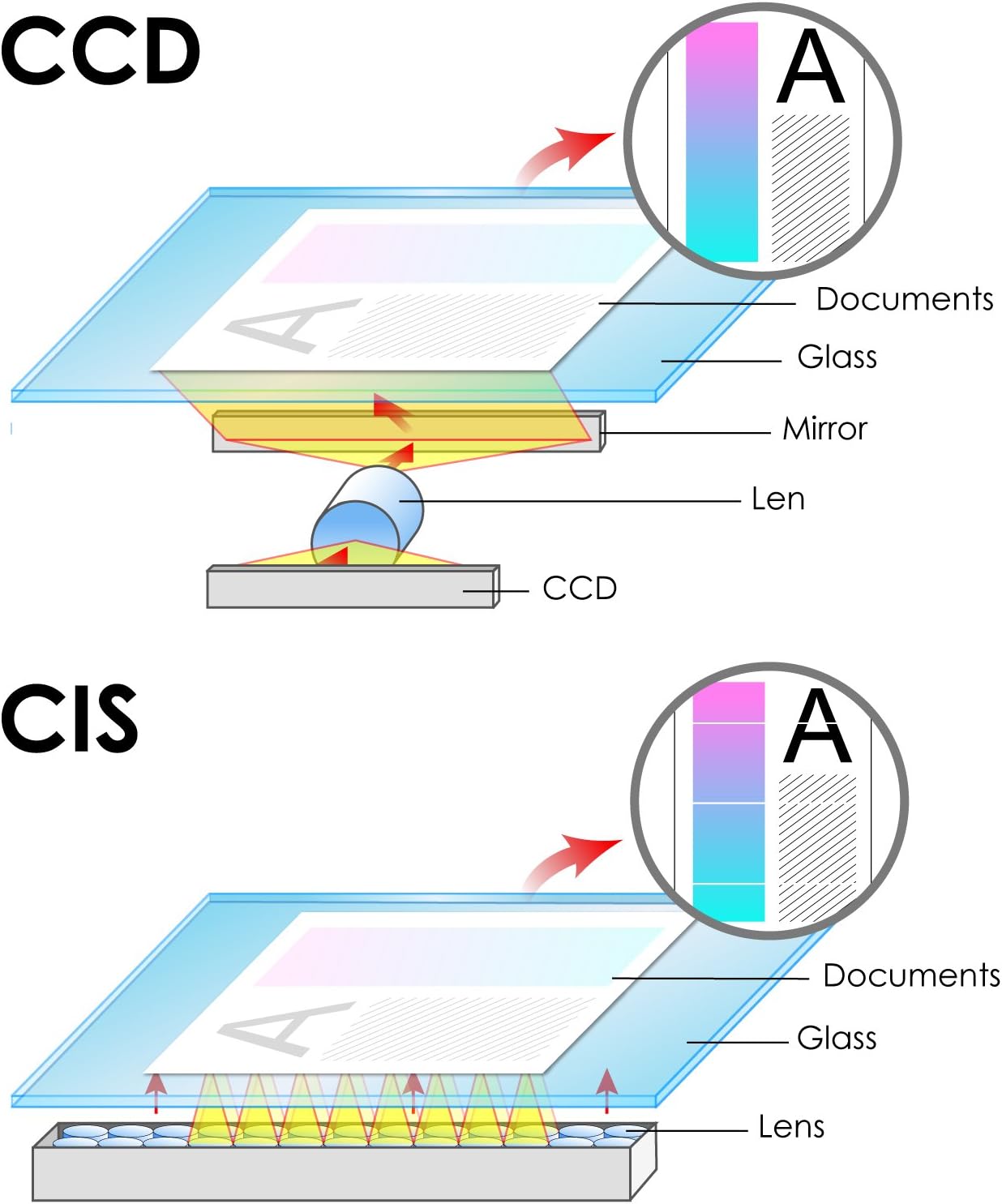
| Optical Sensor Technology | CCD |
| Paper Size | 11.69 x 16.54, 12.01 x 17.01 |
| Product Dimensions | 24.53"W |
| Resolution | 1600 |
| Scanner Type | Photo, Plain Paper |
| Standard Sheet Capacity | 2500 |
| UPC | 783064087711 |
| Warranty Description | 1 Year |
| Wattage | 30 watts |
T**K
Plustek OpticPro A320L on a Windows 10 PC
My wife and I have decades of family photo albums we want to scan so we can throw the physical albums away. Also, some of the photos are over a hundred years old and they are only going to become more faded over time. The Plustek OpticPro A320L allows us to create high quality TIFF computer files of very large, very old photo albums (12 inches by 15 inches) very quickly. I've uploaded a couple of un-cropped photos as examples. Each 300 DPI scan took about 3 seconds. I'm still working on tuning the software. It has been a while since I've installed a scanner on a PC. I remembered that Windows drivers for scanners are very individualized and you do not want to accidently install default Windows drivers for a scanner - so, install the Plustek software and drivers before physically attaching the scanner to your PC. I talked to Plustek technical support a couple of times and I uninstalled and reinstalled the Plustek software/drivers 3 times. My suggestions: 1. Install Plustek software, reboot the PC, before attaching the scanner via USB and turning the scanner on. 2. Allow the software plenty of time to install. Do not click on buttons or go to another step too quickly. Watch the HDD status light on your PC to make sure the PC is not doing something before doing the next step. 3. If things are not working then uninstall the Plustek software, shutdown the PC, detach the scanner from the PC, start the PC and reinstall the Plustek software, Then turn on the scanner after the Plustek software has been installed. 4. When I tested the "Scan" function, it did not "Auto Crop" correctly. I switched the "Application" from MS Paint to Windows Photo Viewer and the "Auto Crop" worked correctly. I guess a bug in the software?
E**K
Stunning quality and resolution at a much lower price
I'm writing this review almost a year after having purchased this scanner. I was hesitant at first because I did not know this brand. I looked into Epson and HP but this scanner had all the features I needed for full-res tabloid-size color scanning. I'm happy I made the right choice! This scanner produces super clear high-resolution scans that are near perfection! And this coming from a former graphic designer. The price is right, way cheaper than other choices and this one has way more features. Buy it, you won't be disappointed. Professional results without a doubt for a great price. I couldn't be happier. My only quibble is that although their scanning application perfectly on my MacBook, the interface could be nicer but it's fully functional so it's a minor issue for me.
S**N
DONT PURCHASE IF YOU ARE A PROFESSIONAL!
So, I am a professional artist and already many many years scanning my images. You can find and see my works if you search me - Suren Nersisyan. However, I always used Epson 11000 xl. The last one saved me 6 years. This time I have decided to try this scanner. As the price was attractive and I could rely on Amazon's return policy if something goes wrong. AFTER TWO MONTHS USE: THE COLORS ARE ALL WRONG! After using two months I regret it buying! I am professional, so the images are so burned... or if you make low contrast they come out gray. However, with many different tries and using photoshop their TIFF image is not really TIFF with options to correct image colors, it's just working the same way as JPG... you can not correct colors for printing! It is useless to pay less money to get a pro-level tool. I am so so disappointed from this scanner. If you are not professional, maybe its ok to have it! BUt quality is very bad!
N**H
Great pictures! Sucky software
Amazing accuracy in resolution and color picture quality excellent! The software is terrible. Took 4 hours to install and reinstall terrible software! It also crashes if its over 600 dpi... I have a brand new hp envy with 12 gb and 8 gb ram, intel 7, windows 10, it shouldn’t do that! Luckily for me all I need is 600 dpi and it’s finally installed!
C**R
Excellent Scanner
Excellent large bed scanner. A replacement for an earlier Plustek scanner. Recommended
J**Y
Complicated software
Not a simple copier like I wanted, but the only one of it's size and ability on the market. Disk was faulty. Uploaded the software three times (and deleted it) because things were either partially loading or not loading at all. Finally it refused to be deleted and became embedded in the depths of my computer. Only a special removal program found it. It took 5 days and three techs to get this installed on my computer. Once I did, it worked fine. There is no user's guide. The one on the internet is incomplete. Thankfully the techs from Plustek were very patient and helpful. Not all the buttons work and there is so many options I don't understand, but I will keep it.
R**N
Capability for reasonable price
The online description was accurate and assisted to make an informed purchase decision
B**Y
Fantastic and Infuriating
I would have given this another star if only that soft wear wasn't so gitchy. Lucky for me that I have a computer information degree and I simply worked around the software and found my own way. I never called tech support. I understand they have a update. After every scan I have to close out the application and I use my graphics software to resize, retouch etc... Then I go back into the scanner application and scan another document or art. If you want scan multiple items back to back without it freezing, then please let everyone know how you do it. The color and detail of my art is exactly what I wanted. In that I am not disappointed. LOUD, THIS THING IS LOUD! Sorry about screaming but if you are using it and trying to carrying on a conversation then practice your screaming. It sounds like a dinosaur in heat crossed with a pavement chewing road machine and a jack hammer combined. I thought that 12 x 17 would mean I could fit it on my desk. You can but it is bigger than you think. I would go and measure it for you but my cat has just fallen asleep on my lap and I am too kind and too lazy to get up. Just be ready to a lot more space. You might think I hate this machine but you would be wrong. Better large bed scanners cost so much more. For the price point you cannot go wrong. I am writing and illustrating a kid's book and I refuse to send my original work to a publisher who won't return it. This way I send quality jpeg art and PDF file to publish. So for me this is a win, win. I treat this scanner like my ex husband; I simply turn a deaf ear, work around its quirks, and give it a wide berth.
Trustpilot
3 days ago
1 week ago