Desertcart purchases this item on your behalf and handles shipping, customs, and support to South Africa.
⚡ Power your productivity with the ultimate 13-in-1 Thunderbolt 4 dock!
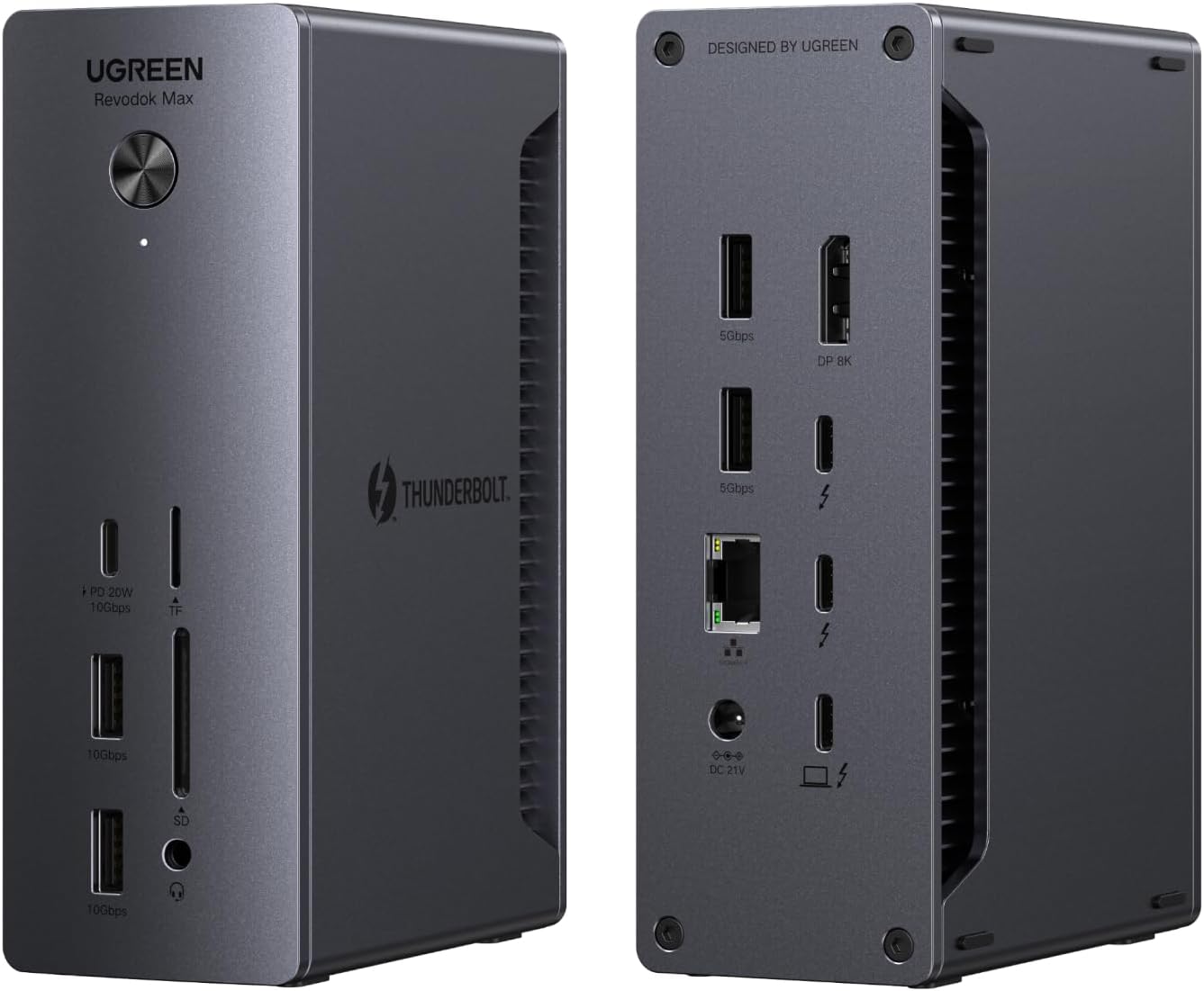
The UGREEN 13-in-1 Thunderbolt 4 Docking Station delivers ultra-fast 40Gbps data transfer, dual 4K@60Hz display support, and 2.5G Ethernet connectivity. Featuring 13 versatile ports including Thunderbolt 4, USB-C, USB-A, DisplayPort, and SD card readers, it powers your laptop with 90W charging while expanding your workstation’s capabilities. Compatible with Mac and Windows laptops, this dock is designed for professionals seeking seamless multi-device integration and high-resolution productivity.


| Asin | B0DQWJNJ21 |
| Best Sellers Rank | #3,587 in Computers & Accessories (See Top 100 in Computers & Accessories) #293 in Laptop Docking Stations |
| Brand | UGREEN |
| Color | Gray |
| Compatible Devices | Compatible with Apple M4/M3/M2/M1 Macs, Intel Thunderbolt 3 Macs, and Thunderbolt 4/3, USB4, or USB-C Windows laptops/PCs |
| Customer Reviews | 3.9 3.9 out of 5 stars (205) 3.9 out of 5 stars |
| Hardware Interface | Ethernet, Thunderbolt 4, USB 3.2 Gen 1 |
| Item Dimensions L X W X H | 5.85"L x 3.79"W x 2.05"H |
| Manufacturer | Ugreen Group Limited |
| Mfr Part Number | 25054A |
| Minimum Required Operating System Version | Mac OS 11 Big Sur, Windows 10 |
| Model Number | 25054A |
| Number Of Items | 1 |
| Number Of Ports | 13 |
| Total Usb Ports | 5 |
| Unit Count | 1 Count |
| Warranty Description | 2 year |
| Wattage | 180 watts |
User
solid, well-arranged, hassle-free
This dock has worked steadily without problems out-of-the-box, supporting a Dell XPS running Ubuntu 25.04+. I have a 4k display connected with a (UGreen) USB-C to DP 1.4 cable, and another ancient display connected to the built-in DP port with an old DP 1.1 cable. I expect everything would work fine with earlier kernels and other cables, as well.I saw a review mentioning troubles with HDMI. DisplayPort is actually a preference for me, because HDMI is proprietary and seemed like it might eventually invite 3rd party drivers on Linux, whereas DP is an open standard. So I haven't even tried HDMI. The USB-C to DP cable was not expensive, and gave me no trouble. (I did have to change settings on a monitor to select DP input.)I like that the fast USB-A ports are on the front. Slower USB-A ports in the back are perfect for keyboard and mouse, and if you want an attached SSD or something, you have more TB/USB-C in the back. But if you want to dynamically connect something, you want the faster USB-A ports to be in the front, right? Why don't others get that?The box is shockingly heavy. I imagine they would've wanted it lighter, if possible, but were forced to make it heavy. Perhaps it's unavoidable, if you want a robust power supply? I previously tried a (reconditioned) Dell WD22TB4 before this, and it just suddenly quit after a couple of days. So, maybe heavy is good. (Or they knew I'd think like that and added a slab of steel to impress me? I doubt it.) Plus, it stays put.Anyhow, I spent a lot of time weighing other options, and this box feels like the perfect balance of capability and cost, and has been rock-solid. My displays come up from sleep in about 2 seconds.I have successfully used the (much less expensive) OWC "Bus-Powered 5-Port Multi-Adapter" TB3 mini-dock with my setup (including HDMI without 3rd party drivers, so go figure). However, there were a few occasions with older kernels, when it had a big problem waking up after sleep, though it seems stable with newer kernels. It's passive and has limited ports, so I have to unplug power or juggle connections when I want to add some temporary extra connection.I did briefly create a problem for myself with the UGreen dock, when I disconnected the laptop in clamshell mode, plugged something into the dock, typed some keyboard keys, power-cycled the dock, etc, before realizing I hadn't reconnected the laptop. After reconnecting, I had to open the clamshell and unlock the laptop, in order to bring back the displays. No big deal.Be aware that other docking stations that connect via USB-C only (rather than Thunderbolt) are going to require "Display Link" drivers.
User
Sleek, Sturdy and functional
Why did you pick this product vs others?:There is no question that you will love the size, look, and build quality. The fact that this was on sale for $239 versus many 200-dollar competitors made it a competitive deal. Additional sets of Thunderbolt to Video connectors will run you about 50 bucks as well, so keep that in mind. My only complaint is that they should include these in the box or offer a package deal with them.I've seen a complaint about this unit's lack of Display Ports or HDMI ports since it only has one Display Port. But the Thunderbolt ports act as Display Ports with the right USB-C video cables.I would just make sure to purchase a USB-C to HDMI 2.1 or a USB-C to DisplayPort 2.1 cable. This will ensure you can push your monitors at the right Resolution and Refresh rate. The bandwidth for Thunderbolt 4 is 40Gbps, HDMI 2.1 is 48Gbps, and DisplayPort 2.1 is 80Gbps. This will ensure 8k or 4k support, or in my case, Ultrawide 1440p @ 144hz.I was also questioning its capability to charge my Lenovo P16s Gen 2 Workstation laptop, which has a dedicated Quadro Video card, but it has no problems maintaining a charge. Also, I've used other docks in the past, and some of them have issues coming out of sleep. Monitors won't come back, you need to reconnect the dock to your laptop, etc. I've not had that issue once with this unit, and that was the reason I was looking for a new one.
User
UGREEN Revodok Max 213 Do Not Buy. Faulty Power Adapter, No Recourse.
UGREEN Revodok Max 213: Do Not Buy. Faulty Power Adapter, No Recourse.Three months in, the dock started randomly disconnecting mid-workflow. Peripherals dropping, network interface cutting out, the works. Not a one-off glitch, a recurring failure that made it unusable for actual work.After troubleshooting, I found the real problem: the power adapter itself is faulty. Not a cable issue, not a firmware issue. The adapter UGREEN shipped with the dock is defective.By the time I identified this, I was outside the return window. So now I own a hundreds+ USD paperweight with no way to get a refund or replacement adapter covered.A dock is infrastructure. It’s supposed to be the reliable, boring piece of your setup you never think about. This one failed at the one job it had, and UGREEN’s return policy left me with zero options once the defect actually showed itself, which conveniently is exactly the kind of failure that takes weeks to surface.I won’t be buying UGREEN again. If a very expensive accessory can’t survive three months of normal desk use, it doesn’t deserve a spot on anyone’s desk.1/5 stars.
User
A robust dock with great expandability—just pricey and missing a few conveniences
The UGREEN Revodok Max 213 is a feature-packed Thunderbolt 4 dock that delivers excellent performance and flexibility for power users. With 13 ports, including dual Thunderbolt 4 downstream ports, DisplayPort 1.4, SD/microSD slots, 2.5Gb Ethernet, and multiple USB-C and USB-A ports, it’s clearly built for serious multitasking and connectivity.Setup was effortless—plug and play with no drivers needed. The build quality feels premium, with a solid metal chassis that stays cool even during heavy use. I especially appreciated the 90W power delivery, which comfortably charges my laptop while running dual 4K monitors and several peripherals without breaking a sweat.However, there are a few caveats. It lacks an HDMI port, so if your monitors don’t support DisplayPort or Thunderbolt natively, you’ll need adapters. The unit is also a bit bulky, taking up a fair amount of desk space. And while the overall USB-C support is solid, having only one USB-C port on the front limits quick-access flexibility.Overall, it’s a reliable and robust dock for professional workflows—ideal for creatives, engineers, or remote workers with high demands. It's not cheap, but the performance and build justify the investment for most users.
User
Functional Dock
This thunderbolt dock is amazing. I have a MacBook Air M4 and wanted to use my two 27" 4K monitors while the lid is closed. It does it perfectly and wakes up without issue. I also have 2 gig symmetrical fiber internet and the dock gives me great results. This was a nice feature that I can take advantage of. It's nice having near full line speed while my MBA is docked. I have not encountered any overheating issues with either the laptop or the dock. Packaging was well done. It was smaller than I was expecting. Has plenty of ports for me and I'm sure most people. Overall a great dock that just works. Wish I had gotten this when I got my laptop. Makes life easier.
User
Great extension for a Mac Mini M4 Pro - drives my 3 monitors with no issues
I ordered the UGREEN Thunderbolt 4 Dock specifically to find a relatively lower-cost option to drive my 3 monitor setup in my creative studio. While I would have loved to have had a Thunderbolt 5 solution, I wasn't willing to put out the extra money for my specific needs. I have been running this for about 6 weeks now and have had not issues. I connect my three monitors using the 1 display port on the UGREEN, 1 Thunderbolt/USB-C on the UGREEN and the HDMI port on the back of the Mac Mini M4 Pro. Additionally, I have connected a Logitech Video Camera via USB on the back of the UGREEN Dock as well as my Bose Companion 3 Series 2 sound system via a back UGREEN USB port. As you can see from my photo, this still leaves all the ports on the fronts of both the UGREEN dock and my Mac Mini. I am not a gamer/video producer so all monitors are running at 60Hertz. My setup is mainly for AI development, 3D printing, day-to-day browsing and tasks. Love the low-profile, small footprint of this dock.
User
Nice dock but would not work with my HDMI only monitor
My biggest issue with this dock is that it does not support anything but DisplayPort, apparently even when you try to adapt it. I do not know what the other "Free item" review is talking about but I tried two different DP -> HDMI adapters and neither worked and I also tried a USB-C to HDMI cable and that did not work either. I reached out to UGREEN and there response was that it only supported DisplayPort. Fortunately for me I had a spare monitor with a DisplayPort and once I plugged it in directly w/o any adapters, the video came right up. I've never had this happen on anything else, I was always able to adapt it to HDMI but for whatever reason this one will not.That said, now that I have the video issue working it seems pretty solid, the build of this product is nice, it's metal and feels very nice, is heavy enough to not go flying off the desk, has feet on both the bottom and one of the sides so it can lay vertical or horizontal, the mix of ports is nice too. The keyboard and mouse connected right up, the Ethernet is working well and it's keeping my laptop charged just fine. Other docks I have used got pretty hot but so far this one gets warm but not hot to the touch.There were a lot of docks in the same price point so after the video fiasco, I cannot say that it's a great value due to this, I likely would have returned if I felt like dealing with that hassle, so if you have DP monitor and this goes on a good sale then go for it but if you have only HDMI then you might want to consider something else.
User
Highly recommend this dock!
Works flawlessly. Quality build with solid materials, all ports work as advertised and the profile is small enough not to get in the way. I run an M4 MBP through this and have not had so much as a single issue. I am running ethernet, audio, a video output connected to a KVM used with my Mac and PC, and wireless usb devices. I also connect 2 separate M.2 enclosures to it without issue. I have but one complaint and I hope they address this in the future. The audio jack is in the front and I want another option for the back. I worked around this by using a usb-a to 3.5mm jack adapter and run it out back which works fine but shouldn't be necessary. I think audio should have options for both front and back since it's common to use both. Overall I'd buy again without hesitating.
User
As good as Anker, or maybe better?
Runs great, this was my first UGREEN product, I usually go with Anker for these types of applications but they were way overpriced compared to others in this case, this model had good specs at a more reasonable price and I couldn't be more pleased with its performance. Doesn't get to hot either. Now I always check what UGREEN has to offer before pulling the trigger on an Anker product.
User
モニターやストレージの接続がよく切れて困っていた人には,体感できるほどの安定性
研究室のデスクで,MacBook Pro(M3 Pro)にLGモニターを2台接続し,イーサネット経由でNASへ,さらにSSDなどのストレージも接続する用途で,Thunderbolt 4対応のドッキングステーションとして2週間ほど使用しています。以前使っていたAnker 565 USB-Cハブ(11-in-1,10Gbps)では,モニターとの接続が頻繁に切れたり,SSDなどからのデータ読み込み中にUSB接続が途中で切断されたりすることがあり,作業中に地味にストレスを感じていました。このドッキングステーションに替えてからは,2週間使った範囲でそうした接続切れが一度も起きておらず,複数モニターとストレージを同時に使う環境でもかなり安定して使えています。Thunderbolt 4接続で,LGモニター2台への出力,イーサネット経由でのNASアクセス,SSDの読み書きを同時に行っても動作が不安定になる様子はなく,研究データを扱う作業環境では特にありがたいポイントです。気になった点としては,HDMIポートが搭載されていないことです。購入前に見落としていたのですが,DisplayPortとUSB Type-Cへの変換ケーブルで接続することで対応でき,映りに問題は特に感じていません。ただし,HDMI接続を前提にしているモニターや機器を使う人は,事前にポート構成を確認しておいた方がよいと思います。複数モニターやNAS,SSDなどを同時に接続する環境で,これまで接続の安定性に不満があった人には,体感できるレベルで違いが分かるドッキングステーションだと思います。一方,HDMI接続を必須とする人や,DisplayPort・USB-Cへの変換を避けたい人は,購入前にポート構成を確認したほうがよいでしょう。
User
Excelente Dock
Llevo usando el UGREEN Revodok Thunderbolt 4 (13-en-1) varios meses con mi MacBook Pro M5 conectado a un monitor Odyssey G9 de 49" 144Hz, más teclado, mouse, webcam OBSBOT, micrófono DJI y periféricos adicionales — y no ha fallado ni una sola vez. Los 13 puertos son más que suficientes para todo mi setup sin necesidad de un segundo hub, y el ancho de banda de Thunderbolt 4 mueve el video del ultrawide sin ningún lag ni parpadeo. Lo compré con descuento en aproximadamente $4,200 pesos, y para lo que ofrece — construcción sólida, todos los puertos que necesito, y estabilidad total con una carga de trabajo exigente — es una relación calidad-precio excelente. Totalmente recomendado si buscas un dock confiable para un setup multi-dispositivo sin gastar en opciones premium mucho más caras.
User
Vale lo que cuesta
Estaba dudando en comprar este Dock ya que se me hacia bastante caro y como ya habia probado un par de Dock de Dell y no había quedado muy convencido, Sin embargo al conectarlo y usarlo es una maravilla, trabaja perfectamente bien, no se calienta y todas las conexiones y puertos funcionan al 100%
User
Well worth the money!
Absolutely a powerhouse of a product. I read the reviews and it does exactly what I want it to do. Not fail me!Running 6 SSDs and one spindle drive and it doesn't flinch. Had an issue where my drives would just self eject. Docks/Hubs I was using just didn't have enough power, hence the drives dropping. This unit fixed all of that.
Trustpilot
1 week ago
1 month ago