Buy anything from 5,000+ international stores. One checkout price. No surprise fees. Join 2M+ shoppers on Desertcart.
Desertcart purchases this item on your behalf and handles shipping, customs, and support to South Africa.
⌨️ Elevate your workspace—type smarter, not harder!
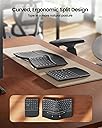
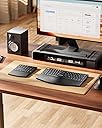
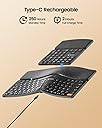
The ProtoArc EK04 Wireless Ergonomic Keyboard features a split, curved design with scooped scissor-switch keys for natural wrist positioning and fast response. It includes a separate numeric keypad for flexible setup and a hard leather wrist rest for durable comfort. Operating on a 2.4GHz wireless USB connection, it offers plug-and-play compatibility with Windows devices and a rechargeable battery delivering up to 250 hours standby after just 2 hours of charging.


| ASIN | B0DQ8BG849 |
| Additional Features | Ergonomic, Hard Wrist Rest, Low-Profile Key, Separate Number Pad, Split Keyset Design |
| Antenna Location | Everyday Use |
| Best Sellers Rank | #412 in Computer Keyboards |
| Brand | ProtoArc |
| Built-In Media | Type-C Charging Cable, USB Receiver (on the bottom of the keyboard), Wireless Ergonomic Keyboard, Wireless Numeric Keypad |
| Color | Black |
| Compatible Devices | Windows Desktop, Windows Laptop, Windows PC |
| Connectivity Technology | USB |
| Customer Reviews | 4.1 4.1 out of 5 stars (325) |
| Enclosure Material | Leather, Plastic |
| Hand Orientation | Ambidextrous |
| Keyboard Description | Ergonomic Split Design, Separate Numeric Keypad, Hard Wrist Rest |
| Keyboard Layout | QWERTY |
| Manufacturer | ProtoArc |
| Mechanical Keyboard Switch Model | Scissor-Switch |
| Number of Keys | 114 |
| Power Source | Battery Powered |
| Switch Type | Scissor-Switch |
| Unit Count | 1.0 Count |
| Warranty Description | 1 year warranty |
K**N
Great, replaced Microsoft natural 4000
Great key placement, performance, noise. I used a Microsoft ergonomic natural 4000 for over 10 years (still going strong), but I decided to try a separate numpad. I'm loving it! The negative tilt is just right. The size is awesome. I think I am even typing better without all that extra keyboard! I can place the numpad on the other side of my mouse, and I am so much more comfortable. The numpad is not perfect for me: it's a bit wide, doesn't have 00 key, backspace or tab key. I'm still enjoying it though. The wrist pad is hard, but the leather is comfortable. I've developed a little callous on my right palm as the Microsoft has a cushioned (but worn and peeling vinyl) pad. Overall, really enjoying this keyboard! (35 hours a week)
S**R
Long battery life, good quality, good feel
Works great, love that it’s rechargeable rather than using standard batteries. Been using it for two weeks (at least 100 hours spent), and it’s still running on my first charging session from when I opened it! Love the number pad separated so I can put my mouse where I need it. Key spacing was a little different from my last ergonomic keyboard, but I adjusted pretty easily and it’s not a big deal. Quality is good. Feeling on my palms/wrists is good. No issues at all with connectivity. Very happy with this purchase and would buy again!
M**Y
Great Value, Great Ergonomics
There are a lot of things to love about this keyboard and I'm extremely happy with my purchase after 2 weeks of using it non-stop. I purchased this keyboard as a replacement for an older Microsoft split keyboard. Pros: Setup was fast and easy and I was connected and using it in less than 1 minute. I'm using the USB dongle and my Thinkpad recognized the new hardware instantly. The height of the keyboard and the angle of the split feel just right. As a touch-typer I appreciate that almost every key I need (see comments below re: Home and End) is within easy reach and there is zero learning curve. The keys themselves have a scooped, low profile and are easy to press, with just the right amount of feedback. The leather wrist pad feels so much better against my skin than the weird fabric material found on many wrist rests. I don't notice it even after 8 hours of typing. The tiny indicator lights for function lock and caps lock are well placed and easy to see at a quick glance. Recharging is quick and easy with the usb c connection. Cons: There are only two things I would change that would make this the perfect keyboard. First, although the keys on this keyboard are low profile and have great action and feedback, they are comparatively loud. There is a lot of noise when I'm typing quickly and I miss being able to type quietly on conference calls. I find that I have to mute myself on meetings now whenever I'm taking notes because the sound of my typing is picked up by my microphone now. It's a bummer but not a deal breaker. Second, I'd like to see one more column of keys to the left of the main keyboard containing the Home, End, Insert and Scroll Lock buttons. Currently, those buttons can be found on the separate number keypad. But I use the Home and End keys all the time in everyday typing and I'm finding that I have to keep the number pad immediately next to the main keypad all the times so I can use them. It really defeats the purpose of having a separate number pad if I can't set it aside to save space until I need it. All in all this is a great keyboard and I'm pleased with the comfort and ease of use. It's a good value for the money and I would buy again.
L**S
Solid performer, 1 year in use.
I've been using this keyboard for a year now for both work and gaming. I type quite a bit and this keyboard has worked great! The keys have a short throw (movement from top to bottom) which seems to increase your typing speed. The key resistance is really good, not too hard, not too soft and the size and key placement is good as well. I actually just leave it plugged in all the time to a USB hub to keep it charged since I'm not moving it from my desktop, so I can't comment on battery life. I do wish that the function keys defaulted to the function keys instead of defaulting to the special (sometimes rather odd) things they do and you have to hit the Fn key to get the actual functions, but that seems to be common with keyboards now. Overall, it's been a really solid and reliable keyboard and their customer service has been excellent!
A**R
Functional, slightly annoying, but could be much better.
It does the job it's meant to do. The keys are not too loud, but also not silent and have a good tactile response (at least for me). Bonus for both pieces being rechargeable and having off switches, though why the numpad has the weird slider switch is beyond me. Big big minus for making it so you must hold fn+esc every time you turn on the keyboard because it forces the Fnumkey row into alternate key functions. This digital toggle is stupid and was likely added by some narcissist who felt that because THEY liked the fnumkey row to always be alt functions, everyone should. Do better, ProtoArc. If you can't add a memory function to remember the previous state of the fnumkey row, then add a physical toggle. Another minus is the home, end, page up/down keys are on the numpad. Not a big deal if you are always using the numpad, but if you are limited for space and keep it off to the side until the numpad is absolutely necessary, it's annoying for a touch-typist to reach over to hit the home or end key only to hit something else, instead. Still, it's a very good price and we're not exactly spoiled for choice in the wireless ergo keyboard realm unless we want to buy the CCP special that may or may not turn your computer into part of a botnet at some point.
M**W
Great ergonomic Logitech replacement
An excellent keyboard. My old Logitech wore out and I didn't want to spend triple digits for a new one. I love everything about this one. Great size, keys feel nice. No connection issues. You couldn't ask for anything better.
A**.
Not most typing friendly. Missing Martian regular keyboard keys, not ideal for Mac users.
D**G
Finally, real engineering thinking went into an ergonomic keyboard. I love this. It's the right price. The reason I bought this one was the price, but I was hoping for the best. The simple design logic of splitting the main keyboard from the extended numbers pad is brilliant. It seems so obvious. First of all, people hunting for ergo keyboards also use keyboard trays to make sure their elbows at the right height -- and most of these aren't that wide. This design solves the problem by splitting off the numbers pad -- now you can move it in when you need it without forcing your mouse hand far to the right in an bad ergonomic zone. Simple, right? So why don't more keyboard makers do it? I bought their matching "handshake" mouse as well (the vertical kind -- it's very good too.) Is it ergonomic? It is for my hands (normal sized male hands). I saw one person complain about keyboard click, but I don't notice anything. I have mechanical keyboards, which are far noisier. This one is slightly clickier than a logitech, but way quieter than a mechanical. It's perfect for me. The keyboard layout is good, except I'm a Mac user, so the Windows key I had to train myself to think of it as the Mac Command key -- I just had to force myself to use it. It's counter-intuitive. I like that it's rechargeable on USBC -- charged quickly, and havent' had to recharge so far in heavy use (I type about 10,000 words a day). Highly recommended. I like the faux leather hand rest better than a spongy memory foam style (like Logitech's ergo keyboard, which I have as well -- those foam ones are softer but get dirty from sweat, cat hair (in my case, since my cat likes to sleep on keyboards), etc. I like the faux leather feel and style. Thumbs up all round, except the stupid Win Key, and I think it's a mistake to have the power button on the bottom (Most people probably don't turn off keyboards, but I do, otherwise my cat will be sending emails to people.) .
M**L
Ergonomics: 10/10 Portability: 10/10 Modularity: 10/10 MAC/PC compatibility: 10/10 Connectivity: 7/10 - no bluetooth connection unlike the EK01, this needs dongle connection Button feel: 7/10 - the EK01 feels so much smoother to press. This feels like a silicon-based keyboard, leaving it feel a bit cheap. Why did I choose it over the EK01? Because the first 4 of the metrics mattered more to me. If you have table room to spare and don't mind the size, EK01 is definitely the better choice. I, on the other hand, am used to TKL keyboards, so I prefer this one despite the drawbacks. You just got to find what works for you.
S**S
From opening the well designed, high end packaging, to usage, I am extremely impressed with this keyboard, especially at such a low price point. Connection is seamless with the included dongle (no Bluetooth) and the keys have a satisfying sound. Having a separate numpad with its own arrow keys is a great idea and allows for your mouse to sit closer to the keyboard in addition to providing space on smaller keyboard trays. I would definitely recommend this keyboard for those looking to improve ergonomics. My only critique is the fact this specific model does not connect via Bluetooth, but it is available on other models.
T**T
The shape, and concept of this keyboard is really neat. I really wanted to like it. Sadly after 2 weeks of use, it started randomly typing out letters that I wasn't even pressing. I would type, and the keyboard was almost as if it had been possessed by a ghost! The shape was really ideal for ergonomic positioning, but I wish it was a tad bit smaller, as my shoulders aren't that wide. I did love how it worked the first two weeks, but sadly I ended up returning it. The keys were whisper soft which was my favorite part. I ended up buying a logitech wave keys to replace this and have had it for several months, and have been really happy with it. With some tweaks , I think this could be a really good affordable option
Trustpilot
2 weeks ago
1 month ago