Desertcart purchases this item on your behalf and handles shipping, customs, and support to South Africa.
🚀 Elevate your iPad Pro 13" game with ESR’s magnetic keyboard case—work smarter, anywhere!
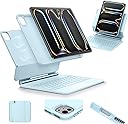
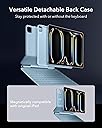
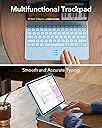
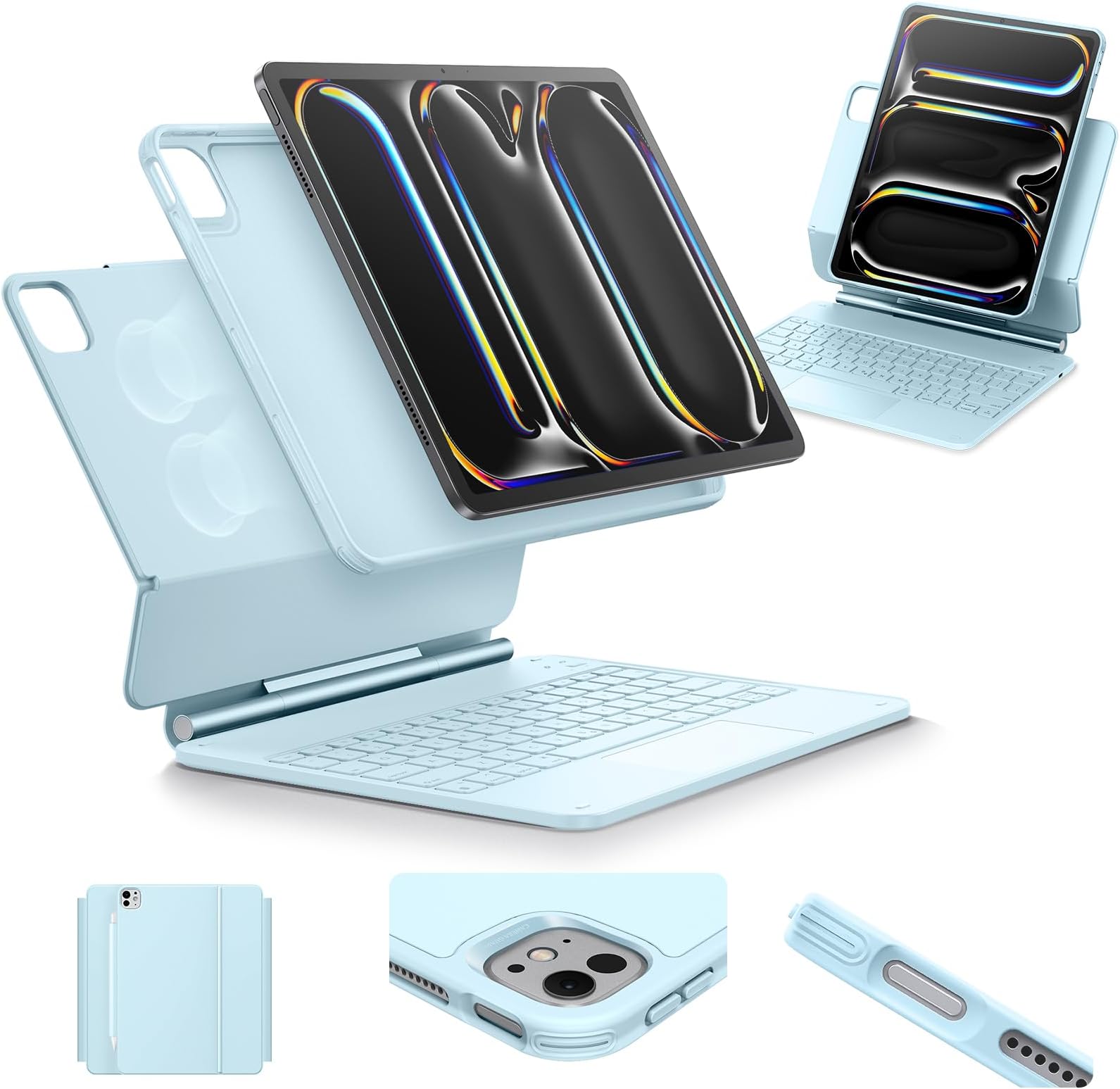
The ESR Keyboard Case for iPad Pro 13" (M5/M4, 2025/2024) offers a versatile, magnetic multi-mode stand with detachable back case, a precision multi-touch trackpad, and a customizable RGB backlit keyboard. Designed for professionals on the move, it secures your Apple Pencil with a magnetic flap and delivers laptop-like productivity at a fraction of the Apple Magic Keyboard’s cost, all while maintaining robust build quality and fast Bluetooth connectivity.


| ASIN | B0D8BCXN1Q |
| Additional Features | Backlit, Foldable, Lightweight, Portable, Rechargeable |
| Antenna Location | Typing Practice Programming Traveling Photo Editing Video Editing |
| Best Sellers Rank | #11 in Tablet Keyboard Cases |
| Brand | ESR |
| Built-In Media | Quick Start Guide ×1, USB-C Charging Cable (1 m) ×1, User Manual, iPad Case ×1, iPad Keyboard ×1 |
| Button Quantity | 78 |
| Color | Blue |
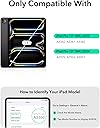
| Compatible Devices | iPad Pro 13 inch (M5/M4, 2025/2024) |
| Compatible Operating System Family | iPadOS |
| Compatible Tablet Computer Models | Apple iPad Pro 13-Inch (M4) |
| Connectivity Technology | USB-C |
| Customer Reviews | 4.2 out of 5 stars 2,515 Reviews |
| Enclosure Material | Aluminum, Polycarbonate, Polyurethane (PU), Thermoplastic Polyurethane (TPU) |
| Generation | Not Obtainable from provided information |
| Hand Orientation | Ambidextrous |
| Item Highlight | For Pro 13" 2025/2024, Secure Magnetic Lock, Detachable Back Case, Precision Multi-Touch Trackpad, Rebound 360 Series, Blue |
| Item Weight | 1.31 kg |
| Keyboard Backlighting Color Support | RGB |
| Keyboard Description | Multi Functional |
| Keyboard Layout | QWERTY |
| Language | English |
| Manufacturer | Electronic Silk Road Corp |
| Minimum Required Operating System Version | iPadOS 13 |
| Model Name | 6B014 |
| Model Number | 6B014 |
| Number of Batteries Required | 1 |
| Number of Items | 1 |
| Number of Keys | 64 |
| Number of Packs | 1 |
| Number of Sections | 1 |
| Power Source | Battery Powered |
| Recommended Uses For Product | Typing Practice Programming Traveling Photo Editing Video Editing |
| Series Number | 2024 |
| Special Feature | Backlit, Foldable, Lightweight, Portable, Rechargeable |
| Style Name | Classic |
| Switch Type | Linear |
| Theme | Technology |
| Unit Count | 1 Count |
| Warranty Description | 1 year |
| Water Resistance Level | Not Water Resistant |
R**I
ESR Rocks! And This Keyboard Case for iPad Pro M5 is AMAZING!
I had the iPad Pro 11 M1 and decided to upgrade to the new for 2025, iPad Pro 11 M5. Not only did I have to buy the new Apple Pencil Pro to work with the new iPad, but my keyboard case for the iPad M1 was no longer compatible. I could have bought the new Apple Magic Keyboard, but really? It's over $300. So off to research new Keyboard cases and ESR, a company I trust (I have two ESR Cases for my iPhone 17 Pro Max and every device we own has ESR Armorite Screen Protectors) and this iPad Pro 11 M5 Rebound 360 case was very favorably reviewed. It comes nicely packaged and includes a USB C to USB A cable (though that's the only thing ESR should change as it should be USB C to USB C) with an easy to follow multi-language user guide and warranty card, you can scan to extend the warranty to two years. Setting up the Keyboard Case couldn't be simple. I did charge it out of the box, but it must have had a good charge to begin with as it was fully charged in about 20 minutes. Then press the power button for about 2 seconds to wake the keyboard. To pair it with your iPad, press the FN/Globe key and the B key until you see the Bluttooth blue pairing light flash. Open settings on your iPad > Bluetooth - look for the ESR Keyboard and tap there to pair. Boom, you're all ready to go. While the 11 inch keyboard case doesn't come with dedicated function keys (the 13 inch one does), you still have all the functions you need. Just tap hold the FN/Globe key and look at the number keys, where all the functions can be adjusted, like Volume Up/Down, Screen Brightness, Changing Audio Tracks, Etc. The Keyboard also has 12 RGB backlit key colors you can choose from or the ability to not use any backlit option. The case is very Apple Magic Keyboard-esque in its design. Of notable goodness is you put your iPad in a nice quality protective case and then attach the case with your iPad magnetically to the Keyboard case. The case doesn't take much effort to open and it offers significantly more flexibility in terms of where you can place your iPad. You can for example, raise the iPad higher if you want, which the Apple case can't accommodate. And you can even place the iPad in Portrait orientation, which the Apple case can't accommodate. Do note that if you place your iPad in a higher position, it needs to be on a very stable workspace as it could topple over. This case as mentioned is Bluetooth. I prefer that over the way Apple's case works, which powers the keyboard by three pins on the back of the iPad when attached to their case. The reason I prefer ESR's approach is if your iPad isn't plugged in when using Apple's case, the iPad is using the battery to power the keyboard. If you're out and about, it can drain your battery pretty quickly (and yes, I had an Apple Magic Keyboard). Since the ESR case isn't using power from your iPad to run your Keyboard, there's much less to worry about if you can't get to a power source to plug your iPad in to charge. Finally, ESR provides a magnetic flap to keep your Apple Pencil Pro safely stored on the case when you're not using it or traveling about virtually eliminating any risk of losing your Pencil. All the buttons on the case your iPad is in are clicky and responsive and all they cutouts for speakers and USB C charging port are perfectly aligned. I'm mightily impressed with this ESR Keyboard Case for iPad Pro M5. For less than a THIRD of the cost of the Magic Keyboard, you get a high quality, yet affordable option, which coming from ESR means it will stand the test of time.
P**K
A fantastic keyboard case at an equally fantastic price
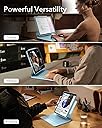
The summary of this review can be found in the title: this is a great keyboard case! Let me walk you through my experience: I’d been in the market for a keyboard case, but wasn’t crazy about the price of the Apple Magic Keyboard Folio Case thingy. My son has one for his 12.9” iPad Pro, but I was willing to do without due to the cost. Having purchased (and been very happy with) ESR gear in the past, I saw an advertisement for this and wanted to give it a try. At best, I’d have found an amazing product; at worse, I could find someone to pawn it off on…er, purchase it from me. So the order was placed, and it arrived quickly. Upon opening the Amazon packaging, I found a very professional-looking ESR packaging which was easy to open and had clear instructions on how to do a quick set-up, along with a QR code for further information and such (see photos above). The case was quite sturdy and well-built upon first glance. The iPad device-specific portion of the “case” felt nice, though it’s more or less just the means to holding the iPad to the keyboard. If you’re looking for a more protective case, sans keyboard, I encourage you to check out some of ESR’s other fantastic products. Anyway, my iPad went very easily into the shell. There are kind of three ways you can use this: portrait-style, landscape style 1 (where you just open the device and go), or landscape style 2 (where you lift or slide the iPad up an inch or two to allow for a little different placement and angle; I prefer this way myself). The magnets hold the iPad incredibly well, and the hinge of the keyboard is very sturdy. Do be aware that this is a chonky piece of kit, so it’s going to add some bulk as well as considerable heft. In fact, the keyboard and iPad together weigh probably as much or just a smidgen more than my MacBook Air M2, and is thicker. However, if you’re looking to consolidate or just want to have laptop-type features with your iPad, then these things can be easily handled. But allow me to say that the MAGNETIC FLAP that helps hold the case closed (doesn’t really need it but it’s a great touch!) also holds the Apple Pencil securely! This feature alone was enough to tempt my son to ditch his Apple Magic Keyboard Case because his pencil is constantly falling off due to not having a secure way to hold it! Almost worth the price itself just for that! Connection is via Bluetooth and was very fast in connecting to the iPad. The battery came in at 96% straight out of the box. The USB-C charging port is on the side of the keyboard. Something to note is that the keyboard does not charge the iPad while in the case. But as a quick test, I used a charging cable to connect the iPad to the keyboard port and found that the iPad began charging the keyboard. So, should you ever run low on juice in your keyboard, you can charge it from the iPad. Still, I suppose if you have a cable to charge the iPad, you kind of have a cable to charge the keyboard directly. At any rate, I enjoyed that little discovery. On the the keyboard itself. It feels great. The keys are really responsive and have just the right amount of that satisfying resistance. It’s quiet when you use it, perhaps just ever-so-slightly louder than my MacBook Air keyboard, but with comparable feel. The backlights for the keyboard are a very nice touch. Light blue, dark blue, green, purple, magenta, red, orange, and white seem to round out the available colors, and there are four levels of brightness (including off entirely). All this can be changed by the touch of two buttons on the function row at the top of the keyboard. I wanted to specifically mention the touchpad. Due to the size of the keyboard itself being pretty much determined by the size of the iPad, the touchpad is somewhat small. I also find that it’s INCREDIBLY sensitive. Pressing the touchpad for mouse clicks makes a nice sound, but it’s very easy to push it more than you wanted or accidentally. Using the iPadOS multi-touch gestures is a little harder at times due to these issues (sensitivity and size) but it is responsive to be sure. It is possible to go into the iPad settings and adjust the scroll speed and such, but I use an external Apple Magic Trackpad which is much more suited to my workflows. Still, if you don’t want to carry another device, the touchpad on the keyboard will more than meet your needs. And as you can see in one of the accompanying photos, I used the keyboard to write my initial thoughts and it worked great. In the week I’ve had the device I’ve been very well pleased, and have written this review using the ESR keyboard. A Quick Summary: Pros - Feel/look, sturdiness, convenience, responsiveness, secure holding of Apple Pencil when it’s not being used, battery life, ease of setup and use, and GREAT PRICE! Cons - A bit heavy, sensitivity and size of the trackpad (but you quickly get accustomed to these things so they’re not problems at all). So basically, if you want a great keyboard that is great on battery, relatively inexpensive when compared to Apple-branded keyboards, sturdy, and gives your iPad the features of a laptop, do not sleep on this ESR Keyboard Case. You’ll be really glad you got it! And I will most definitely be recommending this to my friends and will be very willing to purchase more products from the ESR family!
S**O
Goated quality
Possibly best ipad case I’ve ever seen and used. Keyboard is good, the material itself of the case is high end and feels really nice. Really compact and holds apple pencil securely. Magnet is strong enough for stability either vertically or horizontal, and I like how you also have the case on the ipad as well that you can pull off and use independently in bed or on the go. Personally, I think it’s way better than the Apple one and a steal for the price. 10/10 recommend
G**!
Securely holds and protects iPad. Great Keyboard touch and feel.
This case is prefect for my iPad Pro 13 (M4). Just what I wanted. It is a bit heavy, but I have gotten use to it and like the weigh. I wanted an Apple Magic keyboard but no way I am paying $370 for one. Got this for a little over $100 and it works great. It is reliable. I like the way it times out when not being used to conserve battery. Battery seems to last a very long time. I have only had it go dead on me once and I only charge it once or twice a month. I like being able to rotate the iPad and reattach to the keyboard in a portrait vs landscape mode. I like that the iPad is magnetically attached and easy to pull off and use as a stand alone iPad. The magnet is plenty strong to hold the iPad and has never separated without my removing it. I tried a couple other brands sold on amazon. Those felt more cheaply made, they just did not make the cut. I like the keyboard touch and feel as well as the color and brightness adjustable back lit keys. I also like that it automatically comes on with a touch of the keys. There is a slight delay for the Bluetooth to connect, but then I am off and running. Only issue real issue I have is that rubberize coating is starting to separate just between the two hinges on the left side. I hope it holds together and will update if it worsens. So far everything else has been great. Have only had it for 5 months, since Mid-July 2025. I use it pretty much every day for at least a couple of hours. Some days I have been on it for 6-7 hours. Great purchase and I recommend this on if you want a keyboard attached to your iPad.
K**N
great alternative to the Apple keyboard
I’ve been using this for several months now, and I can definitely say that I am very pleased with this. I love so much about this. My first keyboard was the official Apple version, which was extremely expensive. However, I did like it and its functionality so I was very skeptical about getting an offbrand keyboard. Overall, I would almost call this keyboard and upgrade over the Apple model with the exception of one or two details. First, the pros. This keyboard lights up! I absolutely love that there is an additional role button specifically for functions like playing or pausing music, adjusting the volume or the brightness as well as turning on the microphone. If I went back to my Apple keyboard, I would be missing these features considerably. I also love that I can choose which color to have the keyboard be I wish my eyes could handle the different colors better (I suffered a concussion couple years ago and have not been able to handle certain LED colors since but that’s on me). I also love the fact that there is an additional case that the iPad sits into. It gives me that peace of mind that my iPad is protected even when I disconnect it from the keyboard. The other super bonus, is the fact that I can turn the iPad into the portrait position and still be able to type. That feature alone, was a big selling point for me since one of the apps that I have to use for my business, only comes in portrait mode, and having to type those interactions on my phone before I got this keyboard was an absolute pain. Knowing that I can do that with this keyboard is such a thrill. you have a positive selling point for me was the fact that there is magnetic eye pencil shield that protects my pencil from being knocked off. Before I had to keep my pencil in my purse away from my iPad, which meant that it was never charged when I needed it. Thanks to this case, I can keep my iPencil on the case all the time and rest assured that it is always charged and where I need it. Now for the cons. The back of the attaches to the iPad is not as sturdy as the Apple model. It did take me a while to get used to that and to stop worrying about it, but now that I have gotten used to it and used it for several months without any issues with it, dropping my iPad or things like that, I can definitely say that while it isn’t as sturdy as the Apple model, it is more than sufficient. One other nitpick is the connectability. It connects decently enough via bluetooth, but I do have to tap my keyboard and wait a few seconds while it wakes up and connects. After having the Apple keyboard working instantly, it did take a while to get used to this. However, it does always connect, and I don’t have any issues with it. it never disconnects itself, unless I have left it alone for a while, and at that point, I’m glad it shut itself off because it’s saving the battery. Speaking of which, that is one other downside. I really miss how the Apple model would charge through the iPad itself with this model. I have to plug it in every week or so, but it does give me a warning when it’s getting low and it doesn’t take too long to charge. I’ve also found that I can see it’s battery level on the homepage if I put the battery widget on the homepage of my iPad. Overall, would I buy this keyboard again? Absolutely. Especially for the price. Its features outweigh the Apple keyboard, even if there are other features that it does not have the Apple keyboard specialized in. I’d say it was a good trade off.
A**R
NOT compatible with other ESR products!
While this is a great alternative for the Apple Magic Keyboard, I have one simple, but deal breaking issue with this product. I am a huge fan of ESR products, and I use their screen protectors and cases for almost all of my tech. Ironically enough, this has led to my disappointment of this product: I have the ESR Shift Magnetic Case for my M4 iPad Pro 13 inch (the one that I bought this keyboard for). Similar to this keyboard case, it comes with a detachable inner case that serves as an extra layer of protection if you choose to remove the iPad from its stand at any time. This was a big selling point for me, and I have read numerous reviews that show it is a huge selling point for most of the product’s buyer-base. When searching for a keyboard case for my iPad, I ultimately chose to stick with the ESR brand and buy this keyboard, with the detachable inner case being one of my biggest “pros” in the decision making process. Upon its arrival, I was met with, however, a HUGE disappointment. You see, the inner sleeve cases for these two products are tight fits. (So tight, in fact, that it takes a bit of strength and manipulation to put on and take off the case. This isn’t an issue, however, since I have no need to remove it from the inner sleeve, as it serves as the main piece of protection for my iPad.) They are simple in their design, and are just a silicone slim-fit case with I assume a relatively strong magnet built into the back. This allows them to attach snugly to their case counter-parts without worrying about them falling out of its magnetic hold. It does this very well, as I am always impressed by the strength of the hold the case has on my iPad. Both of these inner sleeve cases are IDENTICAL. If it weren’t for the color, I wouldn’t be able to differentiate the two… until I try to use them. Because of the simplicity of the design of the inner cases, I had foolishly assumed that I would be able to seamlessly switch between the Magnetic Shift case and this Keyboard Case without ever needing to change out the inner sleeves. I was very, VERY wrong. If at any time I wish to switch from the keyboard case back to the Magnetic Shift case, I need to pry my iPad out of its inner silicone case and struggle to re-insert the iPad into the special silicone case that came with it. This is a huge pain, and I honestly will find myself choosing to not even use this keyboard case due to the sheer annoyance and irritation it brings me. ESR: PLEASE make your products interchangeable. I have never been more disappointed in one of your products. Your direction of product design is catered towards ease, accessibility, and variety of use. This should have been taken into consideration when designing an accessory for a product that was made for infinite possibilities. I should NOT have to go through the trouble of taking my iPad out of its snug case every time I want to switch between drawing on Procreate or writing a school essay. Needless to say, I am disheartened and will hesitate in the future when choosing to buy an ESR-branded product.
A**A
An affordable keyboard with all the bells and whistles as the high end keyboards
EDIT: I bought the Magic Keyboard. The ESR Rebound that I liked so much is now sitting in it’s box for back up and I just bought the Magic Keyboard. I regret nothing. TL:DR Basically I really like the ESR Rebound Keyboard case but I still opted to purchase the Magic Keyboard as my daily driver for my IPad Pro 13 M4. There was a lacking in the ESR Rebound in that I missed the Magic Keyboard. I kept finding myself researching the Magic Keyboard and looking at comparison videos even though I claimed to be happy with the ESR Rebound. I couldn’t get it out of my mind! So there you are, I gave in to the $299 on amazon and now I am typing on a keyboard that checks all my boxes, it’s asethetically and functionally JUST RIGHT. I bought this for my IPad Pro 13 M4, which is ginormous and quite thin. This is awesome but it causes my anxiety over the safety of the iPad to rise to a new level. I upgraded from my iPad Air 4th generation (~11”) with the white Magic Keyboard. I had my iPad Air for about 5 years and I was so used to it I would treat it very casually and throw it around, it was my go to so this big thin iPad is something to get used to. I loved the Magic Keyboard I had. I couldn’t justify spending the extra money on the Magic Keyboard even at $299 on Amazon this time around. My second go to would have been the Logitech keyboard however even on Amazon at $259 I might as well have shelled out the money for the Apple Magic Keyboard. After doing some research on compatible keyboards I found ESR made this Rebound Keyboard Case. I already am a big fan of this brand so it made it even easier to choose with the price tag on it being about $100 which is much more affordable than the previously mentioned keyboards that obviously have their quality behind them and their brands as well. It had all the things I could have asked for in the specs. A case for the random time I take my iPad off the keyboard and backlit keys. Not much to ask for however when I received the keyboard it had so much more! The function keys on the top row, the different colors for backlit keys, it’s sturdy and I feel my IPad is protected. The feeling of typing is unlike the magic keyboard in that it is clicky, somewhat like a mechanical keyboard but it is obviously not to that quality. I like how it sounds and feels while typing. I appreciate the different colors for the backlit keys however I would have been fine with just a white backlight because of what I’m used to. The trackpad to me feels like a good size, I am used to the 11” Magic Keyboard and it is about the same size, I have to get used to how loud the clicks are on the trackpad, quite different from a Magic Keyboard especially the new one with the haptic feedback. It doesn’t bother me so much as I just tap on the screen if I need to move or click on anything for the most part. The quality of the material this is made out of is easy smeared onto. If I have lotion or even semi oily hands from cuticle oil, something of that sort it definitely shows on the keys and arm rests. It’s not hard to clean but it’s just a little unsightly and I’m being overly careful with my new big toy so I am constantly cleaning. It might not be a big deal to many but I am a little neat freak. Many have commented or complained about the weight of the case and keyboard. I actually like it. My iPad has not tipped over as my old iPad Air 4th gen with the Magic Keyboard would constantly which I appreciate because it’s a big iPad and I want to keep it safe instead of having it fall off my lap or fall back on the bed because it’s top heavy. I am not one to travel around with my iPad, being a stay at home mom it does not go very far from my home unless we go on vacation and even then it depends on where we’re going. So I cannot account for traveling weight. I still feel IMO it’s not that heavy and if I were a student or if I used it to bring to work it would not be inconvenient to me. Of course in comparison to the Magic Keyboard and the Logitech keyboard they are much thinner and would be more travel friendly. The keyboard has its own battery which holds very well. I’ll be using the set up all day starting at 100% and it’ll go down to 90% by the end of the day. It does have a standby mode that it goes to automatically after a certain amount of time. You can charge the keyboard by charging the iPad but it does not work the other way around. It’s very easy to connect to the Bluetooth and I haven’t had any problems with connectivity. There is a slight lag to get it out of standby mode but it’s 2 seconds to wake the keyboard and it’s back and running, not something you’d see in the Magic Keyboard or Logitech but I can live with the 2 seconds to wake up the keyboard to keep $150-200 or more dollars. For the price this keyboard is with about the same features as the other keyboards and good quality I’m happy with it. I use my iPad everyday for productivity, organization, videos, research, recipes, messaging and browsing. I’m on here more than I am on my phone. This keyboard has been a great affordable addition to my new IPad Pro
J**Z
Worth every penny!
This is a very nice case. Not as nice as the Apple version but solid. Sometimes the touchpad takes a minute to come back to life but not a huge deal. It has a really soft touch to it and it provides more than ample protection. I would say if $300-$350 for a keyboard case just feels wrong (it definitely should) this is a very close second at less than half the cost. Also the keys themselves are big enough and light up evenly with tons of color options. It’s a win in my book
C**E
Versatile, de qualité, un peu lourd mais c'est un tank niveau protection.
Entièrement satisfaite. Plus lourd que le magic keyboard mais beaucoup plus protecteur. C'est un tank et la qualité est là, rien a redire. Pour avoir déjà eu un smart keyboard apple sur mon ancien ipad je préfère celui ci pour le prix et la versatilité. L'étui protecteur est amovible et donc retournable 360° en plus d'être aimanté, je peux donc le coller sur une surface d'acier dans la cuisine pour les recettes. Le bluetooth est très réactif et le pavé tactile fonctionne très bien. Le magic keyboard d'Apple est sans contre dit un pièce d'art mais il est beaucoup trop cher. Si le poids n'est pas un facteur primordial pour vous, n'hésitez pas un instant pour le ESR.
S**.
Misleading Description
Images shown is of the rebound case with the ipad protective cover. Product received is the cheaper version without the protection cover. Misleading information. Return requested.
P**A
Worth the investment (for the nanotextured screen owner)
Very pleased with the item. Performs well with very minimal drawbacks (mostly to do with the touchpad). Probably the best one on the market currently for the price point. I appreciate the customer service, the reliability, trustworthiness, and legitimacy of the brand (compared to other cheaper, questionable, dropshipped brands available on the market). Love that it comes with a detachable magnet case. I have also gotten so much use out of the ability to adjust the orientation, viewing angle, and height of the iPad which you wouldn’t be able to do with Apple’s Magic Keyboard. I bought this for my m4 13-inch iPad with the nanotexture screen and my main use is for reading/researching and sketching/painting designs so protection, durability, and versatility were my main priorities. Yes, it is bulky and heavy, but this is not an issue for me as I think the tradeoff for sturdiness is so worth it. I would rather carry an extra kilogram than have to constantly worry about my screen getting scratched by a poorly designed keyboard case. Initially I was also concerned about the wobbliness of the hinge of the case but in the end this never became an obstacle as I work primarily on a flat surface anyway (as opposed to on my lap). Typing experience is pleasant and smooth. After a week of daily usage (3-4 hours per day), I still have not noticed any latency issues. Battery is long-lasting. No connectivity issues whatsoever. Regarding the touchpad: if you are someone who is used to high-sensitivity touchpads, you may notice a very very slight delay — though this is also not an issue for me because I use gestures directly on my iPad screen in my workflow anyway. Secondly, unlike the Macbook and the Magic Keyboard’s touchpad, tapping gestures seem to not work on the ESR’s touchpad (or if it works I haven’t figured out how yet) and clicking on it does not feel as luxurious as typing on it. Other gestures, such as scrolling, zooming in/out and shifting tabs etc. work like a charm. If your main device for working is an iPad — chances are you primarily work with the Apple Pencil anyway, so the keyboard is only being used as a supplementary writing device — to which the ESR’s keyboard case seem to tick all the boxes for a very reasonable price tag. The design is very sleek — having brightness and color options for keyboard lighting is a plus. The clasp provides extra security for your Apple Pencil. The beveling of the case makes sure the keyboard does not actually come into direct contact with your [nanotextured] screen. Overall, very satisfied with the item!
J**O
Recomendado, muy buena compra.
Muy buena compra, me gustó el diseño, el tamaño, la calidad y el funcionamiento del producto, muchos comentaban que estaba demasiado pesado pero sinceramente no es algo que sea tan molesto como para afectar el uso, al final eso le aporta calidad ya que el teclado no se siente sencillo delgado y todo endeble, al contrario se siente bastante bien y resistente. El track funciona bastante bien y muy similar (no es igual eso si, normal) al de una Mac Y a comparación de otros teclados mucho más sencillos lo más destacable es el click “fuerte” (no solo el click touch) se siente mucho mejor en este teclado ESR. Tiene bastantes colores en la retro iluminación del teclado. Es lo suficientemente silencioso y como para escribir. Bien. Recomendado.
D**E
Pesa más que la MacBook Po de 16”
Es un artículo muy estorboso, pesa más que la MacBook Pro de 16 pulgadas para un iPad
Trustpilot
2 months ago
1 week ago