Buy anything from 5,000+ international stores. One checkout price. No surprise fees. Join 2M+ shoppers on Desertcart.
Desertcart purchases this item on your behalf and handles shipping, customs, and support to South Africa.
๐ถ Stay Connected, Secure, and Ahead โ The Ultimate Dual Band Radio for the Modern Pro
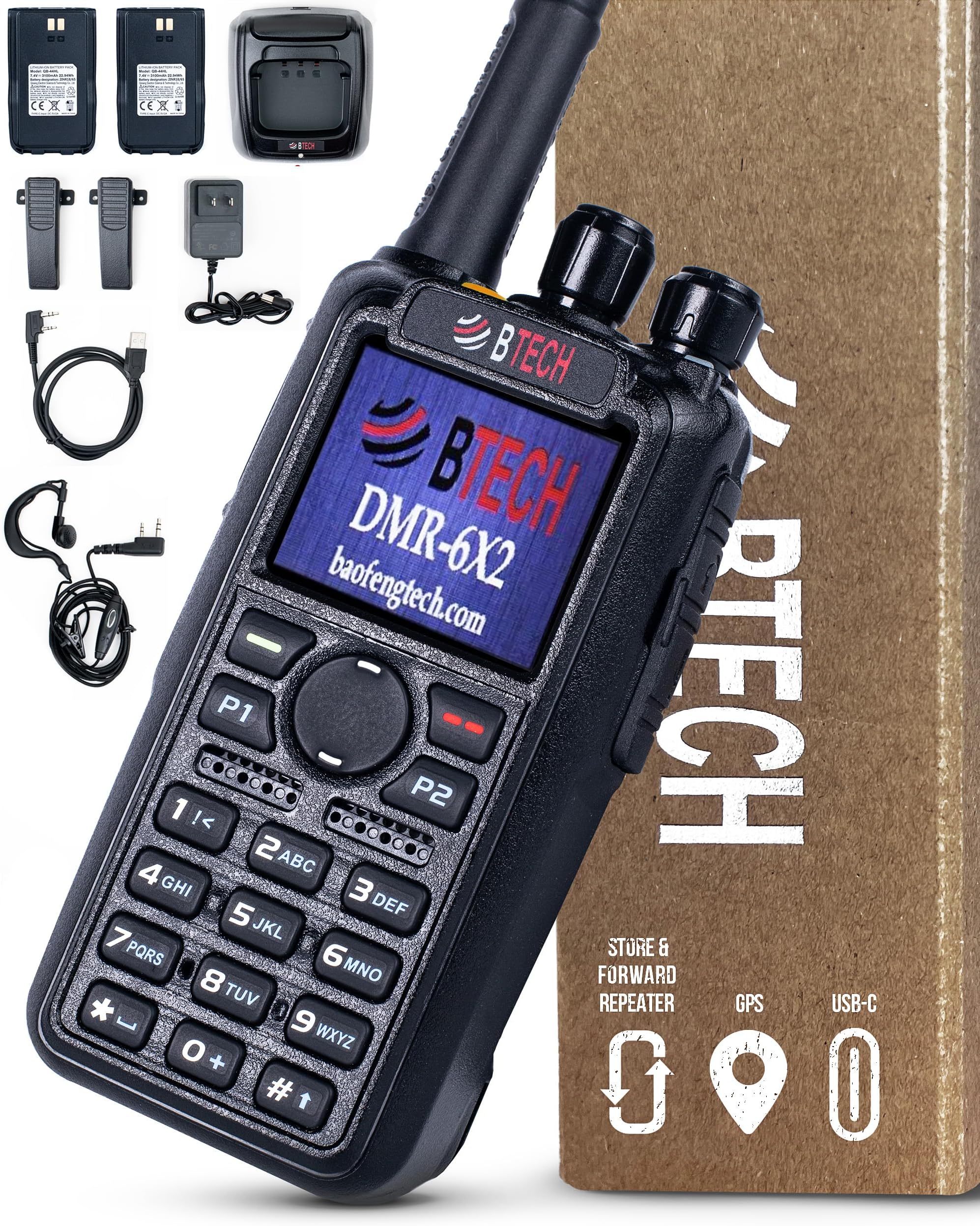
The BTECH DMR-6X2 is a rugged, professional-grade dual band two-way radio supporting both Analog and DMR Tier 1 & 2 networks with 7W output. Featuring military-grade AES256 encryption, a large database capacity, GPS-enabled APRS, and exclusive BTECH firmware for ongoing upgrades, it delivers secure, customizable, and reliable communication. Included is a comprehensive accessory kit with two batteries and USB-C rapid charging, making it ideal for professionals demanding seamless connectivity and advanced features in any environment.


| ASIN | B076H96BDC |
| Additional Features | Software and Information at: https://baofengtech.com/dmr-6x2, YouTube Tutorials: https://www.youtube.com/c/Baofengtechradio |
| Best Sellers Rank | #562 in Portable FRS Two-Way Radios |
| Brand | BTECH |
| Built-In Media | DMR-6X2, 2100 mAh standard battery, 3100 mAh High Capacity battery, 2 Belt Clips, Programming Cable, Charger Base, Charger Transformer, Earpiece Kit, 6" Dual Band Antenna, Wrist Strap, User's Manual |
| Color | Black |
| Compatible Devices | Analog and DMR Tier 1 & 2 networks, MOTOTRBO compatible devices |
| Connectivity Protocol | Digital Radio Standards (DMR Tier 1 & 2, MOTOTRBO) |
| Customer Reviews | 4.5 out of 5 stars 659 Reviews |
| Frequency Range | 136 - 174 MHz, 400 - 480 MHz |
| Item Dimensions D x W x H | 1.5"D x 2"W x 5"H |
| Item Weight | 282 Grams |
| Manufacturer | BTECH |
| Mfr Part Number | DMR-6X2 |
| Model Number | DMR-6X2 |
| Number of Batteries | 1 Lithium Ion batteries required. (included) |
| Number of Channels | 4000 |
| Special Feature | Software and Information at: https://baofengtech.com/dmr-6x2, YouTube Tutorials: https://www.youtube.com/c/Baofengtechradio Special Feature Software and Information at: https://baofengtech.com/dmr-6x2, YouTube Tutorials: https://www.youtube.com/c/Baofengtechradio See more |
| Talking Range Maximum | 5 Mile |
| Tuner Type | UHF, VHF |
| UPC | 722589229251 |
| Unit Count | 1.0 Count |
| Voltage | 7.4 Volts |
| Warranty Description | 1 Year |
| Water Resistance Level | Water Resistant |
| Waterproof Rating | IP54 |
A**R
Good, Solid DMR (and FM) Portable Transceiver (HT)
The BTech DMR-6x2 is excellent value for the money (particularly since supplied with two batteries), providing all the DMR features desired, in a physically solid package that has good sound quality, receive and transmit. It is made by AnyTone, on the same hardware as their 878, and differs only in firmware and surface details - important because AnyTone is one of the higher quality Chinese manufacturers and QUITE POPULAR. This last means that there are many users of this radio "family", with lots of online advice (some of it even accurate!), pre-programmed code plugs available to download for many metropolitan or regional DMR repeater networks, etc. The BTech version shares 95+% of its programming and menus with the AnyTone 878 series, and can even accept code plugs programmed for the 878. You will have a popular radio that is well supported. The DMR-6x2 has a few useful firmware upgrades that distinguish it from the 878 series, most of which I can't recall right now. One is the scanning structure, allowing up to 8 (I think) scan lists for each channel. This makes it much easier to make up scan lists for different types of channels, then include several lists to provide the kind of scanning you'd want while working with each channel (repeater, simplex DMR/FM, HotSpot, etc.), also modifiable from the radio's keyboard menus. It has an excellent "promiscuous"/Digital Monitoring mode, to listen in on all the traffic on a repeater (and join in with any Talkgroup you hear). It has been out for a couple of years now, so has had time to "mature", with the pace of firmware updates having slowed from every month or two down to stability for many months. The features are stable and most bugs have been crushed. A good time to buy if you don't like long and tricky firmware updates. For the rest of this review I will assume that you are in my position, new to DMR but having familiarized yourself with the basic terms (Time Slot/TS, ColorCode/CC, etc.) . You don't have a HotSpot yet, and are just trying to tame the complexity of DMR (and the thin documentation of these radios) enough to get onto local DMR repeaters like you have before with regular analog FM. A usable Code Plug is your biggest barrier. I will refer to various features without explaining them completely (or perhaps not even accurately!), but once you know of them, you'll quickly learn more online or poking around in the CPS (radio programming software). Be sure you have the same firmware version in the radio as the CPS, a mismatch will cause trouble. Always start by downloading the default radio programming, saving it, and building from there - it contains radio setup information that the CPS does not contain at startup. You may want to use the N9GSG DMR Contact Manager (freeware) to help build and combine code plugs. You will likely want to EXPORT various lists and tables from the CPS as a CSV (Comma Separated Values) text file and edit it in a spreadsheet program to move in old FM repeater lists you may have from CHIRP, to combine or reorder Talkgroup Lists, etc., then IMPORT them back into the CPS. A free spreadsheet program like LibreOffice works fine, and only basic spreadsheet features are generally needed. One thing to watch out for when editing these tables, even in the CPS, is that they are a very crude database, linked by position. Move a Talkgroup in that table and the Channels you programmed to use it now use the wrong one. Same thing for most tables. It is easy to mess up a big complicated codeplug you've downloaded with an unwise edit (keep backups), or to mess up your own as you are building it. Start with only a few repeaters (and the DMR simplex frequencies) and experiment with downloaded Talkgroup lists, how you want to organize your Talkgroups ,Channels, Zones, Scan Lists, etc., so mistakes are easy to correct - before you "go big". Simple hints: a Channel is only usable on the radio once included in a Zone. Receive Groups are not that useful, at least right away, use Digital Monitor instead. It is OK to have unused spots in a table (e.g. you can leave unused rows between channels in case you want to add later in-place. Most tables will not allow duplicates (e.g. every Talkgroup number AND NAME must be unique, the CPS will warn you if you try to enter or Import duplicates). It is safe to add to the END of a table (or fill in blank spots you left), as that does not change the position of the earlier entries. Any Talkgroup can be entered from the keypad "on the fly" with Manual Dial (see later). DMR Talkgroups are a mess, there are many DMR networks beyond the big ones, Brandmeister (BM) & DMR MARC (MARC), and all add Groups from time-to-time. If you are lucky, a local one is well organized and offers codeplugs and programming advice for this popular radio. You can't program a Channel's Talkgroup without it being in the Talkgroup table. Hint: research the repeaters in your area and try to determine what DMR network each belongs to, and what their preferred/allowed Talkgroups are (Static/Dynamic for each Timeslot). Example: a couple of local repeaters were listed in RepeaterBook as being on the SF-TRBO Network, but no information was available, even on the somewhat outdated local repeater web sites. Turns out SF-TRBO was long gone and these repeaters are now on the Western States DMR Network, which once found has a nice web site with a map of repeaters and Talkgroup lists. With all these DMR Networks, there are local Talkgroups unique to them, or if the same number as another Network, may not be linked (to BM or MARC, etc.). Search for Networks and C-Bridges (Network hubs) where you can monitor DMR traffic via NetWatch/CallWatch. Hints: The Talkgroup list is available from the upper right red menu button (screen will have "List" above it). Put your most common "on the fly" Talkgroups at the beginning of the list, where they are available on the radio with minimum scrolling. (I have nearly 700 Talkgroups in my radio, just to have them available if needed.) Scrolling up goes to the end of the list, so often-used ones can go there too. The quickest way to select/activate the Talkgroup is by hitting PTT. The quickest way to go back to the Channel's default Talkgroup is to switch Channels away and back. You'll probably want to set the Talkgroup Hold Times to "Infinite", to hang onto whatever one you've selected as long as you want. Starting out, you'll want to avoid programming a Channel for every Talkgroup on every repeater, and this approach will allow you to operate and learn how you want to organize your Channels and Talkgroups to suit your style. Be sure to sign up for a DMR ID on RadioID (requires a valid ham license) and enter it into your radio. Don't be the guy who comes up on your local DMR repeater as 1234567 (the default ID number in the CPS). The Btech site offers download of the latest Caller ID list, which you'll want to load into your CPS and radio so you'll see who is talking. Talker Alias gives "backup" information (first name & callsign only) if someone is new and not in your current Caller ID list. To start, enable Talker Alias only for receive. Transmitting Talker Alias causes audio problems on some repeaters, and BM will insert transmit Talker Alias for you on that network (log into BM Self Care to edit it, their default is OK though). You still have to ID call sign audibly to meet FCC requirements. If you build your own Codeplug try starting out with just two channels per repeater, one for each TimeSlot, choosing a popular/Static Talkgroup (some Codeplugs use a channel for each Talkgroup on each TS, resulting in scores of channels per repeater). Listen with Digital Monitor to monitor everything. To call up a Talkgroup on your own, use the "Dial" function from the radio keypad, or "capture" one that is talking using the "*" (asterisk) key, and then join in as the QSO allows. Program the radio buttons to be useful, both Long and Short press (set the Long press time to 1 second). In my minimalist/startup regime, try these (Short/Long): PF1: Monitor/Nothing, PF2: Power/Nuisance Scan Reject, PF3-round button on top: Voltage/Reverse Repeater Frequency, P1-on front: AorB Display Primary/VFOorChannel Mode, P2-on front: Digital Monitor/Scan. (PF1 Long is not usable "under" Monitor, and Monitor cannot be Long.) Manual Dial of a Talkgroup is already available as as Long Press on "0" (zero). # (pound/hash) switches the Manual Dial between Group and Private Call. PTT activates the dialed Talkgroup. Hit * (asterisk) while listening to "capture" the currently active talk group to transmit on (be sure you are on the same TS). # key also allows you to save a Talkgroup as a channel (but edit it later for CC, TS, etc.). (Also: the P5 button acts as a "Back" button sometimes, when the red button above it is serving as another menu function.) Try programming a few "Hot Keys". The 1-6 Hotkeys are only available using the above buttons, which have better uses, so go with the "func+" keys (hold down upper left green "menu" key until prompt appears, then a keypad key). I suggest func+1 as Menu: Radio Menu, and func+3 as Call: Digital, 4000, Group. You might add func+2 as Call: Digital, 9990, Private. Talk group 4000 is the disconnect command for dynamic (temporary) Talk groups on repeaters and hotspots. 9990 is the Parrot Talk group on BM - after a brief delay it will echo back whatever you say, to test operation and audio quality (mic gain settings) - very useful. Note that to work it MUST BE a Private Call, unlike almost all other Talkgroups that are Group Calls (a 9990 Group Call will allow you to hear other users making your mistake, but not yourself!). Other networks have other Parrot/Echo Talkgroup numbers (as do hotspots) and some are even Group Call, so check on your local repeaters. Finally, an IMPORTANT TIP: When programming the radio, never transmit while connected to the computer; users have reported both computer and radio damage (keep in mind that APRS can trigger timed transmissions, make sure it is off). To avoid damage, power off the radio before connecting to the computer. Power on when the connection is complete, and the computer will detect the radio after the radio "boots". After programming, wait for the radio to settle down and "reboot". Once it is displaying its usual channel/frequency/time/etc info, TURN OFF THE RADIO, then disconnect the cables. It is very easy to hit PTT while connecting and disconnecting the programming cable. With this radio, a ham license, an ID signup, some online research of DMR repeaters and Networks, downloading some Talkgroup and Caller ID lists, and a basic programming of a few local repeater channels, you can get started with DMR. And no, just like Euclid remarked of geometry, there is no Royal Road to DMR, though some paths are simpler than others! If you still want to try DMR, buy this radio.
T**S
Some initial issues, had to exchange it but the replacement radio is fine.
Me and my son each purchased one of these. Unfortunately after a week or so the internal speaker quit working on mine while listening to repeater traffic. The radio wasn't dropped or anything, it was sitting in the cup holder in my truck just listening to a local repeater. An external speaker works fine if I plug in a shoulder mike. I hard reset the radio, re-flashed the firmware, and re-flashed the code plug, all to no avail. I have also notice that the tx audio is a little lower on my sons radio even when I have the mic level set the same. I have set the radio up for refund, and will be exchanging it. I will update this review once I get the replacement and we will see how it goes as we have 2 of these. UPDATE: Received the replacement radio. This one is working perfect. Turn around time through Amazon was also excellent. Customer service through BTech was also very good. The seller reached out to me as well, but I had already warranted the radio through Amazon. Overall, this radio is probably your best option out of all of the currently available DMR options. If you want a radio that is actually manufactured with Ham users in mind, and not a modified commercial radio this is the best one out of all of the current options. It doesn't have the antenna impedance mismatch issues of the HD1, it holds the entire DMR database, and then some. The DMR database is currently over 90k contacts. This radio hold 150k so still has some room to grow as new radio ID's are added. The HD1 also holds the entire database, but at only 100k contacts it is unlikely that it will anymore after this year. The radio isn't Chirp compatible, as others have mentioned, but the BTech CPS isn't too bad. It at least has the ability to import/export CSV files, which makes editing the code plug quite a bit easier. If you choose to edit it locally in the software, it is a bit annoying as when programming channels you can't directly place entries in to the columns. Instead you have to click each channel open, and then enter the information into the dialog box that will open. This makes quick editing a bit of a chore. You also can't highlight multiple channel and edit/copy/delete them, they have to be manipulated one at a time. If you choose to do this in Excel with a CSV file it is much easier. TX and RX audio on the radio are fantastic, and the radio is solid on both analog and DMR. There is also no annoying squelch tail on analog like some of the Radioddity radios exhibit. The scrren is nice as well. There do seem to be some annoying firmware quirks still, such as when the screen has timed out during DMR operation, the radio won't receive text messages. Hopefully this will be fixed in an upcoming firmware update. The messages come through fine when the screen is lit. The radio does still receive fine though when the screen is timed out. It will wake up and light the screen. So it's not like it is hung in a sleep mode or anything. All things considered, it still has the least quirks, and is the most functional of all of the current DMR's on the market. I am changing my rating to 5 stars, as even though the radio isn't perfect, it is still the best option available at this time. BTech's customer service puts it over the top.
R**T
Outstanding Choice for New Amateur Radio Enthusiasts
As a newcomer to the world of amateur radio, I couldn't be happier with the BTECH DMR-6X2 PRO. This radio has exceeded my expectations and made my entry into DMR communication a smooth and enjoyable experience. Itโs my first and only DMR radio, and it has proven to be an excellent choice. I was initially torn between this model and the AnyTone, but I am truly glad I chose the BTECH. The user-friendly interface and robust feature set have made learning and exploring the DMR world a breeze. The build quality is exceptional, and it feels solid in hand, providing confidence in its durability and longevity. The dual DMR and analog capability offers great versatility, allowing me to explore a wide range of communication options. The battery life is impressive, and the audio quality is crystal clear, making it easy to stay connected during long sessions. I also appreciate the wealth of online resources and community support available for this model. I look forward to using this radio for years to come and discovering all it has to offer. For anyone new to amateur radio or looking for a reliable and feature-packed DMR radio, I highly recommend the BTECH DMR-6X2 PRO.
M**)
Good radio,low priced but with serious programming issues
I like the article as it does what it promises. My main reason for buying this mobile radio is DMR. I tried it out and it works very good. I very much dislike the way the memory is programmed. It should be programmable on the radio itself, and not by means of an attached PC. Luckily the frequency channel programming and storing is possible, but the size of the frequency-offset (5 MHz) is different from the dutch offset ( +- 1.6 MHz) for the UHF band. The VHF offset is OK (600 kHz). I did not succeed in connecting the radio to my computer via USB. I need more info about programming the radio by means of the PC. I think this issue spoils a lot of the very good radio features. The construction is very good and the colourscreen good readable. After a few days i found out, that the faulty offset on UHF ( 5 MHz instead of 1.6 MHz) is not necessary for repeater use. The shift can be easily programmed by choosing split rx and tx frequencies (radio set menu) before entering in new channel ( chan set). I raise my review overall rating with 1 star to maximum.
S**N
Great valued DMR handheld transceiver
This great radio is the best value I've seen so far: Dual band analog and DMR radio with 2 batteries and programming cable. From what I've read it's basically a re-badged updated Anytone AT-D868UV. Here are some tests I ran: Transmit power at 146.52Mhz: Low: 848mW Mid: 2.3W High: 5.5W Turbo: 7.8W Transmit Power at 446.00Mhz: Low: 848mW Med: 2.5W High: 5.4W Turbo: 7.1W The stock antenna SWR readings on an analyzer: 144Mhz 1.6 146Mhz 2.2 148Mhz 3.1 442Mhz 1.6 444Mhz 1.9 448Mhz 2.1 These SWR values are on par with my stock Yaesu, Kenwood, Nagoya (these performed the worst), and later Baofeng antennas. As far as spurious emissions: The average user will need to rely on that FCC certification. Pros: - Loud speaker. - Clear MIC. - Feels sturdy. - Large memory bank. - GPS - Accepts Anytone AT-D868 codeplugs and accessories. - Nice bright screen showing caller name, callsign, city, country. - Programming cable included. Cons: - Locked up twice in less than 2 weeks. I'm hoping this is cleared up in a firmware update otherwise I have a 1 year warranty (and more from SquareTrade). - Not waterproof. - Male-SMA antenna port. Come on OEMs, BNC is rated up to 4GHz. - Only does digital repeat. No cross-band repeat on analog. Summary: If you want a radio to talk on analog and DMR, this will more than fit your needs. It has the added benefit of a GPS receiver for digital APRS, digital repeater function, and a HUGE memory bank for zones, channels, talk groups, and every DMR user currently registered.
A**R
Great DMR Radio with nice extras.
I have been using the DMR 6x2 for approximately two weeks and it has become my go to radio. I have the Radioddity GD-77 to compare and the 6x2 blows it out of the water. I know that might not be a fair comparison due to the price difference and the feature difference between the two radios but if I did it over again I would have not bought the GD-77 and saved myself 90 bucks. The BTech's CPS Programing software is very easy to use and I have found their included instructions to be very helpful in the event I have been stuck on a step. You can also refer to instructions and YouTube Videos about the AnyTone 868 because these radios are pretty much identical. The BTech has excellent sound quality on both transmit and receive, there are several volume settings in the menu to choose from so you can select what is best for your use. The screen is very nice and once you upload the DMR Database the information on your screen is very helpful keeping track of call signs and station information. There are plenty of options on how you may program the 5 various front buttons and you can even do that in the radio's menu, not just the CPS Software. In my opinion the dual battery package is a good value and it is very nice to have the ability to swap in the larger battery for those times when you might be away from a charger for awhile. In my experience I have been averaging approximately two days running the 3100 mAh with a little bit of transmitting and a lot of receiving. I am very fortunate that in my area I am very close to several DMR and Analog repeaters and I usually keep the radio on the middle wattage transmit setting. In conclusion I would highly recommend this radio for all your DMR and even analog ham needs!
D**S
Fantastic DMR Dual Band Transceiver
This is a great DMR rig. Sound quality is amazing. Battery life with the large 3100 mah battery is a couple days. The software for the rig is easy to use once you figure our the basics. On thr analog side it works great and has as much range as any hand held transceiver. All that said DMR has a steep learning curve. By steep I mean it's a straight up mountain compared to setting up an analog radio. There are some very good YouTube videos that will help you get the hang of it. If you are living in a rural area like I am you will most likely need a hotspot to take full advantage of this rig. The closest DMR repeater to me is 13 miles away and it's very iffy for me to reach it all the time. The nearest analog repeater is 10 miles and I have no trouble at all using it. But DMR is different. While you may just have a weak signal with static on analog you can still get in and use the repeater. Not so with DMR. If not enough of your digital can reach the repeater will drop out and you will not be understood. A hotspot acts like your own personal repeater and will allow you to is this rig with confidence up to several city blocks away. For me out in the middle of nowhere my hotspot coveres my entire property and even as far as a half mile down the road. Btech has hit this one out of the park. Having looked at many other models this is by far the best buy going in DMR radio at this time.
L**Y
Amazing DMR transceiver for the 2M and 70cm bands
An amazing DMR transceiver. The build quality is fantastic. It is only IP54 rated which makes it splash proof from any angle. I wish it was IP68, but I do not plan on any use in a monsoon. The antenna that comes with it is seriously lacking with excessive SWR in the 2:1 in the 2M, and 1.8 in the 70cm bands and should be replaced with better ones. I really like this radio and it seems durably built and has plenty of power for an HT at 8W.
Trustpilot
2 weeks ago
1 week ago