

🎮 Power up your play with seamless dual charging!
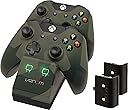
The Venom Xbox One Twin Docking Station includes 2 rechargeable battery packs designed for Xbox One and Xbox One X controllers. It supports simultaneous charging of two controllers via USB or mains power, featuring LED indicators for charging status. Each battery pack delivers up to 20 hours of wireless gameplay, making it an essential accessory for uninterrupted gaming sessions at an accessible price point.
| ASIN | B08NG8WZ49 |
| Best Sellers Rank | 43,876 in PC & Video Games ( See Top 100 in PC & Video Games ) 33 in Xbox One Battery & Charger Sets 16,947 in Legacy Systems |
| Customer reviews | 4.6 4.6 out of 5 stars (34,908) |
| Item model number | VEN-XB1-TWIN-DC12 |
T**D
Review for the uninitiated gamer or a person tasked with buying one for a family member or friend
Review for helping new gamers or people not to sure what they're doing. Turned up next day. It actually works, unlike another product I tried. Xbox one X compatible. Cant atest to it on the new Series X/S. But works on the Xbox one and Xbox one X perfectly! Pack slots into the back of the control pad itself. Recharges by "docking" the control pad back onto the main unit which itself is plugged into the Xbox's USB or you can have it charge straight from the mains, via the docking station. The battery lasts for a solid 6-8 hrs with a headset If you have two people playing on a long session and you want to stay wireless the whole day, would need 2 spare controllers and another 2 spare battery packs, so you can have those on the charger whilst you use the battery up gaming. What my friend and I do, he owns one, I own one, quick swap off one of the packs and away you go, no need for expensive batteries or annoying leads As stated already, plugs into the USB of your Xbox and charges in stand by mode when you are not playing as well as the obvious. Great bit of kit, especially for the asking price. Only downside, takes almost as much time to charge as the length of time it takes to use the battery up in the first place. My only slight criticism, why I advise spare packs . Very happy customer aside from that minor negative and it is a minor one. Enjoy if you get one. I am a flesh and blood person, not a bot and no one has paid me for this review, genuine grateful and happy, customer was costing me a packet in batteries.
C**L
Cheap price, therefore cheap design, but works well!
Have only been using this for about a week so this is a fairly short term review. First impressions are that the materials are cheap (thin plastic) and that the connections for the charging points are quite flimsy (thin metal wires), however this is to be expected for the price. Despite those initial worries the charging dock works perfectly and actually looks significantly better once Xbox controllers are resting on it. The usb plugged into the back of my Xbox very easily and then it was ready to charge (even without the Xbox being turned on, so long as there was power going to it). The replacement battery packs fit into the controller very easily and from my experience seems to offer around 20 hours of gameplay off a full charge. A red light appears when the controller is charging and this usefully changes to green once fully charged. The ability to charge 2 controllers at once is very useful. Summary: Pros: Easy charging (rest controllers on dock) Useful coloured lights to show charging Cheap! Charge 2 controllers at once Cons: Some cheap materials (thin plastic) Difficult to charge the battery packs alone (not in controllers)
R**B
Pluggin' Brilliant!!!
If you are trawling through online stores looking for the cheapest chargers you can, my advice would be to stop and just spend the very reasonable £15 or so on these. Having purchased these for our old 360 and they were the obvious choice when I wanted a charge dock for my XBOX One earlier this year. As we have 2 console in the house I have come back to order a second as I have been so impressed! The Venom Dock not only performs well in relation to its primary role of charging the controller and providing excellent battery life, but it also has a range of little design features that make it a better choice than others you might consider. Firstly, the stand itself offers a perfect fit for each controller, you simply place them on with no concerns that they might not quite fit or need to be adjusted with safe cracking precision just to be in the right position to charge. Secondly, the batteries charge through connectors on the battery pack itself and not through the port in the top of the controller. This might seem a small thing, but it does mean you avoid the damage that occurs through constantly removing and reattaching the controller using that port. Finally, the batteries themselves are a perfect fit for the back of the controller and hold brilliant charge. We gave both our sets a full charge before their first use and have been rewarded with what I think is great longevity. As mentioned above we have 2 consoles - an original XBOX One and also a One S and in each case the above applies.
K**R
XB1 Venom Twin Charging Dock
As someone who spends hours upon hours gaming, this was definitely the right sort of accessory to get for my Xbox One. I'm always a bit weary about these third party products, mainly because I prefer buying the official products by Microsoft, but after trying to find an official Microsoft battery charging kit, and not being too happy on the price of the "Play and Charge kit", I decided to buy this. WHAT COMES WITH IT YOU ASK? Are you blind? There's a picture right there... I'M KIDDING CALM DOWN. This product comes with two Venom rechargeable battery packs, and a charging dock/cradle, with the spaces the batteries to be charged on. To power it, you simply plug (if I'm correct) one wire into the back of the kit and into the USB slot of the XB1. Or the wire is already connected into it's back, requiring you to only plug it into the USB Port. The batteries still charge even with the XB1 is off, which is nice as you won't have to switch it on, just to charge the batteries. THE BATTERY PACKS! Two things about these battery packs. First off, they are a pain to get out. You have to push with all your might in the middle of it, whilst pushing up to get it out. There will be dents left in your thumbs from where you've been pushing sooo hard. Also, due to the flimsiness of the XB1 controller, you can literally feel it bending. I mean it's good, because the battery pack won't keep falling out, but man, it feels like you're going to break the controller in half, so take care. Secondly, they last about 6-10 hours, which sounds good. But, if you're like me, you'll be charging it nearly everyday, which wastes a lot of time... BUT THERE IS A SOLUTION, that I shall soon reveal. THE DOCKING STATION, CRADLEY... CHARGER. The main charging cradle perfectly fits the controllers, allowing you to place and remove the controllers with ease. It's also very light, which is nice if you're travelling. You won't have any more weight added to the 50 ton VCR Player you're also carrying... That being the XB1. The minimum amount of time it takes to charge the battery is around 3 hours, which is pretty standard. Also, whilst the battery is charging, there is a red light. Once it's done, it is a green light! BUT the fact it's green, doesn't mean it's all done, and that it's no longer being charged. The truth is, it's still getting charged, even if it's fully charged, so it's best to remove it from the station to avoid overcharging it. TIPS AND TRICKS! You see that picture, of both the controllers on it, to charge the batteries? Yeah that's a lie. You do not, DO NOT, need to have the battery in the controller to charge. Of course if you're not playing you may as well put the controller on it with the battery for giggles, but it's not necessary. Simple put the battery on top on the hook bits on the dock and it should sit there and charge, just like it would with a controller on (The picture posted below shows a battery on its own charging, as well as a battery in the controller charging... SIMULTANEOUSLY!). If you have trouble, which you shouldn't, you can improvise by putting something at the bottom, and sitting the battery on top of it to charge. SECOND TIP! Whilst you're gaming, take advantage of the previous tip. Use one battery pack with your controller as you play, and charge the other battery with the cradle. Remove it once it turns green so you don't risk overcharging it, which will make it last longer, in the long run. Doing this will allow you to have an instant back up of power for your controller, for you to take, plug in, and then place the other one on charge. You will have your own Battery Pack Tag Team, hurray! Overall, it's a great product. Would love it if the batteries lasted longer, but hey, maybe the fact I make the batteries run out in a single gaming session is something, very very sad on my own part which I should probably be concerned with o_O... Either way! I recommend it to everyone!
S**H
A great budget duel charger.
With a Xbox One playing in the home who uses a wireless controller daily with headphone connection we started going through a huge amount of batteries very quickly, however we didn't have much spare money at the time, but knew we wanted a double charger. This cradle has exceeded out exceptions it is so simple to use (just plug in the USB to the side of your Xbox and your ready to go). The duel lights to the front tell you if the controller is charging (red) or charged (green) both of the slots have their own light. The charger even works when the Xbox is placed into power saving mode, so if your link me and want to grab a whiles TV - he can't complain that he's controllers need charging as an excuse to keep the Xbox on. They charge in the controllers seems to hold up well, some epic Destiny sessions have seen them swapped only once, which again surprised m e as for the price I expected it to hold out an hour or two at most. This is a really good option for those who want to duel charge and it doesn't cost the earth so win - win at least in this household.
J**3
For Xbox Controllers, I will Only Use Venom
I first used a Venom Docking Station, when I got a XBOX 360 as birthday present over 5 years ago. I had to replace that one after about 3-4 years, with another Venom Docking Station, and that one is still working. Top Quality! So, when I bought an XBOX ONE, there was only one option for me when it came to wanting a docking station and rechargeable batteries for my XBOX ONE controllers, VENOM! This docking station is USB powered which means you can plug it into either the XBOX ONE, a USB mains charger, or any other USB device. In the box, you get the docking station, 2 rechargeable batteries, and a USB cable (of very generous length) used to power it, and an instruction manual. The docking station is designed to charge the battery while inside the controller, so if you only have one controller, this product may not be for you. When charging, a LED light on the front (the left one for the front controller, the right one for the back controller) will glow red, and when charged, it will glow green (a VERY bright light) The batteries give an excellent amount of charge (I don't know exactly how long, but it is very generous). Overall, if you own 2 XBOX ONE Controllers, and you want to be able to use one, while charging the other (or, of course charge both at the same time), then this is THE perfect choice. I cannot recommend it high enough, it truly is fantastic.
H**E
The perfect Xbox one charging station
Replaced my original version of this docking station due to age. The batteries had gone beyond the maximum charges and started to swell, eventually failing. This was after nearly 4+ years of everyday use! I have stuck with Venom chargers since the Xbox 360 and have never been disappointed with the build quality and reliability. I am very happy with this newer model and the charge packs fit my new controllers much nicer. What I have always loved about the venom design is the drop and charge. No need to spend time finding the right charge position, just drop your controller in the slot and it seats itself perfectly. One noticable difference is the LED brightness. For me, my previous model was too bright, but this new model has much dimmer charge lights which I prefer. My room is no longer a bright luminous green at night. I'm a little suprised to see that USB mini is still being used instead of a newer connection type such as micro, considering modern phones and devices are mostly using micro these days and would make cable replacement much easier.
K**E
Life Saver
I had bought this for my son a couple of years ago and it was 1 of the best xbox accessory I bought for him, before his controllers were running out of charge regularly or other regular batteries not lasting long. Once I bought this he had 2 batteries he could swap out very easily and quickly even mid-game without much interruption so 1 was always charging or full while other was being used. When he somehow lost one instead of buying new battery I actually bought this again as getting the charging port with 2 batteries was working out cheaper. Came on to buy another and unfortunately it's unavailable as they have a new updated one, but that won't work with his xbox unfortunately. Hope it comes back 🙏
T**N
Mooi docking station
Mooi docking station, makkelijk om te gebruiken en is zo aangesloten. Gelukkig zitten er oplaadbare accu's bij die je zo in je controllee klikt. Veel plezier van en zeker de prijs waard. Het enige minpuntje is dat het docking station niet net zo wit is als de xbox en de xbox controllers. Ook is het lampje ter indicatie van het opladen redelijk fel. Ik raad dit product zeker aan.
A**.
Perfekt und das bei dem Preis... Top!
Ich nutze diese Docking Station zusammen mit meinen Brüdern jetzt schon knapp 3 Jahre und sie funktioniert noch immer einwandfrei. Bei dem Preis kann man sich dieses Produkt echt gönnen, denn es erleichtert dein Zocker Leben ehrlich arg haha! Man muss nicht mehr ständig Akkus wechseln, ehrlich gesagt haben wir sie innerhalb der Jahre nur wirklich wenige Male wechseln müssen, wenn ich so drüber nachdenke. Man hat wenn die Controller voll aufgeladen sind locker 4 Stunden Spielzeit. Super Sache, wir können diese Station wirklich nur empfehlen! Sie macht sich sogar im Zimmer ganz nett. Schönes Design und sehr gute Verarbeitung! Die Controller lassen sich schön leicht reinstellen und rausnehmen und das mit den Lichtern funktioniert auch super. Sind sie grün, sind die Controller auch tatsächlich voll.
A**S
Very good quality. Compatible with Xbox One S.
R**E
Works great
Works great, about one day of use per battery
M**E
Great charger!
Charger works well. Batteries last for hours and fit perfectly. I bought this one 3 plus years after the first one (same model) because the batteries finally started to die a little faster, but still over 3 hours of game play after 3 years.
Trustpilot
2 weeks ago
2 months ago