Desertcart purchases this item on your behalf and handles shipping, customs, and support to South Africa.
❄️ Stay cool, stay unstoppable — power your productivity with Razer’s smartest cooling pad yet!
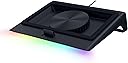
The Razer Laptop Cooling Pad is a high-performance cooling solution designed for laptops and MacBooks between 14" and 18". Featuring a 140mm brushless fan spinning up to 3000 RPM within an airtight pressure chamber, it significantly reduces CPU and GPU temperatures. Its smart adaptive fan control automatically adjusts speeds based on workload, while customizable fan curves and RGB lighting can be managed via Razer Synapse. The pad also includes a 3-port USB Type-A hub for enhanced connectivity and supports multiple magnetic frames for a perfect fit. Backed by a 2-year warranty, it’s engineered to boost laptop efficiency and comfort during intense use.


| ASIN | B0DJDWWHTV |
| Best Sellers Rank | #15,935 in Computers ( See Top 100 in Computers ) #43 in Laptop Cooling Pads |
| Brand | Razer |
| Built-In Media | User manual |
| Color | Black |
| Colour | Black |
| Cooling Method | Air |
| Cooling method | Air |
| Customer Reviews | 4.4 out of 5 stars 597 Reviews |
| EU Spare Part Availability Duration | 2 Years |
| Enclosure Material | Plastic |
| Item Weight | 2.61 Kilograms |
| Item weight | 2.61 Kilograms |
| Manufacturer | Razer |
| Material | Plastic |
| Mfr Part Number | RC21-02300100-R3UC |
| Model Number | RC21-02300100-R3UC |
| Number of Fans | 1 |
| Number of Items | 1 |
| Number of Packs | 1 |
| UPC | 840272914793 |
| Unit Count | 1 Count |
A**I
Extremely excited
“I’m extremely impressed with the Razer laptop cooling solution! It’s sleek, well-designed, and highly effective at keeping my laptop cool during intense gaming or heavy workloads. The build quality is outstanding, and the cooling performance has noticeably improved my laptop’s efficiency and comfort. Highly recommend this for anyone looking to protect their device and enhance performance!”
J**N
Nice Cooling Pad
its effectively cooling my G14 laptop.... good to have this cooling pad..
K**R
Wouldn’t recommend
The cooling pad itself works, but needing the Razer Synapse app just to control the fans is annoying. A simple hardware switch or built-in control would have been enough. The extra software requirement adds clutter for something that should be plug-and-play. Also, I thought it was metal which it is not.
G**A
The Best That I've Tried (& There's Been a Lot)!
I have an interesting set up, and needed something powerful, but also on the smaller side so it wouldn't stick out an awful lot. I tried probably 10 other laptop coolers before finally arriving to this Razer model, and it's the ONE. Obviously, it has a sleek design with none of the weird, unsightly little wheels or knobs a lot of models have. The buttons for this are tucked cleanly on the right side (there are three). It also doesn't stick out a lot, so my laptop/desktop set up is a lot cleaner looking. There's only the one set level of height, but it's not a problem for me since my laptop is hooked to my monitor. I think it's at a height that's comfortable for most people though. I used this pad as a hub of sorts to keep cables tidy before I swapped a Thunderbolt dock, and it worked great. Since the ports are in the back, cables are kept cleanly out of sight. I don't have a Razer laptop (I'd love one though!), but the additional magnetic tip in screens made it possible for this to fit perfectly for my Asus Tuf f15. While my laptop does have an awesome internal fan system, I'll still hit framerate drops and bad lagging about 40 minutes into heavy gaming (like for Oblivion Remastered or Crimson Desert) just due to the extreme heat well into the 200s. This pad though, keeps everything cooler by FAR, sometimes cutting my temps in near half. The screenshot shown is right after a heavy, multi hour gaming session. It might not seem like much to some, but after me worrying I'd toast my GPU (not to mention being super salty about such short gaming times) this is insane. Yes, it's loud, but honestly, I've never had a fan system that wasn't loud when it actually works. It's well worth being able to play games on my older laptop! You can download the app and use it even if you don't have a Razer laptop, you just won't have all of the features. You'll be able to modify the fan speeds/arcs and also the lighting, which for being just a small strip, has some pretty cool modes. I personally LOVE this Razer cooling pad. It makes me want more Razer products, since this is so thoughtfully made. This has made what used to be a depressing time gaming into hours of fun.
L**L
Recommended for 18 inch laptop
Terbaikk !!!
C**L
As expdcted
Didn’t get Australian plug with this.
J**M
El mejor
El mayor inconveniente que tiene es el precio, aunque después de validar sus características se observa que está basado en la funcionalidad que ofrece, todo es configurable a través de su software razer synapse, se pueden crear curvas personalizadas (por temperatura o RPM) y asignárselas a juegos según se requiera el nivel de enfriamiento. Se puede modificar el RGB, incluso se le puede agregar otra funcionalidad diferente a los botones de RGB y RPM de la base, respecto al apagado se sincroniza con la laptop y cuando esta se apaga el ventilador entra en reposo, lo mismo en el encendido, el ventilador toma la última configuración de RPM para funcionar. La construcción es de muy buena calidad e incluye 3 marcos magnéticos para usar según las dimensiones de la laptop, el cable de alimentación para consumo de 36w (muy buen consumo de energía) Respecto al funcionamiento, el ventilador tiene un mínimo de 500 RPM y puede llegar hasta los 3200 RPM, lo cual ofrece un buen nivel de enfriamiento, aunque también a mayores revoluciones incrementa el ruido generado (haciendo pruebas el nivel aceptable de ruido es con 1700 RMP, en adelante se recomienda usar audífonos). A nivel personal observo que favorece más al lado derecho de la laptop manteniendo una temperatura no mayor a los 70 grados en la gráfica usándola al 100% en juegos de alto rendimiento y al procesador en ocasiones no le ha llegado a impactar. Otro de los factores que se debe considerar es el uso de los marcos herméticos para poder concentrar el mayor posible aire fresco, con el marco liso el aire se escapa y la laptop no recupera el aire suficiente para enfriar. finalmente, el hub de 3 puerto UBS es muy bueno y mínimo cubre el puerto USB de la laptop que se estaría ocupando. Si bien puede tener algunos detalles a mi consideración y al momento es la mejor base que se puede llegar a adquirir, las configuraciones que se pueden realizar, la potencia y el mantener mi laptop en las condiciones adecuadas de funcionamiento es lo que le otorgar valor a la base.
T**7
Premium Cooling Pad with Smart Features – Pricey but Worth It!
I got the Razer Laptop Cooling Pad: Adaptive Smart, and honestly, it’s one of the best cooling pads out there. The intelligent fan control and airtight pressure chamber make a huge difference, keeping my laptop much cooler even under heavy loads. The preset & custom fan curves are a great feature, allowing for precise cooling adjustments. Plus, the RGB lighting adds that classic Razer touch. That said, I did have to pay import fees, which bumped the price to $250, making it quite expensive. But considering the build quality, performance, and extra USB ports, I’d say it’s still worth the investment if you need serious cooling. If you’re a gamer, content creator, or heavy laptop user, this cooling pad does the job perfectly!
Trustpilot
4 days ago
1 week ago