Desertcart purchases this item on your behalf and handles shipping, customs, and support to South Africa.
🚀 Elevate your home network to WiFi 7 speed and security — because buffering is so last decade!
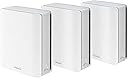
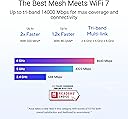
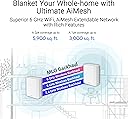
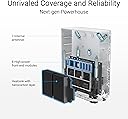
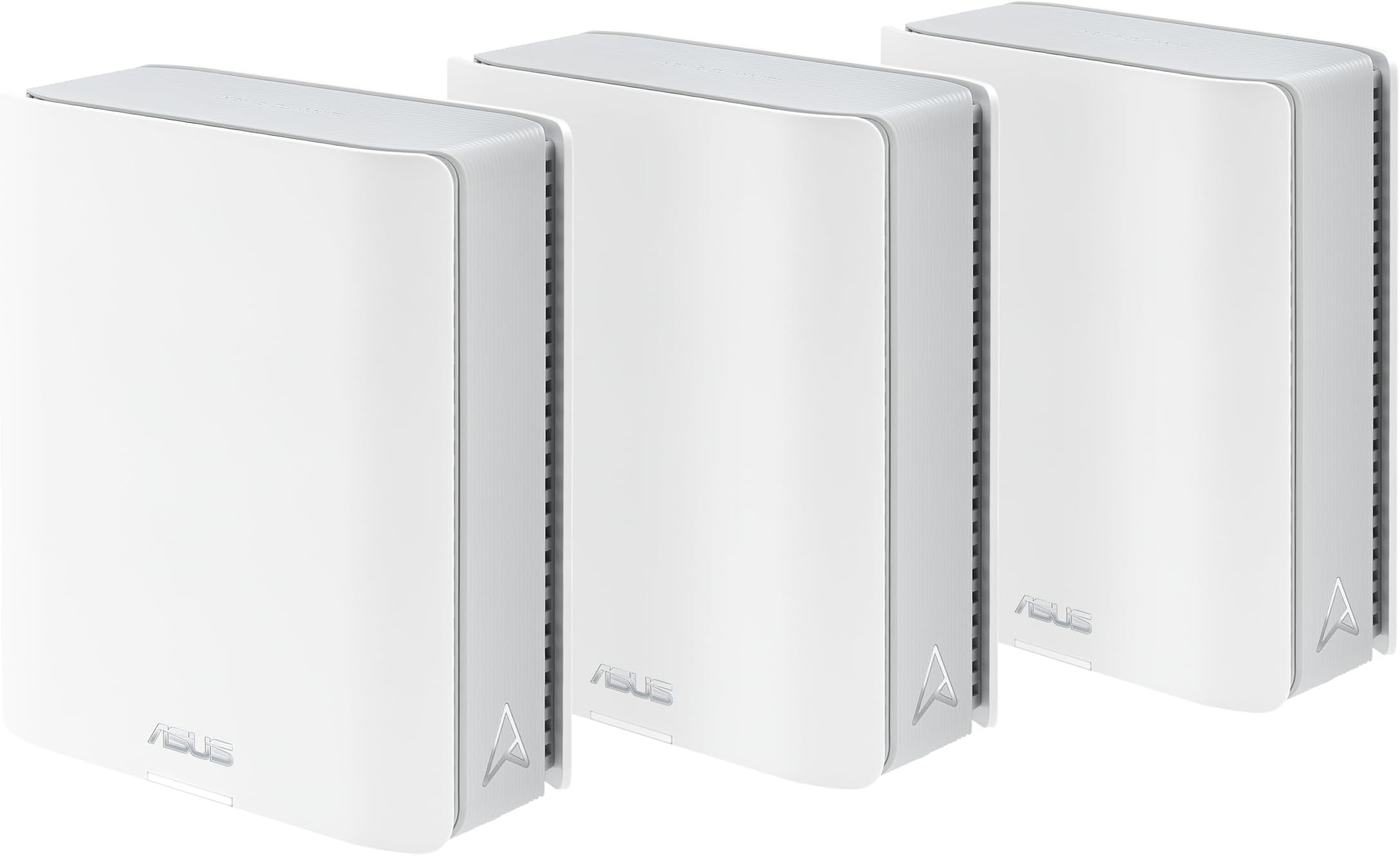
The ASUS ZenWiFi BT8 is a tri-band WiFi 7 mesh router system delivering up to 14 Gbps speeds and coverage up to 8,850 sq.ft. Its AI-powered Smart AiMesh technology ensures seamless whole-home WiFi with advanced security features like AiProtection Pro and VPN support. Designed for professionals and tech-savvy households, it supports multiple devices with parental controls and IoT network management, all controlled via an intuitive app and Alexa compatibility.


| ASIN | B0DHW9P5YL |
| Antenna Location | Business, Gaming, Home |
| Antenna Type | Internal |
| Best Sellers Rank | #1,808 in Computers & Accessories ( See Top 100 in Computers & Accessories ) #53 in Whole Home & Mesh Wi-Fi Systems |
| Brand | ASUS |
| Built-In Media | Power adapter, Quick start guide, RJ45 cable, Warranty card, ZenWiFi BT8 x 3 pack |
| Color | WHITE |
| Compatible Devices | Personal Computer, Smart Television, Smartphone, Tablet |
| Connectivity Protocol | Wi-Fi, Bluetooth |
| Connectivity Range | 2950 square_feet |
| Connectivity Technology | Bluetooth, Wi-Fi |
| Control Method | App, Touch |
| Controller Type | App Control |
| Coverage | 8850 sq.ft. |
| Customer Reviews | 3.6 out of 5 stars 49 Reviews |
| Data Transfer Rate | 8643 megabits_per_second |
| Frequency | 6 GHz |
| Frequency Band Class | Tri-Band |
| Item Dimensions L x W x H | 6.3"L x 2.8"W x 7.3"H |
| Item Weight | 1.9 pounds |
| LAN Port Bandwidth | 2500 Mbps |
| Manufacturer | ASUS |
| Maximum Upstream Data Transfer Rate | 8643 megabits_per_second |
| Mfr Part Number | BT8 (W-3-PK) |
| Model Name | BT8 (W-3-PK) |
| Model Number | BT8 (W-3-PK) |
| Number of Antennas | 7 |
| Number of Ports | 5 |
| Operating System | ASUSWRT |
| Other Special Features of the Product | AI-Boosted Smart AiMesh, Alexa Compatible, Data Range: WiFi 7 (802.11be) - (2.4GHz): up to 688 Mbps/ (5GHz): up to 4323 Mbps/ (6GHz): up to 8643 Mbps, Network Standard: WiFi 4 (802.11n) WiFi 5 (802.11ac) WiFi 6 (802.11ax) WiFi 6E (802.11ax) WiFi 7 (802.11be), Operating Mode: Wireless router, AiMesh Node, Access Point |
| RAM Memory Installed | 128 MB |
| Router Firewall Security Level | High |
| Router Network Type | Tri-Band |
| Security Protocol | AiProtection, VPN, Firewall, WPS, Let's Encrypt ,DNS-over-TLS, Security Scan, WPA/WPA2/WPA3-Personal, WPA/WPA2-Enterprise |
| Special Feature | AI-Boosted Smart AiMesh, Alexa Compatible, Data Range: WiFi 7 (802.11be) - (2.4GHz): up to 688 Mbps/ (5GHz): up to 4323 Mbps/ (6GHz): up to 8643 Mbps, Network Standard: WiFi 4 (802.11n) WiFi 5 (802.11ac) WiFi 6 (802.11ax) WiFi 6E (802.11ax) WiFi 7 (802.11be), Operating Mode: Wireless router, AiMesh Node, Access Point Special Feature AI-Boosted Smart AiMesh, Alexa Compatible, Data Range: WiFi 7 (802.11be) - (2.4GHz): up to 688 Mbps/ (5GHz): up to 4323 Mbps/ (6GHz): up to 8643 Mbps, Network Standard: WiFi 4 (802.11n) WiFi 5 (802.11ac) WiFi 6 (802.11ax) WiFi 6E (802.11ax) WiFi 7 (802.11be), Operating Mode: Wireless router, AiMesh Node, Access Point See more |
| UPC | 197105532090 |
| Unit Count | 3 Count |
| Warranty Description | 3 year |
| Wi-Fi Generation | WiFi 7 |
| Wireless Communication Standard | 802.11.be, 802.11ac, 802.11ax, 802.11n |
| Wireless Compability | 802.11.be, 802.11ac, 802.11ax, 802.11n |
C**Y
Real regret over this purchase
I upgraded from a TP-link 6e wife system to this about two months ago. I shouldn't have because I got much better coverage with the TP-Link 6e. I did get slightly faster speed, but it was an irrelevant 15% boost, but I lost internet coverage in my basement. and parts of my house. I put the TP-Link back up and my coverage is restored. This is the worst value for money I've bumped into for ages. I really regret my purchase and wish I was still within the return window.
J**J
Terrible Mesh System
I purchased this system to replace my 3 node Eero system. When its working, the WiFi is much faster than my previous Eero system. However, it drops connection frequently and videos playing on remote devices buffer frequently when they didn't before. I contacted support via their app and got no response. Then I contacted support thru their chat and was suggested to make some adjustments. Some of the adjustments weren't even options I had with my system. And as part of the adjustments, I was going to lose the connection with the representative. They said that was correct, and to just contact them back if needed; no way to restart my conversation with the same representative. No information was requested about the number of nodes or locations, it seems very scripted, as if they have this issue frequently. I haven't contacted Asus back yet, as I expect I'll get some boiler plate script rather than specific advice. Not sure yet if I will return the product or keep looking for assistance. I also had to set up a new subnet, it wouldn't work with my existing router's IP's as the previous system did. So, I had to manually reconnect several devices... still doing that. When plugging one of my IP cameras into one of the nodes with a wireless connection, it didn't work like it did with the previous setup. I had to adjust settings in the router and the camera to finally get it to work. Bottom line, I would not buy this system. The Eero system was much easier for setup. I just plugged it in and it worked. The reason I replaced was for additional speed and Asus's additional control for my children's devices, which doesn't require a subscription thru Asus like their competitors do. That is the only reason I haven’t returned it yet.. I’m really hoping I can get it dialed in.
T**O
Asus gets it right.
Used to run asus routers, loved them then jumped to another brand for mesh as asus's offerings weren't strong yet. That router went end of life so back to alot of researching. My gripe with how the router market has developed is that they have either dumbed down all the admin features so you don't have many choices (or only make available in their business models for another $1,000), or make you pay subscription for basic firewall capability, or are made by a Chinese company where you may get some features you don't want (backdoors). Well, after researching Asus's offerings for mesh have matured a lot, and their philosophy to let you admin stuff the way you want hasn't (good thing) while not charging you for firewall and security protection built in. Yeah, it may be a more expensive product than others but do the match on that subscription or having to buy a firewall to put in front of it and its a deal. Anyhow, setup was super smooth. Performance is delightful. Speed is super fast and very stable. Note, I have two levels, basement, storage, and 2 foot thick brick walls that my last mesh router hlcould barely give me a signal through (getting 200 maps in my "bad spots now). The freedom only admin controls also means I can create segments, manually prioritize, create white lists, and not only have an iot network but choose which satellite and band they connect to (others force this and created so many headaches and security issues). I stretched my budget on this but given i rely on this and generally keep my routers until end of life, this wifi 7 router is pretty cheap after I do the math per year compared to competing models with a cheaper up front cost but more expensive size in long run that limit function. Anyhow, super happy. Happy to be back at Asus.
B**R
Fine performance but parental controls/blocking simply don't work
I've been running this network for a week or two, it's fine, everything seems to work and speeds are fine. The issue is that the management tools, especially ones that are used to block traffic or enforce parental controls simply don't work. My 2 kids have had unfettered access to the internet thanks to this. I attempted to contact support, couldn't even get someone. It's going back.
K**S
Solid Mesh Router
I've had these routers for about two weeks and they're now running fine. I noticed some poor reviews and feel those customers suggered from the sale of earlier models that didn't have the bugs worked out. As others mention, initial setup takes some time but worked out fine. Just be careful to follow the included written guide exactly. I think Asus has tried to address the initial complaints and has released several updates to the product firmware. I've seen two updated firmwares downloaded aince purchase. All in all wifi is strong and fast throughout my home. No random disconnects or draggy speed. The Asus app is required for initial setup but otherwise limited in functionality. A computer and web interface is needed to delve into the more complex aspects of router configuration.
J**T
Replaced an old google mesh system. Outstanding speed and coverage increase. Easy set up
My old google mesh has served me well for many years but it has gradually been recycling and low speed. Replaced with the Asus and the pictures tell the tape. Both speed test were taken at third node away from the main router. The coverage with three nodes is amazing. Download speed at third node went from 94 to 694 mbs. Upload from 94 to 493 mbs. The app is user friendly and makes set up a breeze.
H**.
Best system out there.
I’ve been doing networking for 30 years both home and business, this is the best mesh system out there today. For wireless range, software options, and what can be done with this system it can’t be beat. The Linksys & Netgear systems fail miserably compared to this system, they aren’t even in the same class. If you’re looking for a mesh system this is the one.
K**R
Terrible, antennas awful, mesh nodes disconnect, devices don't auto connect to best signal.
Replacing an Archer AX50 that wasn't terrible, hoping to fill in a dead spot in my 2nd floor. My first try was a GT-BE98, a huge spider like monstrosity with humongous antennas. Unfortunately, despite the huge antennas, the reception on it was barely better than my old Archer, so that monstrosity went back. Was hoping the mesh system of the BT8 would be better. Unfortunately it was quite a bit worse. 1) Antenna reception was awful resulting in many issues such as first floor coverage was very bad. I room away with a half bathroom in between I was getting -70dbm where my old Archer would be at -60-65dbm. So now I would have to consider more mesh nodes for my first floor. 2) Again because the antenna reception was poor I had a hard time finding a place to put the mesh nodes. I put them centrally, one in the basement and one on the 2nd floor, but they constantly disconnected from the main unit. The Asus router website said one mesh was at -52dbm with a "great" signal, meanwhile my handheld gauge showed it at -65dbm, and it would constantly disconnect. Running wires for a wired backhaul is one option, although due to the next issue this was not a solution. 3) Devices would not switch mesh nodes, even when signal was awful, they would persist with a unit that had poor coverage and result in things such as slow speeds, wifi calls dropping, etc. 4) Asus website is awful, you can't sign in because it won't accept your password. When you force a password reset it won't accept your password even though you are following their protocol. Seems like a known issue doing a search. Couldn't even get online for tech support or registration. Overall not a good choice, I'm better off keeping my Archer AX50 and getting an access point, although the reason I didn't do that was I wanted seamless roaming. Back to the drawing board.
D**D
Excellent Upgrade from Google Mesh WiFi, fast, reliable, stable.
I replaced my aging Google Mesh WiFi system with the ASUS ZenWiFi BT8, 3 pack. I have a 2 GB internet speed for my home internet and this ASUS system is more than capable of supporting those speeds. For wired connections or wireless connections, this product achieves those speeds, so you can actually use the speed you're paying for. The setup was fairly simple and I was pleased to discover that I could set up a legacy WiFi network for older devices that aren't compatible with 5 or 6 GHz WiFi networks.
A**E
A really poor mesh network that you shouldn't consider
Poor connection between units. Signal drops between units all the time. Devices on wifi randomly slow to a crawl. No joke, I have better more reliable coverage with my Orbi RBK20 setup from 2018! I need a mesh system with 2.5g ports minimum and USB C for a media server so I was super excited for this but it is either not ready software wise or the hardware has faults that they can't program around. You can see people with the same struggles on forums so it's not a case of me just getting a lemon. Asus used to be one of the best in the business but over the past five or so years their quality has taken a noticeable turn for the worse. I've build custom PCs for two decades now and Asus was my go to motherboard and router brand but now it looks like I have to find a brand to replace them with. TL;DR bad hardware and software - don't buy. Also, way too expensive for what you get - 1 gigabit ports shouldn't exist at this price point.
T**.
Fast, stable, reliable.
Excellent system. I have been running this system for about 2 weeks and haven't experienced any software/firmware issues that apparently plagued asus bt series routers when they were first released a year and a half ago or so. This system has eliminated all dead spots in the house and the speeds are incredibly fast using wireless backhaul. I highly recommend.
A**R
Outstanding performance for the price at prime day.
I upgrade my home Wifi from XT9 WIFI 6. BT8 performance is outstanding. Speed is 2.5 times of XT9. XT9 is between 500 to 600 mbps, BT8 is 1.1 to 1.5 Gpbs. My home internet speed is 2 Gpbs. My BT8 main unit is connected to the 2.5 wan port of the home internet router in the basement through the wall to form a wireless backhaul mesh wifi system. The only odd will be the connection between the main and nodes is not as strong as XT9, though the nodes speed are very stable.
G**.
My experience with the BT8 after 10 weeks
*Updated Dec. 4/2025: since my last update, the system seemed to calm down and has been stable (there has been no firmware update) . Perhaps there's some auto-adjustment taking place? I've increased my rating back to my original rating. *Updated* Nov. 7/2025 following October firmware update. They seemed to have dropped the ball on this update. The router appears to be dropping the Internet connection at least once per day (resolved by rebooting the router, not the modem). The wifi also occasionally disconnects while in the same room. I'm beginning to lose faith that it will ever be as stable as my RT-AC86U, which was solid from the start. *Updated* Sept. 30/2025 following September firmware update which appears to have taken steps to make the 6 Ghz band more "sticky" and to improve stability by actually checking for failed memory allocations. I give it 3.5 stars because of better stability, but I won't round up until they implement a working version of Tx power on all the nodes. Like any good technical review, it should read back-to-front, so here’s the skinny: 1. Don’t purchase any mesh system with the 6 GHz band if you are expecting the seamless roaming (with possible band switching) to extend to the 6 GHz band. Check posts for different products online and ChatGPT for more information. 2. The BT8 has high power 5 GHz, better coverage than my old RT-AC86U system. 3. Ethernet backhaul is stable and fast. 4. With QOS disabled, we get blazing Wi-Fi speeds on 6 GHz (2.29 Gbps at 14 feet). 5. Satellite Wi-Fi performance is on par with the main node when using Ethernet backhaul. 6. Even if Asus eventually implements it in firmware, don’t plan your system around Wi-Fi 7’s AFC feature. 7. Forget having a single SSID for all 3 bands. You’ll almost never use the 6 GHz band that way and will likely end up "stuck" on the 2.4 GHz band until you restart the Wi-Fi on your phone. Set up separate main SSIDs for 5 GHz, 6GHz and a guest network that will support Iot devices on 2.4 GHz. 8. Client-side MLO seems to work, but there is no measurable performance benefit. 10. Though output power can be adjusted on a per-node basis, it doesn’t seem to work. Even adjusting the main node’s power from maximum to “power saving” gives no measurable change in RSSI at the same distance. As someone indicated to me, this could be due to Automatic Gain Control (AGC) on my phone and I needed to run distance tests to confirm a drop in power. I then tested at a distance and confirmed no adjustment of Tx power has any effect, even when adjusted on the main router. Now for the long-winded review: During Amazon Prime Days I was able to snag the Bt8 for 40% off, so I went for it. The package replaces 2 RT-AC86Us that I had working with AiMesh, one in our central open-concept great room and one in our garage to cover our deck and yard. Here in Canada we get bad winters, but our garage stays above freezing and our RT-AC86U has been fine there for years. With the 3 new BT8 nodes, I now have two in roughly the same locations and an additional node in our basement. I'm using Ethernet backhaul for best performance and it appears to be solid. Our home has a main floor, a second floor and a basement, for a total of 4500 sq ft of area to cover. Our great room has a vaulted ceiling so that one node has access to 2nd floor bedrooms through 1 or 2 walls (not through a floor) on either side of the room. With the 3 nodes, I get gig+ speeds (measured using Ookla) in every room on 6 GHz. When in the great room, I've measured speeds of up to 2.29 Gbps at 14 feet, with the node obstructed by the molding of the cabinet it sits on. It doesn't always do that, I typically get 1.9 Gbps, but sometimes it surprises me. My client is a Oneplus 12 phone. Satellite node performance is excellent with Ethernet backhaul. I've measured over 2Gbps from 22 feet from our garage node on occasion. Note that to get the best speeds you have to turn off QOS. If you have multi-gig bandwidth, you don't need it. The price for QOS was about 25%-30% of throughput. It seems that the processor just doesn’t have the horsepower to push full speed with QOS enabled. To optimize your settings, ChatGPT is very helpful. I've noted that one or even 2 interior walls doesn't stop me from getting gig+ speeds. The signal can get down to -77dbm on my phone and I will still get 1.15 Gbps. The 6GHz band appears to be unused in my area, so I guess it has a very low noise floor. My office laptop is about 9 feet away through the 2 walls of our powder room and gets 1.8 Gbps. My office desk is also about 4 feet below the Bt8 which sits high on our entertainment unit. Our kitchen table is through one wall, about 20 feet away and gets 1.55 Gbps. I even get gig+ in about half of our basement on 6GHz from the node on the main floor that is mounted 7 feet above the floor. One Wi-Fi 7 feature that is currently missing is Automated Frequency Coordination (AFC). This feature allows the router to broadcast up to 4 watts of radiated power on the 6 GHz band, or 6db (4x) more power than it currently broadcasts. Effectively, this feature is intended to provide similar coverage to what you would get on the 5 GHz band. The big catch is that it has to play well with licensed commercial use of the 6 GHz band. This means that if there’s any licensed activity around your home address, such as fixed microwave links or weather radar systems, the router has to be aware of that and lower its power and/or change its channel. It does this by periodically checking an online database of licensed services to see when they are scheduled to be active around your location. I hope they add the AFC feature with a firmware update (after all, this is a premium product for the current marketplace). The difference in power would pretty much allow full speed 6 GHz performance throughout our home. However, the fact that the unit has to request permission to use higher power a few times per day means that you may find your signal is suddenly weak if it doesn't get permission. For that reason, don't design your system to rely on AFC (you may also NEVER get permission, as Dong Knows Tech found out in a recent review). Plan on having enough nodes so that you get good performance without high power. From my testing, if you have no interference from neighbors, the Wi-Fi-7 AFC feature not really necessary. However, you must pretty much forget about outdoor coverage. I found that our main floor brick walls are too much for low power 6GHz. The best my garage unit can do is cover our deck (which backs onto it through a brick wall) where I get 1.6 Gbps over most of the deck, but the rest of our yard is unusable. Even in the garage the signal strength changes wildly depending on if my car gets between the garage node and my phone. It seems that 6 GHz is very sensitive to obstacles, so Wi-Fi roaming will “band-steer” to 5 GHz very quickly. Speaking of band-steering, even indoors where the signal is decent, my Oneplus 12 will drop to 5 GHz quite readily. Having the phone in my pocket and walking behind the kitchen counter will trigger a drop from 6g to 5g, even if I set the roaming threshold to -82dbm. I also found that trying to roam about the house while on a Wi-Fi call would frequently drop the call during a band switch. Calls were ok if I switched nodes staying on 6g, but not always ok if a band-steer to 5g was triggered. Also, once on 5 GHz my phone would almost never steer back to 6 GHz, so I had to give up on having a single SSID that uses all 3 bands. This may be an issue with the Oneplus 12, but I think it has more to do with how the 6g channel beacon is handled. Quite often my phone won't even detect the 6g band until I retry a few times. There are a lot of 6g channels to scan and it takes time to locate the one that is being used, even when I stick to the most commonly-used channels. This makes band-steering useless for 6g (except to drop down to 5g). With the September firmware update, I do find that the phone is doing a better job of trying to stay on the 6 GHz band, particularly if I have a dedicated SSID for 6GHz. In the scenario of having separate SSIDs for the 5 GHz and 6 GHz bands, my phone will actually try to band-steer to the 6g SSID from the 5g SSID. However, I notice that often it just won't connect to 6g and my Wi-Fi simply drops for over 10 seconds. The phone eventually reconnects to 5g. If I try a dual-band 5g/6g SSID I almost never band-steer to 6g from 5g. The takeaway I had from roaming around the house was that I need to leave my phone on a dedicated 5 GHz band and even forget any 6GHz SSID so that the phone doesn't try to band-steer during a Wi-Fi phone call. Once on 5 GHz I'm golden everywhere. I measured the RSSI from the BT8 as 6db stronger than I would get at the same distance from my RT-AC86U (yes, same channel (157) and bandwidth), so the 5g range is excellent. The BT8 garage and great room nodes cover our whole 1/2 acre yard without requiring 2.4g. At 65 feet through a brick wall, I get up to 400Mbps with 5g. However, for the 6 GHz band, it's best to plunk yourself in one place to use it. Band-steering for 6 GHz doesn’t work well, I think it’s because of the time it takes to find the 6g channel. This appears to be a problem common to all Wi-Fi-6E and Wi-Fi-7 systems. I gave client-side MLO a try, though my Oneplus 12 does not support it. The phone supports using 2 bands simultaneously (but with terrible results), so I thought I’d see what it does with MLO anyway. It connected on 2 bands (2g and 6g) and would occasionally steer to 5g and back to 6g again, but its performance was sub-par. I'd often find it using 2g or giving me speeds somewhere between 5g and 6g performance. On the other hand, my laptop supports MLO (it has the BE200 card) and gets 6g performance with it, but not better. I’ve left the laptop using my MLO guest network on the assumption that there’s somehow lower latency or better roaming performance, but I’ve not really noticed any difference from simply connecting to the 6 GHz band. To help with roaming, the BT8 ostensibly allows you to adjust output power at each node (thank you Asus, it’s a long overdue AIMesh feature). However, it does not appear to work (I think it's just a placeholder). When I turn the power down from maximum to minimum at the main node, I still measure the same RSSI at 4 feet distance. I even tested at a 40-foot distance with the same result, no measurable difference in RSSI between max and min power. Hopefully this is something Asus will fix. Overall, I’m satisfied with the BT8, though after 1 week I was ready to return it as it seemed that the 6 GHz band was a waste of time with all its connection/roaming quirks. Once I viewed the 6 GHz band as useful for a stationary device (such as a laptop), then my perspective changed on the system. It essentially works and is stable (at least with an Ethernet backhaul). In fact, my EZVIZ door cameras appear to be happier with it than with my old RT-AC86U system. They are not dropping their server connection as frequently and they are even able to alert me to the doorbell ringing in time for me to remotely talk to the person at the door before they leave. For me, this alone makes the upgrade worthwhile :slightly_smiling_face:.
Trustpilot
3 weeks ago
5 days ago