Desertcart purchases this item on your behalf and handles shipping, customs, and support to South Africa.
❄️ Cool your CPU, heat up your style — the Titan RX LCD is the ultimate power move.
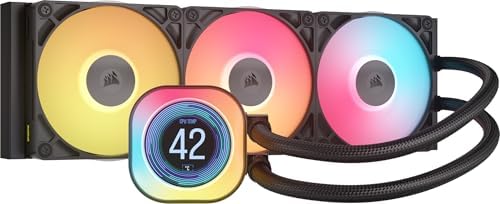
The CORSAIR Titan 360 RX LCD is a premium 360mm all-in-one liquid CPU cooler featuring a high-performance FlowDrive pump, ultra-quiet RX RGB fans with AirGuide technology, and a vibrant 2.1” IPS LCD display for real-time monitoring and customization. Designed for Intel LGA 1851/1700 and AMD AM5/AM4 sockets, it integrates seamlessly with the iCUE LINK system hub to streamline connectivity and reduce cable clutter, delivering efficient cooling with minimal noise and maximum aesthetic impact.


| ASIN | B0DF7CZ9D8 |
| Air Flow Capacity | 73.5 cfm |
| Best Sellers Rank | #41 in Water Cooling Systems |
| Brand | Corsair |
| Brand Name | Corsair |
| Compatible Devices | Desktop |
| Cooling Method | Water |
| Customer Reviews | 4.6 out of 5 stars 1,338 Reviews |
| Global Trade Identification Number | 00840440482956 |
| Included Components | Item |
| Item Dimensions L x W x H | 15.59"L x 4.92"H |
| Item Weight | 3.8 pounds |
| Manufacturer | Corsair |
| Material Type | Aluminum, Copper |
| Maximum Rotational Speed | 2100 rpm |
| Model | CW-9061023-WW |
| Noise Level | 36 db |
| Number of Items | 1 |
| Number of Packs | 1 |
| Part Number | CW-9061023-WW |
| Power Connector Type | 4-Pin |
| Product Dimensions | 15.59"L x 4.92"H |
| UPC | 840440482956 |
| Unit Count | 1 Count |
| Voltage | 12 volts |
| Warranty Description | 6 Year Manufacturer |
T**R
Good AIO
I'll keep this review pretty short. It's a good AIO. Installation was super easy, my only complaint is that the hub uses PCIE for power, which kinda has my future upgrade plans in a bit of a limbo, but that's just my situation. It runs pretty quietly, the pump noise isn't that audible at all, and it keeps my 9600x idling around 30-50 degrees. ICUE is a mixed bag as always. I had to reinstall it to actually detect the AIO, and when ICUE does work, it works well enough. Overall, pretty pleased with this AIO, first time running water cooling in a build, and I'm glad I chose this one. Corsair has a new successor to the Titan lineup they revealed at Computex, but I decided to get this one instead of waiting, since it isn't too much of an upgrade. If you want Corsair's best, I'd suggest you wait a few more months, but if you want one now, this one is perfect.
I**Z
Amazing cooler!
Great AIO cooler! This cooler was significantly better than my tower cooler, my tower cooler (dark rock slim) averaging around 50 to 60 Celsius, and with this cooler, it went down to 40 to 50 Celsius, granted I have a 7600x CPU, but I bought it for aesthetics, and it looks amazing of course! Installing this though, took me about 3.5 hours to try setting this up, took way too long, but the mounting wasn't so bad, it was easy, not too difficult. connectivity works just fine, needing iCUE to work properly, it had plenty of cables verifying in size but make sure you use the right one, I personally used a youtube video so I knew i didn't do anything wrong and installed it right. The only negative I'd say is that, theres so many cables, about 6 of them? compared to just 1 cable for my previous cooler but for the RGB and aesthetics? so worth it!
C**.
Keeps my CPU very cool. Looks great.
Recently built a new PC and used all Corsair parts. They've been reliable in the 8 months since being installed and I've been extremely pleased with their performance. Everything is very customizable and although the software has a slight learning curve to it, it's not impossible to figure out. Once you do, you can have fun with the RGB features on this cooling unit. The display can be used for fun or useful info.
S**E
Highly recommend for the gamers
Built my first new PC in 10 years and chose the parts carefully as I know I won’t be able to afford another for a while. And I wanted to go with an all White build as I like the look, especially when all the lights are set to white too. Went with the Corsair AIO because every PC I have built for me or others I have always used Corsair and never had an issue That combined with the looks and lcs info screen made this the obvious choice. The quality is there for everyone to see and it just feels well made When it came to installation it was very straight forward and before putting it in place I was a little concerned about the pre applied paste. It just didn’t look like enough but I trusted Corsairs judgement on this. Everything is included for installation on Intel and Amd bird as which I am going with an AMD 9800X3D Got it installed and finished the rest of the build and hit the switch. Was greeted with a beautifully clear lcd screen showing the Corsair splash screen and once windows fired up I installed the Icue software to provide the temp info for the lcd. Also have to mention the ability to show images and custom graphics on the display is awesome. Everything was very easy to follow and I have to say I am very impressed with the temps. On idle the PC sits around 30c and when in a heavy load the max I have seen it reach was 80c but on average when gaming it stays around the 50c mark Overall extremely happy with the outcome and my choice of AIO
M**L
Great AIO, Corsair makes good stuff!
You know, what sold me on this was the temp display. I have a Ryzen 7 and I considered the 3 fan, but it would have been overkill. As far as cooling, this does a fantastic job. As far as system link connections, this is a game changer. I honestly don't think I'll put any other fan type in my cases in the future. 1 cable linking all my fans? What a time to be alive. I bought another fan and chained it off of one side of the radiator. If my 4000x case didn't already have AF-120s mounted to the front into a lighting core I would have replaced those as well. The system is quiet. I walk in the room and I honestly can't tell if it's on or not. Everything stays cool. The system link and lighting core sync up and the plug-ins for my gigabyte board and msi GPU work well. iCUE gets better every day. I really like that I can set device memory mode and turn off icue if necessary or in my case turn off the lighting when I lock my system and walk away. I highly recommend this AIO, but if you want even more color, the "groove" modular piece puts off even more light and you can swap it out for the LCD. The modular pieces are easy to swap.
A**R
Corsair's Best AIO cooler yet, as long as you don't mind iCue
The CORSAIR iCUE Link Titan 360 RX is a beautiful CPU cooler with performance that is sufficient for most tasks. I went with the white and I absolutely love the looks. The rest of the fans in my system are white iCue Link fans, and these go well with those. They have a different side-plate and appearance than the rest, but that's ok. Pros: The Titan RX is the best version of the Corsair liquid AIO coolers yet. The fans perform better, the pump is improved, and the whole thing looks excellent. The big selling point to this is the LCD screen. While not completely customizable, you have plenty of options in the iCue software for what you want to display. And if you wish, you can load your own GIFs. The shroud around the screen is much larger than previous generations, but it is also much more vivid and customizable in terms of colors. It's a little shiny and smooth, which may not fit everyone's preference. But it works well in my build. The fans on the Titan RX are very quiet, and they appear to push more air through than previous generations, which is good considering some previous Corsair coolers were a little weak. But this one has kept my Core Ultra 265k very cool, and that's with using the included thermal paste application that comes on the pump block. If you haven't used the iCue Link system for fans, this is a great way to get started. The amount of wires needed for most RGB fan systems is downright annoying, ESPECIALLY the Corsair pre-Link fan generations. But with Link, I've never enjoyed the building process more, and I'll never go back. Cons: iCue is still a little bulky. It has become a necessary evil at this point. It is a powerful utility, and the functionality is pretty awesome, but it's buggy and tends to glitch at times. Regardless, if you want to go the Corsair route, you have to deal with it. This cooler uses the Corsair iCue Link system, which is excellent. However, the pump/screen combo still has two cables you have to run to it. This isn't a huge deal, but it's a step back from the previous generation of Link coolers. Overall, you are still using less cables, and the Link ecosystem is fantastic. Just know that you will have to route two cables. Also, if you have existing iCue Link hubs, they may not work with this cooler because there is an additional port needed. So you may have to switch to the hub included with the Titan RX. Definitely not a deal breaker at all, but worth noting. Overall, I'm quite happy with this purchase. I would recommend it, but if you want the top end cooling performance in the market, this won't give you that. For the large majority of users, this 360mm Titan RX is going to be more than sufficient, and it looks outstanding in the case. It's a little pricier than some options, but if you want a screen and a 360 cooler, it's about right.
P**1
Good Cooler for the Price
Good cooler and love the customizable screen. Instructions were a bit confusing, but I checked YouTube and that solved the problem. Keeps my CPU cool even in the desert.
M**Z
Mistake turned delight
I first bought this before building my first pc not knowing that this did not function exactly like a typical aio. I was unaware of Corsair’s iCUE ecosystem, but when I bought this, I decided to go full iCUE. Needless to say, it’s great. The way every iCUE fan connects to one another all into one 6pin powered hub needing just one fan port on the front is great. The RGB on the fans and around the cooling block looks amazing and the iCUE software is so streamlined and easy to use. It fits perfectly into my HYTE Y60 pc with no issues. The pump makes no noise, and even running on the default balanced speed the fans are also fairly quiet. I will say, I’m not too sure building a system that mixes iCUE cooling with other cooling would be very easy, I’d imagine they don’t mix quite well. Overall though, if you go full iCUE, it’s a great ecosystem, even if it’s expensive.
水**戸
ケースに余裕がある人用
Intel Ultra7 270KPlus に使用していますが、ベンチマークを走らせてもしっかりと冷やしてくれています。
ぺ**ぺ
安定して使いやすい
Aura GC9Mに設置するために購入しました。ギリギリ設置出来ました CPUはRyzen9 9950X3Dで用途はフロムゲーとデータ分析プログラム(kaggle)です。 OC運用はしていません 特に問題なく冷やせました。MAXでも70°C台だったと思います
F**E
Muito bom para R9 9950X3D
Watercooler muito bonito e funcional Ryzen 9 9950X3D + RTX5090, jogos em 4k (BF6, RDR2, etc.) média de temperatura 46°- 48° durante o gameplay. Fácil instalação inclusive para push and pull, fiz a instalação na vertical.
C**S
Top-AIO mit starker Kühlleistung und genialem Design
Die Corsair iCUE LINK Titan 360 RX LCD ist eine absolute High-End-AIO und überzeugt auf ganzer Linie. Die Kühlleistung ist selbst bei leistungsstarken CPUs hervorragend – auch unter Volllast bleiben die Temperaturen stabil und leise. Die RX-Lüfter liefern einen sehr guten Airflow bei angenehm niedriger Lautstärke. Besonders hervorzuheben ist das iCUE LINK-System: extrem aufgeräumtes Kabelmanagement, schnelle Installation und ein insgesamt sehr hochwertiger Eindruck. Das LCD-Display ist ein echtes Highlight – gestochen scharf, gut ablesbar und mit iCUE vielseitig konfigurierbar (Temperaturen, GIFs, Logos etc.). Die Verarbeitung ist typisch Corsair: hochwertig, stabil und durchdacht. In Kombination mit anderen iCUE-LINK-Komponenten ergibt sich ein extrem cleanes Setup. Pro: • Sehr starke Kühlleistung • Leise RX-Lüfter • Geniales iCUE LINK-Kabelsystem • Hochauflösendes, anpassbares LCD • Hochwertige Verarbeitung Contra: • Hoher Preis (aber gerechtfertigt) Fazit: Eine der besten 360-mm-AIOs auf dem Markt. Wer Wert auf Leistung, Optik und ein sauberes Setup legt, macht hier absolut nichts falsch. Klare Kaufempfehlung!
I**D
CORSAIR iCUE LINK TITAN 360 RX LCD + Ultra core 9
Its so beautiful and it cools so good. I use it with the Ultra core 9.
Trustpilot
2 weeks ago
2 weeks ago