Desertcart purchases this item on your behalf and handles shipping, customs, and support to South Africa.
๐จ๏ธ Elevate your home office with speed, style, and seamless printing!
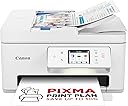
The Canon PIXMA TS7750i is a compact, wireless 3-in-1 inkjet printer designed for high-quality photo and document printing. Featuring fast print speeds of 15 ppm (mono) and 10 ppm (color), a 35-sheet automatic document feeder, and a customizable user interface, it supports mobile printing via Apple AirPrint, Mopria, and Canon's app. The PIXMA Print Plan subscription offers convenient ink delivery, making it an ideal all-in-one solution for home and small office use.
| Additional Printer Functions | All In One |
| Asin | B0CHFRJ6T2 |
| B W Pages Per Minute | 15 ppm |
| Best Sellers Rank | #93,578 in Computers (See Top 100 in Computers) #131 in Ink Cartridge Printers |
| Brand | Canon |
| Built In Media | PIXMA TS7750i Wireless Colour 3-in-1 Inkjet Photo Printer, 2 FINE cartridges (PG-585 x1, CL-586 x1), Power cord, Manuals and other documents |
| Color | White |
| Color Depth | 24 bpp |
| Color Pages Per Minute | 10 ppm |
| Compatible Cartridge | PG-585 (Black) CL-586 (Color) |
| Compatible Devices | Laptops, PC, Smartphones, Tablets |
| Controller Type | Apple Airprint |
| Customer Reviews | 4.3 4.3 out of 5 stars (274) 4.3 out of 5 stars |
| Dual Sided Printing | Yes |
| Duplex | Automatic |
| Hardware Interface | USB |
| Ink Color | Black, Color |
| Item Dimensions D X W X H | 35D x 37.4W x 20.8H centimeters |
| Item Weight | 7.3 Kilograms |
| Maximum Copies Per Run | 99 |
| Maximum Copy Resolution Black And White | 1200 x 1200 dpi |
| Maximum Copy Resolution Color | 1200 x 1200 dpi |
| Maximum Media Size | 10 centimeters |
| Maximum Print Resolution Black And White | 1200 x 1200 |
| Maximum Print Resolution Color | 1200 x 1200 |
| Maximum Sheet Capacity | 200 |
| Model Name | PIXMA |
| Model Number | PIXMA TS7750i |
| Model Series | PIXMA |
| Number Of Trays | 1 |
| Other Special Features Of The Product | Portable |
| Output Sheet Capacity | 200 |
| Paper Size | 10 centimeters |
| Print Media | Envelopes, Fabric, Glossy photo paper, Labels, Paper (plain) |
| Printer Connectivity Type | Wi-Fi |
| Printer Output Type | Colour |
| Printer Type | Inkjet |
| Resolution | 1200 x 1200 |
| Scanner Type | Photo |
| Specific Uses For Product | Home/Office Document Printing, Photo Printing, General-Purpose Use |
| Total Usb Ports | 1 |
User
Canon PIXMA TS7750i Series
have had cannon printers for a few years tried a hp but could not beat this one had a older modle this has both wifi and usb connection to a computer what is a better way to connect it as often wifi can drop in places can have it set to eco or turn it of like i have done as uses very little electric for usb to pc need to down load the cannon app even prints envolopes where my old one does not easy to change the ink by lifting the top up has auto doc feeder
User
Best way to set up is with phone app
I prefer printer with a screen so I can copy a document without needing computer or phone. The print quality is good. Too early to say how long the supplied inks will last - at present it's showing a good quantity of ink left. Disadvantage is that there's just one cartridge for colour (the other cartridge being black) so if one colour runs out, whole multi-colour cartridge needs replacing. But we don't print that much so I think the lower purchase price makes this a good buy. This replaced a years-old Canon printer that still worked but doesn't work with the new macs (M-chip macs). This new printer has Airprint and connected immediately to iPhone and Macbook. The set up process suggests downloading the Canon app to the phone and then set up using that. Advantage of this is that printer connects to your wifi during this process. Also, the app allows you to scan to your phone, if you wanted to, for instance to forward to someone. But printer can also be set up without using the phone. Pleased with printer so far.
User
General First Impression of the Canon PIXMA TS7650i
QUALITYPrint quality for photos is good, used lots of ink maybe I would get ten prints of full A4. Borderless working.INSTALL ISSUE - RESOLVEDPrinter cannot work over TP power extender on Windows 11. I had to run it connected directly to the main hub when in wifi mode. I have not tried direct mode.INKWill need more ink soon after printing some photos for testing the quality. Prints much quicker than my old HP ENVY printer (that no longer works with Win11). I'm still on the original supplied ink which are normally lower capacity.CONSTRUCTIONI think the draw for finished print and paper feeder tray at the top back of the printer look a little weak not sure how well this printer will stand the test of time.POWERThe print does 'got to sleep' and needs waking again manually on the printer.SCANNERScanner seems to work well but there is a big delay on clicking scan on the PC dialog box where it looks like it is not doing anything but actually is.
User
A pretty good all rounder for light to medium use.
Certainly not the quality of build I was expecting from Canon it feels pretty flimsy. Having said that it does work okay and I was impressed at how long the ink cartridges that came with it lasted. The flat bed scanning works well although the sheet feeder scanner can be temperamental at picking up paper particularly thicker paper. There are some good features in the software to correct misaligned documents. The print quality for text is pretty good. It is fairly easy to use and the WiFi connection is useful with my iPad.
User
Void
Good
Trustpilot
2 weeks ago
1 month ago