
Desertcart purchases this item on your behalf and handles shipping, customs, and support to South Africa.
📞 Elevate your office mobility with the WP826 – where freedom meets flawless connection!
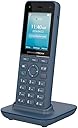
The Grandstream WP826 is a cordless Wi-Fi IP phone featuring dual-band Wi-Fi 6 for fast, reliable connectivity, a 4-inch color LCD for easy navigation, and up to 12 hours of talk time. Designed for professionals on the move, it supports multi-line operation and conference calls, combining mobility, durability, and advanced telephony features in one sleek device.
| ASIN | B0DDQDSCJ9 |
| Answering System Type | Digital |
| Best Sellers Rank | #23,263 in Office Products ( See Top 100 in Office Products ) #73 in Landline Phones |
| Brand | Grandstream |
| Built-In Media | Charging Base, Cordless Phone, Power Adapter |
| Color | Gray/Blue |
| Compatible Devices | Voip Systems, Wi-fi Networks |
| Conference Call Capability | Conference Calling Enabled |
| Customer Reviews | 3.8 out of 5 stars 193 Reviews |
| Dialer Type | Dual Keypad |
| Enclosure Material | Plastic |
| Item Dimensions | 10 x 8 x 6 inches |
| Item Weight | 0.4 kg |
| Manufacturer | Grandstream |
| Material | Plastic |
| Mfr Part Number | WP826 |
| Model Number | WP826 |
| Multiline Operation | Multi-Line Operation |
| Number of Batteries | 1 Lithium Ion batteries required. |
| Number of Items | 1 |
| Phone Standby Time | 240 hours |
| Phone Talk Time | 12 hours |
| Power Source | Battery Powered |
| Telephone Type | Cordless |
| Unit Count | 1 Count |
| Warranty Description | 1 Year Manufacturer |
M**M
Great phone. You have to have a VOIP service for the phone to work
Great phone. Well built. Sound quality is excellent. Everyone should know you have to have a phone provider. I use voip.ms The basic plan is $0.85/month and $0.009 per minute. So less than a penny a minute. Or $4.95 per month for 3500 minutes. What I like is I can use the phone on any WiFi network and the phone remembers the network. Setting up the voip.ms account can be a little intimidating but chatgpt can be of great assistance. Let me see if I can explain the basics. Create your voip.ms account. Note residential you can purchase up to 5 numbers. After your account is created and funded. Purchase a DID. This is going to be your phone number. It's organized by State and City. Next create a sub account. This screen has a lot of options. The only thing you are going to fill out is the user name and a password. user name starts with 6 numbers and _ So something like 123456_House Phone. Next create a password. Write down the user name (example 123456_House Phone) and password. You are going to use this to enter into the phone. In the CallerID Number box Use one of my DID's should be selected and your number should be in the field. Leave everything else on the screen as is and click create account on the bottom. Next from the above menu click on DID numbers and manage DID's. Click on the DID then click the orange box with a pencil. (edit DID). Another intimating screen. Don't worry you are only going to change a couple things. First field SIP/IAX select the sub account you created. example (123456_House Phone). Leave everything else as is. Next all the servers select one nearest you. Whichever one you select I suggest taking a picture of it. You are going to enter this into the phone. Once the server is selected go to the bottom of the screen and click the "click here to apply changes" button. Congrats you now have a working phone number. Next we are going to set up the phone. You need to boot the phone and connect to your wifi network. Once connected to wifi scroll through the menu on the phone and find the phones IP address. Using a laptop or desktop type the IP address of the phone in a browser window. User is admin. You will get a code on the screen of the computer. Enter this code on the phone. Then you will be promoted to change the password. Now that you are logged into the phone on you computer we are going to set up account 1. Click the edit there are multiple menu's. Don't worry we are only going to be interested in a few. General settings. Account name-Anything entered here will show up on the display of the phone. Maybe something like House Phone or you can leave it blank. Next field SIP Server. Enter the server you selected and took a picture of. Example atlanta1.voip.ms This has to match exactly what you selected in voip.ms. Next skip 3 fields and goto SIP User ID. The is the sub account from voip.ms example 123456_House Phone Enter your info exactly as it is in voip.ms The next field is SIP Authentication ID. Enter you info again example 123456_House Phone Next field is SIP Authentication Password This is the password you used when you created the sub account in voip.ms Enter you password here. Then at the bottom of the screen click save and apply. At this point your phone should work. Some other resources if you run into issues. Chatgpt. Also you can email support and ask for the video from the recent workshop. It goes over all the features of voip.ms Good luck and I hope I helped someone with their phone!
D**B
Too hard to set up
I honestly don’t know if the phone is good or not because I couldn’t get it set up. Pretty sure you need an IT degree to get it to work. Sent back after a few hours of trying. Too hard!
J**N
Great cordless phone
This phone is a great phone. Purchased it in April 2026 as I recently started moving long time numbers I had to VoIP ms. It definitely can be a challenge to setup but once you have it working it works great. I also like how you can have multiple SIP accounts on it simultaneously. As of September 2026 I recently started tinkering more and setup a free PBX server and this phone works like a champ. Would definitely purchase more. It’s not a phone you’d want to get for your grandma or grandpa as it’s a much more advanced phone than a basic cordless phone you would find anywhere
J**G
Great fun!
I'm an amateur radio operator. I have a repeater that I want to link to other repeaters using software called AllStar, which is based on the Astrisk PBX. I eventually will be using the WP826 SIP Phone as a way to use the AllStar node, but for now I've been playing around with VoIP and CallCentric. After a few minutes of poking around I had it connected to CallCentric's network and was making test calls. After setting up ZoIPER on my iPhone as another extension, I was calling between extensions, conferencing in and figuring it all out. While I don't know how useful any "landline" is these days (at least for home users), if you want to have a traditional cordless phone experience without signing up for an old analog POTS line, this would be a great choice, along with a few more extensions and handsets. UPDATE (for amateur radio operators): This morning I set it up with my AllStar node. Followed the instructions for "setting up a SIP Phone" on the AllStarLink GitHub manual page. After rebooting my node I set up the account on the phone using the following settings: Account name: Allstar SIP (whatever works for you) SIP server: Your Allstar node IP address SIP User ID: (set in the extensions.conf file) SIP Auth ID: (same as User ID) SIP Password: (set in the extensions.conf file) After that just dial your node number and hit the green call button. It should just connect. You'll get a confirmation message from your node. From there it's pretty easy to use, just search for the various *N commands for controlling your node.
J**T
great VoIp phone, good solid feel, high quality
The wife lost her mobile phone, and we had no house phone, then I researched options and stumbled on this VoIp solution and I love it. (great audio and Voip service is a fraction of the regular cost) I had this phone for a while now, and it's been on standby in the living room for months, staying connected to the wifi service, very reliable. The feels is great in the hand, seems solid and the audio is good, better than what I expected. (my other VoiP phone was a Skype phone decades ago and I remember it had poor audio and felt very low quality and plasticky, but not this one) Set up wasn't that bad, the meanu features are what you expect, contact list, etc.. I like it a lot, was going to give it 4 stars because it is a bit smaller than what I expected, but that's a preference I guess.
R**R
Close But No Cigar
I am torn in this review. This is a quality brand name, and the product is full of features and feels solid in the hand. It found my Access Point hotspot and was very easy to configure with the settings given by my VOIP provider. The downside came in finding out that it does not have the range needed. Imagine a situation where a business person walks away from their desk to go out into the warehouse while using the phone. This scenario is even similarly applicable around the house and in the garage. My hotspot and my DECT phone base station are inches away from each other. Looking out a window, the Grandstream could not reach 40 feet away, while the DECT could reach almost 400 feet. The phone had no problem with all protocols offered by the hotspot, nor did the manufacturer note any requirement for strength of signal. It was returned.
M**L
Works with UniFi Talk
I use this with UniFi Talk. Works great, no complaints.
B**N
Wouldn't work.
Could not connect it.
S**O
Buon compromesso come cordless VoIP Wi-Fi, ma non per tutti
Dopo aver tolto il Fritz e sostituito tutto con una Dream Machine 7, mi sono ritrovato senza cordless: prima usavo il Fritz!Fon. Questo Grandstream WP826 è stato un buon compromesso. Importante chiarirlo subito: non funziona con DECT ma solo tramite Wi-Fi. Significa che se vi spostate per casa e il segnale cala, la chiamata si interrompe. Il telefono in sé funziona abbastanza bene: la qualità dell’altoparlante in vivavoce non è eccellente, ma fa il suo lavoro. L’interfaccia web di configurazione è completa di ogni opzione possibile, ma a tratti caotica: si potrebbe fare molto meglio con un po’ di automazione. Non è un telefono immediato da configurare, non lo consiglierei a chi cerca semplicità assoluta. Una volta impostato tutto correttamente però va alla perfezione: testato con il VoIP di TIM, nessun problema. Unico vero peccato: manca una segreteria telefonica integrata. Nota di merito invece al venditore BoraComputer: spedizione rapidissima, imballaggio perfetto, transazione impeccabile. Complimenti rinnovati.
B**N
Preiswertes Wifi Voip Telefon daa den Anforderungen gerecht wird
Hut ab! Grandstream's WP826 Wifi Voip Telefon begeistert mich voll. Hier stimmt das Preis/Leistungsverhältnis voll Es ist über den Webbrowser konfigurierbar, die Telefonie Einstellungen können auch direkt am Gerät gemacht werden. Mit der Umstellung auf Glasfaser hatte ich mir auch einen Unify UDR7 angeschafft, der momentan noch hinter einem Speedport 3 router am dsl hängt. Das WP826 arbeitet bereits am UDR7. Diw Konfiguration in der Konstellation war etwas tricky und hat mir einiges abverlangt. Doch es funktioniert hervorragend mit super Gesprächsqualität. Die benutzerspezifischen Klingeltöne des Telefons können im ogg format geladen werden, das ein deutlich besseres Klangerlebnis bietet wie das seitherige gsbin format. Das WP826 bietet 3 Konten, was mir ausreicht. Eines ist wohl jedem klar, voip telefone sind nicht so einfach einzurichten, wie Telefone an den dect Stationen der Consumer router. Je nach Konstellation versteht sich. Das WP826 hat auf jeden Fall das potenzial alle Hürden zu meistern und hat einen guten Klang. Für mich war es eine gute und richtige Wahl. Vor allem ist der Preis dafür berechtigt.
単**。
人柱になってみました。
UIはWP810と似たり寄ったりだが、最大のストレスであった反応速度は格段に改善された。 音質もとても良い。 日本語表示にも対応してるし、VPNもOPENVPNとワイヤーガードに対応しているので、ネットワーク外に持ち出して「どこでも子機」にできる。(設定はWebUIからのみ可) 電話帳の日本語入力は本体のみでは不可だがWebUIが洗練されているのでストレスは少ない。 2万円切ってるなんて総合的にコスパが良いと感じたので⭐️4で。
L**E
Wp826 aspect fonctionnel
Conforme a ma commande.. Pas encore éssayé..
S**A
Very good product.
Very good product.
Trustpilot
2 weeks ago
1 month ago