Buy anything from 5,000+ international stores. One checkout price. No surprise fees. Join 2M+ shoppers on Desertcart.
Desertcart purchases this item on your behalf and handles shipping, customs, and support to South Africa.
🎯 Master your workspace with precision and comfort—because your wrist deserves the best.
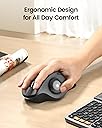
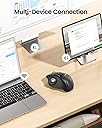
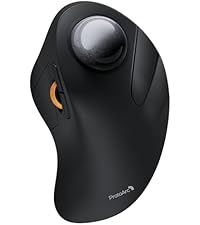
The ProtoArc EM01 NL is a rechargeable, ergonomic wireless trackball mouse featuring 3 adjustable DPI settings, a unique adjustable tilt angle, and triple device connectivity via Bluetooth and 2.4G wireless. Designed to reduce wrist strain and optimize tight workspaces, it offers up to one month of battery life per charge and seamless multi-device switching for professional multitaskers.


| ASIN | B0CWTVY6WQ |
| Antenna Location | Office, Play |
| Are Batteries Included? | No |
| Are Batteries Required | No |
| Battery Average Life | 1 months |
| Best Sellers Rank | 5,641 in Computers & Accessories ( See Top 100 in Computers & Accessories ) 4 in Trackballs |
| Box Contents | A Type C Charging Cable, A USB Receiver, A User Manual, An Ergonomic Trackball Mouse |
| Brand | ProtoArc |
| Brand Name | ProtoArc |
| Button Quantity | 8 |
| Colour | Red Roll |
| Compatible Devices | Personal Computer, Tablet, Taptop |
| Connectivity technology | Bluetooth, USB |
| Country of Origin | China |
| Customer Reviews | 4.3 out of 5 stars 3,421 Reviews |
| Enclosure Material | Plastic |
| Hand Orientation | Right |
| Hardware Platform | Personal Computer |
| Item Dimensions L x W | 11L x 7.5W centimetres |
| Item Weight | 0.33 Kilograms |
| Manufacturer | ProtoArc |
| Manufacturer Part Number | Protoarc B0CWTVY6WQ |
| Model Name | EM01 NL |
| Model Number | EM01 NL |
| Mouse Maximum Sensitivity | 1600 Dots per Inch |
| Movement Detection | Trackball |
| Movement detection technology | Trackball |
| Network Connectivity Technology | Bluetooth, USB |
| Number of Batteries | 1 Lithium Ion batteries required. |
| Number of buttons | 8 |
| Operating System | MacOS, iOS, iPadOS, Win, Android |
| Power Source | Battery Powered |
| Product Features | Ergonomic Design, Portable, Rechargeable, Soundless, Wireless |
| Product Finish Type | Smooth |
| Product Warranty | 1 year |
| Range | 10.0 meters |
| Special feature | Ergonomic Design, Portable, Rechargeable, Soundless, Wireless |
| Style Name | Modern |
| Theme | Computer Accessories |
| Unit Count | 1.0 count |
S**R
I really like this mouse, said Sylvester.
This is a brilliant mouse. The ball has a nice smooth glide action coupled with accurate pointer movements. It is very comfortable to use and the tilt action makes it even more comfortable. I thought it was a bit of a gimmick when I read it in the advert, but having used it for a month or three now, the tilted angle is the most comfortable way to use the mouse. The connectivity is good and you can still use the mouse whilst charging. So there shouldn't be any down time.
B**G
Great mouse
I use a mouse most of the day and this is so comfy my arm feels much better using this.
M**.
Solid Performance, But Falls Short of the MX ERGO
The ProtoArc EM01 NL Wireless Bluetooth Trackball Mouse pairs easily with Windows and looks great next to the ProtoArc keyboard, creating a cohesive, stylish desk setup. The trackball itself isn't bad and provides decent control, but it does require frequent cleaning to maintain a smooth experience. I got it as an alternative to the Logitech MX ERGO, but unfortunately, it doesn't quite match up in terms of precision and overall smoothness. While it’s a good option for basic use, if you’re looking for something that can rival the MX ERGO’s performance, this may not be the best fit. Still, for its price, it’s a solid choice for casual use.
B**9
A really nice comfortable mouse replacement.
I've been using this daily now for almost a year and I find it much more comfortable to use and easier on the wrist than a regular mouse. I bought it to try because I was feeling strain from clicking and holding the middle mouse button whilst also moving the mouse which you have to do a fair bit in Blender and other 3D software. This type of mouse solved my problem as I'm no longer fighting my own grip. It's also a space saver as you no longer need to move the mouse around the desk. This is my first trackball mouse but I quickly adapted and within a couple of days I was just as accurate at moving the ball as I was pointing with a regular mouse. I don't have much to compare to but the build quality feels solid. I've not had any connectivity issues or issues with glide or smoothness, and it works well switching between different devices. The battery lasts a few months between charges and you can use it while charging too. The buttons are all nice to click in both orientations (flat or tilted) and the sensitivity is just set once and forget. You do have to pop the ball out to remove dust occasionally but it appears that's just expected maintenance with this kind of mouse. There's a handy hole you can push something through to help with popping it out. I'm really happy with this purchase and it has become part of my every day setup. I'm not sure how it weighs up against more expensive models but I'm happy enough and not looking to upgrade any time soon.
A**K
Nice trackball, but not perfect
I had high hopes for this trackball and when it arrived, I wasn't dissappointed. The packaging, as one comes to expect with ProtoArc products, was robust with a well made exterior box. Once opened, contained within the box was the usual product, in this case the trackball mouse, an envelope containing warranty and quick reference/installation guide along with a peel off contact sticker to stick on the underside of the mouse, and a further box which contained the 2.4Ghz USB receiver, a more complex manual and a USB lead for charging. As specified within the items description, the trackball has 7 buttons and a mouse wheel, which I presume also acts as a middle mouse button. There's the primary and secondary, back and forward, DPI plus and minus and the connection button which you click to switch between one of 3 connections; 2.4Ghz wireless, BT1 and BT2. Placing the mouse on a smotth table top, the mouse had a tendancy to slightly, very slightly slip such that every few minutes you needed to bring it back to where it started. This I'm sure would easily be solved by a cheap, rubber based mouse mat. The trackball moves smoothly and freely, perhaps a little too freely, but with the numerous DPI settings (5 if I recall, not 3 as it says in the description), more on this later, you can adjust the movement speed to your liking. Personally, I found a mid setting to be the most comfortable and manageable. The primary and secondary buttons are comfortable to click and you can actually "feel" them, rather than "hear" them with very little to no click sound. I'm not one for using back and forward buttons as I prefer the keyboard shortcuts so I can't really comment on them except to say that they also had this definitive "feel" rather than "hear" scenario, although a little less perfected than the primary and secondary buttons. The mouse wheel, which I never tested for "middle mouse button compatability" is nice to the touch although I found it to be a little too far down the mouse (too close to the palm) to be comfortable to use in relation to the primary and secondary buttons. This maybe due to my hand shape, I don't know, but I'm sure, once I'd been using it a while, I wouldn't notice it. Now those pesky little DPI buttons, and I do mean little. The position of them is probablly about right but, as they are so small, with my chubby hands I had a job to feel whether I was clicking the plus or minus one. Sure, there is a light which flashes a set number of times each time you changed DPI setting, but this light, which also acts as a charging indicator which goes out when fully charged, is under the thumb so, unless you move your thumb and/or head, you can't see which setting you're on until the mouse goes shooting off in an arbitrary direction. Now comes the main reason for me only giving this trackball 3 stars. For one, I'm not a pushover so, unless everything is perfect and I can't find any flaws with a product, you wouldn't get 5 stars and on this occasion it falls short of 4. "Don't keep us in suspense, what is the one thing that you're not happy with?" I hear you ask. Well, maybe not, but the thing I have to draw your attention to is the... and we'll be right back after these important messages from our... Whoops! That's for commercials. No, seriously, the one thing I have to draw your attention to, and the only thing I don't think I've covered, is the adjustable angle of the mouse. Firstly, when I read it I thought it was 0 to 20° but it's not. You can set it at 0° or 20° but nothing in between. Apart from this there is no locking mechanism to lock it in place. Rather it relies on, from what I can see look like magnets and, although there is a definite feel to when you change the angle, the angle was being changed much more than I liked. I may be a little heavy handed, but without this locking mechanism, I found I was having to move it to the angle I found most comfortable, which, if I'm honest was 0° so there was no need for this at all for me. Remember, this review is based on my own utilitzation of the **ProtoArc EM01 NL Wireless Bluetooth Trackball Mouse** and your own experiences might be different. Would I recommend the product? That's a difficult one to answer but I would probably say yes; unless you're heavy handed with short and stubby (but not that short and stubby) hands. In this case, I would say you'd have to try it for yourself and see how you get on. As the saying goes, "One man's onions is not necesarily the other man's bird in the bush".
W**D
Great Quality, and value - would recommend.
I have to say, I love my Logitech MX Ergo. I have one at home and in the office. But when I saw this, and it was on Prime Day deal. I had to try it. ProtoArc have taken the MX Ergo and made some subtle but very good improvements. The Logitech is paired with my favourite K860 keyboard, but there's a slight design flaw. The keyboard can switch to 3 devices, the mouse only 2. The ProtoArc mouse not only solves this, it provides a nice way of doing so. Use option 1 with the 2.4MHz Wi-Fi dongle it comes with, or use option 2 or 3 with Bluetooth. This is awesome. Bluetooth switches so easily that it's pretty much an infinite selection, but with two favourites. Then there's a very simple but overlook feature on the Logitech. You have to take it off the magnetic plate to pop out the ball to clean it. ProtoArc made a simple change, put a hole in the plate aligned with the ball removal hole - genius. There is ONE thing I don't like. The roller has teeth, feels a little to rough on my baby smooth fingertips. But other than that, I can't fault it. For the £28 it cost me, a big saving over the £89 Logitech it's a great bit of kit.
G**T
Surprisingly useful!
Well made, connects to three devices, the battery lasts and lasts. Ergonomically sculpted with a slight angle to reduce wrist strain If you wish.
T**T
Good quality and despite what one review video says you can remove the trackball to clean it!
One of the video reviews for this is wrong to say you can't remove the trackball for cleaning - you can - there's a "clean the trackball" photo in the info above and I've done it myself. Absolute plug and play using the dongle. Got used to the 20 degree tilt in a few minutes (and it is very comfortable). Left & right mouse key action is great and very quiet. Unlike the track wheel which is fine but noisy. Also lack of a cut out to store the dongle is a shame but I don't have to travel that much - and I could use the bluetooth option anyway when I do - (hence the 4 stars). DPI buttons also easy to use but I rarely need them. Basically the Logitech MX with a bit more plastic for a lot less money. Unless you really need/want the premium build of the Logitech, this works fine (and I do love my Logitech MX keyboard!)
Z**6
bonne aide quotidienne
avec clavier virtuel car arthrite +++++ aux mains
ま**ー
高級感があって操作性も抜群のトラックボールマウス🖱️✨
非常に使いやすいです😊 以前は別メーカーのトラックボールマウスを使っていましたが、こちらはBluetooth接続を複数設定でき、ボタンひとつで切り替えできるのが便利です。 操作性も良く、トラックボールの動きもスムーズで使いやすいです🖱️ 特にPCとスマホなど、複数の端末で使う時に真価を発揮すると思います。 端末間の切り替えでストレスがほとんどなく、作業がかなり快適になりました✨ 見た目も高級感があり、デザインもかっこいいので満足しています👍
M**O
Buona qualità costruttiva. Comodità suggeriva
Articolo di buona fattura. Purtroppo ho dovuto renderlo in quanto risulta piccolo per le dimensioni della mia mano. Le indicazioni fornite per la corretta misurazione della dimensione della mano sono abbastanza affidabili tuttavia bisogna sempre considerare il fattore comodità che è comunque personale.
N**N
Great trackball without LED lights
Nice stylish black trackball with (I choose) a red ball. Luckily no fancy LED lights, and connects to PC and MAC. Great!! What could be improved is a small storage area in the trackball for the dongle (wifi/bluetooth)
G**H
Best yet ...!
Best Logitech trackball yet. Easy to set-up & use on Win 10 & 11.
Trustpilot
2 weeks ago
2 months ago