
Desertcart purchases this item on your behalf and handles shipping, customs, and support to South Africa.
๐ Power your outdoor world with unstoppable WiFi speed and weatherproof resilience!
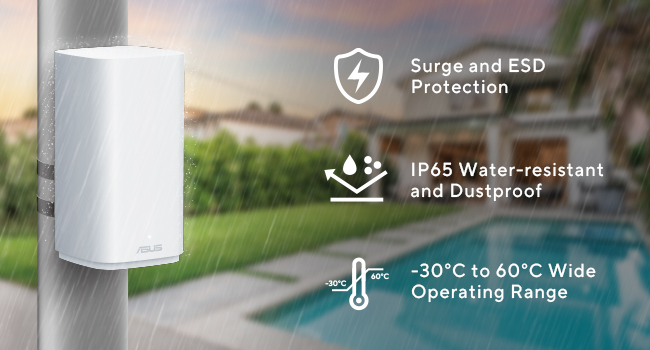
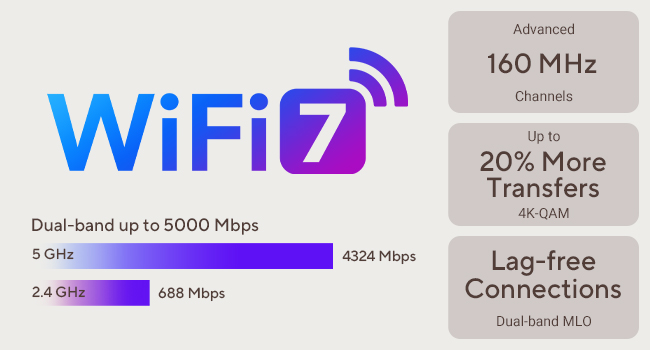
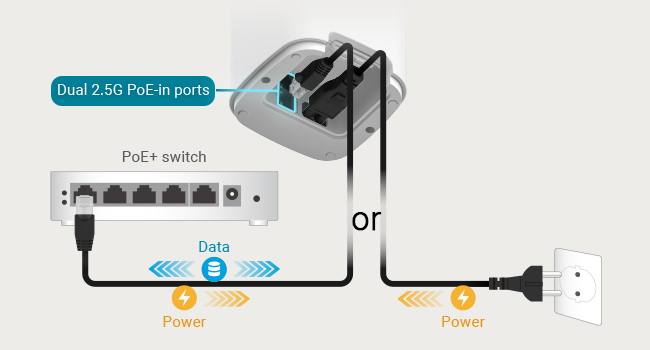
The ASUS ZenWiFi BD5 Outdoor Mesh Router delivers cutting-edge WiFi 7 speeds up to 5Gbps across dual bands, covering up to 2,500 sq. ft. Designed for harsh outdoor conditions with IP65 water and dust resistance, surge protection, and a wide operating temperature range, it supports flexible installation via dual 2.5G PoE+ ports or AC power. Ideal for smart home IoT, CCTV, and EV charging, it seamlessly integrates with ASUS AiMesh for extended coverage and reliable connectivity.
| ASIN | B0DHXJMLDY |
| Antenna Type | Fixed |
| Best Sellers Rank | #1,925 in Computers & Accessories ( See Top 100 in Computers & Accessories ) #86 in Computer Routers |
| Brand | ASUS |
| Color | Black |
| Compatible Devices | Devices compatible with USB 3.2 Gen 2 Type-C, USB 3.2 Gen 2 Type-A, USB 2.0 Type-A, HDMI 2.1, Wi-Fi 6E, and Bluetooth 5.3 Compatible Devices Devices compatible with USB 3.2 Gen 2 Type-C, USB 3.2 Gen 2 Type-A, USB 2.0 Type-A, HDMI 2.1, Wi-Fi 6E, and Bluetooth 5.3 See more |
| Connectivity Protocol | WiFi |
| Connectivity Range | 15000 square_feet |
| Connectivity Technology | Wi-Fi 7, Ethernet |
| Control Method | Touch |
| Coverage | 15,000 sq. ft. |
| Customer Reviews | 3.6 out of 5 stars 70 Reviews |
| Data Transfer Rate | 5000 megabits_per_second |
| Frequency | 2.4 GHz |
| Frequency Band Class | Dual-Band |
| Item Highlight | 2.5G PoE+ Port x2, IP65 Weatherproof, Subscription Free Network Security, Parental Controls Included, Custom SSIDs |
| Item Weight | 1.67 kg |
| LAN Port Bandwidth | 2500 Mbps |
| Manufacturer | ASUS |
| Maximum Upstream Data Transfer Rate | 5000 megabits_per_second |
| Mfr Part Number | BD5 OUTDOOR (W-1-PK) |
| Model Name | Zenwifi Bd5 |
| Model Number | BD5 OUTDOOR (W-1-PK) |
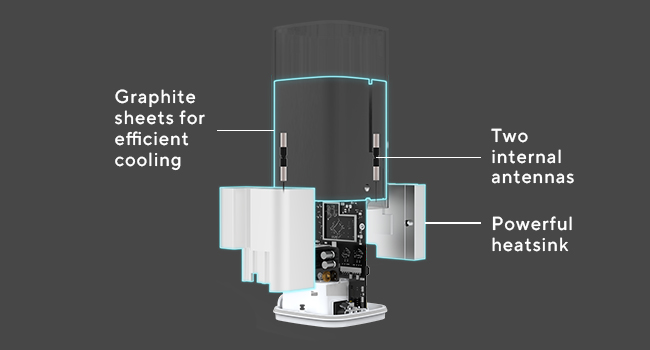
| Number of Antennas | 2 |
| Number of Items | 1 |
| Number of Packs | 1 |
| Number of Ports | 6 |
| Operating System | Windows 11 Home |
| Other Special Features of the Product | Webcam |
| Router Network Type | Dual-band |
| Security Protocol | WPA3, WPA2-Enterprise, WPA2-PSK |
| Special Feature | Webcam |
| UPC | 197105611825 |
| Unit Count | 1 Count |
| Wi-Fi Generation | Wi-Fi 7 |
| Wireless Communication Standard | 802.11ax |
| Wireless Compability | 802.11ax |
A**Y
Fantastic
Great addition to my Asus mesh network. Easy to add in, and now provides great coverage to my pool deck area outside. Itโs been through a few storms and zero issues and allows me to easily connect my pool pump and filter wirelessly where before I always had intermittent issues. This is my third Asus node and half better coverage throughout back yard cutting grass now (we sit on a 2 acre lot w a 3k sq ft ranch). I have one upstairs, one downstairs, and one outside now in a roughly triangular setup. We stream on several TVs and my wife and I both work from home- no speed issues and connectivity is solid. App is easy to use
E**T
This ASUS is Junk
JUNK. This is supposed to be an outdoor rated device. I installed it as instructed. Of course as an outdoor device it was exposed to the elements. The device allowed water intrusion and had a catastrophic failure. It was only a few months old and still under warranty. I have many ASUS products and have had an overall positive experience. However, in dealing with warranty repair or replacement I experienced nothing but frustration. The suggestion by warranty repair was that the device should not be exposed to water or other elements. I explained, more than once, that the device is touted as outdoor rated. The brochure and website show the device on a pole in the backyard exposed to rain and snow. Plainly deceiving and tantamount to knowingly false advertising. In the end ASUS did nothing for me. No concept of customer service and they do not stand behind their products. They wanted me to pay for the repair which was more than the cost to simply buy a new one on Amazon.com. Completely dissatisfied.
T**E
Perfect for casual use
A bit difficult setting up since the last time i did was years ago. I have 1 gig fiber and if i'm close to it, my phone will get 1 gig speed, which is what i would expect for the speed. It has nice features and is of comfort to know that i am future proofed up to 10gig of speed. I was able to use this with frontier fiber but it does disconnect quite frequently but is reliable for the most part. But if could do it over again, i'd get the next one up.
S**E
Be patient and read before you act on any quick set up.
I have had several routers, mesh, AP wifi this and that throughout my upgrading of our home. If you get an ASUS group or decide to put your own firmware on these it should be ok. Either I am the luckiest person alive with ASUS or a have a high threshold for tolerance learning levels. 1. You have to set the network to fit your needs and this was a great addition to our Mesh network 2. Split your network and or decide if you want to run point to point, hard wire, Access points etc. ( We have an IOT or internet of things sub network for stuff that need to talk in the house and not out of the house) 3. Data and information security (Asus combined with 2 firewalls and VPNs etc has done well with this addition) 4. How noisy is your area you are putting this addition in. More doesn't always mean better. If you get jitter, lag and or issues. You need to look at packet priority (web surfing, work from home, gaming, streaming etc). 5. If you dont know how to adjust for these settings and looking for a plug and play situation - call your cable company and let them set you up with their stuff so you can call them for tech questions. ASUS makes a decent set for tech regarding configuration and adaptability. 6. Chances are you can Google the tweaks you need, ask some AI chat bot or call ASUS region based office for support. Don't call fred down the street in his mothers basement who doesnt have a job and games all day showing up at your door with a Coke and Cheeto dust on his face to fix something you can look up yourself on your cell phone. 7. Last piece of advise is try to keep your nodes with visible distance of the other units - Some ASUS units do better thru or around walls but really you should have a hard wired AP at that area in my opinion. Tweak something after you have looked it up. Most smart home items don't get the firmware they need or the old configs cleaned out before changing the heart of your connections. Plan, review and test after you watch some videos, read the information you can (dont be the guy at the end of the project holding bolts after assembling the bike - maybe there are extra parts hell I dont know). Look with those two eyes, listen to podcasts and video advice and speak ill of this if you will after you have done due diligence. I made the mistake of bashing one ZenWifi model and it was because I had picked up the plug from the old unit and it was not getting the right voltage for the new unit. Plugged in the right cord, firmware updates and did the steps and got full bands by finding the channel that fit my neighborhood and home. Best of luck, I love the stuff ASUS puts out. Stability: Stability - Use AP and Mesh combo Speed: Speed - Tweak the packet priority and beamforming to beacon more for noisy networks
A**R
Does what it should
The ASUS ZenWiFi BD5 Outdoor Dual-Band WiFi 7 Mesh does well what it should. Solid performance and reliable coverage for an outdoor-rated mesh system.
R**Y
Stay far away
Asus should be ashamed of this item. What an absolute piece of trash. Doesn't stay on. Doesn't stay connected. Doesn't do what it's meant to do. Multiple setup issues. Way too much troubleshooting for an object that is a simple AP point. Do yourself a favor and do not buy this item. absolute trash
R**M
Asus wifi
Great product, works perfectly, I connected it using POE .
D**N
Works - but read this for tips, especially if you use Asus Merlin
It works, has good range and was easy to set up (5 minutes). In my case I am connecting to an Asus RT AX86U Pro router to allow me to reach several security cameras located on my property. Tip one: Make sure you reset the device to factory settings even if it is brand new. Very important if using Asus Merlin. If you still have trouble connecting using wifi, then resort to an Ethernet connection for set up and then choose your wifi as priority, then after you disconnect the ethernet it will use the wifi. Tip two: Set up separate networks for different bands. In my experience I had one network with the dual band auto select and I found that none of my 5 GHz devices would connect. Once I separated the bands all devices would connect, but, of course I had to reconfigure the 5 GHz devices to the new ssid. Tip three: Put the device as high as you can. The range seems to improve greatly with the height. In my case I could reach cameras 300+ ft away by putting the device 9' above ground. With these considerations, the device will work for you. In my case it did solve the problem of reaching the cameras which were far away and before had only sporadic connections or non at all.
E**N
34 days only?
Unfortunately the router disconnected from the network on its on, so I decided to reconnect it, and since over several days or resetting , I keep getting unable to connect. Not sure what happen to this router but it attempts to connect but now it will not no matter what I try. Maybe I got a lemon or somethin and I missed the return window by 2 days. I will try to figure out with Asus if they will keep good to their warranty and such, this is a lot of money. Overall when it was working it was great since delivery on 27 September 2025, and even now everything seems to be functioning correct. Not sure maybe something in side, as of now caution on this product until I get an answer and update my review.
Trustpilot
4 days ago
2 weeks ago