Desertcart purchases this item on your behalf and handles shipping, customs, and support to South Africa.
🚀 Power up your home WiFi—fast, reliable, and effortlessly connected!
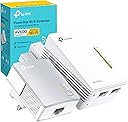
The TP-Link TL-WPA4221 KIT is a powerful AV600 Powerline WiFi extender that delivers up to 600 Mbps over your home’s electrical wiring and extends wireless coverage up to 300 meters. Featuring 300 Mbps WiFi speed, 2 Ethernet ports for wired devices, and a simple plug-and-play setup with one-touch WiFi cloning, it’s designed to eliminate dead zones and provide stable, high-speed internet throughout your home or office. Ideal for professionals seeking reliable connectivity without complex installation.


| ASIN | B0D7MSBFQT |
| Best Sellers Rank | 600 in Computers & Accessories ( See Top 100 in Computers & Accessories ) 2 in Powerline Network Adapters |
| Box Contents | TL-PA4010, TL-WPA4220 |
| Brand | TP-Link |
| Brand Name | TP-Link |
| Color | white |
| Colour | white |
| Compatible Devices | Router |
| Compatible Operating System Family | Windows |
| Compatible devices | Router |
| Country of Origin | China |
| Customer Reviews | 4.4 out of 5 stars 20,590 Reviews |
| Data Link Protocol | Ethernet, HomePlug AV2, IEEE 1901, IEEE 802.3, IEEE 802.3u |
| Data Transfer Rate | 600 Megabits Per Second |
| Data link protocol | Ethernet , HomePlug AV2, IEEE 1901, IEEE 802.3 , IEEE 802.3u |
| Hardware Interface | Ethernet |
| Hardware interface | Ethernet |
| Item Dimensions L x W x H | 13.8L x 10.2W x 19.2H centimetres |
| Item Weight | 0.21 Kilograms |
| Manufacturer | TP-Link |
| Manufacturer Part Number | TL-WPA4221 KIT |
| Minimum Required Operating System Version | Mac OS 14 Sonoma, Windows 11 |
| Model Number | TL-WPA4221 KIT |
| Number of Items | 2 |
| Product dimensions | 13.8L x 10.2W x 19.2H centimetres |
| Unit Count | 2.0 count |
G**Y
A cost-effective solution - for us
I purchased both a TL-WPA4220KIT and TL-PA4010KIT as part of the same home WiFi solution. As such, I have given the same review for both purchases. We have a long thin Victorian house with a BT HomeHub-5 in the front lounge. We have a ‘copper’ connection to the BT exchange as fibre is not available in our area of London yet. That said, we usually get a reasonable 9-10Mbps connection. Our problem is that we cannot get usable WiFi coverage in the kitchen at the rear of the house. We initially tried to use WiFi signal extenders but these proved slow and unreliable. So, about 3 years ago I purchased an AV500 PowerLine solution from SAGEMCOM. This included a Powerline WiFi extender in the kitchen. This proved to be adequate though we did need to reset all of the adapters about once a month when things ‘locked up’. Then, a month ago, the WiFi adapter in the kitchen handed in its cards and died. Thinking I would try for a higher-tech solution I purchased a WiFi Mesh solution on Amazon. However, this proved to be a complete disaster being slow and totally unreliable. I suspect this was due to the requirement for overlapping WiFi signals between the nodes. Also, as we live very close to the Crystal Palace TV transmitter, we are susceptible to RF interference. So, it was back to the drawing board and I returned to the tried and tested PowerLine solution. I chose these AV600 kits as I have always liked TP-Link products and found them dependable and reliable. As such, in total, we have 3 x TL-PA4010 mini PowerLine adapters and a TL-WPA4220 WiFi extender (in the kitchen). One of the mini adapters in located in the lounge and is connected with a LAN cable to the BT router. The other 2 adapters are in the bedroom. One is connected to a BT YouView box and the other to a Roberts Internet Radio (neither of which support WiFi). A secure network was made by connecting all 4 units in turn by use of the ‘pair’ buttons. All then burst into life and worked fine. The WiFi extender was using its factory SSID and password. I successfully trialed changing this by logging onto its admin screens using a browser (you will need to know its IP address to do this – I picked it up from the BT Hub setup menus). But then, I used the ‘WPS’ method to clone the BT Hub SSID and password instead by, temporarily, moving the extender to the lounge and following the easy ‘quick setup’ guide. This worked a treat and everything has now worked without hiccup for over a month. I have had previous issues with cloned SSID’s - with mobile devices getting confused when connecting. However, thus far, we have not had any problems and devices switch between the BT router and TP-Link extender (as we move around the house) without issues. That was a pleasant surprise! I did get the tpPLC android app for my mobile and its quite informative. It has a poor rating in the Google Play Store but this is IMHO, unjustified. It has no whistles and bells or astounding graphics but it does a job simply and well. I can see the status of all adapters and the speed of communication between each one. I seem to be getting a respectable 380-450 Mbps between each device except when they are idling and the communication rate drops to, I presume, a default 11 Mbps. The app also allows you to rename the devices (which may be useful for any future trouble shooting) and it can used (apparently) for firmware upgrades. Alas, it cannot be used to restart devices (it only allows a factory reset). Nor, can it be used for changing the settings (SSID ID etc) on the extender – this can only be achieved by ‘browser’ access. So, we are pleased. This solution is (thus far) reliable and is reasonably priced. It is also easy to set up (though my prior experience in this area helped) and it’s a step up from our old SAGEMCOM PowerLine solution. Had BT supplied us with a higher speed ‘fibre’ internet connection, I would have gone for say, an AV1200 setup with dual band WiFi. As it is, this meets our needs. Also, if you have a shortage of mains outlets in your house, you may want to opt for more expensive ‘mains pass-through’ adapters. NOTE. I see there are a number of debates on Amazon regarding the reliability of PowerLine solutions. ie. Some people are extremely happy while others have persistent problems. This is not peculiar to TP-Link products. Based on my experience, I would suspect that performance is directly related to the state of the house mains wiring. Our house has recently been rewired which not only improves (and reduces the number of) connections, but potentially shortens cable runs too. As such, unfortunately, a PowerLine solution may not be ideal for everyone - particularly in some older houses with extensions and complications added over the years. You may need to 'suck it and see' to decide if it works for you.
T**R
Amazed at how good this is. Superb product
I am a network engineer and I bought this for a job I had to do for a client which involved getting a wifi signal to a set of remote gate posts on a property for a smart intercom / doorbell. This product for me was both vastly cheaper than buying the amount of cat5 (ethernet) cable I needed and a million times easier than running it down the side of a very long driveway. I am incredibly impressed with this product and I use TP Link powerline networking gear a lot but the first time I used this model with the wifi option which not only worked really well the wifi signal this plug produced was very strong and rock solid and could be picked up from a considerable distance away. Setup literally could not be easier you simply plug the smaller of the two plugs into a electrical socket and plug one end of the supplied cat5 (ethernet) cable into the plug and the other end into the back of your broadband router (or network switch / patch panel etc). Then plug the bigger of the two plugs into a electrical socket in the area you want the extended wifi signal in. The bigger of the two plugs also have a ethernet / network port on it so you can plug a cable into it and then into the back of a computer, tv, games console etc and still benefit from the wifi extension too. Take it from someone who knows their stuff when it comes to this carry on.... this is a excellent piece of kit made by a manufacturer who is unable to make a bad product... TP Link are superb. The price paid is a bargain full stop but as I said above given the cost of the cable I would have to have used this for me was the bargain of the century and saved me a back breaking day of pulling cable. Cannot recommend highly enough... it's a no brainer ladies and gentlemen!
J**H
Very good, but not foolproof.
*DISCLAIMER* I’ve reviewed multiple power lines and the same “issue” persists and is not foolproof. In all, this “issue” isn’t so much an issue but is down to a multitude of factors. Power lines operate through the current electric cables running through a household, through the router. This means that everyone’s use case is difference, and performance can vary depending on the Wi-Fi router plugged into, the wiring through your house and the Ethernet cables you use. TP Link are always a safe bet in terms of not just power lines, but all tech products. The AV600 has worked excellently for myself, and struggled in some areas as listed below. (Please read the disclaimer, as this is MY use case, and can be SLIGHTLY different for everyone else. But in general, these pros / cons are universal) Pros: - Excellent consistency. The speed stays the same, regardless of bandwidth and users on the network. I do a lot of network heavy tasks, and have never noticed fluctuations in ping, download/upload speed. - Ease of installation: Anyone can set these up. The box comes with two modules and two Ethernet cables. You simply plug in both plugs in your house, plug into the router and where you want an Ethernet connection, press the connect button and you’re online. - Okay Wi-Fi speed: Included in both the pros and cons. The Wi-Fi that the plugs output functions well, and is consistent, but is about 20-30% the speed of the original Wi-Fi speed. Cons: - Decreased Wi-Fi speed: My internet speed on straight Ethernet is 934mb/s, but using the power lines my speed is decreased to 180mb/s. There is a speed restriction on these units, but this is a significant decrease. - Slow Wi-Fi speed: The modules have an extension which allows for wireless connections, they are very consistent, and function as a Wi-Fi module, but the speed is incredibly slow. Overall thoughts: Power lines could be the answer to all of your Wi-Fi problems, connecting you through a wired connection anywhere in the house, and I believe that the AV600 are probably, at this price point, the best option. I have reviewed £415 power lines, which are only narrowly better than these. Product quality is good, do not consume a massive amount of power and are an incredibly easy way to get connected anywhere, if you don’t mind sacrificing a small amount of your overall Wi-Fi speed for consistency, anywhere in your house. Please ping me a message if you have any questions regarding this product!
M**D
Solved Lag Spikes On PS5 - Exceptional
I was skeptical at first if this powerline adaptor would actually work with mixed opinions online. But it is doing an exceptional job and was easy to set up. My PS5 was suffering lag spikes repeatedly making Cod Bo6 and Fifa difficult to play. My router is on the other side and lower floor of my house meaning weaker wifi signal and interference. I have now had this powerline connected to my PS5 with ethernet for some weeks and i am no longer lagging with steady ping and no packet loss. The download speed is near enough close to full mbps my isp provides and is steady. I even have my BO6 texture streaming on full and there is still no lag with this amazing item. In regards to the wifi extender part of this product, it is decent but does not perform as well as the powerline ethernet connection and download speeds are smaller in comparison. So if you are looking for an adaptor that will solve lag on devices that can be connected with ethernet, it is perfect but not the best option if you want to extend your wifi signal itself to phones and such. It will also depend on your houses electrical wiring and is recommended to be on the same circuit. I didn’t check my circuits or wiring and tested my luck. This product is working perfectly for me and solved my issues hence i give 5 stars!! It is worth trying and if it doesnt work well in your case, it can be returned within the time window.
M**R
Brilliant and so simple to setup.
TP-Link TL-WPA4220KIT is very simple to setup using the clear instructions. I didn’t ‘clone’ my existing WiFi network via WPS as I wanted to be able to identify the TP-Link extenders while I experimented with possible locations. Out of the box, all I had to do was follow the excellent instructions to pair the two Extenders (a second extender bought separately) with the Adapter. The kit worked perfectly without doing anything else; the two TP-Link (WiFi) extenders somehow manage a single, overlapping, WiFi network that covers the whole house - absolutely brilliant! Don’t expect to get quite as good coverage (in a ‘difficult’ site) as you might be getting from a good WiFi router. If you’re in doubt, it was cheaper to buy the kit with two 2-port Extenders rather than buying a second a few days later as I did. If you need more than 2, check prices carefully; from Amazon, it was much cheaper to buy a second complete kit than a single (new) extender. With 2 extender units sited to cover the whole house (massive interior and external stone walls), coverage is seamless as I move around the house with my tablet. Multiple extenders run a single WiFi network – brilliant. You just plug each one into a wall socket near the single Adaptor, pair it with the adaptor, then move it to a suitable wall socket. This means that experimenting for best coverage could not be simpler, just move extenders to different sockets – but do switch off sockets before (un-)plugging. TP-Link tell you not to use extension cables – I had no choice (the power socket close to my router is on the skirting board too close to the floor (listed house), and I’ve had no problems with a simple 2-way extension cable. I suspect it’s multi-way extensions with power indicators, suppressors etc., that cause problems. My 3 TP-Link units are on 2 different ring-main circuits and there’s an RCCD on the consumer unit. I can’t think why going through an RCCD (outbuilding) is likely cause problems, but don't know for sure. Because my new 4G mobile router has to be in an attic window to get a decent mobile signal, I couldn’t put it in the same place as my redundant ADSL router located where it both gives adequate WiFi coverage of most of the house and can be connected (wired Ethernet) to my printer and PC. The 4G router connects to the whole house via the TP-link network: router directly to the TP-Link adaptor (ethernet); extender 1, in place of the ADSL router, via Ethernet to printer and PC and gives WiFi coverage to the middle of the house; extender 2 provides WiFi to the kitchen and the rooms above – where the previous WiFi was patchy. If you really need to tinker with the set-up (e.g. change network SSID, password etc. etc.) there’s a good, intuitive, browser interface.
H**N
Wanted to love these but unfortunately, I was disappointed
I was really excited to get these to solve the issue of a dead spot in my home. I live in a 2 bedroom flat which is about 800sqft or so. Whilst my place isn't big, the wifi signal has to go through 4 walls to reach my studio which means the signal in that room is virtually non existent. My girlfriend sometimes takes conference calls in that room too so a reliable, strong connection there is essential. I didn't fancy ripping up my floors to start hiding ethernet cables just yet so was hoping these powerline adapters would solve my problem and they did, sort of. Now I want to preface this by saying the setup was pretty straightforward. Once up and running, I was showing full wifi connection bars on all devices. This unfortunately didn't last. I would, at times, have a great connection, then it would cut out or stutter, even on zoom call which aren't terribly high bandwidth. The connection would sometimes fall down making even regular browsing nearly impossible. I tried everything I could think of to make things better, even splitting the 2ghz and 5ghz networks and giving them separate ssid's (per the advice when using Virgin Media) but nothing helped. In the end, I gave up and went for a DECO M5 Mesh Network (also by TP-Link) which, at time of writing, is working absolutely flawlessly, providing 200+mb download speeds in my studio which even on their best day, the powerline adapters couldn't get close to. It is a bit more expensive at £150 but if, like me, you need fast and reliable internet throughout your home, it is worth spending the extra money. An additional note, I think the reason that the powerline adapters are hit and miss is owing to the electrical lines in my building being a little bit dated. The problem is you don't really have any idea if your electrics are going to trip you up until you try them. You can have a nice swanky fuse box but the cabling connected to it is ancient so don't assume that because your electrics look ok that they are! If you are in a new build, these will probably work great, but overall if you can spare the money, go mesh!
D**N
Easy solution to extend WiFi to the garage and shed
My router is at the front of the house and by the time you get to the back garden and shed/garage, the signal is dropping off/out. I thought about a wifi extender but they need locating in area of relatively strong signal, otherwise they can't communicate well back to the router. This product has worked out great to give me a second WiFi access point (with duplicate WiFi credentials) in a weak signal area with a fixed data line back to the router. I think these things are very dependent on your electrical infrastructure, so here's mine. The Powerline plug (with an ethernet cable link to the network) is in a radial socket about 30cm away from the consumer unit. The signal to the remote WiFi/network point has to hop across to another MCB on the same bus bar. It then has a direct and dedicated 20-30m wiring run out to the garage, where it goes through an RCD and another MCB and then another 2m out to another radial socket. I consider this quite a simple run but it all has a performance impact that I'll talk about. Per the setup guide recommendations, I plugged both units into the same double socket while I checked pairing and changed the settings I wanted. The PC utility software gives you a simple visualization of your Powerline network, so that you know which device settings you're changing. It also shows you the data link performance between the two points. When next to each other, they registered around 460Mbps. By the time I moved the second endpoint out to the garage, that had dropped to just under 200Mbps. I'm still happy with this because it's x4 faster than the broadband and I only need it for Internet and audio streaming. The Wifi signal is strong, covering the 20m long garden, garage, shed and patio. My Alexa dot in the shed was able to drop in on the house Alexa's and stream music with ease. The router WiFi settings copied over to the remote with WPS as promised. The TP-Link has worked as promised. At £35 it was good value and achieved what I needed it to without the effort of running ethernet cabling out there and installing a dedicated access point device. Especially since the electricians had already done that.
F**T
Solid Performance, Great Value – TP-Link WiFi Extender is a Reliable Solution
I’ve been using the TP-Link WiFi Extender for a few months now, and it has significantly improved my home network’s coverage. Setting it up was a breeze, thanks to the easy-to-follow instructions and the Tether app, which made the whole process super straightforward. The device quickly found my network and boosted the signal in areas that were previously a dead zone. The performance is great for everyday use—streaming, gaming, and browsing are all much smoother with fewer interruptions. The range is solid, and I’ve noticed fewer dropped connections throughout my home. It’s also relatively compact and doesn’t take up much space, which is a nice touch. However, there are a couple of reasons I’m not giving this 5 stars. While the extender works well in general, there’s a slight dip in speeds when compared to being directly connected to the router, especially in areas farther away from the device. Additionally, the design could be a bit more streamlined—while it’s not bulky, the positioning of the antennas could be more adjustable. Overall, the TP-Link WiFi Extender is a fantastic product for the price. It does exactly what it promises and provides a noticeable improvement in Wi-Fi coverage without breaking the bank. Highly recommended for anyone looking to boost their signal and eliminate those annoying dead zones!
R**H
Does the job as expected.
I had 1000mbps tp link powerline. Added this to the same and configured it using tp link windows app(a must else you may not get the desired speeds as it takes random one as primary when multiple are connected). Was able to use primary of this one also as an extender as I already had a primary from the 1k Mbps extender. So I have 1 primary from 1k and 3 extenders with this.
J**N
Excelente opción para extender la señal de WIFI
La tecnología de Powerline (cable de corriente) casi no se conoce ni por los mismos técnicos especializados en esto. La señal corre por el cable de corriente!! si así como se oye!! y con esto no importa que haya paredes gruesas o largas distancias. Es bastante fácil configurar. Excelente producto.
C**N
Ottimo
Ottimo prodotto qualità prezzo
C**N
Ancho de banda
Después de usar varios PLC para conectar el decoder de Movistar plus en diferente lugar al router Movistar este PLC me ha regalado la misma experiencia como si hubiera sido conectado directamente al router. Totalmente aconsejable. Con anteriores PLC no se podían cargar contenido on demand y muchas interrupciónes
G**K
Nixht in Deutschland geeignet
Passt nicht in deutsche Steckdosen.... Kein Adapter dabei
Trustpilot
1 month ago
1 week ago