Desertcart purchases this item on your behalf and handles shipping, customs, and support to South Africa.
🚀 Elevate your network game with silent speed and smart control!
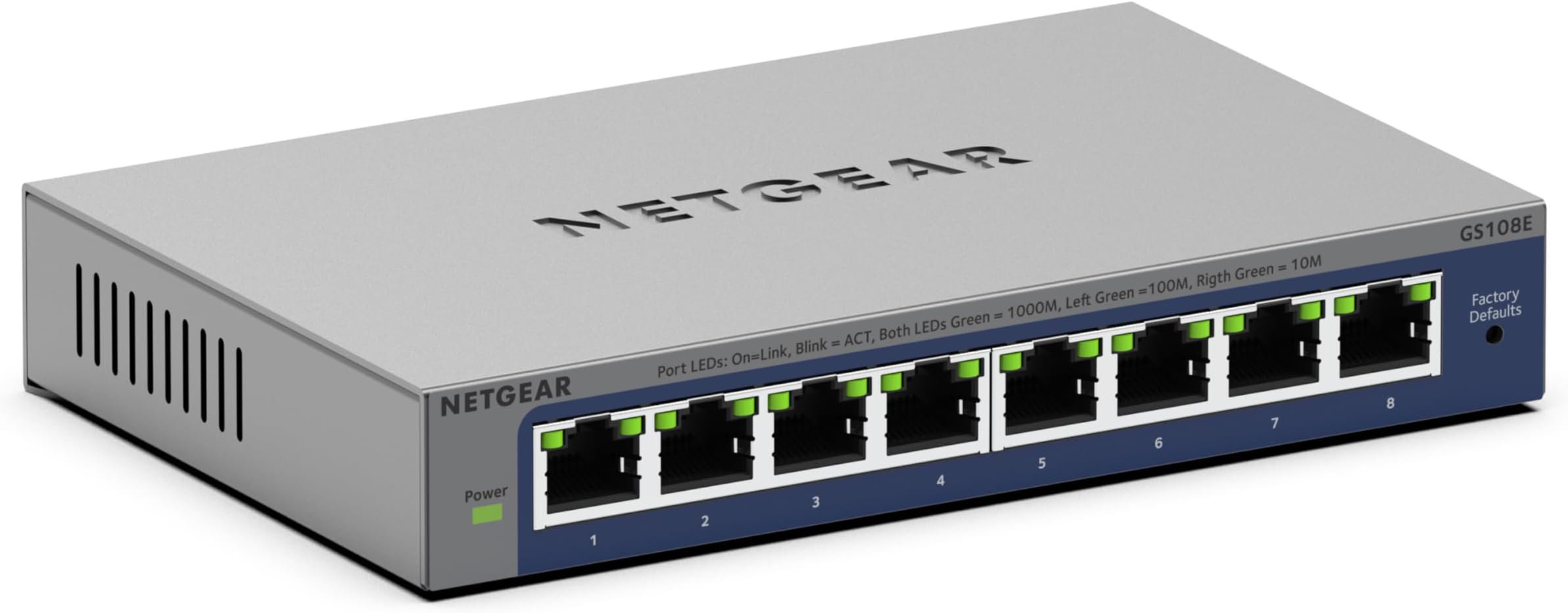
The NETGEAR GS108E is an 8-port Gigabit Ethernet Easy Smart Managed switch designed for small businesses and professionals seeking high-speed, reliable connectivity. Featuring an intuitive management interface for VLAN and QoS configuration, a fanless silent design, and flexible desktop or wall-mount installation, it delivers efficient, secure networking with a lifetime hardware warranty.


| ASIN | B0D953VG1X |
| Best Sellers Rank | #54 in Computer Networking Switches |
| Brand | NETGEAR |
| Built-In Media | 2V, 0.5A power adapter, 8-port Gigabit Ethernet Plus Switch (GS108Ev4), Installation guide, Wallmount kit |
| Color | Gray |
| Compatible Devices | Desktop |
| Customer Reviews | 4.6 out of 5 stars 1,374 Reviews |
| Data Transfer Rate | 1 Gigabits Per Second |
| Interface | RJ45 |
| Interface Type | RJ45 |
| Manufacturer | NETGEAR |
| Mfr Part Number | GS108E-400NAS |
| Model Number | GS108E-400NAS |
| Number of Ports | 8 |
| Platform | Not Machine Specific |
| Switch Type | managed |
| UPC | 606449169942 |
| Warranty Description | This product is backed by NETGEAR limited lifetime hardware warranty. NETGEAR Support offers a customizable support experience based on your operational needs. |
P**Y
Great switch for a simple network or VLAN environment
Great little switch. I bought the five-port model, and it's a nice small size that tucks behind keyboards and monitors no problem. I bought it specifically because I needed VLAN support, so while you can use it as a single-network switch, it also functions great in a multi-VLAN environment. Configuration is through a web GUI. The switch comes up at IP 192.168.0.239 by default, and I had trouble getting to the web GUI at this address until I downloaded Netgear's ProSAFE utility (free from their web site) and used it to connect to the switch and upgrade to firmware 1.4.0.6. Since upgrading firmware, I've had no trouble connecting to the switch. (If you don't need VLAN support or don't know what it is, you can skip this paragraph). In my network, I deployed over 20, with 5-7 VLANs untagged and tagged (802.1Q) depending on location. For example, we have port 1 configured with VLAN 1 (default) untagged and as PVID, and VLANs 20-70 tagged on an uplink to a larger distribution switch; ports 2-4 offer the needed VLANs untagged, and port 5 offers a subset of the VLANs tagged to a Ubiquiti wireless access point (for multiple wireless network access). You can configure VLANs four different ways, but as a Cisco/Juniper guy, I found the 802.1Q/Advanced path most familiar and capable for the project. With 20+ deployed, no DOAs, and no problems after several weeks. Solid little switch.
N**E
Works like a commercial switch in a small package
The NETGEAR 5-Port Gigabit Ethernet Plus Switch (GS105Ev2) is an excellent addition to my home setup. It’s compact, easy to install, and works flawlessly right out of the box. All five ports offer lightning-fast gigabit speeds, which has significantly improved my network's performance for gaming and streaming. The managed features are a bonus for those who want more control over their network. If you need a reliable and affordable switch to expand your home or small office network, this is a great choice!
B**Y
NETGEAR 5-Port Gigabit Ethernet
"I'm extremely satisfied with the NETGEAR 5-Port Gigabit Ethernet Plus Switch! This managed switch has significantly enhanced my network performance and control. Whether it's for home or office use, this switch is versatile and reliable. The desktop or wall mount options provide flexibility in installation, while the gigabit speeds ensure lightning-fast connectivity for all my devices. Setting up and managing the switch is a breeze thanks to its user-friendly interface. Plus, the compact design makes it perfect for any space. If you're in need of a reliable and efficient networking solution, I highly recommend the NETGEAR GS105Ev2!
M**.
A great switch
The GS-108E is a great switch. It has 8-1GB ports. Couldn’t be easier to set up. It also supports VLAN setup, although I haven’t used that yet.
S**Y
Take a peek!
This isn’t the homecoming king or queen. Port 5 can be used to monitor one port 1-4. A must for multiple home networks. Appliances, cameras, kids, all at the touch of a finger. Works best on I/O to / from the firewall/router.
I**D
You need to understand how to set it up and the manufacturer instructions are not very good on this
We bought this Netgear GS105Ev2, firmware version 1.6.0.3, to work as an inline packet sniffer. It was cheaper than the purpose built inline sniffers, which were running about $100. It does work as a sniffer, but there are some non-obvious setup steps. It does work as a span port or mirror port device. You need an inline packet sniffer when you need to see the network traffic to troubleshoot, but can not, or should not, install a packet sniffer on the device you are trying to troubleshoot. IoT things are a prime example. To start, you need to get into the switch’s management interface. I used the web interface. Assuming the switch is in it’s default configuration, plug your computer into any port and configure your network card with an IP of 192.168.0.238 and a subnet mask of 255.255.255.0. None of the other settings need be set. Go to http://192.168.0.239 in any web browser. Enter the password (default: password). Please change the password if you plan on using this as a normal switch. These instructions assume the device whose traffic you want to capture is plugged into port 1 and the sniffing device, such as a laptop, will be plugged into port 5. I highly advise you label these. Because most laptops can’t capture more than about 80Mbps, under System → Management → Port Status, sent port 1 to 10M Full. Apply. Failure to do this can result in missing some traffic. Second, go to VLAN → Port Based → Advanced. Enable it. Apply. Create a VLAN 1 with ports 1, 2, 3, and 4 as members. Leave out port 5. Apply. This will reduce the broadcast traffic, which is mostly noise, sent to port 5. You will still see all the broadcast traffic that is sent to port 1. Finally, go to System → Monitoring → Mirroring. Set Mirroring to enable and Destination Port to 5. In the port check boxes, check only port 1. Apply. From now on, you plug the device whose traffic you want to capture into port 1, plug the cable from your main switch/router into port 2, 3, or 4, and plug your sniffer laptop into port 5. The laptop does not require an IP address (and won’t be able to talk on the network either). The switch will retain the settings if power cycled. You will also need two additional network cables to run this as a packet sniffer (not supplied). Update: It seems a modern laptop, not running much else, and using tshark to capture the packets can handle 1 Gbps rate. If these conditions are true, skip lowering port 1’s speed and leave it at auto. In testing, if you do lower port 1’s speed, you will get some “bad tcp” (tcp.analysis.flags filter in wireshark; the black lines). This is due to the lower speed. Leaving the speed at auto seems to almost completely eliminate that problem.
M**E
Netgear 8 port managed switch
Great switch if you need to setup separate vlans in your network. I’ve been using these for about 2 years with no issues. Latest version has a better web interface than prior version but functionality the same. Full gigabit speed and easy setup.
C**A
A Low-Priced, Fantastic VLAN capable switch
I first purchased a TP-Link TL-SG105E and had some very strange VLAN ARP issues with it (see my review). I replaced with this Netgear and all my problems went away instantly. As a plus, there IS a web GUI on any firmware version above 1.3.0.3, currently at 1.4.0.6. I used the Windows software provided only to upgrade the firmware and locate it on my network. Once that was done I assigned all my VLANs, a static IP for the switch and was off to the races. Just to clarify you DO NOT need the CD or the software. All functionality is in the web GUI, providing you can check your DHCP table to ascertain the switch address. I'm using this switch to trunk two 802.1q VLANs into my EdgeRouter on the other side of the house. My cable modem and solar equipment live in my garage, so I needed both LAN and WAN VLANs over the same physical circuit. Port 1 is my trunk carrying two tagged VLANs, with one port untagged feeding my cable modem (VLAN 100), and the other ports untagged to my LAN VLAN (VLAN 101). While you cannot disable VLAN 1, you CAN simply not use it and not tag or untag any ports so it just sits there doing nothing. One word of note, if using an EdgeRouter and are seeing lots of dropped Rx packets, it's due to enabling loop detection on this switch (RRCP packets). The EdgeRouter doesn't understand these packets so it drops them. You'll see several pile up every few seconds. I turned this feature off and haven't had any drops since. Paint me impressed! It's currently only $25ish after the mail in rebate.
A**.
Decent experience, don't like the UI
User interface is too simplified. Don't like having to set a secure password for a LAN only device
S**Y
Great Little Switch - Easy to Tuck Away So it is Out of Sight
Bought this to allow me to network a few peripheral devices in my home office. Works like a champ! Was easily able to get into the device and configure it the way I needed to. Also, it is light weight enough to stick it to the back of the cabinet that the peripherals are on with a simple medium size Command picture hanger strip, so it is out of the way (had to remove the rubber feet).
T**Y
Buena relación precio calidad
Hace bien su trabajo
A**E
Unvollständige Artikelbeschreibung
Unbrauchbar. Wird mit amerikanischem Netzteil für 110 Volt Steckdose geliefert.
M**1
Very good little switch
Very good little switch. Does not snmp but does just about every else you could expect from a quality switch. Have owned this over a month and it has been rock solid. I use the port mirroring to monitor my home traffic - very nice.
Trustpilot
1 day ago
2 weeks ago