Desertcart purchases this item on your behalf and handles shipping, customs, and support to South Africa.
๐ Elevate your network game with the future-proof Nighthawk WiFi 7 powerhouse!
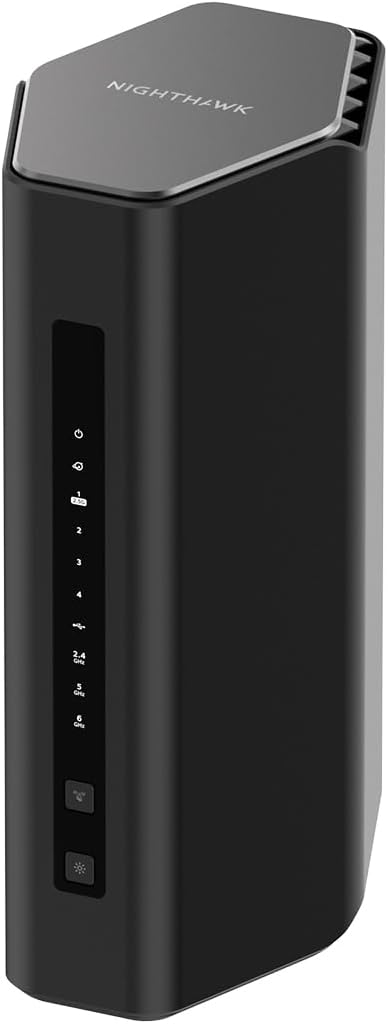
The NETGEAR Nighthawk RS500 is a cutting-edge WiFi 7 tri-band router delivering up to 12 Gbps speeds, covering 3,000 sq. ft., and supporting 120 devices. Featuring a 2.5 Gigabit Ethernet port for multi-gig wired connections and advanced antenna design, itโs engineered for ultra-smooth 8K streaming, gaming, and video conferencing. Note: This is a router-only device requiring a separate modem.


| ASIN | B0DG71H4GD |
| Antenna Location | Business, Gaming, Home |
| Antenna Type | Fixed |
| Best Sellers Rank | #181 in Computers & Accessories ( See Top 100 in Computers & Accessories ) #18 in Computer Routers |
| Brand | NETGEAR |
| Built-In Media | One (1) 12V/3.5A power adapter, One (1) 2m Ethernet cable, One (1) WiFi 7 Tri-Band Router (RS500), Quick start guide |
| Color | Black |
| Compatible Devices | Gaming Console, Personal Computer, Security Camera, Smart Television, Smartphone |
| Connectivity Protocol | Wi-Fi, Ethernet |
| Connectivity Range | 3000 square_feet |
| Connectivity Technology | Ethernet, Wi-Fi |
| Control Method | Push Button |
| Coverage | 3000 square feet |
| Customer Reviews | 4.4 out of 5 stars 583 Reviews |
| Data Transfer Rate | 12 gigabits_per_second |
| Frequency | 6 GHz |
| Frequency Band Class | Tri-Band |
| LAN Port Bandwidth | 2500 Mbps |
| Manufacturer | NETGEAR |
| Maximum Upstream Data Transfer Rate | 2500 megabits_per_second |
| Mfr Part Number | RS500-100NAS |
| Model Name | RS500-100NAS |
| Model Number | RS500-100NAS |
| Number of Antennas | 6 |
| Number of Items | 1 |
| Number of Ports | 4 |
| Operating System | ZyNOS |
| Other Special Features of the Product | Internet Security |
| Router Network Type | Tri-Band |
| Security Protocol | WPA2-PSK, WPA3 |
| Special Feature | Internet Security |
| UPC | 606449170504 |
| Unit Count | 1 Count |
| Warranty Description | 1 Year Limited |
| Wi-Fi Generation | WiFi 7 |
| Wireless Communication Standard | 802.11.be |
| Wireless Compability | 802.11.be |
A**R
Easy Excellence & Expansion
Description: The NETGEAR Nighthawk BE12000 Wi-Fi 7 Router (RS500) has been an outstanding upgrade for my home network. The setup process was incredibly simple using the NETGEAR app. From unboxing to being fully operational took only a few minutes, and the app guided me through every step clearly and efficiently. The improvement in my home internet performance was immediate. I noticed significantly faster speeds throughout the house, better coverage, and much more consistent connectivity. Perhaps the biggest improvement has been the router's ability to handle the growing number of connected devices in our home. With computers, phones, tablets, smart TVs, streaming devices, and smart home equipment all connected simultaneously, the network remains fast and reliable. I am also impressed with how well NETGEAR has designed its networking infrastructure and management tools. The hardware feels premium, the software is intuitive, and the entire ecosystem appears thoughtfully engineered for both ease of use and performance. If you're looking to upgrade to Wi-Fi 7 and want a router that combines simple setup, excellent speed, strong device capacity, and reliable performance, the Nighthawk BE12000 RS500 is an excellent choice.
T**.
Faster than The Flash!
Needed a new router to use as an access point and saw this model on Amazon. We just upgraded to 1 Gbps speed at the house and needed to extend the signal upstairs on the opposite end of the house. I saw this Nighthawk 7 (RS500) had numerous positive reviews later- a lot of people vouched for itโs speed, coverage, functionality, and easy set up through the Nighthawk mobile app. Although the latter isnโt an issue for me (I work in tech), I opted for this router because of the bands - 2.4, 5, and 6 GHz - coverage area, the latest wifi 7 tech, and security features even though I am using this as an AP (I may create a separate network later and switch back to โRouter Modeโ allowing you to access the Nighthawkโs customizable security features). I swapped out all my CAT5 cables with some new CAT8s and everything hooked up to LAN was super fast - SpeedTest outputs of 700 Mbps to a little over 1Gbps of speed depending on the time of day. More importantly, wi-fi speeds didnโt disappoint - as I moved all over my house, front-yard, and back-yard, no issues of the network dropping. So glad I moved on from my Apple home networking eco-system to this Netgear 7 router. If youโre on the fence about upgrading to this model, donโt be - worth every penny!
T**S
Better than my ISP's router
Title: Great router Description: Great router, puts out better speed than my ISP's router. The quality and look of the router is nice. Its Great that the router is somewhat future proof with the 2.5G port. The negative I do have is with the nighthawk app which has nothing to do with router. I kept getting errors half way through the process. It could be a problem if your not tech savvy. I have had issues with the app even with my previous nighthawk router. I thought by now after some many years the issues with the app would have been resolved. No matter what I did, I could not completely activate the router with the app, which would make the process easier for people who aren't that familiar with navigating around a router. I had to end up activating the router by using a hard wired laptop and interfacing directly with the router that way to set it up. The average person won't know how do that. Also make sure you do the firmware update or you will have poor upload speeds. I have gig service with Verizon. I was getting about 850mb download and 3mb upload before firmware update. After update I was getting 850mb download and about the same for upload.
K**N
No Advanced Settings Link in the App
Title: No Advanced Settings Link Description: The Setup via App has made great progress through the years. This app is easy as it can be. Just hit the "Radio Button" and watch the progress bar setup your equipment with ease. This is great for probably 80% of the people setting up this Router (it even picks a SSID and password for you). The only problem is: what if I want this to be an AP that just repeats the existing signal coming from the Cable Modem. There is no "advanced settings" link in the UI. You are forced to setup the device with Netgear's chosen SSID and password. To fix this, you have to make the changes like you did 30 years ago by logging into 192.168.1.1. Also, I wanted to use the ports to run devices that get their network access via the Nighthawk that is connected via ethernet cable to my Cable Modem. The Nighthawk sets up its own LAN. I would think that this is a med-to-high level Router where experienced people use it. It is very cumbersome to setup for anything but the basic settings.
B**N
Works perfectly
Perfect for our use! No stuttering at all, VERY fast speeds. Love the app, too.
M**M
INCREDIBLE ROUTER!!
Title: The best network investment I have ever made Description: I am amazed at the speed and reliability of my new NETGEAR Nighthawk RS500 Router! It surpasses my expectations.
B**Y
An expensive router that *sometimes* works.
I am not a dumb individual. I grew up around computers and routers, and I know how to use and set them up. This router had great reviews and it seemed to be exactly what we needed for our home - something to handle higher speeds, good range for a big house, and the ability to handle multiple devices. It does all those things, except for 1 glaring problem - it justy randomly drops signal. Our hardwired PC's still work fine. I replaced the entire cat 6 line, twice, to ensure it wasn't that, and I've used older routers in place of this Nighthawk to also check on that. They're all worked fine, and never dropped signal. The router drops its signal at random times, sometimes going a full month+ working perfectly, and then we'll have a run of several days in a row with multiple drops. Friendly reminder that my hardline PC's work just fine when the wifi router fails, so it's not my ISP having issues. I have updated the firmware. I'm factory reset. I've let the unit power down for over a minute. I've looked on forums, on troubleshooting posts, on the manufacturers website, and I cannot find an answer to this problem. When this router works, it works great. I have fast speeds, it's handling multiple devices like console, tablets and phones, and it has great signal for my old farm house. But that's just when it works. I cannot in good faith recommend this router to anyone, based on my experiences with it. The random dropping of signal is infuriating, disruptive and without any rhyme or reason that I can come up with. If I had it my way, I'd take the thing outside and retire it via "Office Space" in the backyard. But my wife won't let me.
J**S
Super easy to install
Title: Great Description: Super great!! Replaced my R9000 router seamlessly. All I had to do is transfer the wires and it did all the work.
Trustpilot
3 weeks ago
2 months ago