Desertcart purchases this item on your behalf and handles shipping, customs, and support to South Africa.
🔒 Elevate your home security with clarity and control — don’t just watch, protect!
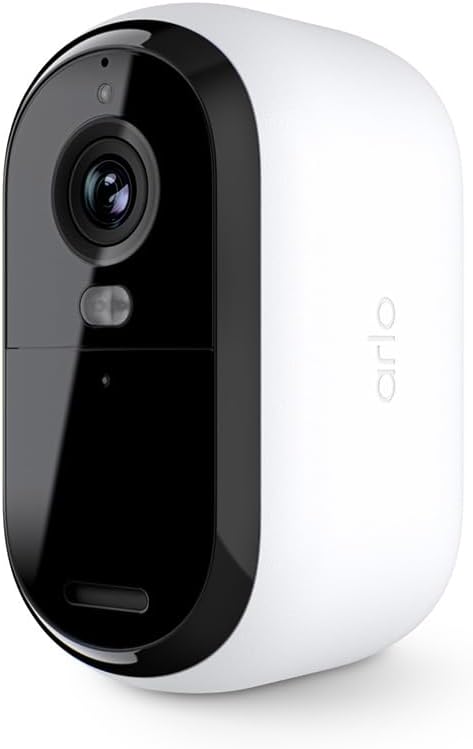
The Arlo Essential Wireless Security Camera (2nd Gen) delivers professional-grade 2K video quality with 12x zoom, integrated spotlight, and color night vision for unmatched home monitoring. Its wireless, weather-resistant design ensures flexible indoor/outdoor placement, while smart motion alerts and 2-way audio keep you connected in real-time. Compatible with Alexa, Google Assistant, and IFTTT, it’s a sleek, privacy-focused security solution tailored for modern smart homes.


| ASIN | B0C67X3J5F |
| Alert Type | Motion, Live View |
| Antenna Location | Outdoor Security |
| Are Batteries Required | No |
| Best Sellers Rank | #45,808 in Electronics ( See Top 100 in Electronics ) #284 in Bullet Surveillance Cameras |
| Brand | Arlo |
| Built-In Media | 1x Arlo Essential Outdoor Camera (2nd Generation), 1x Quick Start Guide, 1x USB Charging Cable, 1x Wall Mount and Screw Kit |
| Color | White |
| Compatible Devices | Desktop, Laptop, Smartphone, Tablet |
| Connectivity Protocol | Wi-Fi |
| Connectivity Technology | Wi-Fi |
| Connectivity technology | Wi-Fi |
| Control Method | App |
| Controller Type | Amazon Alexa |
| Customer Reviews | 4.2 out of 5 stars 1,687 Reviews |
| Field Of View | 130 Degrees |
| Form Factor | Bullet |
| Indoor Outdoor Usage | Outdoor |
| Indoor/outdoor use | Outdoor |
| Installation Type | Screw In |
| Item Dimensions | 5.9 x 5.3 x 9.3 centimeters |
| Item Type Name | Camera |
| Item Weight | 204 g |
| Light Source | Infrared |
| Manufacturer | Arlo |
| Model Name | Essential 2K Outdoor Camera |
| Model Number | VMC3050 |
| Model name | Essential 2K Outdoor Camera |
| Mount Type | Wall Mount |
| Night Vision | Night Color |
| Number of Channels | 2 |
| Number of Items | 1 |
| Other Special Features of the Product | 2K Resolution |
| Photo Sensor Technology | CMOS |
| Power Source | Battery Powered |
| Recommended uses for product | Outdoor Security |
| Room Type | Study Room possibility |
| Special features | 2K Resolution |
| Specific Uses For Product | Family Safety, Home Protection, Home Security |
| UPC | 193108145657 |
| Unit Count | 1 Count |
| Video Capture Format | MP4 |
| Video Capture Resolution | 1080p |
| Viewing Angle | 130 Degrees |
| Water Resistance Level | Water Resistant |
| Waterproof Rating | IP65 |
| Wireless Technology | Wi-Fi |
| Zoom Type | تقريب رقمي |
I**Y
Slechte beeld kwaliteit.
De kwaliteit van de beeld is niet zelfde zoals mijn andere Arlo Essential camera. Ik had spijt van.
E**O
Best Camera
I recently purchased the Arlo camera for my home security needs, and I must say, it has exceeded all my expectations. The camera's exceptional resolution and effortless installation process have truly impressed me. From the moment I started using the Arlo camera, I felt a sense of comfort and peace of mind knowing that my family and home were being protected. The clarity of the footage is remarkable, allowing me to easily identify any potential threats or unusual activities around my property. One of the standout features of the Arlo camera is its user-friendly installation process. Setting it up was a breeze, and I was able to get it up and running within minutes. The camera seamlessly connects to my Wi-Fi network, eliminating the hassle of dealing with wires and cables. This simplicity is a huge plus for anyone who wants a hassle-free setup. The Arlo camera has truly proven to be the best camera I have ever owned for the safety of my family and home. It offers a level of security that gives me peace of mind, especially when I'm away from home. The ability to remotely monitor my property through the Arlo app is incredibly convenient, allowing me to keep an eye on things no matter where I am. In conclusion, I highly recommend the Arlo camera to anyone in need of a reliable and high-quality home security solution. Its exceptional resolution, ease of installation, and overall performance make it a top choice for ensuring the safety of your loved ones and property.
M**S
There is a software issue that can brick these cameras...
There is some combination of settings I use in their app that will brick these cameras permanently with no ability to factory reset. I haven't figured out which combination of settings it is, but it seems that it might just be safer to keep the cameras at their out-of-the-box settings if you want to avoid bricking the product. This is garbage coding by the manufacturer. It's easy enough to return a new one, but you are out of luck (and money) if you brick an older one. Pretty cool business model to place a trap door in your firmware code that forces people to buy your product again. EDIT: figured out the trick to re-syncing these when you get stuck with the blue light long flash. What's happening is that when you have gone into the app and removed the camera, it can no longer connect to your wi-fi. The issue is that it is STILL creating and trying to upload recordings nonetheless. When you go to perform the reset and reconnect steps they wont work because you are handling the camera and generating new recordings by creating motion. The trick is to: 1. Make sure the camera is fully charged. 2. Set the camera on a shelf in a well-lit room, facing a static scene like a wall or at objects that will have no motion from things like shadows, movement or lights being turned on/off. Leave it here for whatever amount of time it needs to complete trying to record/upload. Wait until the long blue light flash stops plus some time for good measure. 3. Press the pair button on the camera for 3 seconds but do so while holding the camera perfectly still and not generating a shadow in the view of the camera - all of this while facing the static scene you created. This should give you the fast blue light flash we need. 4. start the "add device" process in the app. 5. the add device process will tell you this device has been previously paired and needs to be reset. 6. press the pair button on the camera again, this time for 15-20 seconds (or until you see an amber light flashing) - again, hold the camera perfectly still. 7. Wait until the amber light stops flashing, then press the pair button again to get the fast blue light flash. 8. tell the app to attempt to connect to the device again. This time the app should find the camera. 9. in my case, the app froze when attempting to name the camera. If this happens, close/terminate the app. Re-open the app and go into the settings for the camera you just successfully added. It will have an error message that "onboarding must be completed", click that and complete the rest of the setup if necessary. What a farce. This company needs to fire their developers and bring on new people to improve this code/logic.
A**A
Great Outdoor camera
The Arlo Essential Outdoor Camera 2nd Generation is a fantastic choice for anyone looking to bolster their home security. This camera excels in several key areas, making it a top contender in the market. First and foremost, the camera offers impressive 1080p HD video quality. The footage is crisp and clear, ensuring that you can easily identify details both during the day and at night, thanks to its superior night vision capabilities. This is crucial for outdoor surveillance, where varying light conditions can be a challenge. Installation is a breeze with the Arlo Essential Outdoor Camera. It is entirely wireless, which means you don’t have to deal with the hassle of running cables around your property. The setup process is straightforward and user-friendly, making it accessible even for those who aren’t tech-savvy. The motion detection feature is highly sensitive and accurate, providing instant alerts to your smartphone whenever motion is detected. This real-time notification system is invaluable for keeping you informed about any activity around your home. The built-in siren and two-way audio further enhance security, allowing you to deter potential intruders and communicate with visitors directly through the camera. One of the standout features of this camera is its compatibility with smart home systems like Alexa and Google Assistant. This integration allows for convenient voice control and seamless interaction with other smart devices in your home. Storage options are flexible with the Arlo Essential Outdoor Camera. You can choose between cloud storage and local storage with an Arlo SmartHub or base station. This flexibility ensures that you can select the storage solution that best fits your needs. In summary, the Arlo Essential Outdoor Camera 2nd Generation is a robust, user-friendly, and highly effective security solution. Its excellent video quality, ease of installation, responsive motion detection, smart home compatibility, and flexible storage options make it a top choice for enhancing home security. Highly recommended!
B**A
Need subscription to record
The camera is good, but I didn’t realize that you have to subscribe in order for it to record. It still picks up motion and notifies.
Trustpilot
2 months ago
1 month ago