


Desertcart purchases this item on your behalf and handles shipping, customs, and support to South Africa.
🚀 Elevate your home network to WiFi 7 — because buffering is so last decade!
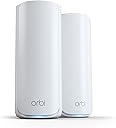
The NETGEAR Orbi 770 Series WiFi 7 Mesh System delivers ultra-fast, tri-band WiFi 7 speeds up to 11 Gbps, covering up to 5,500 sq ft with a router and satellite combo. It supports up to 100 devices simultaneously with a dedicated backhaul band, ensuring no slowdowns. Easy to set up via the Orbi app, it offers advanced security features including automatic updates and a 30-day NETGEAR Armor trial. Compatible with any ISP and expandable for larger homes, it’s designed to future-proof your home network.


| ASIN | B0D526GSYY |
| Antenna Location | Business, Gaming, Home |
| Antenna Type | Fixed |
| Best Sellers Rank | #245 in Computers & Accessories ( See Top 100 in Computers & Accessories ) #18 in Whole Home & Mesh Wi-Fi Systems |
| Brand | NETGEAR |
| Built-In Media | One (1) 2m Ethernet cable, One (1) Orbi WiFi 7 Router (RBE771), One (1) Orbi WiFi 7 Satellite (RBE770), Quick start guide, Two (2) power adapters |
| Color | White |
| Compatible Devices | Gaming Console, Personal Computer, Security Camera, Smart Television, Smartphone |
| Connectivity Protocol | Wi-Fi, Ethernet |
| Connectivity Range | 5500 square_feet |
| Connectivity Technology | Ethernet, Wi-Fi |
| Control Method | App |
| Coverage | 5,500 sq. ft. |
| Customer Reviews | 4.1 out of 5 stars 974 Reviews |
| Data Transfer Rate | 11 gigabits_per_second |
| Frequency | 6 GHz |
| Frequency Band Class | Tri-Band |
| Item Highlight | Up to 11 Gbps, 100 Devices, Easy Set Up, Tri-Band, Security Features, 2.5 Gig Port, Router + 1 Satellite Extender, RBE772 |
| LAN Port Bandwidth | 2500 Mbps |
| Manufacturer | Netgear |
| Maximum Upstream Data Transfer Rate | 2500 megabits_per_second |
| Mfr Part Number | RBE772-100NAS |
| Model Name | RBE772-100NAS |
| Model Number | RBE772-100APS |
| Number of Items | 2 |
| Number of Packs | 2 |
| Number of Ports | 7 |
| Operating System | NETGEAR Genie |
| Other Special Features of the Product | Internet Security, IoT Network, Parental Control, VPN, WPA3 |
| Router Firewall Security Level | Advanced |
| Router Network Type | Hybrid |
| Security Protocol | WPA3 |
| Special Feature | Internet Security, IoT Network, Parental Control, VPN , WPA3 |
| UPC | 606449172010 |
| Unit Count | 2 Count |
| Warranty Description | 1 Year Limited |
| Wi-Fi Generation | WiFi 7 |
| Wireless Communication Standard | 802.11.be |
| Wireless Compability | 802.11.be |
S**G
Better than my old system for sure! 5 Stars
For the longest of TIME, I have been just avoiding going big on a specific product to help boost my internet coverage as well as speed up. My internet provider is Quantum Fiber and I have been with them for over 3+ years now (since late 2023). My internet plan is 940Mbps Upload & Download. The product that I got was the "NETGEAR Orbi 770 Series WiFi 7 Mesh System, Up to 8,000 sq ft., 3 Pack." In the picture, you can see that one picture is the "Before" when I was still using Quantum Fiber's 360 WiFi Pods and the "After" is when I got this NETGEAR ORBI 770 and switched out all of the pods to this mesh system. I did do a bunch of research on it via the "GPT" and Google. I wanted something that'll have it's own backhauling just cause. I like the saying, "I rather have it and not need it than to need it and not have it." I should've snag this up when it was on sale for cheaper. I believe I got it for $559.99 or so. Signal Strength: Very good. Compared to the 360 WiFi Pods that I used to have (mind you, I did place them properly in a good placement apart from each other), it did give me double, if not triple the range. Ease of use: Very easy. I did however, have to use YouTube just a bit to get it going and double check. But there's the instruction paper you can also follow. But it doesn't hurt having both of them up. Orbi App: After setting up the first satellite or main router, I got the app started first before placing down the other two satellite. It was easy to understand and maneuver. I ended up changing out WiFi name & password. From what I gathered, you can use the old WiFi & Password if you keep it the EXACT same. The old devices doesn't need to reconnect. But, I want to be safe and make sure other people don't have access to my internet. Overall: I'm very pleased with this product. My little brother who also has the other satellite in his room connected a Ethernet Cable to his PC was able to get around 800Mbps or so for the Upload & Download. Not as good as mine but he wasn't complaining. I'm not big into gaming nowadays but as I said before, I like the saying, "I rather have it and not need it than to need it and not have it." However, my little brother did told me that he wasn't getting lagg spikes when playing games or buffering on high quality video when watching YouTube or other streaming platform. It is pricey but I say this is the medium product for me. I saw 2 other ones, a cheaper one for about $300 or so and a more expensive one for almost $1,000, if not over? I ended up going for this one. The reason why I found it was due to using "GPT." I like the mesh system more. I don't see a reason for me to return this product at all. Lastly, I'm not sure if this will help but when I had the 360 WiFi Pods from Quantum Fiber, to download a game that I played that need 2GB, it takes about 10 - 30 minutes depending on how many people are using the internet at the time. I tried to download the same game again, same 2GB file and it takes less than 10 seconds. HACK YEAH! Can't wait to for GTA VI to see how long that'll take to download. If there's any changes or weirdness going on down the road, I will be sure to update my review. Thanks for reading and I very much hope that this help people who are struggling with the mindset of "should I buy it? What if it doesn't help?" Sorry if there's not a lot of picture. But, I can't 100% guaranteed you'll get 100% of what you expect to get but I'm simple, as long as there's no lagg spike, no buffering for my video streaming, then I'm good and a bit more coverage for my wireless cameras. So, for now, I'm happy with the purchase.
A**R
That 2.5G Port speed OOF
I've been using the Netgear Orbi 770 (2-pack) for a few months now in my home, and it's been a game-changer Setup was straightforward through the Orbi app; it took maybe 15-20 minutes to get everything synced and running. Coverage is impressive, reaching every corner of our house (including the backyard) with strong, consistent signals — no more dead zones like with our old router. What really stands out is the network speed and the ports. The 2.5 Gig internet port (WAN) and the multiple 2.5G LAN ports on the router and satellites work great. I have a multi-gig internet connection. Devices plugged into the satellites maintain excellent throughput too, even over wireless backhaul. The ports deliver reliable, multi-gig performance that matches what | expected from a WiFi 7 system. Wireless speeds are solid as well-up to 11 Gops total rated, and in real-world use, I see great results on WiFi 7-compatible devices (often 1-2 Gops close-range). The tri-band setup with MLO helps keep things smooth even with dozens of devices connected. Overall, highly recommend the Orbi 770 if you're looking to future-proof your network. It's not the cheapest, but the performance, especially those fast 2.5G ports and whole-home coverage, make it worth it. 5 stars!
T**S
Nightmare Router!! Go with Eero 7 Pro instead.
We had a Netgear Orbi RBR50v2 for years and it was time to get a new router. Since we didn't have issues with the Orbi RBR50v2 we decided to continue using Netgear for our wifi needs. We went with the Netgear Orbi 770. When it arrived I set it up as usual and it seemed to be fairly straight forward. I could still use the same app I always used since the router was by the same company so that was nice. I was already familiar with the UI of the app. After some usual hiccups like WPA2/3 compatibility issues with certain devices, we managed to get it up and running. Not long after, the disconnections started to happen. At first I thought it needed to be reset. So I did that and it seemed ok after each time I did this but it would keep returning. So then I looked into firmware updates. I tried looking into other things like the distance between the router and the satellites. I tried EVERYTHING. I'm fairly tech savvy and am usually able to figure out how to get things up and running for the most part. I read forums like Reddit with people have similar issues and also they were throwing out all kinds of things to try. Even downgrading the firmware. Eventually, I told myself, if I have to jump through this many hoops just to get this stupid router to work while paying an arm and leg for it, this router isn't cheap, I really don't feel like it's fair to the consumer to have to go through all of this misery and so I decided to return the item. I went with the Eero 7 Pro and never looked back. The Eero 7 Pro was SO MUCH EASIER to set up, it was like a night and day difference. I was completely blown away by how simple it was. Not to mention how good the connection has been since setting it up. I never once experienced a drop connection again. I don't know what happened with Netgear but I am no longer bringing their routers into my home ever again. From here on out its going to be Eero all the way. Thank you Eero for creating such an awesome product and Netgear, you have a lot of work to do if you want to stay relevant in the wifi market. Such a big disappointment. Hope this review helps you out and thanks for reading.
A**K
Huge difference in my house and yard with Orbi router and Satellite!
First of all - amazing help by phone provided by Sahil with Netgear/Orbi support! And - everything works perfectly! This is my first time using a separate cable modem with A router and mesh system, but I am so glad that I did. My video calls/meetings are so much clearer, don't freeze anymore and transmit without delays now. Easy to set up, use and the app makes it even easier! It is asthetically pleasing with great signal strength throughout my home and yard. I really appreciate the separate band for Internet of Things (IoT)!
R**Y
The Orbi is Rock Solid. But the installation is a PIA!
I am giving this four stars only because of the setup issues I'm the first to admit I'm doing something a little bit different than a lot of people do it's a router behind router situation I have T-Mobile home internet. I am replacing a 4-month-old Deco system that I was using as a bridge letting the T-Mobile do DHCP and it was a absolute disaster. Every time I'd lose power my home assistant and cameras and ring would lose connectivity. If you're not tech savvy setting up the satellites can be frustrating. I am tech savvy and it was still a pain in the butt I see why some people return this item right from the get-go. It takes time!!!!!! Getting the router setup takes roughly 10 minutes and then each of the satellites take 10 to 15 minutes to be found and set up so you're looking at 30 to 40 minutes to get this thing up and running I've had multiple orbi systems in the past, and never anything like this. Another thing if you are doing a ethernet backhaul, set it up with Wi-Fi backhaul first. Let it all get stabilized which again takes a while. Then plug in the ethernet cable into the satellites. It will take 5 to 10 minutes before it recognizes the ethernet. What I read was you may have to reboot it and I was just about to and my one ethernet backhaul satellite showed up as it was supposed to. The Orbi since that I was going router behind router and changed the default IP addresses from 192.168 1. 1 to 10.168.168.1 so the normal way you log on through the web can't be done you need to use that address to connect to the admin pages. So once I got the satellites humming along and figured out how to find my home assistant raspberry pi, which by the way the easiest way to find out what the IP address was assigned to is to look on the mobile app cuz you probably won't be able to find the home assistant page using the normal login. Then I had to integrate home assistant with insteon once again. All that being said it immediately found my ring camera system my swann system and it's faster than anything in the past. I am using the orbi as DHCP and there does not seem to be any double Nat issues The weird thing is my T-Mobile home internet does not even recognize that there's a device attached to it. But it's feeding through the internet to the Orbi just fine. In fact it is totally stable I am getting 350 MB download and 15 up which for some of you folks that have starlink or wired internet seems low but that is pretty much max speed for T-Mobile home internet All in all the same seems Rock solid after the setup I'll try and review it again after a few months. If you're going to buy this thing even if you're a tech guy have patience!!!
D**E
Solid Performer
I replaced an older Orbi system with this new updated model The two transmitters of this model replaced three of the older ones. The signal strength is strong and solid. The capacity is large and does not seem to slow down with all of the devices that are connected to it. A cool thing with the app that comes with it allows you to set up various sub networks, such as guest, IOT, etc. which makes it easy to set up everything. You can monitor what devices that are on your network and lock out any that do not belong.
R**.
Big improvement for us over older Google Wifi mesh system
We got this to replace an older 4-puck Google mesh system that struggled to cover a 3-floor, ~4000 sq foot house. We recently had gigabit fiber installed, but we were still only getting 50-100 mbps in my wife's office upstairs, even with her PC directly connected to one of the satellites with an ethernet cable. The replacement process shouldn't have taken very long, but it's so fool-proof that I screwed up a little and cost some ~20 extra minutes. Both systems allow you to have a main/admin network and also set up a guest network. All of our devices connected to the old guest network, and I wanted to keep the name and password the same so they would automatically re-connect. There are NO instructions that come with the Orbi, just a QR code to get the app that tells you how to set the system up. It's easy, but it doesn't tell you that you're setting up an admin network first. It's not until you're up and running that it gives you the option to run a guest network. Once I saw that, I had to rename the admin network, which took the system like 5 minutes. Since I wasn't interacting with it, it assumed I had a problem and kept giving me a "Report Problem" popup. After renaming the admin network, I created the Guest network using the same name and PW as the old one. That process also took 5+ minutes, with all the popups. But it worked. The only other hitch was that our older Blink cameras couldn't talk to the Orbi. Gemini was able to walk me through the process of setting up the Orbi IoT network that can talk to 2.4 Ghz devices. It took about 10 minutes of resetting and restarting the Blink hub before everything got working again. All told, everything's working, and working well. My wife's PC is now getting over 900 mbps hardwired to a satellite, and our mobile devices are getting over 300-500 mbps even through a floor and over a room or two.
E**S
Very Strong WiFi 7 performance ( when it worked)
I have only had the Orbi for a few days so this review is subject to change. At this time I will add one very important negative about it . It has its own security suite that determines if a web site is dangerous or not . I could not access one of my favorite media websites and figured out the Orbi determined it was a risk of Fruad . So I turned off the entire security feature and relied on my own software for that. Speeds are up and down every time I do a speed test but I do have 2gb up/down so speeds are going from 400mb to 1650gb and that possibly could be my fiber providers fault. Setup took two attempts and about 35 mins . Update 1; I figured out how to leave the security suite on and when you find a website it seems unsafe you just copy and paste the url and add to the safe list. So far in 5 days and my kid playing Xbox with his friends 20/7 , it has pretty much had a solid connection performance with no drop outs that I’m aware of. Worth $700 ? Only if your house has a LOT of dead zones . Update * I have had the Orbi for just over two weeks and in two weeks I have had to unplug the main unit numerous times because it would provide no wired or WiFi signal at all .For $600 that is unacceptable so it’s going back to Amazon . One more curious thing that it does is not see any web site as a secure ip address not even my NAS. Gonna try TP Link next Final comments; This expensive router is not for everyone. I didn’t get continuous connection with it wich isn’t a huge deal but for the $650 price tag , it is. And really the only reason you buy this three piece mesh router is if you have a tri level home or you have a mansion. I have a 5 bedroom single floor house and it was definitely overkill .
G**A
Gran cobertura de internet
Excelente producto.
Trustpilot
1 week ago
3 weeks ago